


















AdsCreator
What is AdsCreator?
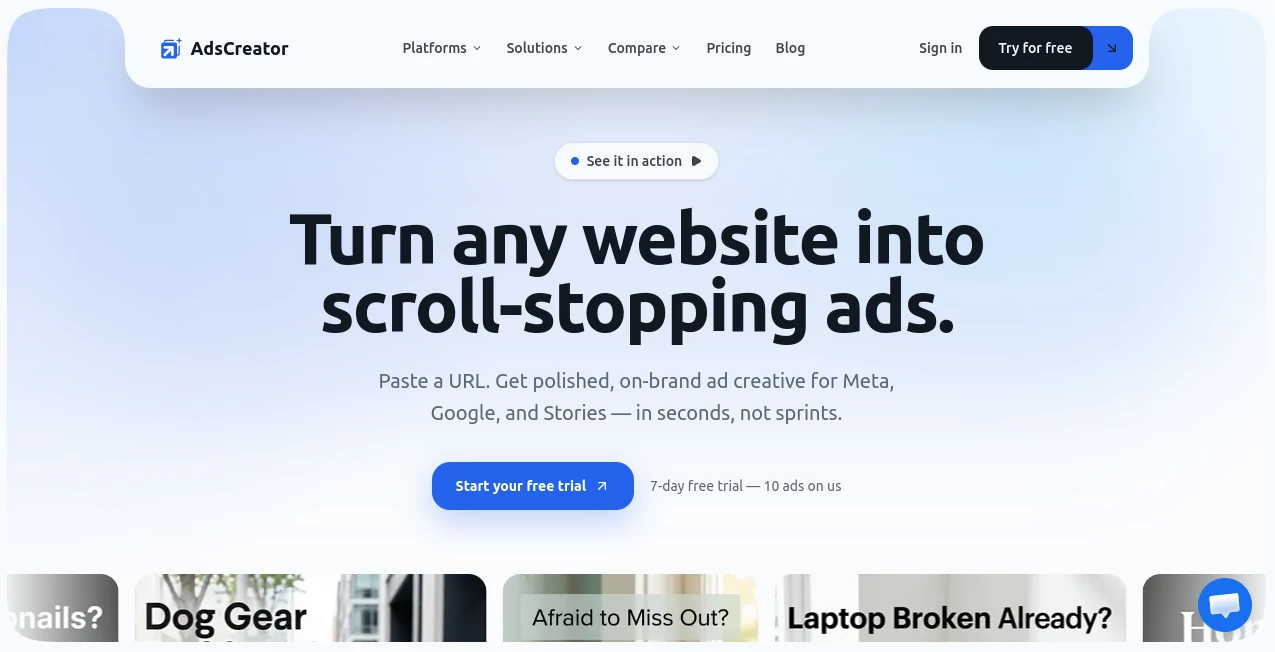
If you have ever stared at a blank ad template at 11pm wondering why a single banner is taking you three hours, you already know the problem this tool solves. Marketing teams are expected to ship more creative, more often, across more platforms — yet most small teams still don't have a dedicated designer on call. This is exactly the gap this platform was built to close. Instead of starting from a blank canvas, you start from something you already have: your own website. Paste in a URL, and within seconds the system pulls together a finished, on-brand ad ready for Meta, Google, LinkedIn, TikTok, or Stories.
What makes this approach genuinely clever is that it skips the most painful part of ad creation — brand setup. There's no uploading logo files, no manually picking five shades of blue from a color wheel, no typing out a tone-of-voice document. The platform reads your existing site and figures out the visual language on its own.
Key Features
User Interface
The dashboard is refreshingly uncluttered. You land on a single input field, drop in a website address, and watch the brand extraction happen in real time as colors, fonts, and imagery populate a small brand board. From there, generating ad variations feels less like operating software and more like flipping through a lookbook someone made for you. Even someone who has never opened a design tool in their life can move from URL to finished creative without a tutorial.
Accuracy & Performance
The brand extraction engine is the real differentiator here. Rather than asking users to manually define brand guidelines, it scans live pages and identifies the actual colors, typography, and product photography already in use. In practice this means the first batch of ads usually looks close enough to "on-brand" that only minor tweaks are needed, rather than a full rebuild. Generation itself is fast — most users go from pasting a link to holding a usable ad in well under a minute.
Capabilities
Output isn't limited to one shape or one platform. Square, landscape, and story formats are generated from the same creative direction, which means a single session can produce assets for an Instagram feed post, a Google display banner, and a TikTok story without redoing the brand work three separate times. Brand presets can be saved, which is particularly handy for agencies juggling several clients, since switching between brands becomes a one-click action rather than a re-onboarding process.
Security & Privacy
Payments run through Stripe, which is a reassuring detail for anyone hesitant about handing over card details to a smaller SaaS product. The platform only reads publicly available pages from the URL you submit, rather than requiring deeper account access, which keeps the onboarding process low-friction and low-risk for businesses cautious about data sharing.
Use Cases
- Solo founders who need professional-looking ads but have no budget for a designer.
- Marketing agencies managing multiple client brands and needing to switch creative direction instantly.
- E-commerce stores running seasonal promotions or product launches that need fresh creative fast.
- Performance marketers who want to test ten ad variations before lunch instead of waiting days for one.
- SaaS teams that need consistent creative across Meta, Google, and LinkedIn without hiring separate specialists for each platform.
Pros and Cons
Pros:
- Goes from a website URL to a finished ad in roughly thirty seconds.
- Automatically extracts brand colors, fonts, and tone with no manual setup.
- Supports every major ad format and platform in one workflow.
- Saves brand presets for quick switching between multiple clients or projects.
- Pricing scales sensibly from solo founders up to full agency teams.
Cons:
- Heavily templated brands with unusual layouts may need manual touch-ups after generation.
- Credit-based plans mean high-volume agencies will want to budget carefully around monthly limits.
- As with any automated tool, the very first batch of ads benefits from a quick human review before launch.
Pricing Plans
Three tiers are available, each billed monthly or annually with a discount for yearly commitment. The Starter plan is aimed at solo founders and side projects, offering fifty ads per month at an entry-level price. The Creator plan, the most popular option, suits marketers and small agencies juggling several active campaigns, with a higher monthly ad allowance. The Teams plan is built for agencies managing multiple brands, including unlimited brand presets and a shared workspace with permission controls. Every plan starts with a 7-day free trial that includes ten ads at no cost, and a money-back guarantee backs the first week of any paid subscription.
How to Use AdsCreator
- Paste your website's URL into the input field on the homepage.
- Let the system scan your pages and extract your brand's colors, fonts, and imagery.
- Review the auto-generated brand board to confirm it captured your visual identity correctly.
- Generate ad concepts across square, landscape, and story formats in one click.
- Download the finished creatives, or tweak details before exporting for your campaign.
Comparison with Similar Tools
Compared to general-purpose design tools like Canva, this platform removes the manual setup step entirely — there's no dragging elements onto a canvas or hunting for the right font pairing. Compared to other AI ad generators on the market, its standout strength is the URL-based brand extraction, which feels less like filling out a form and more like the tool actually visiting your site and understanding it. Against hiring a freelance designer, the math is hard to argue with: a single ad from a freelancer can run $50 to $150 and take days, while this tool produces comparable on-brand output in seconds at a fraction of the cost.
Conclusion
For any team that finds creative production to be the bottleneck between a marketing idea and a live campaign, this tool offers a genuinely practical shortcut. It won't replace a dedicated design department for a major brand overhaul, but for the everyday grind of producing on-brand ad variations across multiple platforms, it removes nearly all the friction. The combination of speed, automatic brand consistency, and straightforward pricing makes it a smart addition to any marketer's toolkit.
Frequently Asked Questions (FAQ)
Does it work with any website? Yes, any public website URL can be used as the starting point for brand extraction.
Can the generated ads be edited afterward? Yes, ads can be adjusted after generation before downloading the final files.
Which ad platforms are supported? Meta, Google, LinkedIn, TikTok, Pinterest, Snapchat, YouTube, Twitter/X, and Reddit are all supported.
Is there a free trial? Yes, a 7-day free trial includes ten ads at no cost.
Can it manage multiple brands at once? Yes, brand presets can be saved and switched between instantly, which is especially useful for agencies.
Do unused monthly ad credits carry over? Credit rollover depends on the specific plan selected, so it's worth checking current plan details before subscribing.
AI Ad Creative Assistant , AI Ad Generator , AI Marketing Plan Generator , AI Advertising Assistant .
These classifications represent its core capabilities and areas of application. For related tools, explore the linked categories above.

AdsCreator Alternatives Product

Quizify - AI…

RankingRider

Quso AI

Enji

Beamtrace
Picmim

Jasper

ReviewRespon…
CheckAEO
