
AI Video Maker
What is AI Video Maker?
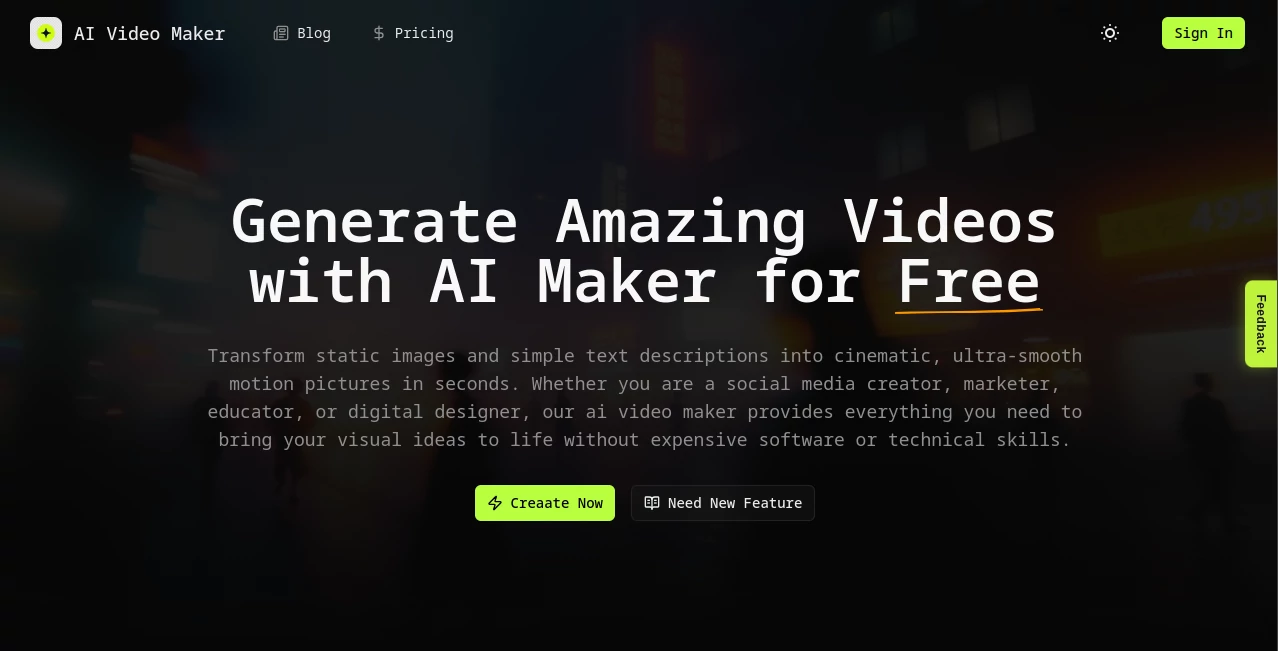
AI Video Maker is a practical video-generation platform designed to turn still images and written ideas into short, dynamic videos. Instead of relying on a traditional editing timeline, users can upload an image, describe the desired movement with a text prompt, choose output settings, and let the system handle the rendering.
The platform is particularly appealing to creators who want to experiment with image-to-video production without learning complicated editing software. It can be used for social media content, product visuals, educational clips, digital artwork, and other projects where a static image needs a little more life.
One of its most interesting strengths is its multi-model approach. The service brings several modern video-generation models into one workspace, including Seedance, Kling, Veo, and Runway, making it possible to explore different generation technologies without managing several separate workflows.
Key Features
- Image-to-video generation from uploaded source images.
- Text prompts for describing movement, actions, lighting, and environmental changes.
- Support for multiple AI video-generation models.
- Custom duration and video-fluidity controls.
- Virtual camera controls including pans, zooms, tilts, and rotations.
- Style customization for cinematic, anime, cyberpunk, and 3D-render aesthetics.
- Advanced controls such as seed settings and negative prompts.
- Resolution upscaling options.
- Free access with limited generation settings.
- Built-in credits for accessing more advanced models and configurations.
User Interface
The interface follows a straightforward creation workflow. Users start by adding a source image, enter a prompt describing the desired animation, select parameters such as duration and fluidity, and then generate the result. This makes the learning curve relatively gentle, even for someone who has never worked with professional video-editing software.
The main workspace keeps the important controls close to the generation area rather than forcing users through a complicated editing process. For a creator who simply wants to turn a product photo or character illustration into a moving clip, that simplicity can save considerable time.
Accuracy & Performance
Generated results depend heavily on the source image, prompt quality, selected model, resolution, and motion settings. The platform is designed to interpret both visual information and written instructions, allowing users to specify how subjects should move and how the camera or environment should behave.
Its motion-focused controls are useful when a completely random animation is not enough. Fluidity settings can influence how smooth the movement feels, while camera controls provide additional direction over pans, zooms, tilts, and rotations.
For demanding projects, users can also work with advanced settings such as seeds, negative prompting, noise scheduling, and resolution upscaling. These options provide more room for experimentation than a basic one-click video generator.
Capabilities
The platform is primarily built around image-to-video generation, but its workflow also supports text-directed creative control. A user might upload a photograph of a product and ask for a slow cinematic camera movement, or provide a character illustration and describe a specific action or environmental change.
Its multi-model setup is another notable capability. The service provides access to several generation engines, with available options including Seedance and Kling and references to other major video models such as Veo and Runway. This gives creators more flexibility when testing different approaches to the same visual concept.
Output settings can also be adjusted according to the project. The free interface currently presents a 5-second, 720p generation configuration, while paid credits unlock additional models, resolutions, and settings.
Security & Privacy
The website provides dedicated Privacy Policy and Terms of Service pages, but the public product information does not provide enough technical detail to make strong claims about encryption architecture, data retention, or how long uploaded media is stored.
For professional or confidential projects, users should review the platform's current privacy documentation before uploading sensitive photographs, proprietary designs, unreleased products, or other material that requires strict data handling.
Use Cases
Social Media Content: Turn static images into short motion clips suitable for social posts, promotional campaigns, and visual experiments.
Product Marketing: A product photograph can become a more engaging promotional scene by adding camera movement, lighting changes, or other visual effects.
Digital Art: Illustrators and designers can animate characters, artwork, landscapes, and 3D renders without manually creating every frame.
Educational Content: Teachers and content creators can add motion to diagrams, illustrations, and other visual assets to make short explanations more engaging.
Creative Prototyping: When developing an idea for a larger production, generating a short AI clip can be a quick way to test a visual concept before investing in conventional production.
Short-Form Video: The ability to work with short generated sequences makes the platform suitable for experimenting with quick visual stories and attention-grabbing clips.
Pros and Cons
Pros:
- Simple image-to-video workflow.
- Combines image input with detailed text instructions.
- Offers access to multiple AI video models.
- Includes camera and motion controls.
- Provides advanced settings for experienced users.
- Has a free starting option for experimentation.
- Useful for creators without professional video-editing skills.
Cons:
- Generation quality can vary depending on the model and prompt.
- The free configuration has limited duration and resolution.
- More advanced generation requires credits.
- Some of the technical controls may be unnecessary for casual users.
- Users working with sensitive material should review the privacy terms before uploading files.
Pricing Plans
The service offers a free option with limited generation capabilities. The current free configuration shown on the website uses a 5-second duration and lower-resolution generation, making it suitable for testing the workflow before purchasing credits.
The Starter one-time plan is currently listed at $199, reduced from $299, and provides 20,000 credits valid for one month. It includes access to additional Seedance 2.0 resolutions, Kling 2.6, and higher queue priority.
There is also a monthly Starter subscription currently listed at $29.90 per month, reduced from $49.90. It provides 3,000 credits valid for one month and access to the same listed generation models and higher queue priority.
Credit consumption varies according to the selected model and resolution. For example, the pricing page lists Seedance 2.0 at different credit-per-second rates for 480p, 720p, 1080p, and 4K output, while Kling 2.6 uses a separate rate for its default HD generation.
How to Use AI Video Maker
Start by uploading a suitable source image. A clear, high-resolution image generally gives the generation system more visual information to work with.
Next, write a detailed prompt describing what should happen. Rather than simply writing “make this move,” describe the subject's action, camera movement, lighting, atmosphere, and other important details. For example, a product image could be accompanied by instructions for a slow camera push-in with soft lighting and subtle background movement.
After that, configure the available motion and advanced settings. Duration and fluidity can be adjusted according to the type of clip you want to create, while more experienced users can experiment with additional generation controls.
Finally, generate the video and review the result. If the motion does not match the original idea, changing the prompt, source image, model, or motion settings can often produce a substantially different result.
Comparison with Similar Tools
Many AI video platforms focus primarily on generating videos from text prompts, while this platform puts a strong emphasis on using an existing image as the visual starting point. That makes it particularly useful when maintaining the appearance of a character, product, illustration, or scene is important.
Another distinction is its multi-model workflow. Instead of building a project around only one generation engine, users can access different model options from the same environment. This can be useful when one model produces better motion for a particular image while another gives a more suitable visual style.
Compared with conventional video editors, the workflow is considerably more automated. Traditional editing provides precise frame-by-frame control, while AI generation trades some of that manual control for speed and experimentation. For short creative clips, promotional visuals, and concept development, that trade-off can be worthwhile.
Conclusion
This platform is a strong option for creators who want to turn static visual assets into short AI-generated videos without dealing with a conventional editing workflow. Its combination of image input, text prompts, motion controls, camera customization, and multiple generation models gives users a useful balance between simplicity and creative control.
The free option makes it easy to test the basic experience, while the paid credit plans are aimed at users who need more capable models, higher resolutions, and greater generation capacity. It is not a replacement for a full professional editing suite, but for quickly transforming images and ideas into animated video content, it offers a focused and accessible workflow.
Frequently Asked Questions (FAQ)
Can I create videos for free?
Yes. The website provides a free generation option with limited settings. The currently displayed free configuration includes a 5-second video at 720p.
Can I generate a video from an image?
Yes. Uploading an image is the central part of the creation workflow. The image provides the visual foundation, while a written prompt describes the desired motion and changes.
Which AI video models are supported?
The platform currently lists models and integrations including Seedance and Kling, while its website also references Veo, Runway, and other major video-generation technologies. Available models can depend on the selected plan and current platform configuration.
Can I control camera movement?
Yes. The platform provides controls for virtual camera movements such as pans, zooms, tilts, and rotations, allowing users to provide more specific direction for generated scenes.
Can I control the duration of generated videos?
Yes. Duration is one of the available generation controls, although the exact options depend on the selected model and plan.
Does it require video-editing experience?
No professional editing experience is required for the basic workflow. The process mainly involves uploading an image, writing a prompt, selecting settings, and generating the video.
Are advanced controls available?
Yes. More advanced users can work with settings such as seeds, negative prompts, noise scheduling, and resolution upscaling to fine-tune generation.
Is the paid plan subscription-based?
There are both one-time and monthly Starter options currently listed. The one-time plan provides a larger credit allocation valid for one month, while the monthly option provides recurring credits valid for one month.
What type of content can I create?
The workflow can be used for social media clips, product visuals, animated artwork, educational content, character animation, creative prototypes, and other short-form visual projects.
AI Image to Video , AI Video Generator , AI Video Enhancer , AI Text to Video .
These classifications represent its core capabilities and areas of application. For related tools, explore the linked categories above.

AI Video Maker Alternatives Product

Wan 2.7

Seedance 2.0…

kling 3 AI

Veo 4

Seedance 4.0
Kling Motion

ds video

Kling O1

Wan 2.7