
AnimoX
What is AnimoX?
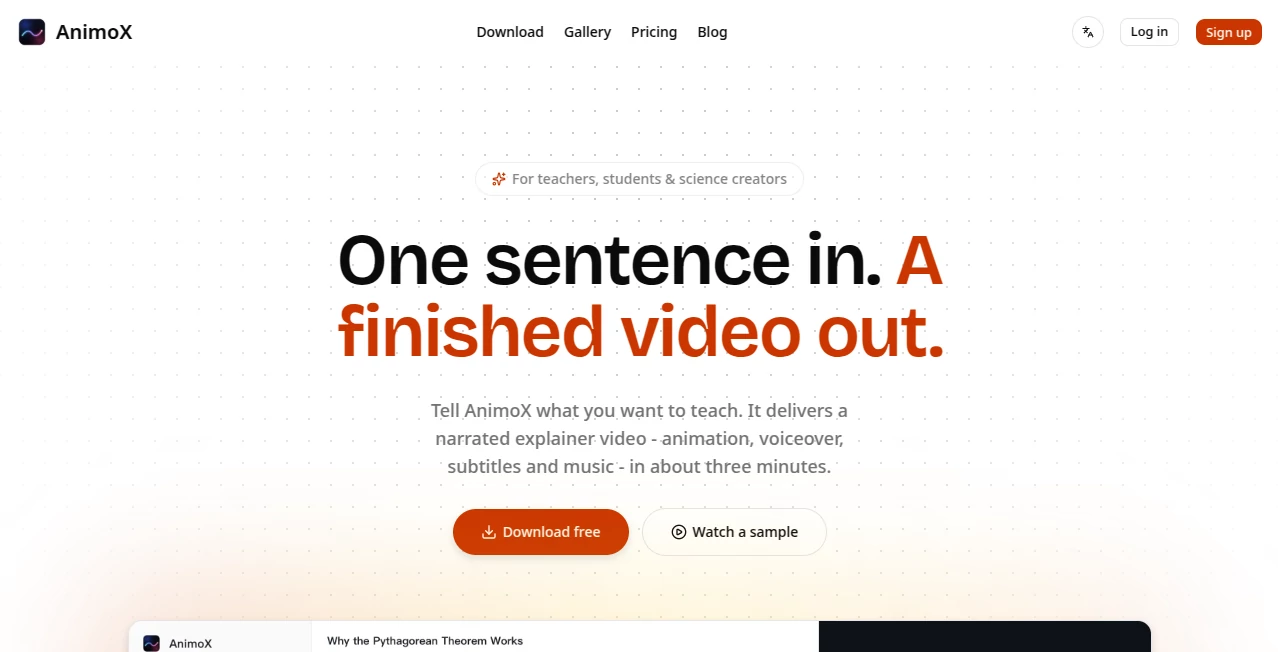
Creating educational animations has traditionally required multiple tools, editing experience, voice recording, and hours of production work. This platform changes that process by transforming a single text prompt into a polished explainer video complete with animation, narration, subtitles, and background music. It is designed for educators, students, technical professionals, and content creators who want to explain complex concepts without spending days editing.
Instead of generating isolated clips, it delivers a complete presentation ready for sharing. Whether the topic is mathematics, engineering, finance, science, or technology, users can simply describe what they want to teach and receive a professionally narrated video within minutes. The workflow feels surprisingly natural, making educational content creation accessible even to people with no previous animation experience.
Another standout advantage is its conversational editing system. Rather than rebuilding an entire project, creators can request small changes through simple instructions, allowing titles, narration, or visual elements to be updated quickly while preserving the rest of the project. This dramatically reduces production time for lessons, tutorials, and presentations.
Key Features
User Interface
- Simple prompt-based workflow requiring only one sentence to begin.
- Interactive conversation for refining videos naturally.
- Minimal learning curve suitable for beginners.
- Preview generation while scenes are being rendered.
- Desktop application available for both Windows and macOS.
Accuracy & Performance
- Automatically generates synchronized narration and subtitles.
- Produces complete educational videos instead of disconnected clips.
- Fast rendering with most short videos completed in only a few minutes.
- Supports multilingual prompts and narration.
- Optimized for technical explanations including mathematics and science.
Capabilities
- Create animated educational videos from plain text.
- Generate professional voiceovers automatically.
- Add subtitles and background music without manual editing.
- Edit existing projects through conversational commands.
- Create videos suitable for classrooms, online courses, YouTube, and business training.
Security & Privacy
- User-created videos remain owned by their creators.
- Commercial usage is supported for generated videos.
- Payment processing is handled through secure third-party providers.
- Uses encrypted communication and standard security practices.
- Personal information is not sold for advertising purposes.
Use Cases
- Teachers creating classroom lessons.
- Students preparing visual presentations.
- YouTube educators producing science explainers.
- Technical trainers developing onboarding materials.
- Engineering demonstrations.
- Mathematics tutorials.
- Financial education videos.
- Internal company knowledge sharing.
- Academic content creation.
- Online learning platforms.
Pros and Cons
Pros
- Extremely easy to use with almost no learning curve.
- Produces complete narrated videos instead of separate assets.
- Excellent for educational and technical subjects.
- Supports multiple languages.
- Conversation-based editing saves significant time.
- Commercial usage rights for generated videos.
Cons
- Primarily focused on educational explainers rather than cinematic storytelling.
- Desktop installation is required.
- Video generation consumes credits.
- Advanced creative customization is more limited than professional video editing software.
Pricing Plans
A free download allows users to explore the application and preview its capabilities before creating projects. Paid subscriptions are credit-based and include Starter, Pro, and Team plans with increasing monthly credit allowances, making it suitable for individual creators as well as collaborative teams. Annual subscriptions provide discounted pricing compared to monthly costs.
How to Use AnimoX
- Install the desktop application.
- Create an account and sign in.
- Describe the lesson or topic using a simple sentence.
- Select the preferred presentation style and video length.
- Allow the platform to generate animation, narration, subtitles, and music.
- Review the finished video.
- Request revisions through natural language if needed.
- Export and publish the completed video.
Comparison with Similar Tools
Many AI video generators focus on marketing videos, social media clips, or avatar presentations. This platform takes a different direction by specializing in educational explainers and technical visualization. Instead of asking users to combine voiceovers, animations, subtitles, and music manually, it delivers an integrated production pipeline from a single prompt.
Its strongest advantage lies in simplifying complex educational content. Teachers and technical communicators can explain concepts such as geometry, engineering principles, economics, or physics without building scenes individually. For users whose priority is teaching rather than video editing, this specialized workflow offers a practical and efficient alternative.
Conclusion
For anyone who regularly creates educational content, this solution offers an impressive balance of simplicity and production quality. The ability to transform one sentence into a complete narrated explainer dramatically reduces the effort normally required for instructional video creation. Combined with multilingual support, conversational editing, commercial usage rights, and fast rendering, it provides a practical workflow for educators, students, trainers, and technical creators seeking polished videos without traditional animation software.
Frequently Asked Questions (FAQ)
Can beginners create videos without editing experience?
Yes. The workflow is designed so that anyone who can write a simple prompt can generate a complete educational video.
Does every generated video include narration?
Yes. Videos include AI-generated narration, subtitles, animation, and background music.
Can the generated videos be used commercially?
Yes. Users retain ownership of their generated videos and may use them for commercial purposes.
Is multilingual content supported?
Yes. Prompts, narration, and subtitles support multiple languages.
Who benefits most from this platform?
Teachers, students, technical educators, researchers, engineers, online course creators, and anyone producing instructional content will gain the most value from its specialized workflow.
AI Animated Video , AI Video Generator , AI Education Assistant , AI Presentation Generator .
These classifications represent its core capabilities and areas of application. For related tools, explore the linked categories above.

AnimoX Alternatives Product

seedance 2

ai seedance …

ViraFlow
seedance2-pro

Free Sora Ge…

seedance 2.0

Casper Pract…

GenPPT AI
videodance