


















Blinkvid
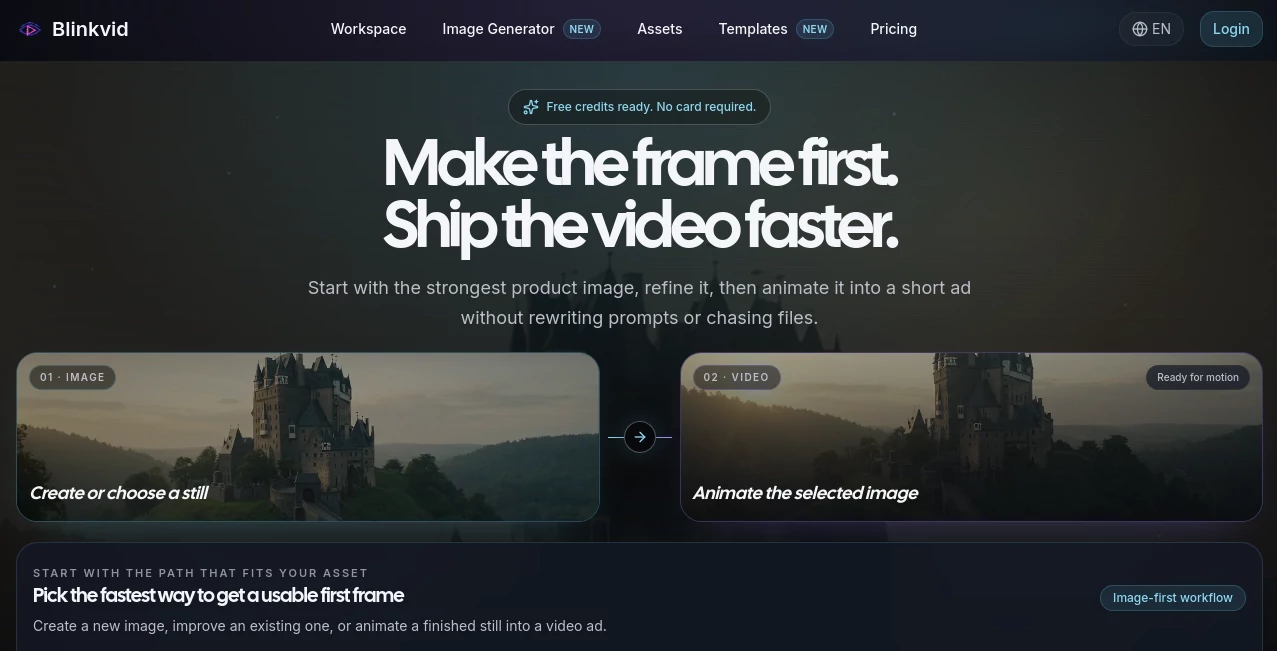
What is Blinkvid?
Creating high-quality marketing videos often means jumping between multiple design, editing, and animation tools. That process can quickly become time-consuming, especially when every revision requires recreating prompts or moving files from one application to another. This platform simplifies the entire workflow by bringing image generation, enhancement, and AI-powered video creation into a single creative workspace.
Instead of treating images and videos as separate projects, it keeps every asset connected. A still image can be created from text, refined with AI, and then transformed into a polished motion clip without losing the original creative direction. This approach makes it particularly valuable for marketers, ecommerce brands, agencies, and content creators who need to produce engaging advertising assets in less time.
Whether the goal is launching a new product, creating short-form social media content, or testing multiple campaign ideas, the workflow feels natural and efficient. Rather than starting from scratch for every iteration, users can continue improving existing assets until they achieve the desired result.
Key Features
User Interface
The interface is designed around a straightforward creative pipeline. Users can begin with a text prompt, upload an existing product image, or select a previously generated asset. Every stage is clearly organized, making it easy to move from image creation to animation without unnecessary complexity.
The workspace also keeps prompts, source images, and generated videos together, making future edits faster and reducing the frustration of managing scattered project files.
Accuracy & Performance
The platform integrates several advanced AI image and video generation models, allowing creators to choose the engine that best fits their project. Generated visuals maintain strong consistency between the original image and the animated output, making product showcases and promotional videos look more natural.
Fast rendering speeds, HD output, and efficient credit usage help creators test multiple creative concepts before committing to a final version.
Capabilities
- Generate images from text prompts.
- Improve existing product or marketing images.
- Convert still images into animated videos.
- Create promotional clips for ecommerce products.
- Produce social media advertisements.
- Support reference-based video generation.
- Maintain consistent visual style across revisions.
- Create cinematic marketing visuals.
- Generate content suitable for landing pages and advertising campaigns.
- Commercial usage rights included with paid plans.
Security & Privacy
The service explains how uploaded files and prompts are handled while providing a secure workspace for creative production. Users also benefit from commercial licensing on paid plans, making generated content suitable for business marketing campaigns. Email support is available whenever assistance is needed.
Use Cases
- Creating ecommerce product advertisements.
- Producing social media marketing videos.
- Generating short promotional clips for startups.
- Building engaging landing page animations.
- Creating visual assets for digital advertising campaigns.
- Developing branded video content for agencies.
- Testing multiple creative concepts before publishing.
- Producing AI-generated product showcases.
Pros and Cons
Pros
- Complete image-to-video workflow in one place.
- Supports multiple leading AI generation models.
- Simple and beginner-friendly interface.
- Fast generation with HD exports.
- Commercial license included with paid plans.
- Free credits available for new users.
- No credit card required to begin testing.
Cons
- Advanced projects consume credits quickly.
- Final output quality still depends on prompt quality.
- Professional editing software may still be useful for complex productions.
Pricing Plans
New users receive free credits to explore the platform without providing payment details. Paid options include a Starter plan for small projects, a Standard plan for growing workloads, and a Pro plan designed for frequent marketing video production. All paid plans include HD video generation, fast processing, no watermark, and commercial usage rights.
How to Use Blinkvid
Begin by choosing how you want to start your project. Enter a text prompt to generate an original image, upload an existing product photo for improvement, or reuse a previous creative asset. Once the preferred image has been selected, choose the animation workflow, define the desired camera movement or motion style, and generate a short AI-powered video. Review the result, make adjustments if necessary, and export the final clip for marketing, ecommerce, or social media publishing.
Comparison with Similar Tools
Many AI video generators focus on only one stage of content creation, such as text-to-video or image animation. This platform stands out by combining image creation, image enhancement, and video generation inside a single connected workflow. Instead of constantly switching between different applications, creators can keep their prompts, images, and videos organized within one creative environment, making revisions faster and more consistent.
Conclusion
For creators who regularly produce advertising content, product showcases, or social media videos, having an integrated creative workflow saves both time and effort. The combination of AI image generation, image refinement, and video animation creates a smooth production experience that minimizes repetitive work. With flexible pricing, commercial licensing, and access to multiple AI generation models, it offers a practical solution for businesses and individuals looking to create professional marketing content with greater efficiency.
Frequently Asked Questions (FAQ)
Is there a free version available?
Yes. New users receive free credits that allow them to test the platform before purchasing additional credits.
Can generated videos be used commercially?
Yes. Paid plans include commercial usage rights for generated content.
Can I upload my own images?
Yes. Existing images can be uploaded, improved, and animated into short AI-generated videos.
Who benefits most from this platform?
Marketing teams, ecommerce businesses, agencies, content creators, and entrepreneurs producing promotional videos can gain the most value.
Does it support both image and video generation?
Yes. Users can generate images from text, enhance existing visuals, and convert approved images into animated videos within the same workflow.
AI Image to Video , AI Video Generator , AI Advertising Assistant , AI UGC Video Generator .
These classifications represent its core capabilities and areas of application. For related tools, explore the linked categories above.

Blinkvid Alternatives Product

uni-1

RunwayAI

ImgVid

Seedance 2.0

CinemaDrop

Mediagen
RightAI

AiSora

hailuo03
