
Buzzabout
What is Buzzabout?
There's a conversation happening right now about your brand, your competitors, and your market — and most of it, you're missing. Not because the data isn't there, but because the sheer volume of it is simply impossible to process manually. Millions of posts, comments, threads, and reactions across Reddit, TikTok, YouTube, Instagram, X, and LinkedIn — all of it moving fast, all of it relevant, and none of it neatly packaged for your next strategy meeting.
That's exactly the gap this platform was built to close. Trusted by over 10,000 marketers worldwide, it turns the noise of social media into something genuinely useful: clear, data-backed insights that help you make better decisions, craft sharper messaging, and actually understand what your audience cares about before you spend a dollar on content or ads.
Whether you're a solo marketer doing competitive research, a strategy director at an agency, or a product team trying to understand unmet needs in your space, this tool meets you where you are — and gives you a real edge.
Key Features
User Interface
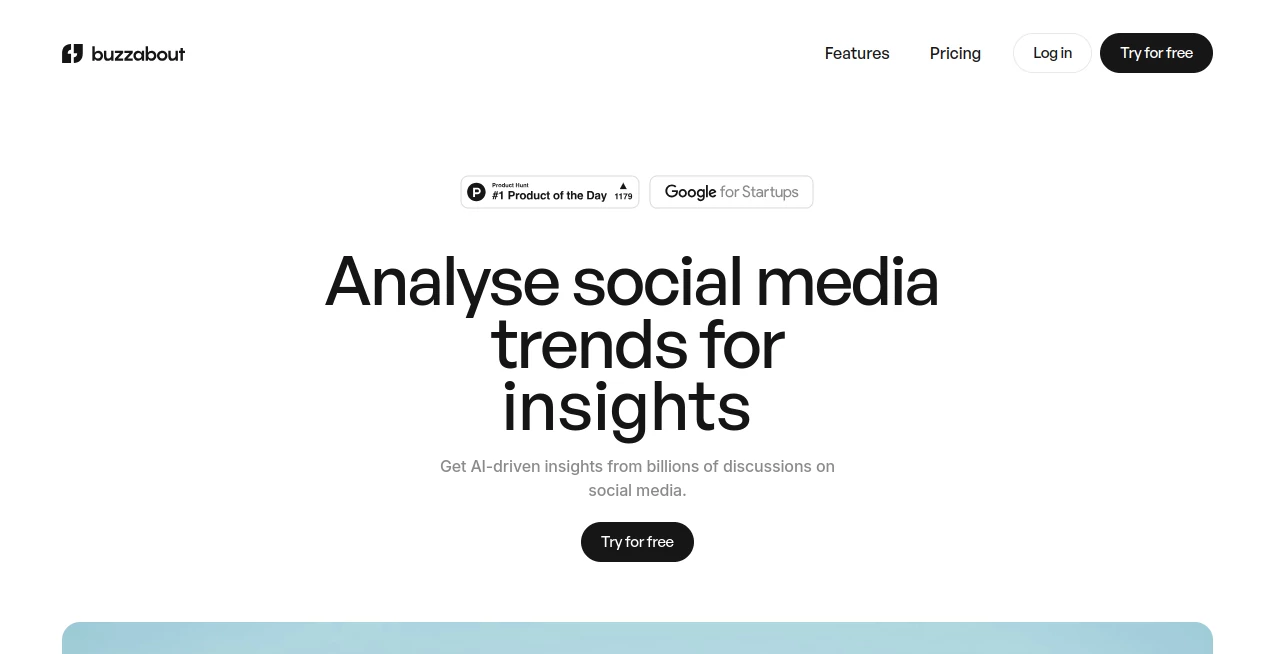
The interface is clean, purposeful, and built for people who don't have time to learn complex dashboards. From the moment you log in, the experience feels like a research assistant that already knows what you're looking for. You can search by topic, analyze a specific profile or page by URL, filter by language and platform, and get results that are visually organized and easy to share.
The built-in AI chat lets you explore data conversationally — asking follow-up questions, requesting summaries, or drilling deeper into a specific trend without switching contexts. You can also build and share charts directly inside the chat, which is something most tools in this category still haven't figured out.
Accuracy & Performance
The platform pulls from billions of real social conversations, not sampled data or approximations. When a report comes back showing 125.5M views on a topic like Apple Vision Pro 2 or 99.6M views tied to a brand like Crocs, those numbers are grounded in actual platform data across TikTok, Instagram, YouTube, and more. Results are fast, and the AI analysis layer processes the qualitative side — sentiment, narrative tone, pain points — with a level of nuance that goes well beyond basic keyword counting.
One thing that stands out is the "Go Beyond Sentiment" feature. Rather than just telling you people feel positive or negative about something, it surfaces the why behind those feelings — the specific frustrations, desires, and triggers driving audience behavior. That's a meaningful difference for anyone building messaging or positioning.
Capabilities
The feature set here is genuinely broad. Here's what you can do:
- Trend Analysis: Explore the latest trending topics in your niche and study high-performing content before creating your own.
- Synthetic Audiences: Build detailed audience segments and personalize your messaging for each one based on how real people in your niche actually talk and think.
- Market Insights: Analyze popular posts and comments to surface pain points, unmet needs, and market opportunities you might never have spotted otherwise.
- Competitor Research: Reverse-engineer what's working for competitors — not just what they're posting, but why it resonates.
- Narrative Tracking: Monitor shifts in how your industry or brand is being discussed over time, with Slack alerts for important mentions.
- Engagement Tools: Generate AI-powered replies using custom prompts to help you build a consistent presence across platforms.
- Multi-platform Coverage: Research across Reddit, TikTok, YouTube, Instagram, X, and LinkedIn from a single interface.
- Custom Prompts & PDF Export: Process content with your own prompts and share reports via link or download them as PDFs.
Security & Privacy
The platform operates under clearly defined privacy, user, and returns policies. Data handling is transparent, and the tool only analyzes publicly available social content — it doesn't scrape private profiles or require access to your personal accounts. For teams and agencies, the multi-seat plan structure means you can collaborate without sharing credentials, which is a practical security consideration that's often overlooked.
Use Cases
The range of people getting value from this tool is wider than you might expect. A content strategist at a mid-size brand used it to identify that their audience on Reddit was constantly asking a specific question that no competitor had ever addressed in content — that insight alone drove a content series that outperformed everything else they'd published that quarter.
For agency teams, the ability to generate shareable reports by link has become a genuine client-facing asset. Rather than exporting raw data into a PowerPoint, you hand over a live, readable insight report that looks polished and speaks directly to the client's brand context.
Product teams use the market insights feature to run lightweight VOC (Voice of Customer) research without coordinating surveys or interviews. The conversations are already happening — this tool just makes them readable at scale.
And for anyone running paid social, the competitor research angle alone can justify the cost. Knowing what content formats and messaging angles are working in your space — before you write your next brief — is the kind of intelligence that used to require a dedicated research team.
Pros and Cons
- Pro: Covers six major platforms in one place — Reddit, TikTok, YouTube, Instagram, X, and LinkedIn.
- Pro: Goes beyond surface-level sentiment to explain the motivations behind audience behavior.
- Pro: AI chat interface makes data exploration fast and conversational, no SQL or data skills needed.
- Pro: Synthetic audience feature is genuinely useful for segmentation and messaging work.
- Pro: Shareable reports and PDF export make it easy to present insights to clients or stakeholders.
- Pro: Slack integration for real-time tracking alerts keeps you informed without logging in constantly.
- Con: The credit-based system (RH credits) can be a bit confusing to estimate upfront if you're running many parallel researches.
- Con: API access is only available on the Enterprise tier, which may be a limiting factor for developers wanting to build on top of the data.
- Con: No free plan beyond the trial — teams on very tight budgets may find the entry price a stretch.
Pricing Plans
There are three main tiers, each designed for a different scale of usage:
- Pro – $49/month: Includes 200 Research Hours (RH) per month at $0.25/RH, credit rollovers, AI assistant, tracking, parallel researches, custom date range, audience analysis, and up to 5 seats.
- Business – $149/month: Everything in Pro, but with 600 RH per month — better suited for agencies or teams running multiple active research projects simultaneously.
- Enterprise – Custom pricing: Unlimited credits, API access and integrations, custom data sources, managed service, unified data access, unlimited seats, and premium support. Requires booking a call to discuss specifics.
Both Pro and Business plans are available on monthly or yearly billing, and unused credits roll over — a small but meaningful detail if your research volume varies month to month. One-time credit top-ups can also be combined with any plan, which gives you flexibility during high-demand periods without forcing an upgrade.
How to Use Buzzabout
Getting started takes about two minutes. You sign up, start a free trial (no credit card required upfront), and you're immediately inside the research interface.
- Step 1 – Define your research topic: Enter a keyword, brand name, product, or niche topic you want to analyze. You can also paste in a specific profile or page URL to analyze that account directly.
- Step 2 – Set your parameters: Choose which platforms you want to pull from, select a custom date range, and set your language preference to localize results.
- Step 3 – Run the analysis: The platform processes the data and returns a structured report covering trending topics, sentiment breakdown, audience pain points, and content performance signals.
- Step 4 – Explore with AI chat: Ask follow-up questions, request comparisons, or have the assistant summarize key findings in plain language. Build charts directly within the chat if you need visuals.
- Step 5 – Share or export: Share results via a link with teammates or clients, or download the full report as a PDF for presentations or internal documentation.
- Step 6 – Set up tracking: For ongoing monitoring, configure tracking for specific narratives or keywords and connect Slack to receive alerts when important mentions surface.
Comparison with Similar Tools
There are a handful of social listening and intelligence tools in this space — Brandwatch, Sprout Social, and Mention being among the most established. But the comparison is telling.
Traditional social listening tools were built around volume metrics and keyword alerts. They'll tell you how often your brand is mentioned; they're less useful at telling you why people feel the way they do. The depth of qualitative analysis here — the synthetic audiences feature, the narrative-level sentiment work, the ability to ask the AI direct strategic questions about your data — is a step ahead of what most legacy tools offer.
Sprout Social and Brandwatch are also significantly more expensive at the team level, and they're built primarily for social media managers rather than marketers doing strategic research. If your primary use case is understanding market narratives and competitor positioning rather than scheduling posts, the fit here is simply better.
Against newer AI-native tools like Zest or Talkwalker's AI features, the multi-platform depth combined with the conversational AI interface and the synthetic audience builder is a difficult combination to match at this price point.
Conclusion
Social media has always been a goldmine of honest consumer opinion — unfiltered, unsolicited, and massive in scale. The problem was always access. Getting meaningful signal out of that volume used to require enterprise contracts, dedicated analysts, and weeks of turnaround time.
That's no longer the constraint it once was. This platform has done something genuinely useful: it's taken the complexity of large-scale social analysis and made it accessible, fast, and — importantly — actually insightful rather than just data-dense. The combination of multi-platform coverage, deep qualitative analysis, AI-powered exploration, and audience intelligence tools makes it one of the more complete offerings in this category right now.
If you're making decisions about content strategy, messaging, product positioning, or competitive intelligence without this kind of social data in your corner, you're making those decisions with one eye closed. The free trial makes it easy to test without commitment — and for most marketers, a single good insight from one research session will more than justify the cost.
Frequently Asked Questions (FAQ)
- What social platforms does it analyze? The tool covers Reddit, TikTok, YouTube, Instagram, X (formerly Twitter), and LinkedIn — all from a single interface.
- What are RH credits? RH stands for Research Hours — the credit unit used to measure usage. Each research consumes a certain number of RH depending on the depth and scope of the analysis.
- Do unused credits roll over? Yes. Both Pro and Business plans include credit rollovers, so unused RH carry forward to the next billing period.
- Can I analyze a specific social media account or page? Yes. You can input the URL of any public profile or page and analyze it directly.
- Is there a free plan? There's no permanent free tier, but a free trial is available with no credit card required at signup.
- Can I share reports with people who don't have an account? Yes. Reports can be shared via a public link or downloaded as a PDF, making it easy to present findings to clients or colleagues.
- Is API access available? API access is included in the Enterprise plan. It's not available on Pro or Business tiers.
- How many seats are included in each plan? Pro and Business plans include up to 5 seats. Enterprise offers unlimited seats.
- Can I get a refund? Refund requests are handled according to the platform's Returns Policy, which can be reviewed on their website.
- What languages are supported? The platform supports localized results by language, allowing you to filter and analyze conversations in specific languages relevant to your market.
AI Marketing Plan Generator , AI Social Media Assistant , AI Research Tool , AI Analytics Assistant .
These classifications represent its core capabilities and areas of application. For related tools, explore the linked categories above.

Buzzabout Alternatives Product

Sound Level …

Simplified

Pixelied
CoolVerdict
Yorph AI

softshill
Groniz

TranAI

Discord Time…