


















CartoVoxel
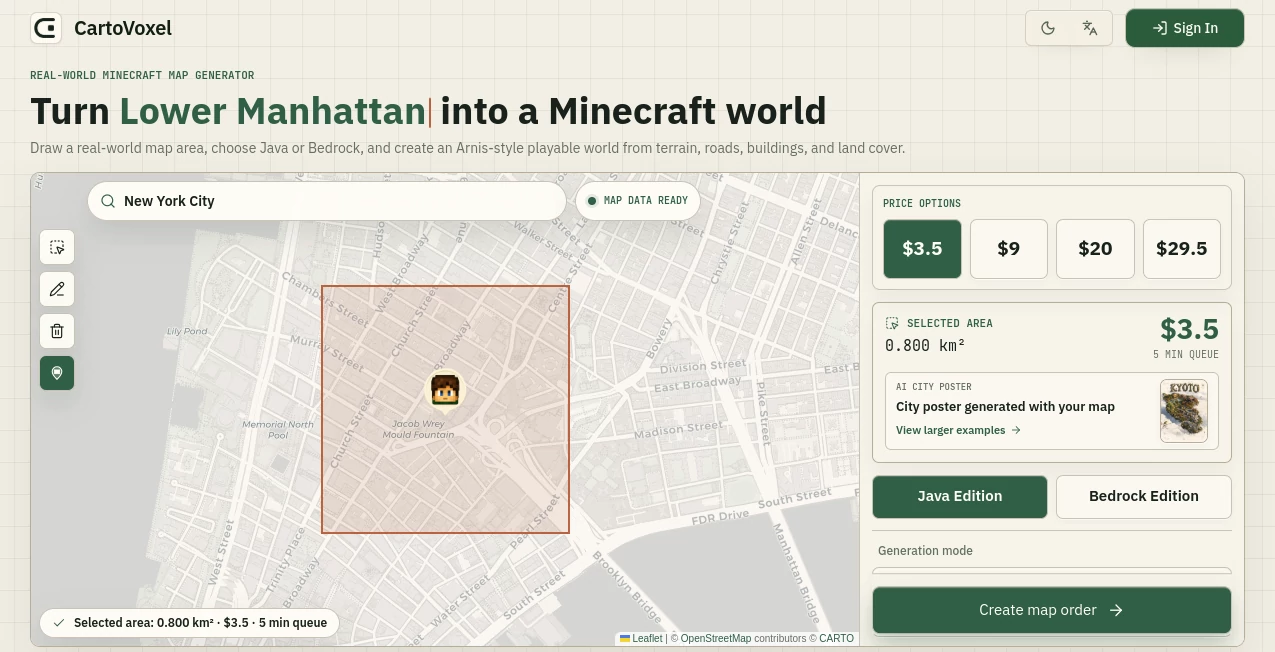
What is CartoVoxel?
I still remember the first time I selected a small neighborhood I grew up in and watched it transform into a Minecraft world. Roads, buildings, parks, even the gentle curves of the terrain — it all appeared in a way that felt strangely familiar yet completely new. This tool makes that magic possible for anyone. No heavy software to install, no complicated setups. You simply draw an area on a map in your browser, choose Java or Bedrock, and a few minutes later you get a ready-to-play world file delivered to your email. It’s the kind of experience that turns “what if” moments into something you can actually walk around in.
Introduction
Most Minecraft map generators require downloading big programs, dealing with complex settings, and hoping your computer doesn’t crash during rendering. CartoVoxel flips that experience entirely. It’s fully web-based and cloud-powered, letting you pick any real-world location, preview the area, get an instant quote, and receive a high-quality Minecraft world without taxing your own machine. Whether you want to recreate your hometown, a favorite travel spot, or an entire city block, it handles the heavy lifting so you can focus on exploring and building. The results feel personal because they’re based on real places you already care about.
Key Features
User Interface
The interface is clean and welcoming. You start by choosing a preset city or drawing a custom bounding box directly on an interactive map. As you adjust the area, it instantly shows the size in square kilometers and gives a transparent price and queue estimate. Everything feels intuitive — no confusing sliders or hidden menus. Even first-time users can go from idea to generation in just a few clicks. The whole process stays relaxing rather than technical.
Accuracy & Performance
It uses real map data to recreate terrain, roads, buildings, and land cover with impressive detail. The generated worlds feel grounded and recognizable while still being fun to explore in Minecraft style. Cloud rendering means even large areas finish reasonably fast, and you get accurate estimates upfront so there are no surprises. Users consistently praise how well it balances realism with playable Minecraft charm.
Capabilities
You can generate for both Java Edition (.zip) and Bedrock Edition (.mcworld). It supports custom area selection, different detail levels, and even includes a bonus AI-generated city poster with your order — perfect for sharing your creation online. The tool works beautifully on desktop and mobile, requires no installation, and delivers everything via email so you can import and start playing right away.
Security & Privacy
Your selections and generated worlds are handled securely. No unnecessary data collection, and the entire process happens through standard browser connections. You stay in full control — generate what you want, download it, and the rest is yours to keep or share as you like.
Use Cases
A teacher recreates their local town so students can explore geography in Minecraft. A traveler turns favorite vacation spots into personal worlds they can revisit anytime. Content creators generate impressive city maps for YouTube videos or server showcases. Families build worlds based on where they live or where their relatives are from, creating meaningful shared experiences. The possibilities feel endless because the starting point is any place that matters to you.
Pros and Cons
Pros:
- Fully browser-based — no downloads or powerful PC required.
- Transparent pricing and queue times before you commit.
- Supports both Java and Bedrock with good detail and playability.
- Includes bonus AI city poster for sharing.
- Great for personal, educational, and creative projects.
Cons:
- Larger areas naturally cost more and take longer to generate.
- Still relatively new, so the library of presets is growing.
Pricing Plans
Pricing is pay-per-generation and scales with the size of the area you select. You see the exact cost and estimated wait time before confirming, so there are no surprises. Smaller personal maps are very affordable, while larger city-scale projects offer good value for the level of detail you receive. It’s a fair, transparent model that works well for both casual users and serious creators.
How to Use CartoVoxel
Go to the map, choose a starting city or draw your own area with the selection tool. Adjust the bounding box until you’re happy with the coverage. Pick Java or Bedrock edition, review the instant quote and queue time, then confirm to start generation. Once finished, you’ll receive an email with the download link. Import the file into Minecraft and start exploring your new world. The whole flow is designed to feel exciting rather than technical.
Comparison with Similar Tools
Traditional desktop generators like Arnis require downloads, more technical knowledge, and powerful hardware. This platform removes all of that friction by handling everything in the cloud through a simple browser experience. While some alternatives feel outdated or overly complicated, CartoVoxel focuses on ease, transparency, and accessibility without sacrificing quality. It’s especially strong for users who want fast results without the hassle.
Conclusion
Bringing real places into Minecraft has never been this approachable. Whether you want to relive childhood memories, explore cities you’ve never visited, or create something unique for friends and followers, this tool makes it genuinely fun and achievable. It turns imagination into something you can walk around in, one real-world location at a time. If you’ve ever wanted to see your favorite place in block form, this is the way to make it happen.
Frequently Asked Questions (FAQ)
Do I need to install anything?
No — everything runs in your browser with cloud rendering.
Which Minecraft versions are supported?
Both Java Edition and Bedrock Edition are fully supported.
How long does generation take?
It depends on area size, but you see an accurate estimate before you start.
Can I generate very large areas?
Yes — larger selections are supported with clear pricing and queue times.
Is there a bonus with every generation?
Yes — every paid map includes an AI-generated city poster for sharing.
AI Game , AI Design Generator , Other .
These classifications represent its core capabilities and areas of application. For related tools, explore the linked categories above.

CartoVoxel Alternatives Product

OC-Maker
Z-Image Gene…

Sovibe AI

AI Clothes

Before After…

Nano Banana …

Banana Promp…

EZ Grader
forge calcul…
