
CelebMakerAI
What is CelebMakerAI?
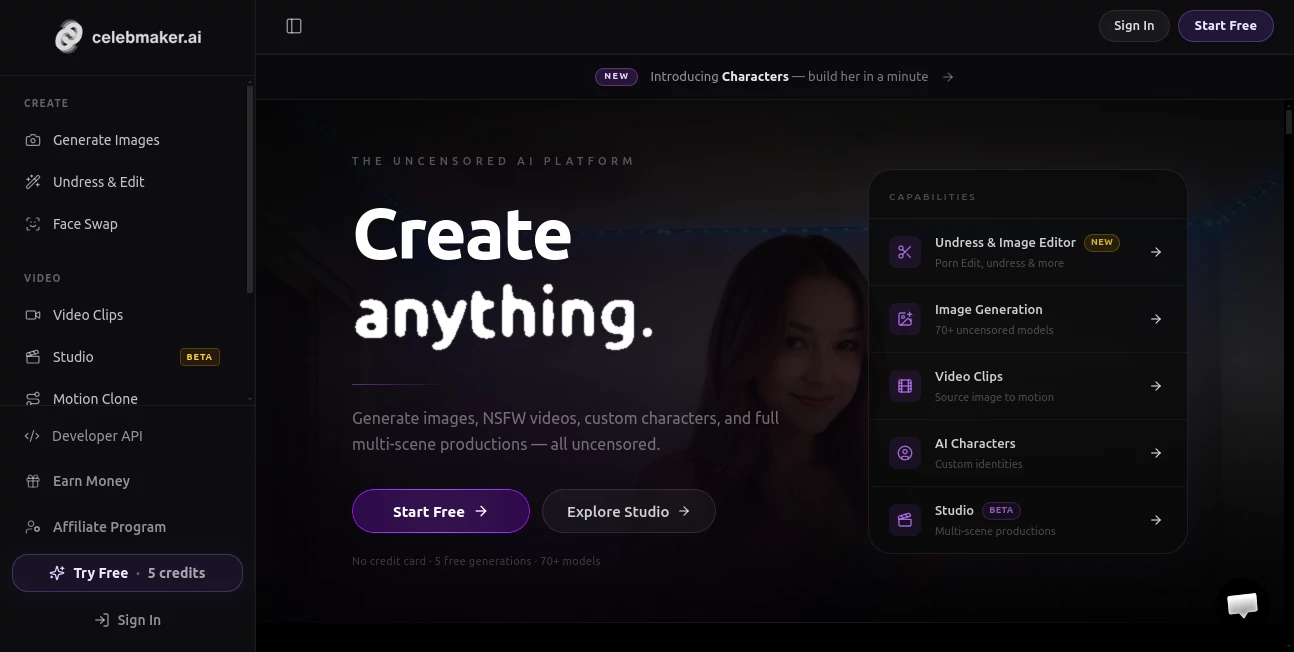
CelebMakerAI is an AI content creation platform built for creators who want to produce realistic digital characters, images, and short-form videos from a single workspace. It brings image generation, editing, face-based generation, character creation, and video production together instead of making users jump between several separate tools.
One of its strongest ideas is consistency. Rather than generating a completely different person every time, creators can build or select a character and reuse that identity across different scenes, outfits, and visual concepts. This makes the platform particularly interesting for virtual influencers, digital creators, visual storytelling, and other projects that depend on a recognizable AI persona.
The service also offers a browser-based workflow, so there is no local installation required. New users can start with five free credits without entering a credit card, making it relatively easy to test the image and editing experience before choosing a paid plan.
Key Features
- AI image generation using a large selection of models
- AI image editing and enhancement
- Custom AI character creation from reference photos
- Marketplace of ready-to-use AI characters
- Image face swapping and video face swapping
- Image-to-video generation
- Multi-scene video creation through Studio
- Motion cloning for character-based content
- AI-generated audio on supported video actions
- Image upscaling and enhancement
- Developer API for automated workflows
- Credit-based usage across the main creative tools
User Interface
The interface is designed around a creator workflow rather than a complicated technical setup. The main tools are separated into areas for creating images, editing, generating video, working with characters, and exploring available models.
That organization is useful when working on a larger project. For example, a creator can start with an image, refine the strongest result, and then move into video creation without rebuilding the project somewhere else. The platform also provides sensible defaults while leaving additional controls available for users who want more control over their results.
Accuracy & Performance
Visual quality depends heavily on the selected model, prompt, source material, and settings, but the platform is clearly designed around photorealistic AI content. Its workflow encourages users to generate several possibilities, select a strong frame, and refine it before moving forward.
Character consistency is another important part of the experience. Once a character has been created or selected, it can be reused across different environments and concepts. For creators building a recognizable virtual persona, this can save considerable time compared with recreating the same visual identity from scratch.
Video generation is handled through short clips as well as a Studio workflow for longer multi-scene productions. Individual scenes can be previewed and regenerated before the final production is assembled, which gives creators more control over the finished result.
Capabilities
The platform covers a surprisingly broad range of visual creation tasks. Its image generator supports prompts, references, and saved characters, while the editor can be used to refine generated material. Creators can then turn suitable images into short motion clips or use the Studio workflow to plan several scenes.
The character system is particularly useful for people working on recurring digital personalities. Users can train a custom character from their own reference images or select models from the marketplace. The marketplace currently offers more than 70 ready-made models across different tiers.
For developers, a public API is also available. It supports workflows involving source uploads, image generation, image editing, video clips, characters, credit checks, polling, and signed webhooks. API-generated media is retained for 30 days, so developers should save required outputs within that period.
Security & Privacy
Because the service can process images containing faces, responsible use of reference material is especially important. The platform states that users must have the necessary rights and consent to use images of identifiable people. Its terms also prohibit non-consensual intimate imagery, unauthorized use of real people's likenesses, and content involving minors.
The privacy policy explains that facial information may be processed to provide requested generation features and states that the service does not create or store biometric templates for identification purposes. Uploaded facial images are retained according to its data-retention policies and may be deleted upon request, subject to legal and compliance requirements.
Payment information is handled by Stripe, while the service may use third-party providers for functions such as hosting, analytics, fraud prevention, customer support, and age verification. Users should still review the current privacy policy and terms before uploading sensitive material or using the platform for commercial projects.
Use Cases
- Virtual influencers: Build a consistent digital personality and produce images or videos for social media.
- AI character projects: Create reusable characters that can appear across different scenes and concepts.
- Social media content: Produce visual material for platforms such as Instagram, TikTok, and X.
- Visual storytelling: Develop several scenes around a recurring character without starting from scratch for every image.
- Creator businesses: Produce a steady stream of AI-generated visual content for digital audiences.
- Creative experimentation: Test different styles, environments, outfits, and visual directions quickly.
- Automated workflows: Connect image and video generation capabilities to other applications through the API.
Pros and Cons
Pros
- Combines image, video, editing, and character tools in one workspace
- Five free credits are available without requiring a credit card
- Supports reusable custom characters
- Offers a marketplace with more than 70 ready-made models
- Includes both short video generation and multi-scene production workflows
- Provides an API for developers and automation
- Credit pricing is clearly defined across the main generation features
Cons
- Video creation consumes credits relatively quickly
- The lower-cost Lite plan does not include video generation or characters
- Users creating large amounts of video content may need a higher subscription tier
- Some advanced character and generation capabilities require additional credits or tokens
- Users need to understand consent, likeness, age, and platform-specific content requirements before publishing generated material
Pricing Plans
The service uses a credit-based subscription system. New users can try the platform with 5 free credits and no credit card. Paid plans currently start at $19.99 per month.
- Free: 5 credits with image generation and image editing.
- Lite: $19.99/month with 50 credits, image generation, image editing, storylines, and image face swap. Video generation and characters are not included.
- Basic: $49.99/month with 150 credits, one character per month, image and video face swap, and five X posts. Video generation is not included.
- Pro: $79.99/month with 250 credits, up to 31 videos at the listed 8-credit rate, two characters per month, and 60 X posts.
- Elite: $139.99/month with 400 credits, up to 50 videos at the listed 8-credit rate, four characters per month, and 100 X posts.
Additional credit packs are available when users run out of their monthly allowance. The listed options include 50 credits for $4.99, 115 credits for $9.99, 250 credits for $19.99, and 650 credits for $49.99. Model tokens can also be purchased separately when needed.
How to Use the Platform
- Create an account and start with the available free credits.
- Choose whether you want to generate an image, edit an existing image, create a character, or work with video.
- Write a clear prompt or provide an appropriate reference image.
- Generate several results and select the frame that best matches your idea.
- Use the editing or enhancement tools to refine the selected result.
- Turn a suitable image into a short video when motion is needed.
- For larger projects, arrange multiple scenes through the Studio workflow.
- Download and save important results, particularly when using API-generated media because API outputs expire after 30 days.
Comparison with Similar Tools
Many AI image platforms concentrate on one part of the creative process. Some are primarily image generators, while others specialize in animation, face swapping, or character creation. The main advantage here is the combination of these workflows in one environment.
For someone who only needs occasional text-to-image generation, a simpler image-focused service may be sufficient. However, creators who need a recurring AI character, image editing, face-based generation, short videos, and multi-scene production may find the broader workflow more practical.
The credit model also makes the service easier to evaluate according to actual usage. A casual creator can begin with the free allowance or a smaller plan, while people producing content regularly can move toward Pro or Elite as their production volume increases.
Conclusion
For creators interested in building AI characters and producing a steady stream of visual content, this platform offers a well-connected workflow rather than a collection of isolated features. The combination of image generation, editing, character consistency, video creation, motion, and API access gives it room to serve both individual creators and more technical production workflows.
The character system is arguably the most compelling part for long-term projects. Once a recognizable digital persona is established, creators can continue developing new scenes and content around that identity. Add the Studio workflow and developer API, and the service becomes more than a simple image generator.
Anyone considering it should start with the free credits, test the image quality and character consistency, and then choose a subscription based on actual production needs. As with any AI media platform, users should also make sure their source material, generated content, and intended distribution comply with applicable laws and the rules of the destination platform.
Frequently Asked Questions (FAQ)
Is there a free version?
Yes. New users receive 5 free credits and do not need to provide a credit card to begin testing the platform.
Can I create custom AI characters?
Yes. Users can create a character from reference photos or claim a ready-made character from the available marketplace, depending on their subscription.
Does it support AI video generation?
Yes. Users can create short video clips from images and can also use the Studio workflow for planned multi-scene productions. Video access depends on the selected plan and available credits.
Is there an API?
Yes. The public API supports several workflows, including source uploads, image generation, image editing, video clips, characters, credit checks, polling, and signed webhooks.
What happens if I run out of credits?
Additional credit packs can be purchased separately. The platform currently lists several packs ranging from 50 to 650 credits.
Can I use images of real people?
Only when you have the necessary rights and consent. The platform's terms prohibit creating non-consensual intimate imagery and unauthorized sexual or compromising content involving real, identifiable people.
Is the platform suitable for beginners?
Yes. The service is browser-based and provides guided workflows with sensible defaults, while more advanced controls are available for users who want greater creative control.
NSFW .
These classifications represent its core capabilities and areas of application. For related tools, explore the linked categories above.

CelebMakerAI Alternatives Product

GirlfriendGPT

SinfulX.ai

Nudify-AI

PepHop AI Ch…

Undress Vide…

Charstar
Soulgen

Hifun AI

Joyland