
ChatLily
What is ChatLily?
Growing an app through Apple Ads can become surprisingly complicated once campaigns, keywords, countries, search terms, and actual customer revenue all need to be considered together. Looking only at installs or ad spend does not always reveal which campaigns are truly making money. ChatLily takes a different approach by bringing advertising performance, revenue data, and market demand into one AI-assisted workflow.
The platform is designed for app founders, growth teams, studios, and agencies that want clearer decisions without spending hours moving data between different dashboards. Instead of simply reporting what happened, it looks for profitable opportunities, identifies wasted spending, and helps teams decide what should be scaled, reduced, or reviewed.
One particularly useful idea is the connection between advertising activity and real business outcomes. Apple Ads data can be combined with information from services such as RevenueCat or AppsFlyer, making it possible to evaluate campaigns based on purchases, subscriptions, paying users, and revenue rather than installs alone.
Key Features
- Revenue-aware Apple Ads analytics
- Campaign and keyword-level ROAS analysis
- Search-term and spending analysis
- Market demand research across countries
- AI recommendations for campaigns, keywords, and markets
- Identification of wasted advertising spend
- Bulk campaign creation, pausing, and optimization
- Integration with Apple Ads, RevenueCat, AppsFlyer, ChatGPT, and Google Search
- Approval-based automation with optional Autopilot functionality
- Support for managing multiple applications on higher plans
User Interface
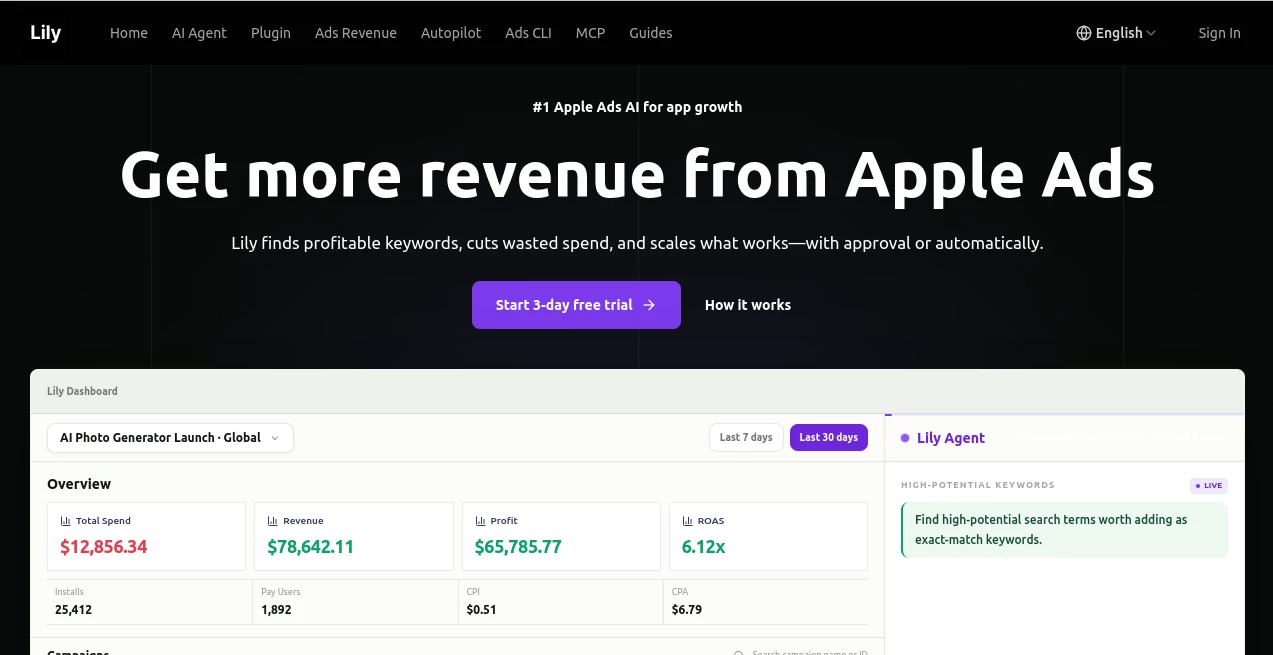
The interface is built around the idea of giving an app growth team a practical view of what deserves attention. Instead of presenting a collection of disconnected advertising metrics, the dashboard brings spending, revenue, profit, and ROAS into a single workspace.
The experience is especially useful when reviewing an account that has accumulated many campaigns and keywords. A growth manager can quickly move from a broad account overview to individual campaigns and revenue opportunities. The daily brief is another practical touch, highlighting issues such as keywords spending without revenue, changes in ROAS, and markets that may have room for additional investment.
This approach makes the product feel less like another analytics dashboard and more like a working environment for making advertising decisions.
Accuracy & Performance
The quality of advertising recommendations depends heavily on the quality of the underlying data. This platform addresses that by combining Apple Ads performance with revenue and market-demand information. Apple Ads contributes campaign, keyword, search-term, spend, tap, and install data, while RevenueCat or AppsFlyer can provide information about purchases, subscriptions, paying users, and customer revenue.
That combination can make performance analysis considerably more meaningful. For example, a keyword that generates many installs but no paying customers may deserve a very different treatment from a keyword producing fewer installs but strong subscription revenue.
The system also analyzes market demand through sources such as App Store search popularity and Google keyword data. This gives recommendations more context than advertising metrics alone can provide.
Capabilities
The core capability is turning several streams of app-growth data into actionable advertising decisions. The AI analysis layer can identify keywords worth scaling, spending that should be reviewed, and markets that may offer attractive opportunities.
For teams handling larger accounts, bulk operations can reduce repetitive work. Campaigns can be created, paused, or adjusted through controlled workflows, while users can choose whether changes should require approval or operate within predefined limits.
The platform also supports AI-assisted interaction through ChatGPT and a managed MCP connection for Claude. This allows teams to bring advertising analysis into an AI workspace rather than constantly switching between separate tools.
Security & Privacy
Security is particularly important when advertising accounts and financial performance data are involved. The platform uses provider OAuth authorization for Apple Ads and states that users do not need to paste an Apple password or reusable private key into the service.
Its connection model is designed around scoped access and approval. AI assistants receive the platform's controlled tools rather than direct Apple Ads credentials, while self-serve write actions can require user approval before they are executed.
The integration documentation also describes an OAuth-based connection for RevenueCat and an encrypted API V2 token for AppsFlyer reporting. This gives teams a clearer separation between their advertising credentials and the AI environment they use for analysis.
Use Cases
App founders: A founder managing an app without a dedicated Apple Ads specialist can use the system to identify inefficient spending, understand keyword performance, and discover potential growth opportunities.
Growth teams: Teams running campaigns across multiple countries can use centralized revenue-aware analytics to compare markets and identify campaigns that deserve additional attention.
App studios: Studios managing several applications can benefit from repeatable workflows and higher-tier plans that support multiple apps. This can make campaign analysis and optimization easier to standardize.
Advertising agencies: Agencies can use the platform as an operational layer for analyzing multiple app accounts, preparing changes, and keeping approval processes under control.
Revenue-focused optimization: Teams that care more about paying customers than raw installation numbers can connect revenue data and evaluate advertising through actual business results.
Pros and Cons
- Pros: Connects Apple Ads performance with real revenue data.
- Pros: Helps identify wasted spending and profitable keywords.
- Pros: Includes market-demand analysis for expansion decisions.
- Pros: Supports approval-based automation and optional Autopilot.
- Pros: Integrates with several tools used by modern app-growth teams.
- Pros: Higher plans support multiple applications and deeper diagnostics.
- Cons: Its strongest value is aimed at teams actively running Apple Ads.
- Cons: Revenue-focused features become more useful when reliable RevenueCat or AppsFlyer data is available.
- Cons: Users with very small advertising accounts may not need all of its advanced automation and analytics features.
Pricing Plans
The current self-serve pricing is structured around AI usage and the number of applications managed. Every self-serve plan includes Apple Ads revenue analytics, and a three-day free trial is available without requiring a card.
- Starter – $9.90/month: Includes a revenue dashboard, campaign and keyword-level ROAS analytics, 50 AI tool calls per month, support for up to $3,000 in monthly Apple Ads spend, and one app.
- Plus – $49/month: Adds 150 AI tool calls per month, AI recommendations for campaigns, keywords, and countries, unlimited Apple Ads spend, and support for up to five apps.
- Pro – $99/month: Includes 600 AI tool calls per month, unlimited Apple Ads spend, support for up to 30 apps, deeper diagnostics, and priority support.
There is also a separate Autopilot service for teams that want the platform to apply approved types of optimizations continuously within defined limits. This service follows its own onboarding and service path rather than being simply another feature bundled into the self-serve subscriptions.
How to Use the AI Advertising Platform
Getting started follows a straightforward workflow. First, connect the relevant Apple Ads account using the available authorization process. This allows campaign, keyword, search-term, spend, tap, and install information to be synchronized securely.
Next, connect RevenueCat or AppsFlyer if revenue-based optimization is required. This gives the system access to purchase, subscription, paying-user, or revenue information that can be compared with advertising costs.
Once the data is available, review the initial analysis. The system can surface potential wasted spend, profitable keywords, campaign opportunities, and markets worth investigating. Users can then review proposed actions before approving them.
For teams that prefer more automation, Autopilot can later be configured to perform permitted optimizations within the limits established by the account owner.
Comparison with Similar Tools
Traditional Apple Ads dashboards are useful for understanding advertising activity, but they primarily focus on metrics such as spend, taps, installs, campaigns, and keywords. That can leave teams doing additional work when they want to understand which advertising activity actually produces paying customers.
General-purpose analytics platforms can provide broader reporting, but they may not offer the same depth of Apple Ads campaign workflows or keyword-level optimization. On the other hand, generic AI assistants can help analyze information when data is provided to them, but they are not necessarily connected to the advertising account with the same scoped workflow and approval model.
The main distinction here is the combination of revenue attribution, Apple Ads data, market-demand research, and AI-assisted action. For an app team that wants to move from simply monitoring advertising to actively improving it, that combination can be considerably more useful than relying on a single conventional reporting dashboard.
Conclusion
For app businesses spending money on Apple Ads, the difference between collecting advertising metrics and understanding profitable growth can be substantial. A campaign may generate impressive installation numbers while contributing little revenue, while a smaller campaign can quietly produce much stronger customers.
This platform is built around that distinction. By connecting ad performance with revenue and market demand, it gives teams a more complete picture of where their budget is working and where it may be leaking. The approval-first approach is also appealing for businesses that want AI assistance without immediately handing over complete control of their advertising accounts.
With plans starting at $9.90 per month and a three-day free trial, it is accessible enough for smaller app teams while offering additional capacity for companies managing larger portfolios. For anyone looking to make Apple Ads decisions based on revenue rather than installs alone, it is a compelling addition to an app-growth workflow.
Frequently Asked Questions (FAQ)
What type of advertising does the platform focus on?
Its primary focus is Apple Ads for mobile applications, with tools for campaign, keyword, search-term, revenue, and market-demand analysis.
Can it analyze actual app revenue?
Yes. Revenue data can be connected through services such as RevenueCat or AppsFlyer, allowing advertising performance to be compared with purchases, subscriptions, paying users, and customer revenue.
Does it automatically change advertising campaigns?
Users can review and approve changes before they are executed. An optional Autopilot workflow is also available for teams that want approved optimizations to run automatically within defined limits.
Can it be used with ChatGPT?
Yes. A dedicated ChatGPT integration allows eligible users to work with scoped advertising and revenue tools directly inside the conversation.
Does it support multiple apps?
Yes. The number of supported applications depends on the subscription. The Starter plan supports one app, Plus supports five, and Pro supports up to 30 apps.
Is there a free trial?
Yes. The service currently offers a three-day free trial, and the site states that no credit card is required to start.
Is Apple Ads experience required?
No. The platform is designed to help app founders and teams make Apple Ads decisions without needing to be specialists in Apple advertising.
What makes revenue-aware advertising analysis useful?
It allows teams to distinguish between advertising activity that generates installs and advertising activity that generates paying customers. This can lead to more informed decisions about which keywords, campaigns, and markets deserve additional budget.
AI Sales Assistant , AI Marketing Plan Generator , AI Analytics Assistant , AI Advertising Assistant .
These classifications represent its core capabilities and areas of application. For related tools, explore the linked categories above.

ChatLily Alternatives Product

DemoDash

Medialyst

Crawlly AI

AILeadz.io

Techvorizon …

Roipad

Marketbetter…

Leado.co

Ad Suite AI