
clipmyapp
What is clipmyapp?
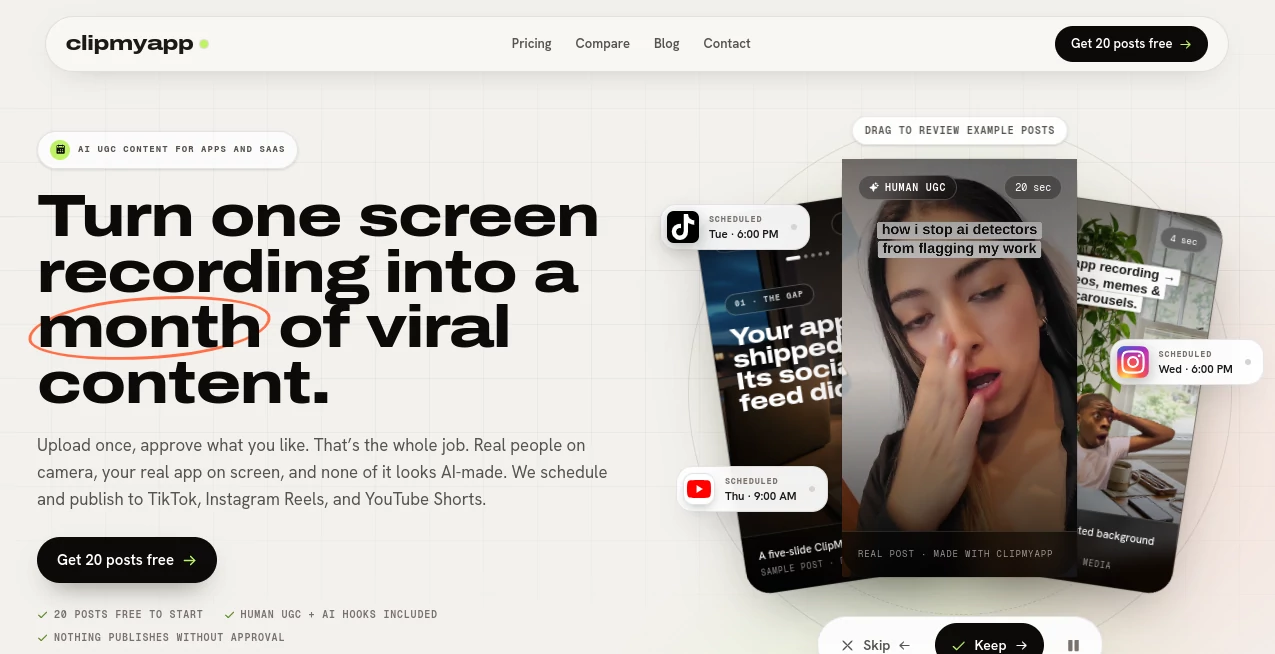
For app founders and small SaaS teams, having a good product is only half the job. The harder part is often finding enough content ideas to keep social channels active week after week. ClipMyApp takes a practical approach to that problem by turning a website and optional product screen recordings into short-form content designed for modern social feeds.
The platform can create vertical videos, memes, and five-slide carousels around an app or SaaS product. It also combines real licensed human UGC with AI-generated hooks, giving founders a way to produce creator-style content without constantly hiring creators or recording themselves.
The workflow is refreshingly straightforward. Add a website, optionally provide a screen recording, review the generated posts, and schedule the ones worth publishing. For a small team that does not have a dedicated social media specialist, that can remove a surprisingly large amount of repetitive work.
Key Features
- Turns websites and screen recordings into short-form social content.
- Creates vertical videos, memes, and five-slide carousels.
- Supports licensed human UGC openings and AI-generated hooks.
- Provides a custom AI creator option for repeatable creator-style videos.
- Lets users review, edit, keep, reject, or replace generated posts.
- Provides a unified calendar for TikTok, Instagram, and YouTube.
- Tracks views, likes, and follower growth for connected channels.
- Allows content to be generated whenever the publishing calendar needs fresh material.
User Interface
The interface is built around a simple content workflow rather than a traditional video-editing timeline. Users move through creation, review, scheduling, and publishing without having to manage a collection of separate folders and social media tools.
The review stage is particularly useful. Instead of automatically sending generated material to social accounts, users can decide which posts deserve to go live. Posts can be edited, moved around the calendar, or rejected before publication. This makes the system feel more like a content workspace than an automatic posting machine.
Accuracy & Performance
There is no single accuracy score that makes sense for a creative content platform. What matters more is whether the generated material stays connected to the product being promoted. The workflow starts by learning from the submitted website and can use real product footage when a screen recording is provided.
Screen recordings are also processed with a useful focus on the important moments. Unnecessary waiting and loading sections can be removed, while meaningful taps, changes, and results are turned into a shorter vertical presentation. This is especially helpful when a two-minute product walkthrough needs to become a concise social video.
Capabilities
The platform goes beyond basic screen-recording conversion. A single product can become the basis for several different content formats, including short videos, memes, and carousels.
Its UGC workflow is another notable capability. Real licensed human reactions can be placed at the beginning of posts, while AI-generated hooks provide additional creative options. Users can also create a custom AI creator identity and reuse the same face across different scenes and videos.
For SaaS products, the browser-based workflow is especially convenient. A founder does not need to film a laptop with a phone. A browser recording can be reframed into a vertical format, with attention directed toward the part of the interface that matters.
Security & Privacy
The service provides a dedicated privacy policy and gives users control over the content that gets published. One of the most important workflow safeguards is that generated material does not automatically go live: users review and approve posts before they are scheduled.
Because the platform can work with product recordings and creator imagery, businesses should still review the provider's current privacy terms before uploading sensitive customer information, confidential interfaces, or proprietary material.
Use Cases
- Indie app founders: Turn a product walkthrough into a steady stream of social content without becoming a full-time video editor.
- SaaS startups: Show real product features through short videos that fit TikTok, Instagram Reels, and YouTube Shorts.
- Product launches: Prepare several posts before launch instead of trying to create content every day.
- Social media marketing: Keep a publishing calendar populated with different formats rather than repeating the same promotional post.
- UGC campaigns: Add human-style reactions to product demonstrations without organizing a traditional creator campaign.
- Content repurposing: Turn one screen recording into several pieces of social-first content.
- Small marketing teams: Handle creation, approval, scheduling, and basic performance tracking from one workspace.
Pros and Cons
- Pros: Simple workflow from product information to published content.
- Pros: Supports videos, memes, and carousels rather than relying on one format.
- Pros: Real licensed UGC and AI-generated hooks provide different creative directions.
- Pros: Users maintain approval control before anything is published.
- Pros: Direct scheduling for TikTok, Instagram, and YouTube is convenient for small teams.
- Pros: Screen recordings can be transformed into concise product videos.
- Cons: Premium AI features use credits, so heavy video production can require a larger plan.
- Cons: Monthly credits expire rather than rolling over to the next billing cycle.
- Cons: Businesses looking for advanced manual video editing may still prefer a dedicated professional editor.
Pricing Plans
The pricing structure is designed around different publishing volumes. New accounts receive 20 finished posts about their product free of charge, giving users an opportunity to evaluate the workflow before committing to a subscription.
- Starter – $29/month: Includes 300 premium credits, approximately 15 app-footage videos per month, one project, and unlimited memes, hooks, carousels, drafts, and scheduling.
- Growth – $49/month: Includes 600 premium credits, approximately 30 app-footage videos per month, one project, plus unlimited memes, hooks, carousels, drafts, and scheduling.
- Scale – $99/month: Includes 1,400 premium credits, approximately 70 app-footage videos per month, three projects, and the same unlimited content and scheduling features.
Premium credits are used for features such as app-footage videos, custom creator identities, and AI-generated hook scenes. Users can also purchase an additional 200 credits for $12 when needed. Annual billing is available at a launch price equivalent to nine monthly payments, effectively providing three months free.
How to Use It
- Start by providing your app or SaaS website so the platform can understand the product and its audience.
- Add a screen recording if you want videos that demonstrate real product interactions. This step is optional.
- Let the platform generate videos, memes, and carousels based on the available product information.
- Review the generated posts and keep the ones that fit your brand and marketing goals.
- Edit hooks, sounds, meme backgrounds, or carousel slides when necessary.
- Connect your TikTok, Instagram, and YouTube accounts.
- Place approved posts on the content calendar and choose the preferred publishing times.
- Monitor views, likes, and follower growth after the posts are published.
Comparison with Similar Tools
Many AI video platforms concentrate on generating a video from a text prompt, while some social tools focus mainly on scheduling or repurposing existing material. This platform takes a more product-focused route. The starting point is the app or SaaS itself, and the resulting content is built around showing what that product does.
That distinction can make it a better fit for founders who want marketing content rather than generic AI-generated videos. The combination of product footage, human UGC, AI hooks, memes, carousels, approval controls, and social scheduling creates a workflow that covers much more of the journey from product demo to published post.
It is not necessarily a replacement for a full professional video-editing suite. Someone producing cinematic campaigns or highly customized brand videos may still want a traditional editor. For fast-moving app marketing, however, the narrower focus can actually be an advantage.
Conclusion
Keeping an app's social presence active can become a full-time task surprisingly quickly. The real value here is not simply generating another short video. It is connecting product information, screen recordings, UGC-style openings, content variations, approval, scheduling, and basic analytics into one repeatable process.
For indie founders and small SaaS teams, that makes the platform particularly appealing. Instead of recording a new video every time a social channel needs something to publish, one product walkthrough can become the starting point for a much broader content calendar.
The 20 free posts are also a sensible way to test the workflow. If the generated content matches the brand and requires little editing, the paid plans offer a practical path toward maintaining a consistent publishing schedule.
Frequently Asked Questions (FAQ)
What type of content can it create?
It can create vertical short videos, memes, and five-slide carousels designed for social platforms. Videos can use real product footage, licensed human UGC, or AI-generated hooks.
Does it work with SaaS products?
Yes. Web-based SaaS products can be recorded in a browser and converted into vertical product videos without filming a laptop screen with a phone.
Do I need to record myself?
No. The service can use licensed real-person footage, product recordings, memes, carousels, and AI-generated content, so founders do not have to appear on camera.
Can I approve posts before they are published?
Yes. Every generated post can be reviewed, edited, kept, rejected, or adjusted before it is scheduled for publication.
Which social platforms are supported?
The publishing workflow supports TikTok, Instagram, and YouTube, with approved posts managed through a shared calendar.
Is there a free option?
New accounts receive 20 finished posts for free. Paid plans also offer a 48-hour trial option, while the cardless free-post route allows users to start without entering payment details.
Do unused credits carry over?
No. Monthly credits refresh at the beginning of each billing cycle and unused credits expire. Failed generations are automatically refunded.
Who is it best suited for?
It is particularly well suited to indie founders, SaaS startups, and small marketing teams that need consistent short-form content but do not have a dedicated video editor or social media specialist.
AI Video Generator , AI Tiktok Assistant , AI Social Media Assistant , AI UGC Video Generator .
These classifications represent its core capabilities and areas of application. For related tools, explore the linked categories above.

clipmyapp Alternatives Product

Seedream 6.0
ds video

LTX 2.3

Veo4AI

Kling 5.0

Seedance 2.0

Video Upscal…

Seedance

VIGGLE