
Colorito
What is Colorito?
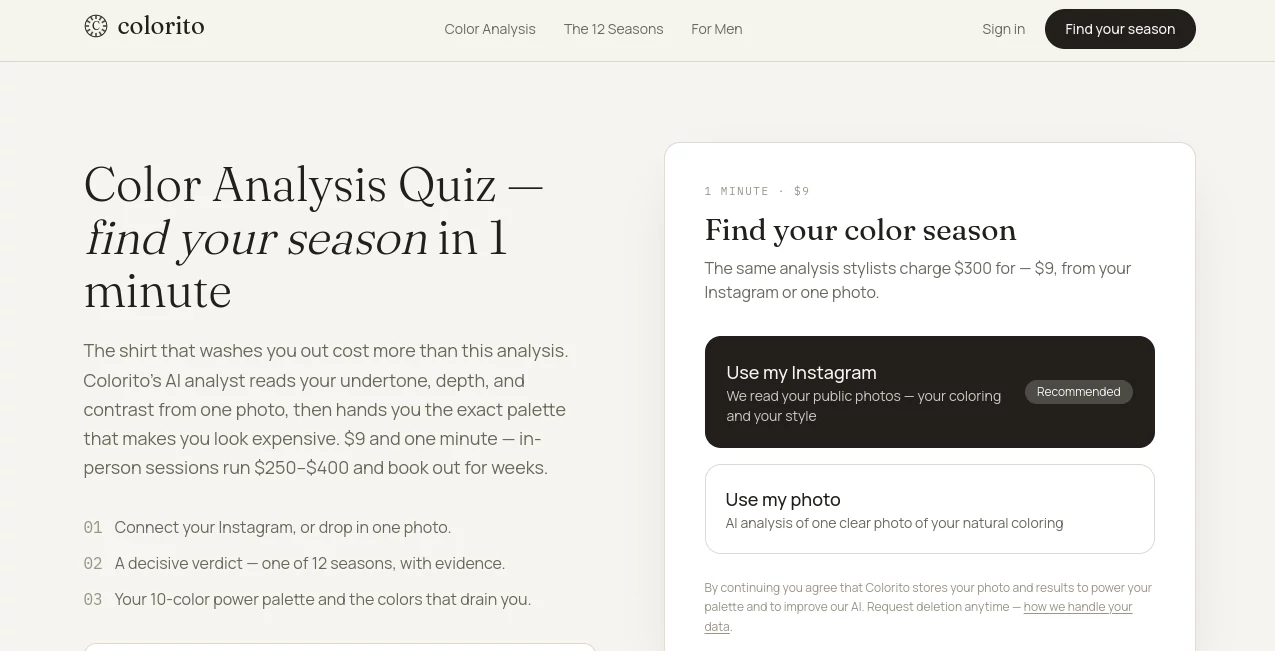
Finding the colors that genuinely suit you can be surprisingly difficult. A shade may look great on someone else but make your complexion appear dull, washed out, or overly harsh. Colorito takes a simpler approach by using AI to analyze a photo and identify the colors that are most likely to complement your natural appearance.
The experience is designed around seasonal color analysis. Instead of spending hours comparing fabric swatches or booking an expensive in-person consultation, users can upload one clear photo or connect their Instagram and receive a personalized result in about a minute. The analysis considers undertone, depth, and contrast before placing the user into one of 12 seasonal categories.
The result is practical rather than purely theoretical. Users receive a 10-color power palette, along with colors that may work against their natural coloring. For anyone interested in clothing, personal style, shopping, or building a more consistent wardrobe, this can be a useful starting point.
Key Features
- AI-powered personal color analysis from a single photo.
- Instagram-based analysis using public photos.
- Classification into one of 12 seasonal color types.
- Analysis based on undertone, depth, and contrast.
- A personalized 10-color power palette.
- Identification of colors that may be less flattering.
- Results saved to the user's account for future reference.
- A particularly useful approach for men looking to simplify everyday wardrobe choices.
User Interface
The interface keeps the process straightforward. Users can either connect Instagram or upload a photo that clearly shows their natural coloring. There is no complicated questionnaire that asks users to become experts in color theory before getting started.
The overall flow is intentionally short: provide a photo, receive the analysis, and explore the resulting palette. That simplicity makes the service approachable for someone discovering seasonal color analysis for the first time.
Accuracy & Performance
The analysis focuses on three important elements of personal coloring: undertone, depth, and contrast. These factors are then used to determine the closest match among the 12 seasonal categories, ranging from Light Spring and Warm Spring to Deep Winter and Bright Winter.
As with any photo-based visual analysis, the quality of the input matters. A clear image with natural-looking coloring should provide a better foundation than a heavily filtered selfie or a photo taken under unusual lighting. The service itself notes that the result may sometimes land on a person's season or its nearest neighboring season, much like the disagreements that can occur between human color analysts.
Capabilities
The most useful part of the experience is the conversion of analysis into something that can actually be used. Rather than simply telling users whether they are warm or cool, the system produces a specific seasonal classification and a 10-color palette.
This can make everyday decisions easier. Someone identified with a warm palette, for example, can use the recommended colors as a reference when choosing shirts, jackets, accessories, or other wardrobe pieces. The list of colors that are less suitable can be just as helpful, particularly when shopping online.
The service also takes a men-first approach to styling. This is a sensible niche because men's wardrobes often rely on a relatively small selection of staple colors. Knowing whether cream works better than stark white, or whether a particular brown is more flattering than black, can make a noticeable difference without requiring a complete wardrobe overhaul.
Security & Privacy
Because the service analyzes personal photographs, privacy is an important consideration. Uploaded photos and analysis results are stored securely so the personalized palette can remain available on the user's profile and help improve the AI analyst.
The service states that photos are not sold or made public, and users can request deletion of their stored information. Users should still choose photos carefully and review the available privacy information before submitting personal images.
Use Cases
- Wardrobe planning: Build a collection around colors that complement your natural coloring.
- Online shopping: Use a personal palette as a quick reference before purchasing clothing.
- Men's styling: Make everyday staples such as shirts, trousers, jackets, and shoes easier to coordinate.
- Personal styling: Get a useful starting point before working with a professional stylist.
- Special occasions: Choose colors for weddings, interviews, parties, photographs, and other important events.
- Wardrobe simplification: Reduce trial and error when deciding which colors deserve more space in your closet.
Pros and Cons
- Pros: Fast analysis, simple photo-based process, 12-season classification, personalized 10-color palette, identification of less flattering colors, and a strong focus on practical wardrobe decisions.
- Pros: The service is considerably cheaper than the in-person color analysis sessions it compares itself with.
- Pros: Particularly appealing to users who want straightforward styling guidance rather than a lengthy consultation.
- Cons: Results depend on the quality and lighting of the submitted photograph.
- Cons: AI-based analysis cannot completely replace the nuance of an experienced human color consultant in every situation.
- Cons: Users who want a complete personal styling service may need additional tools or professional advice beyond color analysis.
Pricing Plans
The analysis is offered at an early-bird price of $9 for one complete analysis. This includes the seasonal verdict, a 10-color power palette, and the colors identified as working against the user's natural coloring.
The service compares this with in-person color analysis, which it says can cost around $250–$400 and may involve waiting for an available appointment. The current $9 price is described as an early-bird offer and may increase as the service develops.
How to Use It
- Open the color analysis experience and begin a new analysis.
- Choose whether to connect Instagram or upload one clear photo.
- Use an image that represents your natural coloring without excessive filters or unusual lighting.
- Allow the AI analyst to evaluate your undertone, depth, and contrast.
- Review your assigned seasonal color category.
- Explore the personalized 10-color power palette.
- Keep the recommended colors in mind when shopping or planning outfits.
- Use the less-flattering color guidance to avoid choices that may work against your natural coloring.
Comparison with Similar Tools
Traditional seasonal color analysis usually involves an appointment with a stylist who examines a person's coloring using physical fabrics, lighting, and professional judgment. That approach can be highly detailed, but it is also more expensive and less convenient.
Photo-based AI analysis takes the opposite approach. It trades the hands-on experience of a professional consultation for speed, accessibility, and a much lower entry cost. The 12-season framework also gives users a familiar system for understanding their results instead of leaving them with a vague description such as “warm” or “cool.”
For someone who simply wants a useful direction before buying clothes, this approach can be more practical than spending hundreds of dollars on a first consultation. More experienced users or people seeking highly nuanced styling advice may still prefer to combine an automated analysis with professional guidance.
Conclusion
Personal color analysis does not need to be complicated. By turning a single photograph into a seasonal classification and a focused palette, this service makes a traditionally time-consuming styling exercise much easier to try.
Its strongest quality is the practical nature of the result. Instead of stopping at an abstract color theory explanation, it gives users a collection of colors they can actually take into the real world, whether they are shopping for a new jacket, refreshing a wardrobe, or simply trying to understand why certain shades look better than others.
At its current early-bird price, it is also an inexpensive way to explore personal color analysis before committing to a much more expensive in-person appointment.
Frequently Asked Questions (FAQ)
What is seasonal color analysis?
Seasonal color analysis groups natural coloring into 12 categories across the Spring, Summer, Autumn, and Winter families. The classification considers characteristics such as undertone, depth, and clarity to determine which colors are likely to complement a person best.
How long does the analysis take?
The service is designed to provide a result in approximately one minute after submitting a suitable photo or using public Instagram photos.
How many color seasons are there?
There are 12 seasons: Light Spring, Warm Spring, Bright Spring, Light Summer, Cool Summer, Soft Summer, Soft Autumn, Warm Autumn, Deep Autumn, Deep Winter, Cool Winter, and Bright Winter.
What do I receive after the analysis?
You receive a seasonal classification, evidence supporting the result, a 10-color power palette, and guidance about colors that may be less flattering for your natural coloring.
Can men use AI color analysis?
Yes. The service has a particular focus on men's styling and is designed to help simplify decisions around common wardrobe colors, including shirts, jackets, trousers, and other staples.
Does the quality of my photo matter?
Yes. A clear photograph with natural-looking lighting and minimal filters gives a better basis for visual analysis. Strong color filters, unusual lighting, or unclear images can make any photo-based assessment less reliable.
Is the analysis a replacement for a professional stylist?
It can be a convenient starting point, but it should not be treated as an absolute replacement for every professional consultation. A human color analyst can consider lighting, physical fabrics, and subtle visual details that may not be fully captured by a photograph.
What happens to my uploaded photo?
The service states that photos and results are stored securely to keep the personalized palette available and improve its AI analyst. It also states that photos are not sold or made public and that users can request deletion.
How much does the analysis cost?
The current early-bird price is $9 for one complete analysis. The service states that this price may increase in the future.
Can I use the results when shopping for clothes?
Yes. The personalized palette is particularly useful as a quick reference when choosing clothing colors online or in stores. It can help reduce guesswork and make wardrobe decisions more consistent.
AI Life Assistant , AI Image Recognition , AI Selfie & Portrait , AI Photography .
These classifications represent its core capabilities and areas of application. For related tools, explore the linked categories above.

Colorito Alternatives Product

Ask Bishop

GetFIT App

MixBooze

MemoTune

tarotguide

FacialHarmon…
FaceSage

Astrology Bot

Rizzwords