


















Deroom
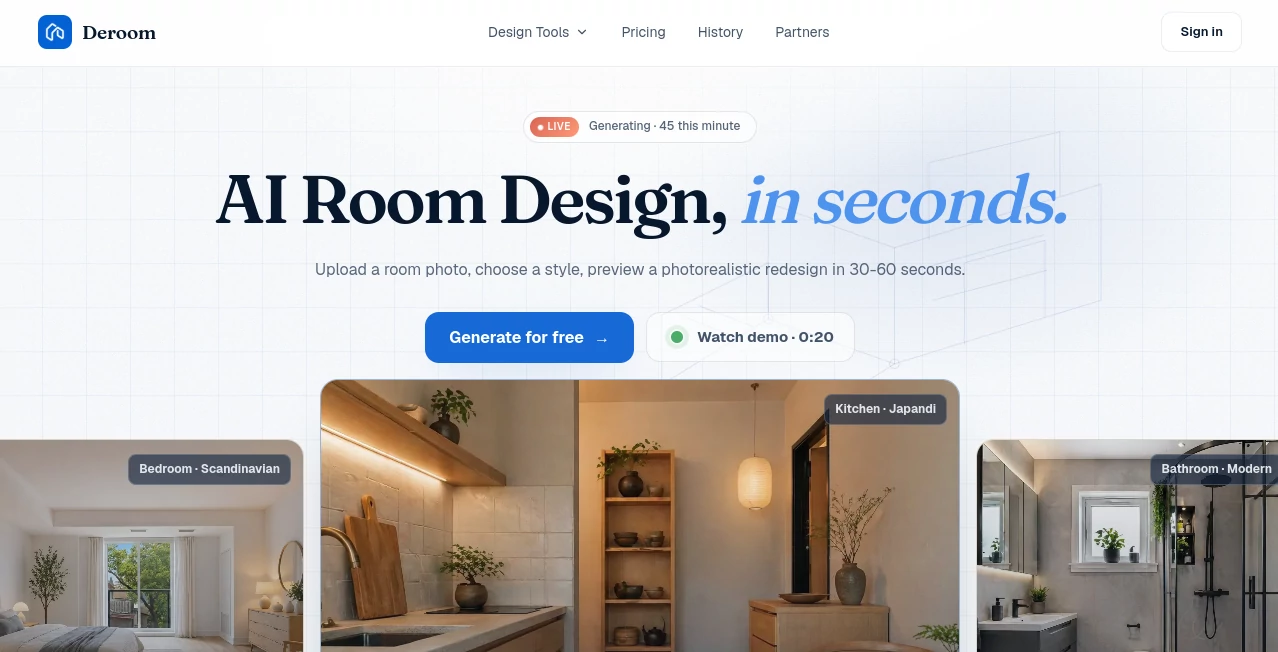
What is Deroom?
Redesigning a room often starts with inspiration but quickly becomes complicated when it comes to choosing colors, furniture, layouts, and decorative elements. This platform simplifies that journey by turning a single room photo into a realistic interior concept within seconds. Instead of relying on imagination alone, homeowners, interior designers, real estate professionals, and renovation enthusiasts can instantly visualize different design directions before making expensive decisions.
What makes this solution especially appealing is its balance between speed and realism. Rather than generating completely unrelated concepts, it preserves the structure and perspective of the original room while applying carefully selected design styles. The result feels practical, believable, and surprisingly close to what a finished renovation could look like.
Whether someone wants to modernize a living room, experiment with a Scandinavian kitchen, refresh a bedroom, or test landscaping ideas, the platform provides an enjoyable and efficient workflow that removes much of the guesswork from interior planning.
Key Features
- Generate photorealistic room redesigns from a single photo.
- Choose from curated interior design styles.
- Support for multiple room types including kitchens, bathrooms, bedrooms, offices, gardens, and exteriors.
- Several editing modes for different renovation goals.
- Furniture replacement while maintaining room structure.
- Wall and material recoloring without changing the layout.
- Decluttering mode for cleaner room visualization.
- Quick room refresh with updated finishes and decoration.
- High-resolution exports on paid plans.
- Commercial usage rights for subscribers.
User Interface
The interface focuses on simplicity from beginning to end. Users upload a photo, choose the room type, select a preferred design style, pick an editing mode, and wait for the generated result. Navigation remains clean without unnecessary options, making the experience approachable even for people who have never used an AI design application before.
The before-and-after comparison also helps users evaluate design changes naturally, making it easy to compare multiple concepts before deciding which direction fits their project.
Accuracy & Performance
One of the strongest aspects of the platform is its ability to preserve important architectural details. Windows, doors, room proportions, and camera perspective generally remain consistent while furniture, colors, lighting, textures, and decorative elements are transformed. Most generations are completed in less than a minute, allowing users to test several ideas during a single design session. Paid subscriptions also benefit from faster processing queues. :contentReference[oaicite:0]{index=0}
Capabilities
The platform goes beyond complete room redesigns by offering specialized editing modes for different situations. Users can perform a full redesign, swap furniture while keeping the same room layout, recolor walls and materials, quickly refresh décor, or remove clutter without dramatically changing the original space. These focused editing options provide greater creative control than many traditional AI visualization tools. :contentReference[oaicite:1]{index=1}
Its support for numerous room categories—including living rooms, kitchens, bathrooms, bedrooms, closets, home offices, gardens, and building exteriors—makes it useful for both residential and professional projects.
Security & Privacy
User accounts are required before generating designs, allowing projects to be stored and managed securely. The service also supports commercial usage rights for paid subscribers, making it suitable for professionals preparing presentations, renovation proposals, or real estate marketing materials. :contentReference[oaicite:2]{index=2}
Use Cases
- Visualize home renovation ideas before construction begins.
- Compare multiple interior styles for the same room.
- Create staging concepts for real estate listings.
- Prepare design proposals for clients.
- Explore furniture arrangements before purchasing.
- Test wall colors and finishing materials.
- Generate landscaping concepts for outdoor spaces.
- Create inspiration boards for remodeling projects.
Pros and Cons
Pros
- Very fast image generation.
- Photorealistic design results.
- Multiple editing modes instead of only full redesigns.
- Simple workflow suitable for beginners.
- Supports many room categories.
- Commercial usage available with paid plans.
Cons
- Account registration is required before generating designs.
- Free usage is limited by available credits.
- High-resolution exports require a paid subscription.
Pricing Plans
A free tier is available with complimentary credits for new users. Paid subscriptions start with a Starter plan, followed by Pro and Enterprise options that provide additional generations, faster processing, higher limits, 4K exports, commercial rights, and advanced professional features. :contentReference[oaicite:3]{index=3}
How to Use Deroom AI
- Create an account.
- Upload a clear photo of your room.
- Select the room category.
- Choose an interior design style.
- Select an editing mode.
- Generate the redesigned image.
- Compare the before-and-after versions.
- Download or continue refining the design.
Comparison with Similar Tools
Many AI interior design platforms primarily focus on generating completely new concepts from prompts. This solution stands out by preserving the original room structure while allowing targeted modifications such as recoloring, decluttering, furniture replacement, or complete redesigns. The curated design styles and specialized action modes create a workflow that feels practical for homeowners as well as professionals who need realistic renovation previews rather than purely artistic images.
Conclusion
Planning a renovation becomes significantly easier when design ideas can be tested before spending money on furniture or construction. This platform combines realistic rendering, intuitive controls, and multiple editing modes into a polished experience that serves homeowners, designers, contractors, and real estate professionals alike.
Its ability to generate convincing room transformations while preserving architectural consistency makes it an excellent choice for anyone looking to explore creative possibilities with confidence. Instead of relying on imagination alone, users gain visual direction that supports smarter renovation decisions and more effective project planning.
Frequently Asked Questions (FAQ)
Can I redesign any type of room?
Yes. The platform supports numerous indoor and outdoor spaces including kitchens, bathrooms, bedrooms, living rooms, offices, gardens, closets, and home exteriors.
Does it keep my room layout?
Most editing modes preserve the original layout and camera perspective while changing decorative or structural design elements.
Is there a free version?
Yes. New users receive free credits to try the service before upgrading to a paid subscription. :contentReference[oaicite:4]{index=4}
Can professionals use generated images commercially?
Yes. Commercial usage rights are included with paid subscription plans. :contentReference[oaicite:5]{index=5}
Who benefits the most from this platform?
Homeowners, interior designers, architects, contractors, furniture retailers, and real estate professionals can all benefit from its visualization capabilities.
AI Design Assistant , AI Design Generator , AI Image to Image , AI Interior & Room Design .
These classifications represent its core capabilities and areas of application. For related tools, explore the linked categories above.

Deroom Alternatives Product

MeltFlex AI

Wan 2.7 Image

Normal Map G…

Artguru

Ambigram Gen…

HD Photo Con…

BananaPro

AI Thumbnail…

CozAIPhoto
