
Filter Remover
What is Filter Remover?
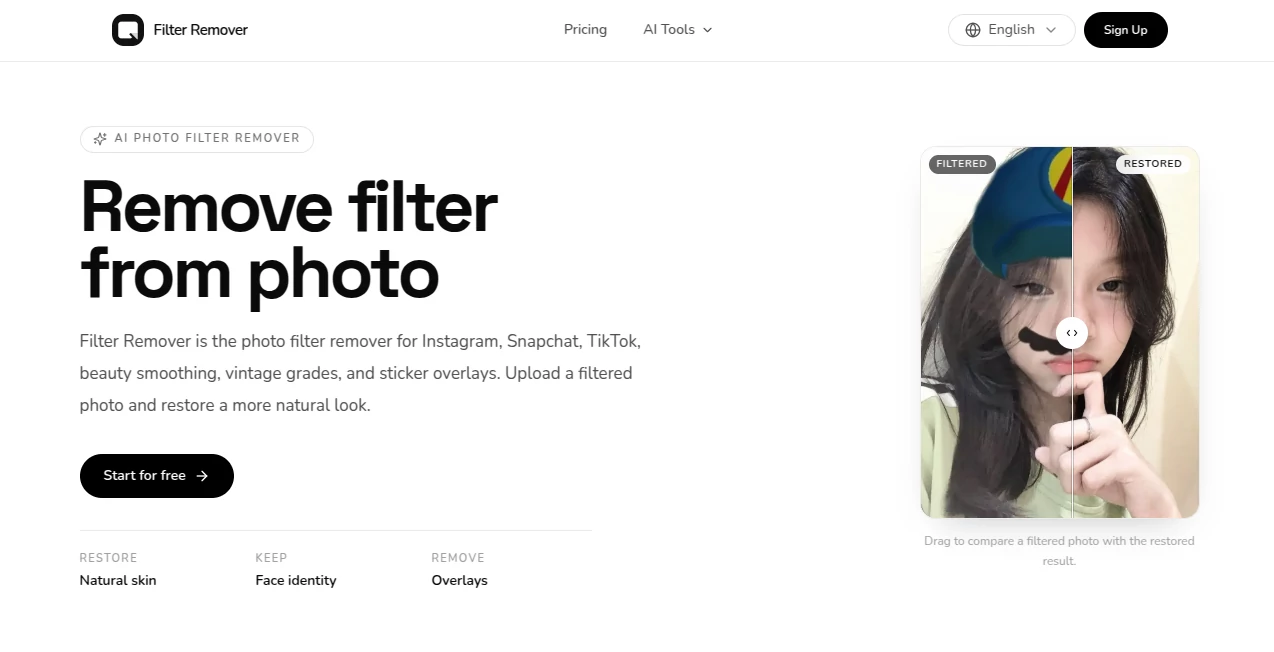
Filter Remover is an AI-powered photo restoration tool designed for people who want to bring a more natural appearance back to filtered images. Instead of adding another visual style, it takes the opposite approach: reducing the effects of beauty filters, color grades, AR overlays, stickers, and other edits that may have changed the original look of a photo.
This makes it particularly useful for selfies, portraits, social media images, vintage photos, and pictures where filters have become too strong. The process runs directly in the browser, so there is no need to install a desktop photo editor or spend time learning complicated editing controls.
A useful example is a selfie with heavy skin smoothing. Rather than applying another retouching preset, the tool attempts to restore skin texture, natural color, and facial characteristics while keeping the overall composition intact.
Key Features
- One-tap removal of common photo filters
- Beauty filter and skin-smoothing restoration
- Black-and-white and sepia colorization
- Vintage and social media color-grade restoration
- Sticker, emoji, text, and overlay removal
- AR filter cleanup for hats, mustaches, and similar effects
- Identity-preserving photo edits
- Custom prompts for more specific restoration requests
- Support for JPG, PNG, and WebP images
- Medium and 2K resolution options
- Before-and-after comparison for checking the result
User Interface
The interface keeps the editing process straightforward. Users upload an image, select the type of restoration they need, choose available quality and resolution settings, and start the process. The result is displayed in the same workspace, making it easy to compare the original filtered image with the restored version.
The before-and-after slider is especially helpful because photo restoration can be subjective. Instead of simply accepting the output, users can visually inspect how much of the filter has been reduced and decide whether another attempt is necessary.
Accuracy & Performance
The main strength of the restoration approach is that it focuses on reconstructing a natural-looking image rather than simply applying a generic enhancement. The system is designed to preserve facial identity, pose, background, and the original composition while attempting to reverse visible effects.
Results can naturally vary depending on the source image. A lightly filtered portrait may be easier to restore than an image where the original details have been heavily covered by stickers, extreme color grading, or aggressive beauty processing. For that reason, the before-and-after preview is a useful part of the workflow.
Capabilities
The tool covers several types of photo restoration in one place. Beauty smoothing can be reduced to reveal more natural-looking skin texture, while vintage and sepia effects can be reversed through color restoration. It can also work with common social-media-style overlays and AR effects.
Another practical capability is sticker and emoji cleanup. Hearts, sparkles, text stickers, and similar overlays can be removed and the missing areas reconstructed from surrounding visual information. This is useful when an old social media image contains edits that are no longer wanted.
For more specific requests, a custom prompt option provides additional control over the restoration task rather than forcing every image into the same preset.
Security & Privacy
Privacy is presented as an important part of the service. The website describes generations as private by default and directs users to its privacy policy for details about how uploaded files are handled.
As with any online image-processing service, users should review the privacy terms before uploading sensitive personal photographs. For ordinary portraits, social media images, and general restoration work, the browser-based workflow provides a convenient alternative to installing editing software locally.
Use Cases
- Removing beauty filters: Restore a more natural appearance to portraits affected by excessive skin smoothing or beauty effects.
- Cleaning social media photos: Reduce the impact of filters commonly used on Instagram, Snapchat, and TikTok-style images.
- Restoring vintage photos: Bring color back to monochrome and sepia images while aiming for realistic-looking tones.
- Removing stickers and emojis: Clean up old photos containing decorative overlays, text, hearts, or emojis.
- Reversing AR effects: Remove elements such as virtual hats, facial accessories, and other playful overlays.
- Fixing heavy color grades: Reduce strong cinematic or vintage color treatments when a more ordinary appearance is preferred.
- Preparing personal archives: Restore older edited photos before saving them as cleaner versions for personal collections.
Pros and Cons
Pros
- Focused specifically on reversing photo filters rather than adding new effects
- Simple browser-based workflow
- Supports several different restoration types
- Includes beauty, color, vintage, AR, sticker, and overlay cleanup
- Provides before-and-after comparisons
- Supports JPG, PNG, and WebP uploads
- Offers up to 2K resolution options
- Private generations are included in the listed plans
Cons
- Restoration quality can depend heavily on how much original information remains in the image
- Highly edited images may require another restoration attempt
- Processing uses a credit-based system
- Users working with very sensitive images should review the privacy policy before uploading them
Pricing Plans
The service uses credit-based plans, with monthly and yearly options shown on the pricing page. The yearly plans currently display the following rates:
- Basic: $14.90 per month when billed yearly, with 1,860 credits per year.
- Pro: $39.90 per month when billed yearly, with 5,760 credits per year.
- Max: $79.90 per month when billed yearly, with 13,698 credits per year.
The listed yearly plans include 2K and Medium image access, private generations, and email support. The Max plan also includes 24×7 priority email support. The pricing page states that yearly billing can reduce the listed price by up to 25%, while the displayed cost per restore decreases with the higher-volume plans.
A custom volume option is also available for users who need a larger amount of processing capacity.
How to Use the Photo Filter Remover
Using the tool takes only a few basic steps:
- Upload the filtered photo in JPG, PNG, or WebP format.
- Select the restoration mode that best matches the image, such as one-tap filter removal, beauty filter removal, colorization, or sticker removal.
- Choose the available quality and resolution settings.
- Start the restoration process and wait for the generated result.
- Use the before-and-after comparison to inspect the changes.
- If necessary, refine the image again and save the restored version.
For example, someone with an old selfie covered by a strong beauty filter can upload the image, select the beauty restoration option, and compare the resulting skin texture with the original. The same workflow can be used for vintage color grades or images containing unwanted stickers.
Comparison with Similar Tools
Many online image editors are primarily designed to enhance photographs, add creative effects, or generate completely new visuals. This tool takes a narrower approach by concentrating on reversing modifications that have already been applied to a photo.
That distinction makes it particularly interesting for users who do not want a new artistic treatment. Someone trying to undo an Instagram-style color grade, reduce artificial skin smoothing, or clean an old image containing stickers may find a dedicated restoration workflow more convenient than searching through a large general-purpose editor.
It also combines several related restoration tasks in one interface, including filter removal, beauty restoration, colorization, and overlay cleanup. The result is a more focused experience for people whose main goal is to get closer to a natural-looking photograph.
Conclusion
For anyone who has looked back at an old photo and thought, “I wish I had the original version,” an AI restoration tool built specifically around that problem can be genuinely useful. Rather than encouraging another round of editing, this service focuses on reducing the visual changes that were added in the first place.
Its combination of filter removal, beauty restoration, color recovery, AR cleanup, and sticker removal gives it a practical range of uses. The straightforward upload-and-restore workflow also makes it accessible to people who would rather not deal with a traditional photo editor.
While no restoration system can perfectly recover information that was completely lost or covered in the original image, the approach is well suited to everyday filtered portraits, social media photos, vintage images, and other pictures where the goal is a cleaner and more natural appearance.
Frequently Asked Questions (FAQ)
What is an AI photo filter remover?
An AI photo filter remover is designed to reduce or reverse visual modifications that have been applied to an existing photograph. Depending on the image, this can include beauty smoothing, color grading, sepia effects, AR overlays, stickers, and similar edits.
Can it remove Instagram, Snapchat, and TikTok-style filters?
Yes. The service is specifically designed to work with common social media filters, including beauty effects, AR-style overlays, vintage grades, and other visual treatments associated with social platforms.
Can it remove beauty filters?
Yes. The beauty restoration mode is designed to reduce skin smoothing, artificial glow, and heavy makeup effects while attempting to restore a more natural complexion and visible skin texture.
Can black-and-white or sepia photos be restored?
Yes. The colorization option is designed for black-and-white, monochrome, and sepia photographs, adding realistic-looking color to create a more natural appearance.
Can stickers and emojis be removed from photos?
Yes. The sticker cleanup capability can remove elements such as emojis, hearts, sparkles, and text overlays, then reconstruct the affected areas using surrounding image information.
What image formats are supported?
The service supports JPG, PNG, and WebP images.
Does the service preserve facial identity?
The restoration system is designed to preserve face identity, pose, and background rather than turning the photograph into a completely different image. However, the final result can vary depending on the quality and extent of the original edits.
Does photo restoration use credits?
Yes. The service uses a credit-based system, and the available plans provide different annual credit allowances.
Is there a high-resolution option?
Yes. The interface provides Medium and 2K resolution options on the listed plans.
Is the uploaded photo private?
The website describes generations as private by default. Users should still review the privacy policy for the complete details of how uploaded images and generated files are handled.
Can restored images be used commercially?
Commercial use can depend on the specific image, its ownership, and the applicable licensing terms. Users planning commercial use should review the service's image licensing and terms before publishing restored content.
How long does filter removal take?
Processing time can vary depending on the image and the restoration request. The workflow is designed to handle the process online without requiring a desktop editing application.
AI Background Remover , Photo & Image Editor , AI Photo Restoration , AI Image to Image .
These classifications represent its core capabilities and areas of application. For related tools, explore the linked categories above.
Filter Remover details
Website unavailable — View Alternatives
Pricing
- Freemium
Apps
- Web App
Categories

Filter Remover Alternatives Product

Text Remover…

Kirkify

FaceShapeDet…

Better Image

EaseMaker

Nano Banana …

img2img.net

Image to Ima…
Nano Banana 2