
FluidForms
What is FluidForms?
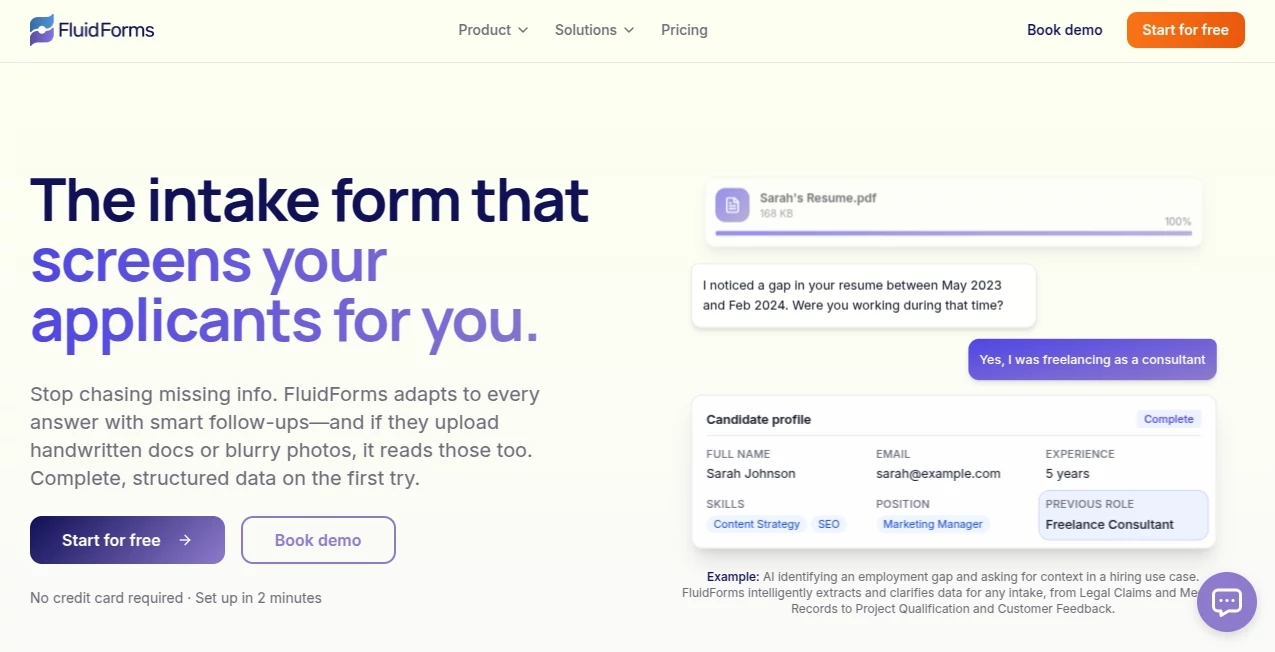
Collecting information should never feel like chasing people for missing details. Traditional online forms often leave businesses with incomplete responses, unclear answers, and hours of manual follow-up. This platform transforms the entire intake experience by replacing static forms with intelligent conversations that gather complete, structured information from the very beginning.
Instead of forcing users through endless fields and rigid logic, the system understands responses, recognizes missing context, and asks meaningful follow-up questions in real time. It also analyzes uploaded documents, images, voice recordings, and other files to automatically extract valuable information. The result is a smoother experience for users while organizations receive cleaner, more reliable data that is ready for immediate action.
Whether handling customer onboarding, patient intake, recruiting, legal case collection, surveys, or sales qualification, the platform dramatically reduces manual work while improving response quality. Its combination of conversational AI, document intelligence, and workflow automation makes data collection feel more like a helpful discussion than a traditional form.
Key Features
User Interface
The editor is designed with simplicity in mind. Forms can be created from scratch, generated with AI, or imported from existing documents and web forms. The document-style interface makes building complex workflows surprisingly easy, while users completing forms enjoy a natural conversational experience instead of navigating long pages of fields.
- Document-style editor
- AI-generated form creation
- Import existing forms
- Conversation-based user experience
- Flexible section management
Accuracy & Performance
One of the strongest advantages is its ability to identify incomplete or vague responses and immediately ask clarifying questions. Rather than accepting low-quality submissions, the AI actively improves data quality before the form is completed. Uploaded PDFs, images, audio recordings, and videos can also be analyzed to extract structured information automatically.
- Adaptive AI interviews
- Automatic clarification of unclear answers
- Document data extraction
- High-quality structured outputs
- Reduced manual review
Capabilities
The platform combines traditional form fields with AI-powered interviews and intelligent autofill features in a single workflow. It supports everything from lead qualification and customer onboarding to healthcare intake, recruiting, government applications, legal documentation, research, and internal operations.
- AI interviews
- Document intelligence
- Structured data extraction
- Workflow automation
- Webhook support
- Email notifications
- Slack integration
- Zapier integration
- Make integration
- n8n integration
Security & Privacy
Business information often contains sensitive data, making privacy an important consideration. The service includes secure infrastructure, controlled data handling practices, configurable integrations, and enterprise options that support organizations with higher compliance requirements, including available HIPAA support for qualifying plans. :contentReference[oaicite:0]{index=0}
Use Cases
- Customer onboarding
- Sales lead qualification
- Legal client intake
- Healthcare questionnaires
- Recruitment screening
- Insurance claims collection
- Research surveys
- Project qualification
- Support request collection
- Government application workflows
Pros and Cons
Pros
- Creates conversational AI interviews instead of static forms.
- Extracts information from documents, images, audio, and video uploads.
- Improves data quality through intelligent follow-up questions.
- Supports powerful workflow automations.
- Integrates with popular automation platforms.
- Simple editor suitable for both technical and non-technical teams.
Cons
- Advanced capabilities are available primarily on paid plans.
- Organizations with very high AI usage may require enterprise pricing.
- Some direct integrations are still expanding over time.
Pricing Plans
A free plan is available for getting started with AI-powered forms and limited monthly usage. Paid subscriptions add higher AI action limits, unlimited responses, larger file uploads, advanced integrations, multiple users, branding controls, priority support, and enterprise-level customization for large organizations. :contentReference[oaicite:1]{index=1}
How to Use FluidForms
Begin by creating a new form using AI generation, importing an existing form, or building one manually. Add standard fields alongside conversational AI interview sections and document analysis blocks where needed. Publish the form, share it through a link or embed it on a website, then connect submissions to existing workflows using webhooks or automation platforms. Once responses begin arriving, the collected information is already organized into structured data that is much easier to process. :contentReference[oaicite:2]{index=2}
Comparison with Similar Tools
Unlike traditional form builders that rely heavily on conditional logic and fixed question paths, this solution introduces dynamic AI conversations that adapt to every response. Instead of simply storing uploaded files, it analyzes their contents, extracts meaningful information, and combines those insights with follow-up questions to produce complete submissions. This approach significantly reduces administrative work while improving the overall experience for both businesses and end users.
Conclusion
Modern organizations need more than digital forms—they need intelligent data collection that understands context, verifies information, and removes repetitive manual tasks. By combining conversational AI, document understanding, workflow automation, and flexible integrations, this platform delivers a much smarter approach to intake management. Teams spend less time requesting missing information and more time acting on accurate, structured data, making it a valuable solution for businesses seeking faster, more efficient operations.
Frequently Asked Questions (FAQ)
Can uploaded documents be analyzed automatically?
Yes. The platform can extract structured information from documents, images, audio recordings, and other supported files.
Can forms be embedded on websites?
Yes. Forms can be shared through direct links or embedded into websites using multiple display options.
Does it support workflow automation?
Yes. It integrates with webhooks, email notifications, Slack, Zapier, Make, and n8n for automated workflows.
Is there a free version?
Yes. A free plan allows users to explore the core AI-powered features before upgrading.
Who can benefit from this platform?
It is suitable for businesses, healthcare providers, recruiters, legal professionals, customer support teams, researchers, and organizations that depend on collecting accurate information efficiently.
AI Workflow Management , AI Productivity Tools , AI Forms & Surveys , AI Customer Service Assistant .
These classifications represent its core capabilities and areas of application. For related tools, explore the linked categories above.

FluidForms Alternatives Product

fasturl

ApplyBtn

MindSnapz

Motion

Tinylawn

AllInOneTools

Duct Tape 3

Workik

YT Video Sum…