


















FolioDrop
What is FolioDrop?
Turning an AI-generated webpage into something other people can actually open and review is often more complicated than creating the page itself. A finished HTML file may look great on a local computer, yet sharing it can still mean dealing with repositories, hosting settings, deployment tools, or a collection of files.
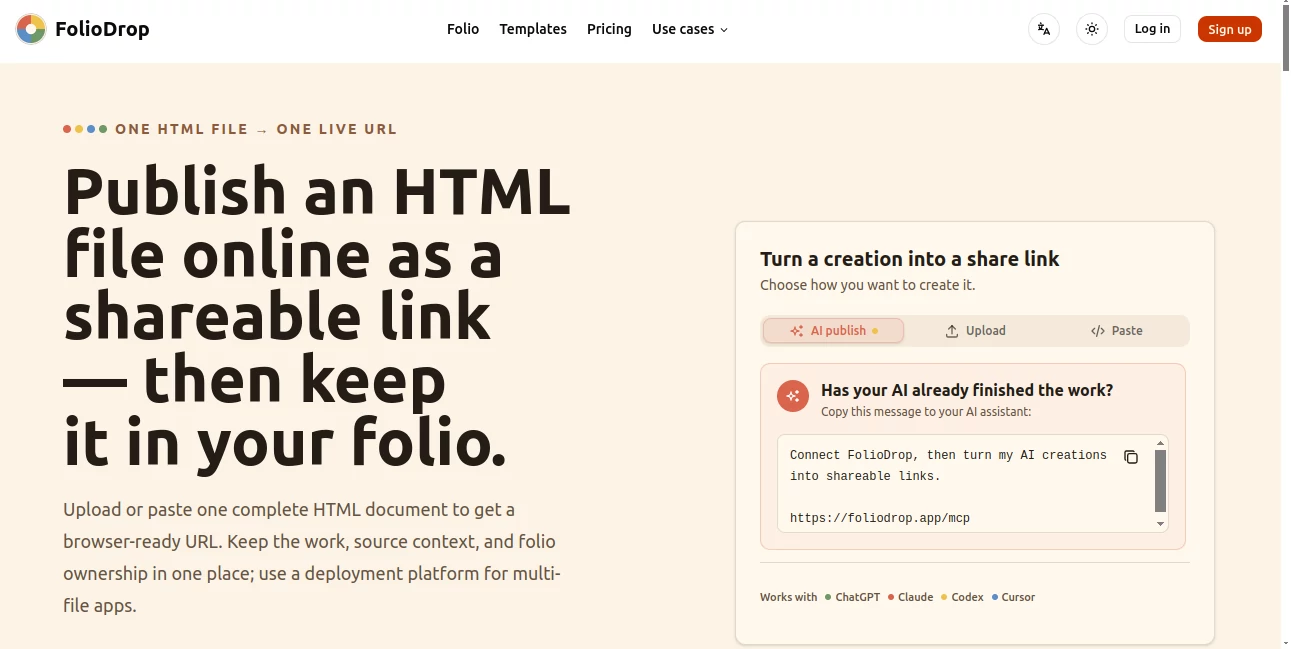
FolioDrop takes a much narrower and more practical approach. It lets users upload or paste one complete HTML document and turn it into a browser-ready live URL. The result can then be shared with a client, recruiter, colleague, student, or friend without setting up a traditional deployment workflow.
The idea is particularly useful for people who work with AI assistants to create small web experiences. Instead of treating every generated page as disposable output, users can preserve the work, add context, organize it in a personal folio, and return to it later.
Key Features
- One-file HTML publishing: Upload or paste a complete HTML document and receive a live shareable URL.
- AI publishing: Connected AI assistants can publish creations through MCP or OpenAPI workflows.
- Personal folio: Published work can be collected in a public professional surface rather than being left as an isolated link.
- Source context: Users can preserve information such as the source platform, model, upload date, title, tags, and notes.
- Light editing: Published work can be renamed, annotated, tagged, or reframed without rebuilding the original generation workflow.
- Access-key sharing: Paid plans support protected previews when a page should only be available to selected people.
- Basic and professional analytics: Depending on the plan, creators can access analytics for their published work.
User Interface
The interface is built around a simple publishing flow rather than a traditional website-building dashboard. Users can bring in a finished HTML document, review its details, and publish it without first configuring repositories, build commands, or deployment settings.
This focused approach makes sense for quick prototypes and AI-generated pages. Someone preparing a client concept, an interactive resume, or a small presentation page can move from finished HTML to a usable link without navigating a complicated deployment stack.
Accuracy & Performance
Performance is closely tied to the nature of the published HTML document. The service is designed around complete, portable pages, with inline CSS and JavaScript recommended when portability is important. External images, fonts, and scripts can continue to work when their HTTPS URLs remain accessible.
The publishing process also checks that the submitted input is a complete web document. That gives users a useful checkpoint before turning a local AI creation into something intended for sharing.
Capabilities
The strongest capability is the bridge between AI creation and practical publishing. An AI assistant can generate a finished page and, through supported publishing connections, send it directly into the sharing workflow.
This can be useful for portfolios, product concepts, interactive demos, resumes, proposals, educational pages, and visual experiments. The personal folio adds another layer of usefulness because finished creations can become a growing collection of work rather than disappearing inside an old chat conversation.
There is also a clear boundary to the product. It is designed for one complete HTML document, not for applications that require server-side logic, databases, framework builds, multiple project files, or extensive deployment infrastructure.
Security & Privacy
For work that should not be openly accessible, access-key sharing is available on the paid plans. Protected works are not intended to appear on public folio pages, making the feature useful for private previews and client-facing material.
Users should still avoid publishing passwords, private credentials, or other sensitive secrets inside an HTML document. External assets should also be reviewed before publishing to make sure their permissions and URLs are appropriate.
Use Cases
- Job applications: Add a live project or interactive resume page to an application instead of sending a static HTML file.
- Client presentations: Share a polished concept with a client before committing to a full production deployment.
- Design prototypes: Present interaction experiments and visual concepts through a clean browser link.
- AI-generated websites: Publish a finished single-page creation made with an AI assistant without setting up a repository.
- Education: Share interactive exercises, lesson pages, demonstrations, and small learning experiences with students.
- Independent makers: Quickly put an idea online for feedback without building a complete hosting workflow.
- Portfolio building: Preserve small AI-assisted projects and gradually turn them into a collection of work.
Pros and Cons
Pros
- Very straightforward publishing process.
- No repository or build pipeline is required for a single HTML page.
- Works with AI-assisted publishing workflows through MCP and OpenAPI.
- Useful personal folio for collecting finished work.
- Supports source information, notes, tags, and other contextual details.
- Access-key sharing is available on paid plans.
- Well suited to prototypes, demos, portfolios, and small interactive pages.
Cons
- It is intentionally limited to complete single-file HTML work.
- It is not intended to replace full deployment platforms for complex applications.
- Projects requiring databases, server logic, framework builds, or multiple files need another hosting solution.
- Free usage has a limited number of creations and does not include access-key sharing.
Pricing Plans
The service offers Free, Plus, and Pro plans. The Free plan costs $0 and includes up to 3 creations, public share links, agent and MCP publishing, a public portfolio, work management, and basic analytics.
The Plus plan is designed for creators who need a larger collection. It supports up to 10 creations, access-key sharing, agent and MCP publishing, a public portfolio, professional analytics, and work management. The pricing page currently lists yearly billing at an effective $2.42 per month, with an annual charge of $29.
The Pro plan is aimed at users who want unlimited creations. It includes access-key sharing, agent and MCP publishing, a public portfolio, professional analytics, and long-term availability while subscribed. The pricing page currently lists yearly billing at an effective $8.25 per month, with an annual charge of $99.
There are also one-time credit packs for keeping eligible Free works available after their included availability period. Credits do not expire, while active subscriptions do not consume credits for keep-alive.
How to Use It
- Step 1: Create a complete single-file HTML page using an AI assistant or your preferred editor.
- Step 2: Upload the HTML file or paste the complete document into the publishing workflow.
- Step 3: Review the title, description, source context, visibility, and other available details.
- Step 4: Publish the page and receive a browser-ready share URL.
- Step 5: Share the URL with your audience and keep the work in your personal collection for future reference.
For AI-assisted publishing, supported assistants can also connect through the available MCP or OpenAPI workflow. This is especially convenient when the goal is to go directly from an AI-generated page to a shareable result.
Comparison with Similar Tools
The main difference between this service and traditional static hosting platforms is the size and purpose of the publishing workflow. A service such as Vercel, Netlify, or Cloudflare Pages is a better fit when a project has multiple files, a framework, repository-based development, custom domains, server functionality, or a long-term production deployment.
This approach is more focused. When the finished product is simply one complete HTML document that needs a URL quickly, there is little reason to introduce a full deployment pipeline. That makes the service particularly attractive for AI-generated prototypes, portfolio pieces, previews, and small experiments.
It also differs from simply sending someone an HTML file. The recipient gets a normal browser-ready link, while the creator can retain source context and organize the work in a folio. That small distinction can make repeated AI-assisted work much easier to present professionally.
Conclusion
For anyone who regularly creates small web experiences with AI, the final step of publishing can be surprisingly frustrating. A good-looking page should not have to become a deployment project just because someone else needs to see it.
This service handles that specific moment well. Its strength is not trying to become another all-purpose hosting platform, but keeping the path from finished HTML to shareable URL short and understandable. The added folio, metadata, editing, and access options make the workflow more useful than simply uploading a file somewhere and forgetting about it.
For AI-generated prototypes, interactive resumes, client previews, educational pages, and portfolio experiments, it offers a practical middle ground between a local HTML file and a full production deployment.
Frequently Asked Questions (FAQ)
What type of files can be published?
The service is designed around one complete HTML document. A portable page can contain its markup along with inline CSS and JavaScript.
Do I need Git or a build step?
No. The core publishing flow is designed to work without creating a repository or running a build command.
Can AI assistants publish pages directly?
Yes. AI publishing is supported through MCP and OpenAPI workflows, with compatibility designed for connected AI tools and coding assistants.
Can I share a page privately?
Yes. Access-key sharing is available on the Plus and Pro plans. This is useful when a prototype or client preview should not be openly accessible.
Can it replace Vercel or other deployment platforms?
Not for complex applications. Projects that require multiple files, framework builds, databases, server-side functionality, custom domains, or more advanced infrastructure are better suited to a full deployment platform.
Is there a free plan?
Yes. The Free plan provides up to 3 creations along with public sharing, agent and MCP publishing, a public portfolio, work management, and basic analytics.
Who can benefit most from this type of publishing workflow?
AI-assisted creators, designers, job seekers, consultants, educators, developers, and independent makers can all benefit when they need to turn a finished HTML creation into a simple link that others can open and review.
CategoAI Website Builder , AI Productivity Tools .
These classifications represent its core capabilities and areas of application. For related tools, explore the linked categories above.

FolioDrop Alternatives Product
AnyToURL

VisualGPT

Lexikon AI

Syncity AI

MachineTrans…

ApplyBtn

TypingFirst

KarmaGuy

Enji
