
















FreeMaker
What is FreeMaker?
FreeMaker is a free online AI photo editor designed for people who want to change, clean up, or restyle images without spending time learning complicated editing software. Instead of working through layers, masks, and menus, users can upload a photo and describe the change they want in plain language. The service then uses AI to apply the requested edit.
The straightforward approach makes it useful for quick image work, whether the goal is removing an unwanted object, changing a background, adjusting clothing, improving an older photograph, or trying a completely different visual style. There is also no account creation required, which makes the workflow particularly convenient when an edit is needed immediately.
Key Features
The editor focuses on practical image changes rather than forcing users through a long list of technical controls. Users can work with JPG, PNG, and WebP images up to 10 MB, then describe their desired modification through a text prompt.
- Prompt-based AI photo editing
- Object removal, replacement, and addition
- AI background replacement and scene changes
- Clothing and color modifications
- Text, logo, caption, and graphic editing
- Photo restyling in different visual directions
- Image enhancement, restoration, and expansion
- High-quality image downloads without an added watermark
- No account or subscription required for the free editing workflow
User Interface
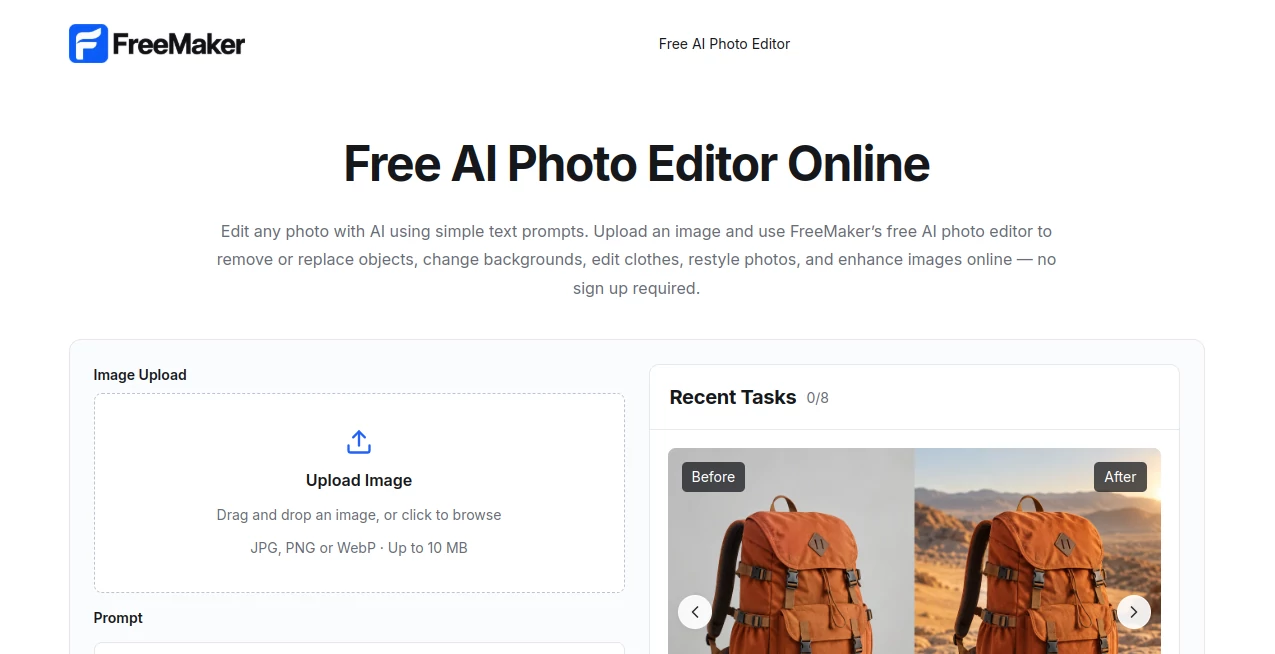
The interface keeps the main workflow easy to understand. Uploading a photo is handled through a drag-and-drop area or a standard file selector, followed by a prompt field where the desired change can be described. Quick actions such as background editing, object removal, and restyling also help users get started without having to think about complicated editing terminology.
For someone who simply wants to say “remove the person in the background” or “change the clothes to a black jacket,” this approach feels much more natural than searching through conventional editing menus.
Accuracy & Performance
The quality of an AI edit naturally depends on the source image and the complexity of the instruction. Simple requests, such as removing a distracting object or changing a background, are particularly well suited to the prompt-driven workflow. More complicated transformations may require a clearer description or another attempt.
The platform is designed to process requested changes quickly, with the editing workflow focused on generating a result within seconds. Users can preview the result before downloading it, making it easy to decide whether another variation is worth trying.
Capabilities
The range of supported edits goes well beyond basic background removal. An existing photograph can be turned into a different scene, an unwanted element can be removed, clothing can be modified, colors can be changed, and an image can be restyled in directions such as cinematic, anime, cartoon, 3D, vintage, fashion, or photorealistic.
The tool can also help with older or lower-quality photographs by improving details, reducing blur and noise, restoring visual quality, and extending the edges of an image. This gives the same workflow value for both practical corrections and more creative experiments.
Security & Privacy
Privacy is addressed through automatic deletion of uploaded images. According to the service, images are deleted within 24 hours rather than being retained indefinitely after processing. Users should still avoid uploading material they do not have permission to edit and should review the service's privacy and terms information when working with sensitive or commercially important images.
Use Cases
One particularly useful scenario is e-commerce photography. A seller can take a basic product photograph, remove distracting elements, replace the background, and create variations suitable for different campaigns without photographing the product again for every visual concept.
Content creators can use the same workflow when preparing images for social media. A single photograph can be adapted for different posts by changing the background, clothing, lighting, or overall style.
Marketing teams can also benefit when they need several visual variations for advertisements, landing pages, presentations, or promotional campaigns. Instead of rebuilding every asset from scratch, an existing image can become the starting point for several new concepts.
For everyday users, the appeal is even simpler. Removing an unwanted person from a travel photo, cleaning up a family picture, improving an old image, or experimenting with a new visual style can all be handled through a short written instruction.
Pros and Cons
Pros
- Free online editing workflow
- No registration required
- Prompt-based editing is easy to understand
- Supports JPG, PNG, and WebP
- Useful for both practical corrections and creative changes
- Includes object, background, clothing, text, and style editing
- No added watermark on downloaded results
- Uploaded images are automatically deleted within 24 hours
Cons
- Results can vary depending on the source image and prompt complexity
- Highly detailed professional retouching may still require dedicated editing software
- The maximum upload size is 10 MB
- Complex edits may need several prompt variations to achieve the desired result
Pricing Plans
The service is positioned as a free AI photo editing solution. Its website states that users can edit images without creating an account, subscription, or payment. The workflow is presented as free and unlimited, making it particularly attractive for users who only need occasional edits as well as those looking for a simple alternative to paid image-editing software.
How to Use This AI Photo Editor
Using the editor takes only a few steps. Start by uploading or dragging a JPG, PNG, or WebP image into the editor. Then describe the desired change in the prompt box. A useful instruction might be “remove the background,” “change the jacket to blue,” or “place this product in a modern studio.”
After entering the instruction, generate the edit and review the result. If the image is not quite what you had in mind, refine the instruction and try again. Once the result looks right, download the finished image.
Comparison with Similar Tools
Traditional photo editors generally provide much deeper manual control, which is valuable for professional designers who need precise adjustments at the pixel or layer level. The advantage here is a different kind of workflow: describe the change first and let AI handle much of the technical work.
Specialized AI services may also focus on one particular task, such as background removal or image upscaling. This editor brings several common tasks together, making it convenient when a project involves more than one type of modification. For quick creative iterations, that broader workflow can save considerable time.
Conclusion
This free AI photo editor takes a refreshingly direct approach to image editing. Instead of requiring users to master a complicated interface, it lets them explain what they want and uses AI to turn that instruction into an edited image. Background changes, object removal, clothing edits, restyling, enhancement, and restoration are all available within the same general workflow.
It is especially practical for e-commerce sellers, content creators, marketers, photographers, and everyday users who need fast image changes without installing software or creating an account. While highly specialized professional projects may still call for traditional editing applications, for quick edits and creative experimentation, the prompt-based approach offers a convenient way to get from an original photograph to a usable result with much less friction.
Frequently Asked Questions (FAQ)
Is this AI photo editor free?
Yes. The service is presented as a free online AI photo editor, with no subscription or payment required for its core editing workflow.
Do I need to create an account?
No. Users can upload an image and start editing without signing up for an account.
Which image formats are supported?
JPG, PNG, and WebP images are supported, with an upload limit of up to 10 MB per image.
Can I remove objects from a photo?
Yes. Users can describe the unwanted object in a prompt and ask the AI to remove or replace it while adapting the surrounding image.
Can I change the background?
Yes. Backgrounds and entire scenes can be replaced or transformed through natural-language instructions.
Can I change clothes in a photo?
Yes. Clothing can be modified by describing the desired change, such as requesting a different color or style.
Can I edit text and logos in an image?
Yes. The editor supports modifications involving text, logos, captions, signs, and other graphic elements, provided that users have the appropriate rights to edit the material.
Does the editor add a watermark?
No. The service states that downloaded images do not receive an added watermark.
What happens to uploaded images?
Uploaded images are automatically deleted within 24 hours according to the service's stated privacy information.
Can the edited images be used commercially?
Commercial use is possible when the user has the necessary rights to the original image and the resulting content complies with the service's terms.
Does it work on mobile devices?
Yes. The online editor can be used through supported mobile browsers, allowing users to upload, edit, and download images without installing desktop software.