

















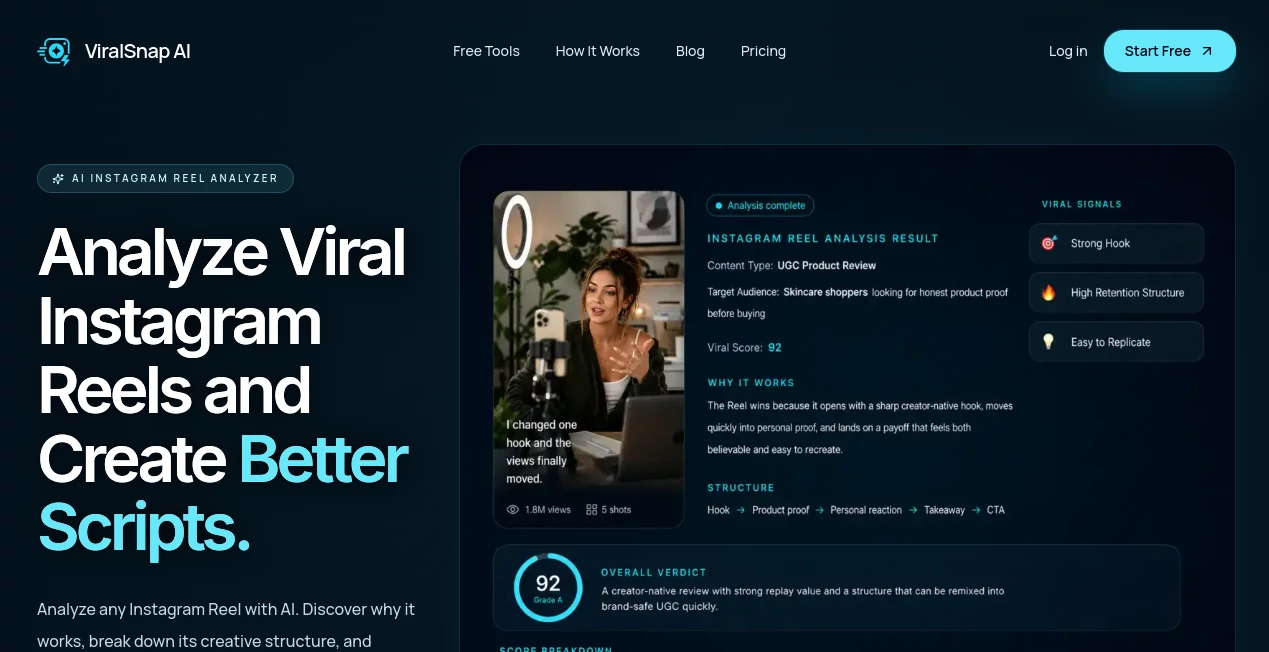
What is ViralSnap AI?
Creating short-form content is not simply about finding a popular video and trying to copy what made it successful. The more useful question is why a particular Reel keeps people watching in the first place. ViralSnap AI takes that approach by analyzing public Instagram Reels and turning the useful parts of their structure into practical creative direction.
The platform examines elements such as the opening hook, pacing, scene structure, and creative pattern. It can then rewrite the underlying idea into a fresh script suited to a creator's audience, product, or niche. For UGC creators and social media teams, this creates a much more practical bridge between content research and production.
Instead of keeping dozens of inspirational Reels open in separate browser tabs, creators can turn individual references into structured ideas they can actually work with.
Key Features
- AI Reel Analysis: Paste a public Instagram Reel URL and receive an analysis focused on the hook, structure, pacing, and creative pattern.
- Hook Analysis: The platform helps identify what makes the opening effective and why it may encourage viewers to keep watching.
- Scene-by-Scene Breakdown: Reels can be broken into individual creative building blocks, making the structure easier to understand and reproduce in an original way.
- AI Script Rewrite: Successful creative patterns can be adapted into a new script for a different audience, product, or niche.
- Reel Transcription: Spoken content can be converted into text for review, research, and further analysis.
- Saved Analysis History: Completed analyses and rewrites can be saved so useful research does not disappear after one session.
- CSV Export: Analysis data can be exported for creators and teams that want to organize their research outside the platform.
- Creator Research Tools: Additional utilities are available for downloading public Reels, captions, thumbnails, audio, photos, and converting Reel speech into text.
User Interface
The workflow is deliberately straightforward. A creator starts with a public Instagram Reel, provides its URL, and moves into the analysis process rather than navigating through a complicated collection of settings.
The analysis is presented in a structured format, with information about the hook, pacing, scenes, and creative pattern separated into useful sections. This makes the output easier to scan when researching several pieces of content in a row.
The saved history feature is particularly useful for people who regularly study short-form content. Instead of treating every analysis as a one-time result, creators can build a personal library of patterns and references.
Accuracy & Performance
The value of the analysis comes from looking beyond a basic transcript or summary. The system focuses on creative decisions, including how a Reel opens, how its message develops, where proof or an outcome appears, and how individual scenes contribute to the overall structure.
For example, an effective Reel may begin with a personal claim, introduce a problem quickly, and then provide proof before the viewer loses interest. Breaking the content into those components gives a creator something more actionable than simply knowing that the original video performed well.
As with any automated content analysis, the results should be treated as creative guidance rather than a guarantee of future performance. Audience, topic, execution, timing, and platform trends can all affect how a new script performs.
Capabilities
The strongest part of the platform is the connection between analysis and execution. After examining a Reel, creators can move from understanding the original creative pattern to developing a new production script.
The rewritten output can include elements such as voiceover direction, on-screen text, and shot suggestions. That makes the result useful not only for individual creators but also for teams where someone researches content and another person handles production.
The surrounding free tools also make the workflow more complete. Captions, transcripts, thumbnails, audio, photos, and downloaded Reel references can all support the research stage before a creator starts developing an original concept.
Security & Privacy
The service is designed around public Instagram content, and its Reel analysis workflow accepts public Reel URLs. Users should still respect the rights, permissions, and platform rules associated with content they download, study, or reuse.
As with any online service, creators should avoid submitting private or sensitive information that is not required for their content research workflow and should review the service's current privacy and terms documentation before using it for commercial projects.
Use Cases
UGC Creators: UGC creators can study successful Reels, identify the structure behind them, and turn those observations into scripts they can film in their own voice and style.
Short-Form Content Creators: Creators who regularly publish Instagram content can use the platform as a research companion when they need new hooks, structures, or creative directions.
Brands and Marketing Teams: Marketing teams can analyze examples from their niche and translate useful creative patterns into concepts for products, campaigns, or social media content.
Social Media Managers: Social media operators can build a reusable library of content patterns instead of repeatedly starting their research from scratch.
Content Researchers: Anyone who spends time studying why certain short-form videos work can use scene breakdowns and transcripts to turn visual references into organized research material.
Pros and Cons
- Pros: Focused specifically on Instagram Reels and short-form content research.
- Pros: Combines Reel analysis with script rewriting instead of stopping at a basic summary.
- Pros: Provides hook, pacing, structure, and scene-level insights.
- Pros: Includes saved analysis history and CSV export.
- Pros: Offers several useful free tools for captions, transcripts, thumbnails, audio, photos, and Reel downloads.
- Pros: Has a free plan that allows creators to test the workflow before subscribing.
- Cons: The current product focuses on analyzing and rewriting content rather than generating complete videos.
- Cons: Analysis quality can depend on the available content and the complexity of the Reel being studied.
- Cons: Creators looking for a full video production suite will need additional software for editing and generation.
Pricing Plans
The platform offers a free option for creators who want to test its Reel analysis workflow. The Free plan includes 100 lifetime credits, with up to five AI Reel analyses when the credits are used only for analysis. It also includes AI script rewriting, Reel transcription, saved analysis history, CSV exports, and access to the free creator tools.
The Starter plan costs $12 per month and includes 1,000 credits each month. It adds regular AI Reel analysis, transcription, script rewrites, saved history, script exports, and credit top-ups.
Teams and agencies can use a Custom plan with flexible usage limits, a shared workspace, custom workflow support, and priority support. Pricing for this option is provided through direct contact.
How to Use the Tool
- Choose a public Instagram Reel: Find a Reel that represents the type of content, hook, or creative approach you want to study.
- Copy the Reel URL: Copy the public Reel link from Instagram.
- Start an analysis: Paste the URL into the analysis workflow and allow the system to process the content.
- Study the breakdown: Review the hook, pacing, structure, scene sequence, and creative pattern.
- Generate a new direction: Use the script rewrite capability to adapt the useful structure to your own audience or niche.
- Save the result: Keep valuable analyses in your history so they can become part of a reusable content research library.
- Prepare for production: Use the resulting voiceover, on-screen text, and shot direction as a starting point for your own original Reel.
Comparison with Similar Tools
Many general-purpose AI writing assistants are capable of producing social media scripts when given a prompt. The difference here is the starting point. Instead of asking for a script from a blank page, creators begin with an actual public Instagram Reel and examine its creative structure before developing a new version.
Traditional Reel downloaders and transcript tools are also useful for collecting references, but they generally stop after retrieving an asset or converting speech into text. This platform combines those research activities with structured creative analysis and script rewriting.
It is therefore best viewed as a specialized research and scripting workflow rather than a replacement for a complete video editor or AI video generator.
Conclusion
For creators who regularly study successful Instagram Reels, the biggest advantage is the ability to turn inspiration into something more organized and actionable. A Reel can be examined for its hook, pacing, scenes, and creative logic, then transformed into a fresh script instead of simply being bookmarked and forgotten.
The combination of AI analysis, script rewriting, transcription, saved research, exports, and supporting Instagram utilities makes the platform particularly appealing to UGC creators, social media operators, and marketing teams. The free plan also gives new users a practical way to test the workflow before committing to a monthly subscription.
It does not attempt to replace video production software. Instead, it tackles an earlier part of the creative process: understanding what makes short-form content work and turning that understanding into a stronger starting point for the next piece of content.
Frequently Asked Questions (FAQ)
What does the tool analyze?
It analyzes public Instagram Reels and focuses on elements such as the hook, structure, pacing, scenes, and creative patterns.
Can I analyze any public Instagram Reel?
The service is designed to analyze public Instagram Reels by pasting their URLs into the analysis workflow.
Does it generate new scripts?
Yes. After analyzing a Reel, the system can create a fresh script adapted to a creator's product, audience, or niche.
Does it generate videos?
Not currently. Its primary focus is Reel analysis, creative research, transcription, and script generation. Video generation is planned for future releases.
Can I save my analyses?
Yes. Completed analyses and rewrites can be stored in the history area so creators can revisit their research later.
Is there a free plan?
Yes. The Free plan provides 100 lifetime credits, up to five AI Reel analyses when credits are used only for analysis, script rewriting, transcription, saved history, CSV exports, and access to free creator tools.
How much does the Starter plan cost?
The Starter plan costs $12 per month and includes 1,000 monthly credits along with analysis, transcription, script rewriting, saved history, script exports, and credit top-ups.
Who should use this tool?
It is particularly suitable for UGC creators, short-form content creators, social media managers, marketing teams, and anyone who studies successful Instagram content before creating their own.