

















GreenPRD
What is GreenPRD?
I’ve been part of too many projects where the initial excitement faded once the spec document got outdated. Requirements scattered across Notion pages, Figma files, and random comments — nothing stayed in sync. This platform changes that feeling completely. You describe your idea in plain language, and it builds a living spec that connects the big picture with the details: workflows, screens, integrations, and even exportable prompts for AI coding tools. It feels like having a tireless product partner that keeps everything connected as your thinking evolves.
Introduction
Most product specs start strong and slowly drift apart from reality. GreenPRD was built to fix that pain. Instead of static documents that become obsolete, it creates a dynamic blueprint where changes in one place ripple naturally to the rest. You can map complex workflows on a canvas, design page flows, connect integrations, and keep everything in one coherent system. Whether you’re a solo founder sketching your first MVP or part of a larger team, it makes the messy early stage feel organized and actionable. The best part? It plays nicely with AI coding tools through MCP, so your spec can actually guide development instead of gathering digital dust.
Key Features
User Interface
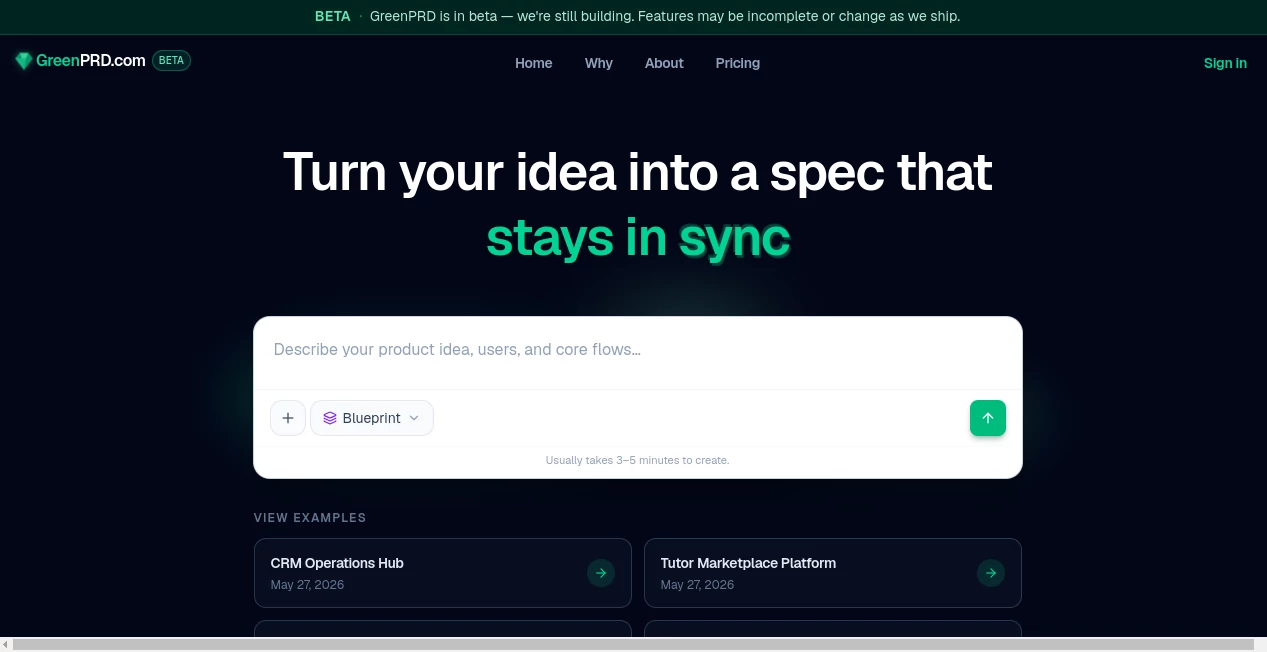
The interface is clean and thoughtful. You start with a simple prompt area to describe your idea, then watch it expand into interconnected views: a graph canvas for workflows, dedicated sections for screens and navigation, and a hub for integrations. Everything stays visually linked so you can see how changes affect the whole product. It’s powerful without being intimidating — you can drag nodes, explore paths, and zoom between high-level strategy and detailed components without losing context.
Accuracy & Performance
It does a remarkably good job turning vague descriptions into structured specs. The AI understands product logic well enough to suggest logical flows, identify potential edge cases, and keep technical notes consistent. Updates feel immediate and accurate across views. In practice, it saves hours of manual alignment work and reduces those frustrating moments where one document says one thing while another says something different.
Capabilities
You can model triggers, branches, and actions in workflows, design screens with routes and component hints, and map integrations with clear ownership. The system keeps the graph, docs, and MCP prompts in sync automatically. It supports GitHub import for Pro users and two-way sync with tools like Cursor, turning your spec into something that actively supports development rather than sitting separately from it. It’s especially strong at handling complexity without becoming chaotic.
Security & Privacy
Your product ideas and specs stay under your control. The platform is built with care for intellectual property, offering appropriate visibility controls and secure handling of sensitive information. For founders and teams working on early-stage ideas, that peace of mind matters a lot.
Use Cases
A solo founder describes their app idea in a few sentences and quickly gets a complete spec with workflows and screens ready to share with a developer. A product team uses the canvas to map out a complex new feature, exploring different user paths before committing to code. An engineering lead imports their repo to connect existing code with the living spec, keeping documentation accurate as the product evolves. It shines whenever clarity and alignment between idea, design, and implementation are critical.
Pros and Cons
Pros:
- Keeps requirements, workflows, screens, and code prompts in sync automatically.
- Visual canvas makes complex logic much easier to understand and discuss.
- Strong integration with AI coding tools through MCP.
- Fast way to go from rough idea to structured spec.
- Reduces misalignment between different team members and documents.
Cons:
- Still in beta, so some features are evolving quickly.
- Advanced GitHub sync and full MCP capabilities require higher plans.
- Learning to use the graph effectively takes a short adjustment period.
Pricing Plans
It offers a free tier generous enough to build and explore real specs, making it easy to try on actual ideas. Paid plans unlock advanced features like deeper GitHub integration, higher limits, and team collaboration tools. The pricing feels reasonable for the time and headaches it saves during the critical early stages of product building.
How to Use GreenPRD
Start by describing your product idea in the prompt area — be as detailed or high-level as you like. Review the generated spec, then explore the different views: workflow canvas, screen map, and integrations hub. Drag and connect elements to refine the logic. Export prompts for AI coding tools when you’re ready to build. For teams, invite collaborators and keep everything in one living document that evolves with your thinking. The process feels natural, moving smoothly from idea to actionable blueprint.
Comparison with Similar Tools
Traditional spec tools are usually static documents that get outdated fast. Other diagramming tools create pretty pictures that don’t stay connected to the actual requirements. This platform stands out by keeping the graph, documentation, and development prompts in sync as a single source of truth. It’s less about drawing boxes and more about maintaining a living understanding of the product — a much more practical approach for modern teams.
Conclusion
Building products is hard enough without fighting outdated specs and misaligned documents. GreenPRD brings welcome clarity and consistency to the early chaotic phase, turning rough ideas into structured, connected blueprints that actually support development. Whether you’re going solo or working with a team, it gives you a better foundation to build from. In a world where speed matters, having your product vision stay coherent and actionable is a real advantage.
Frequently Asked Questions (FAQ)
How long does it take to create a spec?
Usually 3–5 minutes for a solid starting point, though you can refine as much as you want.
Do I need technical knowledge to use it?
No — you can start with plain language descriptions. The AI helps structure the technical parts.
Can it connect with my existing codebase?
Yes — Pro users get GitHub import and two-way sync capabilities.
Is it suitable for solo founders?
Absolutely — many solo builders use it to organize their thinking and communicate clearly with contractors or AI tools.
What happens if my idea changes?
The living graph updates across all views, keeping everything consistent as you evolve the product.
AI Workflow Management , AI Project Management , AI Developer Tools , Other .
These classifications represent its core capabilities and areas of application. For related tools, explore the linked categories above.

GreenPRD Alternatives Product

Sound Level …

ModelsLab
Ask Bishop
Project Genie

DiRe-RAPIDS

Screenshot t…

HeyZinc

Lessgames

Solovio
