

















hailuo3.me
What is hailuo3.me?
Hailuo 3 is a modern AI video creation platform built around the MiniMax H3 model, giving creators a focused way to turn text, images, video references, and audio references into short cinematic clips. The platform supports outputs of up to 2K resolution, clips from 4 to 15 seconds, and native stereo sound, making it useful for everything from social media experiments to more polished visual storytelling.
What makes the experience particularly interesting is that it is not limited to a simple text-to-video workflow. Users can animate an existing image, guide a scene with multiple references, or combine different media to influence identity, movement, composition, and sound. This gives creators considerably more control than simply entering a sentence and hoping for the right result.
Key Features
- Text-to-video generation from detailed natural-language prompts.
- Image-to-video creation for animating photographs, illustrations, products, and other still images.
- Reference-to-video workflows using images, video clips, and audio files.
- Support for up to nine image references, three video clips, and three audio files in reference workflows.
- Up to 2K video output.
- Video durations ranging from 4 to 15 seconds.
- Native stereo sound generated alongside the visual content.
- First-frame and last-frame control for more deliberate transitions.
- Private creation history and secure video downloads.
- Credit-based plans designed for different levels of creative activity.
User Interface
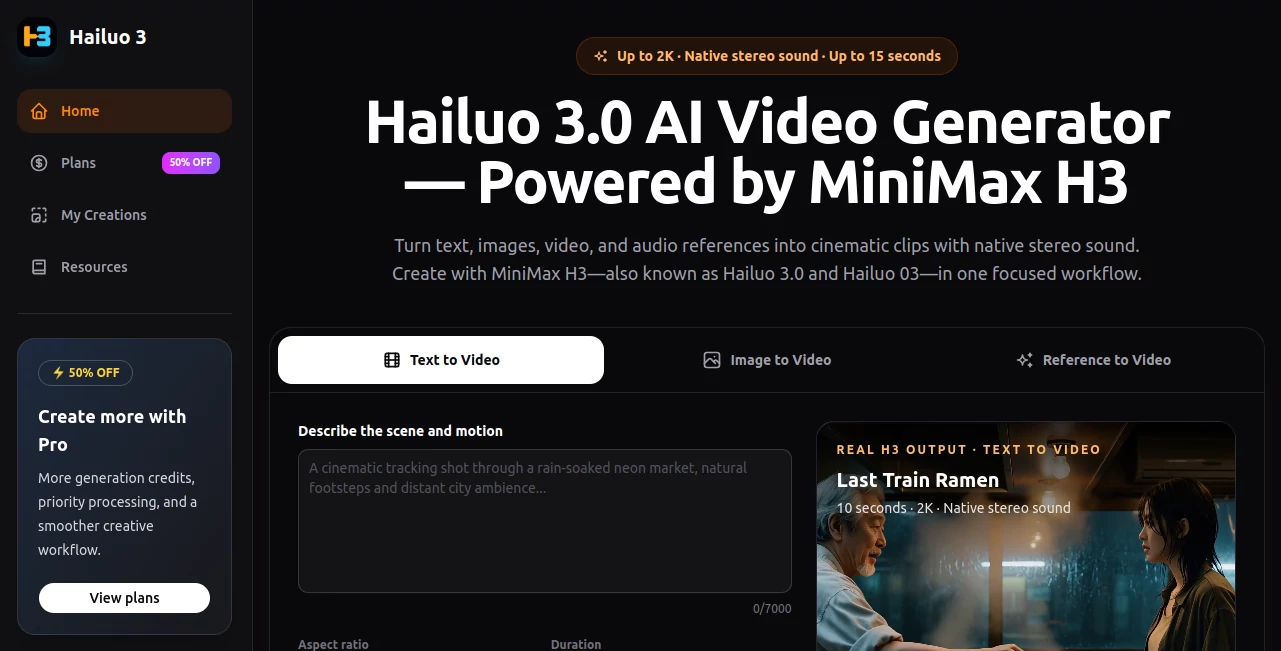
The interface keeps the generation process relatively straightforward. Instead of forcing users through a complicated production setup, it begins with three clear workflows: text to video, image to video, and reference to video. From there, creators can provide their prompt or source material, select an aspect ratio and duration, and start the generation process.
The My Creations area provides a practical place to track generated work and download finished clips. This is especially useful when experimenting with several versions of the same idea, since video generation often involves comparing multiple takes before choosing the strongest one.
Accuracy & Performance
Performance depends on the complexity of the prompt, selected settings, and generation queue, but the underlying workflow is designed around short-form iteration. A creator can produce a scene, evaluate the result, adjust the direction, and generate another version without rebuilding the entire concept from scratch.
The model is also designed to understand detailed creative direction. Prompts can describe subjects, camera movement, pacing, lighting, dialogue, and ambience. For visual projects where consistency matters, reference inputs provide another layer of control over the final result.
The ability to generate clips at up to 2K and include native stereo sound is a notable advantage for creators who want something closer to a finished scene rather than a silent visual draft.
Capabilities
The text-to-video workflow is suitable for creating scenes from an idea written in natural language. A prompt can describe not only what appears on screen but also how the camera moves, how the scene feels, and what should happen during the shot.
Image-to-video takes a different approach. Instead of starting from nothing, users can provide a portrait, landscape, product image, or illustration and bring it to life. The option to specify a final frame can also help create a more controlled transition between two visual states.
The reference-to-video workflow is where the platform becomes especially flexible. Multiple images, videos, and audio files can be combined to guide different aspects of a scene. For example, one reference can establish a character, another can influence movement, while an audio reference can help anchor the atmosphere.
With clips lasting up to 15 seconds, the tool is well suited to short-form storytelling, advertising concepts, product demonstrations, social media content, visual experiments, and cinematic shot development.
Security & Privacy
Privacy is addressed through private creation history, while generated videos can be downloaded securely. These features are useful for creators who are working on unfinished concepts or want to keep their generated material organized within their account.
As with any cloud-based creative service, users should still review the current privacy policy and terms before uploading sensitive or confidential material. In particular, professional teams should make sure that their use of reference images, audio, and video complies with the rights and permissions associated with those files.
Use Cases
Social Media Content: Short videos can be created for platforms where concise, visually engaging content performs well. Creators can generate several variations of a concept and select the version that best fits their audience.
Marketing and Advertising: Marketers can turn campaign ideas, product imagery, and creative concepts into short promotional scenes. Reference-based generation can also help maintain a particular visual direction.
Product Visualization: A static product photograph can be transformed into a moving shot, making it easier to demonstrate a product from a more dynamic perspective.
Storytelling: Writers, filmmakers, and creative teams can use short generations to explore scenes, characters, camera ideas, and visual moods before committing to a larger production.
Creative Experiments: The combination of text, images, video, and audio references makes the platform useful for testing unusual visual concepts that would otherwise require considerably more production work.
Content Prototyping: Agencies and creators can quickly produce visual drafts for presentations, campaign pitches, storyboards, or early-stage creative discussions.
Pros and Cons
Pros
- Supports text-to-video, image-to-video, and reference-to-video workflows.
- Up to 2K output provides strong visual detail for short clips.
- Native stereo sound adds another dimension to generated scenes.
- Multiple reference types provide greater creative control.
- First and last frame control can make transitions more intentional.
- Private creation history helps keep projects organized.
- Plans are structured around credits, making usage relatively straightforward to track.
Cons
- Generated clips are limited to 15 seconds per generation.
- High-volume experimentation can consume credits quickly.
- Results can still vary depending on the prompt and reference material.
- More advanced workflows may require several generations before achieving the desired result.
- Creators looking for a complete long-form video editor will need additional production software.
Pricing Plans
The platform uses credit-based subscriptions with monthly pricing and discounted annual billing. The Basic plan is listed at $29.90 per month, with annual billing currently reducing the effective price to $14.95 per month and providing 12,000 credits per year.
The Professional plan costs $49.90 per month, or an effective $24.95 per month with annual billing. It includes 24,000 credits per year, additional reference capabilities, first- and last-frame control, and priority support.
The Studio plan is priced at $99.90 per month, with annual billing bringing the effective monthly price to $49.95. It provides 48,000 credits per year and is aimed at users who need substantially more generation capacity and the full multimodal reference workflow.
All listed plans support features such as text, image, and reference-based video generation, up to 2K output, clips of up to 15 seconds, and native stereo sound. The exact credit consumption depends on the generation settings and workflow used.
How to Use Hailuo 3
Start by choosing the type of generation that matches your project. Text to Video is the simplest option when you are starting with an idea, while Image to Video works well when you already have a visual asset. Reference to Video is useful when you need more control over identity, movement, composition, or sound.
Next, write a detailed prompt. Rather than describing only the subject, include useful production details such as camera movement, lighting, pacing, environment, emotion, dialogue, or ambience. If you are using reference material, add the files that should influence the result.
Choose the desired aspect ratio and a duration between 4 and 15 seconds. Then generate the clip and review the result in your creations area. If the movement, framing, or atmosphere is not quite right, adjust the prompt or references and try another version.
A practical approach is to treat each generation as a visual draft rather than expecting the first attempt to be perfect. Small changes to camera direction, subject movement, or environmental details can make a noticeable difference in the final scene.
Comparison with Similar Tools
Compared with simpler AI video generators, this platform stands out through its multimodal reference workflow. Many services focus primarily on converting a written prompt into a video, whereas this workflow allows creators to bring images, videos, and audio into the generation process.
It also sits between basic social-media generators and more complex professional production systems. The short generation length makes it particularly suitable for individual shots, advertisements, social clips, and visual prototypes rather than complete long-form productions.
The combination of up to 2K output, native stereo sound, reference controls, and first- and last-frame guidance gives creators several ways to influence a scene without requiring traditional video-production expertise.
Conclusion
This is a compelling option for creators who want more control over AI-generated video without turning the process into a complicated production workflow. Its combination of text, image, video, and audio references gives users plenty of room to experiment, while up to 2K output and native stereo sound make the results more useful for polished short-form projects.
The biggest strength is the flexibility of the creation process. A filmmaker can explore a cinematic shot, a marketer can develop a product concept, and a social-media creator can test several variations of a short clip using the same core workflow.
For anyone working primarily with short visual content, the ability to move from an idea to a generated scene, refine it, and download the result makes this a practical addition to an AI video production toolkit.
Frequently Asked Questions (FAQ)
What is Hailuo 3?
It is an AI video generation platform powered by the MiniMax H3 model. It can create short videos from text, images, and multimodal references, with output of up to 2K resolution and native stereo sound.
Can I create a video from an image?
Yes. The Image to Video workflow can animate a still image, including portraits, landscapes, product photographs, and illustrations. A final frame can also be supplied when a more controlled transition is needed.
Can I use multiple reference files?
Yes. The reference workflow supports up to nine images, three video clips, and three audio files. These references can help guide elements such as identity, motion, visual direction, and sound.
What is the maximum video duration?
Generated clips can be between 4 and 15 seconds long, with output reaching up to 2K resolution.
Does it generate sound?
Yes. Native stereo sound is supported, allowing the generated visual and audio elements to be created as part of the same workflow.
Is there a free plan?
The current pricing page presents paid credit-based plans. Availability of free credits or promotional access can change, so users should check the current plans before creating an account.
Which plan is best for regular creators?
The Professional plan is positioned for serious creators and provides 24,000 credits per year with annual billing, along with additional reference capabilities and priority support. Users with heavier production needs may prefer the Studio plan.
Can the generated videos be downloaded?
Yes. Generated creations can be downloaded from the My Creations area, and the service states that its workflow includes secure video downloads.
What can I create with it?
Possible projects include social media clips, product visuals, advertising concepts, cinematic scenes, creative experiments, visual prototypes, and short-form storytelling.
Is it suitable for professional projects?
It can be useful for professional creative work, particularly short-form advertising, marketing concepts, client presentations, product visualization, and content development. Before using generated material commercially, users should review the current terms and ensure that their source assets have the necessary rights.
AI Image to Video , AI Video Generator , AI Text to Video .
These classifications represent its core capabilities and areas of application. For related tools, explore the linked categories above.

hailuo3.me Alternatives Product
SkyReels-V4

Seedance Pro…

HappyHorse AI

Veo 4 AI

JoyFlix AI

Seedance 2 P…

Seedance 2.0

Wan AI Video…

Seedream 6.0
