Img2Prompt
What is Img2Prompt?
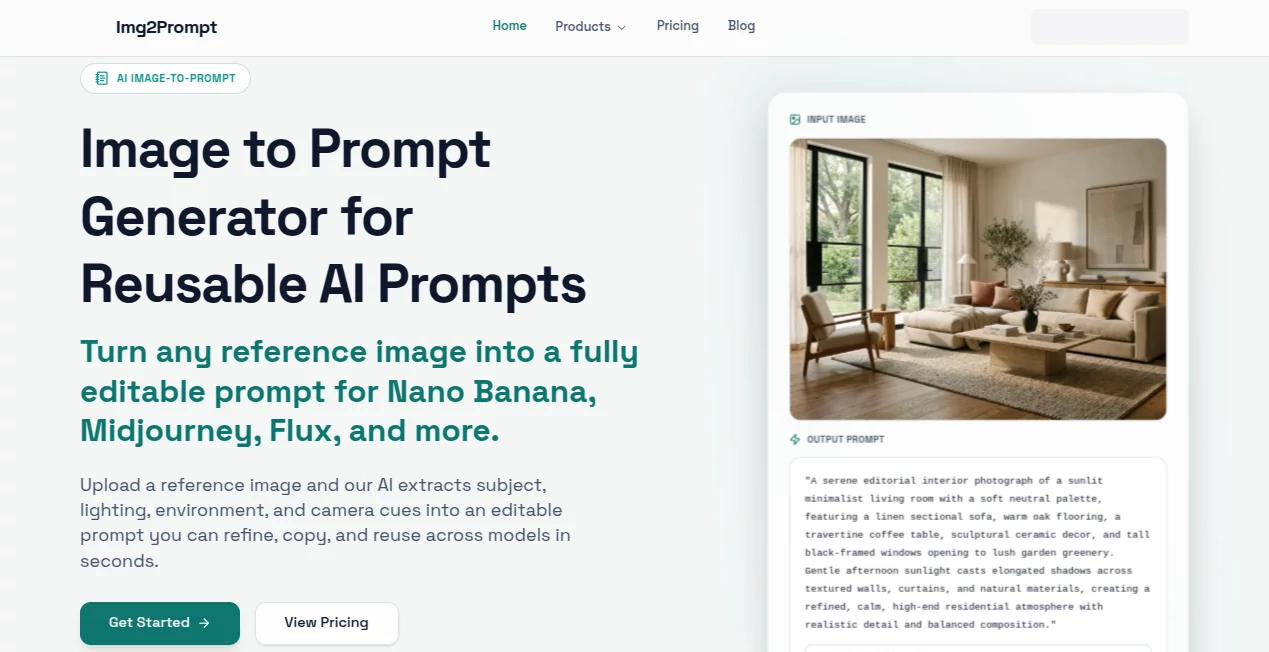
You see an image you love — a moody portrait, a beautifully lit interior, or a wild concept art piece — and you think, “I wish I could generate something like this.” The problem is always the same: writing a good prompt is harder than it looks. This tool solves that frustration beautifully. Upload any picture, and it instantly gives you a rich, detailed prompt ready to paste into Midjourney, Stable Diffusion, Flux, or any other generator. I’ve watched artists go from staring at a blank prompt box to generating variations in under a minute. It’s one of those small tools that quietly removes a major creative roadblock.
Introduction
Great AI art starts with great prompts, but crafting them manually takes time and skill. Img2Prompt flips the process: instead of guessing what words will work, you let the AI reverse-engineer an existing image and hand you back a structured, highly effective prompt. It breaks down subject, lighting, composition, style, mood, and technical details in a way that actually makes sense. For concept artists, product designers, social media creators, or anyone who uses AI images regularly, it has become an essential part of the workflow. The best part? It doesn’t just spit out a wall of text — it gives you organized, editable prompts you can refine and reuse.
Key Features
User Interface
The design is wonderfully straightforward. You drag and drop an image or click to upload, and within seconds you get both a full prompt and a neatly structured breakdown. Before/after comparisons show how well the regenerated image matches the original. Everything feels fast and intuitive, with no unnecessary steps or confusing options. It’s the kind of clean interface that lets you stay in creative flow rather than fighting with the tool.
Accuracy & Performance
It excels at capturing the essence of an image — lighting direction, color palette, composition, artistic style, and subtle mood. The structured output (subject, lighting, environment, camera, style, mood) is particularly useful because you can see exactly why the prompt works. Regeneration tests show strong fidelity to the original intent, and processing is quick even on detailed or complex images. The accuracy is high enough that you often only need minor tweaks before using the prompt elsewhere.
Capabilities
Beyond basic prompt generation, it offers structured breakdowns, batch processing for multiple images, regeneration previews to test prompt quality, and export options including plain text and formatted prompts. It handles everything from photorealistic photos to digital art, illustrations, and concept pieces. You can use the generated prompts directly in any major AI image model, making it a true universal translator between visual inspiration and text prompts.
Security & Privacy
Your uploaded images are processed temporarily and not stored long-term unless you choose to save them in your workspace. The platform focuses on delivering the prompt without unnecessary data retention. For artists and designers working with client references or personal work, this respectful approach builds trust.
Use Cases
A concept artist uploads a moodboard image and quickly extracts prompts to generate variations in their preferred style. A product designer turns competitor photos into prompts to create their own unique versions. A social media creator analyzes trending visuals to understand what makes them work and generates similar but original content. A hobbyist turns favorite artworks into prompts to learn prompt engineering while creating new pieces. Wherever you need to understand or recreate a visual style quickly, it becomes incredibly useful.
Pros and Cons
Pros:
- Extremely accurate and well-structured prompts that actually work well in generators.
- Fast processing and helpful before/after regeneration previews.
- Batch support saves massive time when working with multiple references.
- Clean, focused interface that respects your creative process.
- Generous free tier for regular use.
Cons:
- Very abstract or heavily stylized art can sometimes need prompt refinement.
- Advanced batch features and unlimited use require a paid plan.
Pricing Plans
The free tier offers solid daily usage with access to core features — enough for regular personal and light professional work. Paid plans unlock batch processing, higher limits, faster generation, and permanent storage of your prompt history. Pricing feels fair for the time and creative leverage it provides, especially for anyone who works with AI images on a regular basis.
How to Use Image to Prompt
Upload your reference image by dragging it in or clicking the upload area. Wait a few seconds while it analyzes the image. Review the generated prompt and the structured breakdown. Use the regeneration feature to test how well the prompt recreates the original. Copy the prompt, make any tweaks you want, and paste it into your favorite AI image generator. For multiple images, use batch mode on paid plans and export everything at once. The whole process is fast enough that you can analyze several references in one focused session.
Comparison with Similar Tools
Many image-to-prompt tools give you a long block of text that’s hard to understand or edit. This one stands out by providing both a ready-to-use prompt and a clear, structured breakdown that helps you learn and improve your own prompting skills. The regeneration preview feature is particularly valuable because you can see how effective the prompt actually is before using it elsewhere. It strikes an excellent balance between automation and control.
Conclusion
Good prompts are the foundation of great AI art, but writing them consistently is tough. This tool makes that foundation much easier to build by turning any image into a strong, reusable prompt. It saves time, reduces frustration, and helps you understand what makes an image work visually. Whether you’re a professional creator or someone who just loves making art with AI, having this kind of reverse-engineering power in your toolkit feels like a genuine advantage. The next time you see an image you wish you could recreate or build upon, you’ll be glad this exists.
Frequently Asked Questions (FAQ)
How accurate are the generated prompts?
Very accurate for most images. The structured breakdown helps you understand and refine them further.
Can I use it for commercial projects?
Yes — prompts you generate are yours to use for any purpose, including commercial work.
What image formats are supported?
JPG, PNG, WebP, and HEIC files up to 10MB.
Is batch processing available?
Yes, Pro and higher plans support batch uploads for processing multiple images at once.
Do I need an account to use it?
You can try it without signing up, but creating an account unlocks prompt history and batch features.
Photo & Image Editor , AI Art Generator , AI Design Generator , AI Image to Image .
These classifications represent its core capabilities and areas of application. For related tools, explore the linked categories above.

Img2Prompt Alternatives Product

uni-1

Banana Pro
Picnana

GPT IMAGE2

Image to Pro…

MakeMyOC
Image To Ima…
Album Cover …

Nano Banana 2