
















The Agentic Coding Kit
What is The Agentic Coding Kit?
The Agentic Coding Kit is a ready-to-use configuration pack for developers who rely on AI coding assistants but want more control over how those assistants work inside a real project. Instead of repeatedly explaining coding standards, testing expectations, architecture boundaries, and workflow preferences, developers can place a prepared set of configuration files directly into a repository.
The kit is designed around a practical problem: AI coding assistants can be productive, but they may also make assumptions about a project, choose the wrong commands, overlook testing, or treat a task as complete too early. The included rules, templates, subagents, commands, and workflow files give the assistant clearer project-specific guidance from the beginning.
Key Features
User Interface
This is not a traditional web application with a dashboard or complex interface. The experience is centered on downloadable development files that are added to an existing repository. That makes the setup particularly straightforward for developers who already work with tools such as Claude Code or Cursor.
The package contains 34 files covering rules, templates, workflow instructions, and development configuration. Once the files are in the project, the developer can continue working in the coding environment they already use rather than learning another interface.
Accuracy & Performance
The main performance benefit comes from providing AI coding assistants with clearer instructions before they begin working. Project rules can help reduce common mistakes such as using an inappropriate test command, ignoring established conventions, or making changes without considering the wider architecture.
For example, a developer maintaining a Python API can start from the supplied FastAPI configuration instead of writing a complete set of instructions from scratch. The assistant receives a defined working framework, while the developer remains responsible for reviewing and accepting the resulting code.
Capabilities
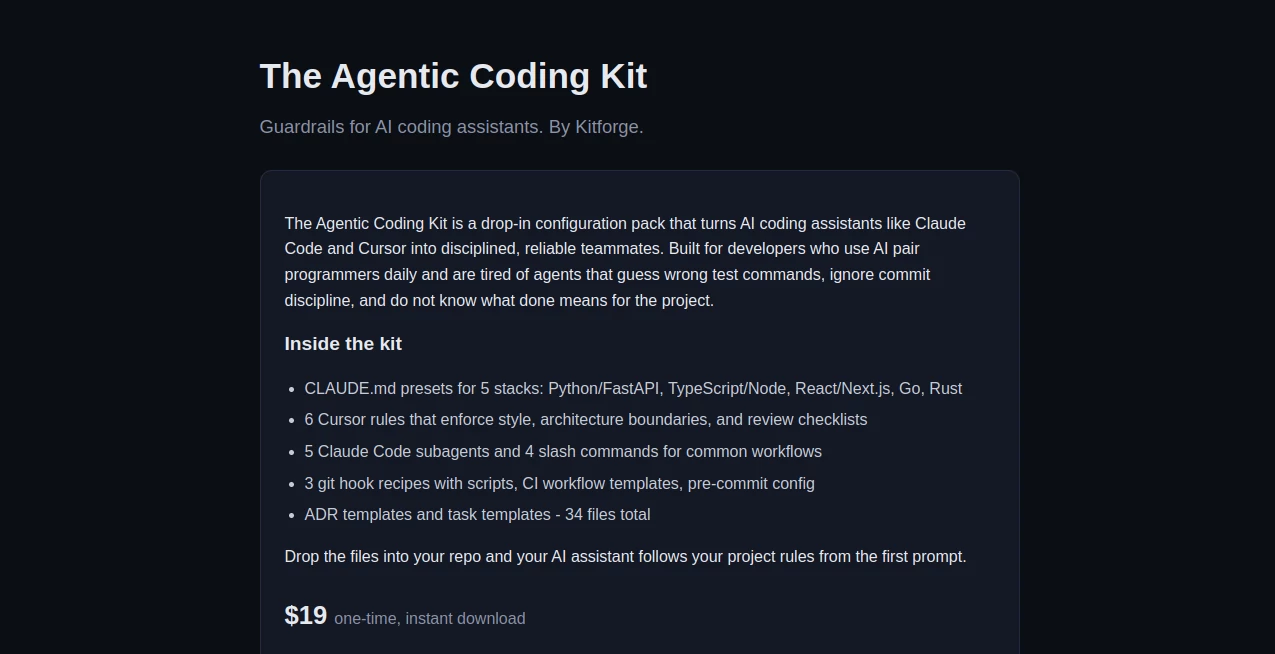
The package includes CLAUDE.md presets for Python/FastAPI, TypeScript/Node, React/Next.js, Go, and Rust. It also provides six Cursor rules covering areas such as coding style, architecture boundaries, and review checklists.
Developers also receive five Claude Code subagents and four slash commands for common development workflows. Three Git hook recipes, CI workflow templates, pre-commit configuration, ADR templates, and task templates round out the package.
Rather than offering one generic prompt, the collection brings several parts of an AI-assisted development workflow together. This is useful for teams that want their coding assistant to follow a more consistent process across planning, implementation, testing, review, and documentation.
Security & Privacy
The product is delivered as a collection of development files rather than as a hosted coding environment. The website does not describe a separate cloud workspace that requires developers to upload their source repositories to the service.
However, developers should still review the supplied rules, scripts, hooks, and workflow configurations before adding them to production repositories. As with any third-party development configuration, teams should make sure the included commands and policies match their own security requirements and CI/CD practices.
Use Cases
This toolkit is well suited to developers who use AI pair-programming tools on a regular basis and want a repeatable working method.
- Setting consistent rules for AI-assisted software development.
- Starting new repositories with predefined development guidance.
- Giving coding assistants clearer architecture and style boundaries.
- Creating more structured planning, implementation, testing, and review workflows.
- Helping teams standardize how AI assistants interact with their codebases.
- Reducing the need to repeatedly paste long project instructions into AI coding sessions.
- Supporting development projects built with Python, TypeScript, React, Go, and Rust.
It can also be useful for an individual developer who has noticed that an AI assistant performs differently from one project to another. A consistent configuration layer can make the working relationship feel much less improvised.
Pros and Cons
Pros
- One-time purchase rather than a recurring subscription.
- Includes 34 ready-made files.
- Supports several popular development stacks.
- Works with established AI coding workflows such as Claude Code and Cursor.
- Includes rules, templates, subagents, commands, Git hooks, and CI-related configuration.
- Simple repository-based setup.
Cons
- It is aimed primarily at developers who already use AI coding assistants.
- There is no conventional visual dashboard or standalone editor.
- Developers still need to review and adapt the supplied configurations to their projects.
- The package is more useful for structured development workflows than for casual one-off coding questions.
Pricing Plans
The package is offered for a one-time payment of $19 with instant download. This pricing model makes it different from many AI developer products that charge a recurring monthly subscription.
For a developer who frequently works with AI coding assistants, the cost can be relatively small compared with the time spent creating project instructions, workflow templates, review rules, and development conventions manually.
How to Use It
- Purchase the development configuration pack and download the files.
- Choose the configuration files that match your technology stack and workflow.
- Add the relevant files to your project repository.
- Review the rules and templates to make sure they match your team's conventions.
- Open the project with your preferred AI coding assistant.
- Start a development task and allow the configured rules to guide the assistant's workflow.
- Review generated code, tests, configuration changes, and documentation before committing them.
A sensible approach is to treat the included files as a starting framework rather than an untouchable set of rules. Teams can adapt them as their architecture, testing strategy, and development process evolve.
Comparison with Similar Tools
Many AI coding products focus primarily on generating or editing source code. This approach addresses a slightly different part of the development process: the instructions and guardrails surrounding AI-assisted coding.
Instead of replacing an AI coding assistant, it is designed to sit alongside one. The distinction is useful for developers who already have a preferred coding assistant but want to improve its consistency. The collection combines project rules with practical templates, subagents, slash commands, Git hooks, CI examples, and documentation structures.
Compared with creating these resources manually, the main advantage is convenience. A developer can begin with an organized set of files and then customize the parts that make sense for the project.
Conclusion
AI coding assistants can save substantial development time, but their usefulness depends heavily on how well they understand the project's expectations. Clear rules and repeatable workflows can make the difference between an assistant that simply produces code and one that follows a more disciplined engineering process.
This collection is a practical option for developers who want to introduce that structure without spending hours building every rule and template themselves. With support for several popular stacks, dedicated configurations for common AI coding environments, and 34 files covering different parts of the development workflow, it provides a compact starting point for more controlled AI-assisted programming.
Frequently Asked Questions (FAQ)
What is included in the package?
The package contains 34 files, including stack-specific CLAUDE.md presets, Cursor rules, Claude Code subagents, slash commands, Git hook recipes, CI workflow templates, pre-commit configuration, ADR templates, and task templates.
Which programming stacks are supported?
The supplied CLAUDE.md presets cover Python/FastAPI, TypeScript/Node, React/Next.js, Go, and Rust.
Does it replace Claude Code or Cursor?
No. It is intended to work alongside AI coding assistants rather than replace them. The included files provide additional rules and workflow guidance for those environments.
How much does it cost?
The listed price is $19 as a one-time purchase, with instant download.
Is it suitable for beginners?
It can be useful for developers who are learning structured AI-assisted development, but its strongest value is likely to be for people who already have experience with repositories, coding assistants, and normal software development workflows.
Can the included rules be customized?
Yes. Because the package consists of development configuration and template files, developers can review and modify them to better match their own project conventions, architecture, testing practices, and team workflows.