
KraflIO
What is KraflIO?
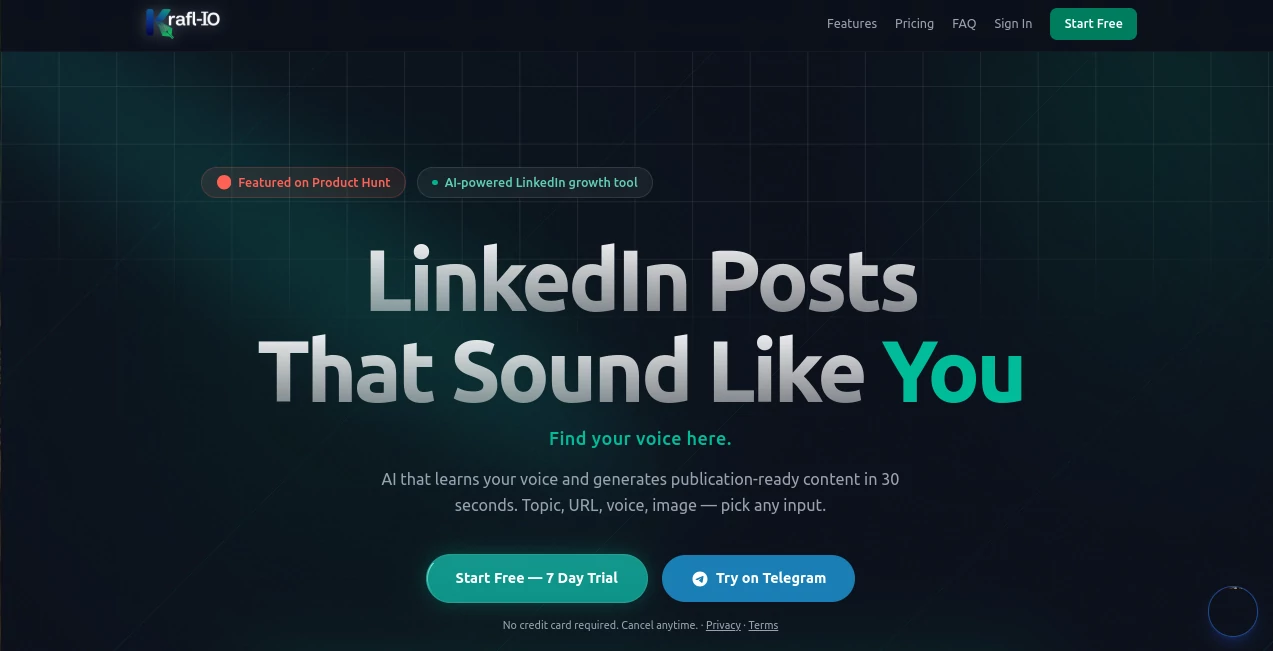
I used to dread writing LinkedIn posts. Staring at a blank screen, second-guessing every sentence, wondering if it sounded like me or just another generic AI post. Then I found this tool. You feed it a few of your past posts, and it actually learns how you write — your rhythm, your favorite phrases, your tone. Suddenly, you can drop a topic, a URL, or even a voice note, and get back something that feels authentically yours in under 30 seconds. No more robotic fluff. Just posts that get engagement because they sound human. I’ve watched my own reach climb after switching, and friends keep asking what changed. The difference is noticeable.
Introduction
Most AI writing tools spit out polished but soulless content. Kraflio takes a different path: it studies your unique voice first. Paste 3–5 of your best posts, and the system builds a profile of how you actually communicate. From there, it generates fresh content that matches your style instead of some generic template. It works through web app or Telegram bot, supports multiple input types (text, voice note, image, URL), and offers 20 different post frameworks. Creators love it because their audience can’t tell it’s AI-assisted — it just feels like them on a really good day.
Key Features
User Interface
The dashboard is refreshingly straightforward. No overwhelming options or hidden menus. You see your voice profile, past posts, and a big prompt area ready for new ideas. The Telegram bot is especially handy — send a voice note while walking the dog and get a polished post back by the time you’re home. Everything feels designed for busy professionals who want speed without sacrificing authenticity. The preview even shows exactly where LinkedIn will truncate your post, so you can adjust before publishing.
Accuracy & Performance
The three-agent system with an Authenticity Score is impressive. It doesn’t just generate — it checks whether the output actually matches your voice. Most posts score 90+ after the initial training. Generation happens in around 30 seconds, and the quality stays consistent even when you switch between story posts, hot takes, or how-to formats. I’ve tested it on topics I usually struggle with, and the results read like something I would actually post.
Capabilities
It supports seven input types: plain text, voice notes (transcribed and turned into posts), images, URLs, PDFs, and more. You get 20 templates including Story → Lesson, Hot Take, How-To, and contrarian angles. Daily trending ideas arrive in the morning, and every edit you make helps refine your voice profile further. Posts can be scheduled, analyzed for engagement potential, and delivered directly to LinkedIn or other platforms. It’s a full content companion, not just a generator.
Security & Privacy
Your writing samples stay private and are used only to improve your personal voice model. No broad training on your data for other users. The system is designed with creators in mind — you control what gets generated and shared. That level of respect for your content and voice builds real trust.
Use Cases
A founder records a quick voice note about a recent win while commuting and has a polished story post ready before reaching the office. A marketing director turns a competitor article URL into a thoughtful contrarian take that sparks discussion. A consultant generates consistent how-to threads that position her as the go-to expert in her niche. Even teams use it to maintain brand voice across multiple contributors. It shines whenever you need to show up regularly on LinkedIn without burning out on content creation.
Pros and Cons
Pros:
- Voice cloning actually works — posts sound like you, not generic AI.
- Multiple input methods (voice note, image, URL) make creation effortless.
- Fast enough to fit into a busy schedule without disruption.
- Telegram bot brings the tool where you already spend time.
- Authenticity scoring prevents robotic-sounding output.
Cons:
- Best results require feeding it good sample posts first.
- Free tier has daily limits; serious users upgrade quickly.
- Primarily optimized for LinkedIn (other platforms supported but secondary).
Pricing Plans
It starts with a free plan generous enough to test the voice cloning and generate several posts. Paid tiers unlock unlimited generations, priority processing, advanced templates, analytics, and team features. The jump in productivity for active LinkedIn users makes the upgrade feel like an investment rather than an expense — many say it pays for itself in saved time and better engagement within the first month.
How to Use Kraflio
Sign up and paste 3–5 of your existing LinkedIn posts to train your voice profile. Once trained, go to the composer: type a topic, paste a URL, upload an image, or record a voice note. Choose a template (story, hot take, how-to, etc.), review the generated post with its Authenticity Score, make small edits if desired, and copy or schedule it. The more you use and refine it, the better it gets at matching your style. The Telegram bot makes it even easier for on-the-go creation.
Comparison with Similar Tools
Generic AI writers produce correct but soulless content. Other LinkedIn tools often sound formulaic or overly salesy. This one stands out because it prioritizes voice authenticity above everything else. The combination of multi-input support, Authenticity Score, and seamless Telegram integration gives it a practical edge that busy creators actually use daily, rather than trying once and abandoning.
Conclusion
Consistent LinkedIn presence doesn’t have to mean sacrificing evenings to content creation. This tool makes showing up regularly feel sustainable and authentic. It learns how you write, respects your voice, and turns rough ideas into polished posts faster than you could do alone. For anyone serious about building their personal brand without burnout, it’s one of those rare tools that quietly becomes essential. Your audience will notice the difference — and so will your engagement numbers.
Frequently Asked Questions (FAQ)
How long does voice training take?
Just 3–5 good sample posts and you’re ready to generate in your style.
Can I use it on mobile?
Yes — the Telegram bot makes it incredibly convenient for creating on the go.
Does it only work for LinkedIn?
Primarily optimized for LinkedIn, but it supports content for YouTube, Instagram, TikTok, X, and Bluesky as well.
Is the output really undetectable as AI?
Most users report that colleagues and connections can’t tell — the Authenticity Score helps ensure it stays natural.
What if I want to edit the generated post?
Edits are encouraged — every change you make helps the system better understand your voice over time.
AI Content Generator , AI Social Media Assistant , AI Digital Marketing Generator , AI Writing Assistants .
These classifications represent its core capabilities and areas of application. For related tools, explore the linked categories above.

KraflIO Alternatives Product

Analyse

Instaposts.ai

MDZ.AI

Domer

Prompt Sloth

gemini omni …
Noir Prompt

FinalLayer

TClaw AI Hum…