


















Lazy Ads
What is Lazy Ads?
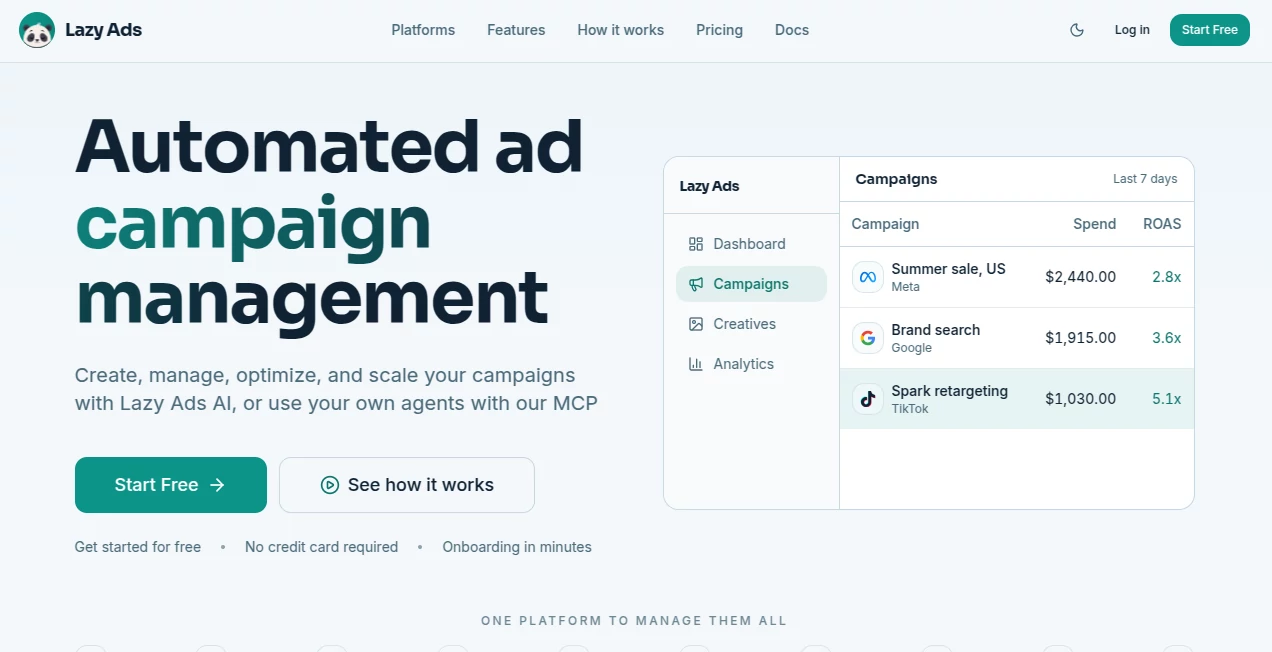
Lazy Ads is an AI-powered advertising platform built for businesses that want to create, manage, optimize, and scale paid campaigns without constantly jumping between different ad managers. Instead of handling each advertising channel separately, users can bring their campaigns together in one dashboard and let AI handle much of the repetitive work.
The platform supports major advertising networks including Facebook, Instagram, Google, TikTok, LinkedIn, Reddit, Apple, Bing, ChatGPT, and Snapchat. Users can describe their business, audience, goals, and budget, then receive campaign strategies, targeting suggestions, ad copy, budgets, and creative assets tailored to different platforms.
What makes the approach particularly interesting is the combination of automation and control. Campaigns can be reviewed before launch, published automatically, or managed through natural-language commands. For example, a marketer can ask the system to pause weak campaigns and move more budget toward a better-performing channel.
Key Features
- AI campaign creation based on business goals, audiences, products, and budgets.
- Centralized management across nine major advertising networks.
- Automated bid and budget optimization designed to improve ROAS.
- AI-generated image and video advertising creatives.
- Automated A/B testing for creatives, copy, and audiences.
- Competitor campaign tracking and analysis.
- Natural-language controls for campaign management.
- Multi-platform performance monitoring from a single dashboard.
- MCP support for users who want to connect their own AI agents.
- REST API access on the Growth plan.
User Interface
The interface is centered around a unified advertising dashboard rather than separate screens for every network. This makes the workflow easier to follow when several campaigns are running simultaneously. Performance information, spending, and campaign activity can be viewed in one place, reducing the need to repeatedly switch between advertising platforms.
The natural-language control is another practical touch. Instead of manually searching through campaign settings, an experienced marketer can give a straightforward instruction such as moving budget toward a particular channel or pausing underperforming campaigns.
Accuracy & Performance
Advertising performance ultimately depends on the quality of the campaign data, audience, creative, offer, and tracking setup, so no automated platform can guarantee a particular ROAS. However, the system is designed to continuously analyze campaign performance and make adjustments to bids and budgets.
Its optimization process can also run A/B tests, identify stronger variations, scale winning campaigns, and reduce spending on weaker ones. Depending on the subscription, performance analysis ranges from daily monitoring to checks every four hours.
Capabilities
The platform covers much more than ad copy generation. It can build full-funnel campaigns with targeting, budget allocation, scheduling, copy, and creative assets. A single product photograph can also be transformed into different advertising formats, including feed, video, story, and UGC-style creatives.
For businesses selling products online, the workflow can be especially useful because product information and existing campaign data can be incorporated into the advertising process. Shopify integration is also available for importing product and sales information.
Advanced users can connect external AI agents through MCP. This makes the platform interesting not only for marketers but also for developers and technical teams building their own AI-driven advertising workflows.
Security & Privacy
Because the service connects to advertising accounts and campaign information, businesses should review the platform's privacy policy, permissions, and account-access requirements before connecting production advertising accounts. Users should also follow the security practices recommended by their advertising platforms, particularly when multiple team members or external AI agents are involved.
Use Cases
Small businesses can use the platform to reduce the amount of manual work involved in launching their first paid campaigns. Rather than learning several advertising interfaces at once, they can work from a centralized environment and allow AI to handle much of the campaign setup.
Marketing teams can use it to coordinate campaigns across multiple networks while keeping performance information together. Agencies may also benefit from centralized campaign management, competitor tracking, automated testing, and API capabilities when handling larger advertising operations.
Ecommerce businesses have another strong use case. A product image can become multiple ad creatives, while product and sales information can help inform campaign decisions. For teams running campaigns across Meta, Google, TikTok, and other networks, having one place to monitor performance can save considerable time.
Pros and Cons
- Pros: Multi-platform campaign management, AI-assisted campaign creation, automated optimization, creative generation, A/B testing, competitor tracking, natural-language controls, and MCP integration.
- Pros: Supports a broad range of advertising networks from a single dashboard.
- Pros: Useful automation for businesses that do not want to manually adjust campaigns throughout the day.
- Cons: The higher-tier plans can become expensive for smaller advertisers.
- Cons: Automated recommendations still depend heavily on the quality of available campaign and business data.
- Cons: Users managing complex campaigns may still want direct access to the native advertising platforms for certain advanced settings.
Pricing Plans
A free tier is available without requiring a credit card. The Starter plan costs $99 per month when billed monthly, or $79 per month when billed annually, and supports up to $3,000 in monthly ad spend, nine advertising networks, AI campaign creation and management, daily performance analysis, and 3,000 AI credits per month.
The Growth plan costs $249 per month monthly, or $199 per month with annual billing. It supports up to $20,000 in monthly ad spend, 8,000 AI credits, analysis three times per day, automated A/B testing, REST API access, and tracking for up to 15 competitor campaigns.
The Scale plan costs $499 per month monthly, or $399 per month with annual billing. It includes unlimited ad spend, 16,000 AI credits, analysis every four hours, advanced A/B testing, unlimited competitor campaign tracking, and priority API access.
There is also a BYOA option for users who want to bring their own AI agent. It costs $24 per month monthly or $19 per month with annual billing and provides an MCP bridge for managing connected advertising accounts through compatible agents.
How to Use Lazy Ads
Start by describing the business, product, target audience, advertising goals, and budget. The system uses this information alongside available business and campaign signals to develop an advertising strategy.
Next, review the proposed campaign structure, including targeting, messaging, budget allocation, creative assets, and scheduling. Once everything looks right, campaigns can be approved for launch or configured for automatic publishing.
After campaigns are running, the platform monitors their performance and can adjust bids and budgets, test variations, scale stronger campaigns, and reduce spending on weaker performers. Users who prefer more technical control can connect their own compatible AI agent through MCP.
Comparison with Similar Tools
Many advertising tools focus on a single advertising network or concentrate primarily on creative generation. This platform takes a broader approach by combining campaign creation, management, optimization, analytics, creative generation, and cross-platform control in one system.
That distinction makes it particularly appealing to advertisers who operate across several networks. A company running campaigns on Meta, Google, TikTok, LinkedIn, and other channels can benefit from having campaign performance and management consolidated rather than maintaining separate workflows for every platform.
It is also more automation-focused than a conventional campaign dashboard. Automated testing, budget allocation, continuous optimization, and AI-agent connectivity make it suitable for users looking to build a more autonomous advertising workflow.
Conclusion
For businesses spending meaningful time managing paid advertising, Lazy Ads offers a compelling way to simplify the process. Its biggest strength is the combination of multi-platform management and automation: campaigns can be created, launched, monitored, tested, and optimized without requiring marketers to constantly move between different advertising interfaces.
The platform is particularly attractive for ecommerce brands, growing marketing teams, agencies, and technically minded advertisers who want to connect AI agents to their advertising workflow. While human oversight remains important for budget decisions, messaging, and brand direction, the automation can take care of many of the repetitive tasks that consume a marketer's day.
Frequently Asked Questions (FAQ)
What is Lazy Ads?
It is an AI-powered advertising management platform that helps businesses create, manage, optimize, and scale campaigns across multiple advertising networks from one dashboard.
Which advertising platforms does it support?
Supported networks include Facebook, Instagram, Google, TikTok, LinkedIn, Reddit, Apple, Bing, ChatGPT, and Snapchat.
Can it create advertising creatives?
Yes. The platform can generate image and video advertising creatives and adapt product imagery into formats such as feed, video, story, and UGC-style advertisements.
Does it automatically optimize campaigns?
Yes. Its automation can monitor performance, adjust bids and budgets, run A/B tests, scale stronger campaigns, and reduce spending on weaker performers.
Can I use my own AI agent?
Yes. The BYOA option provides an MCP bridge that allows compatible AI agents such as Claude Code, Cursor, Hermes, or other MCP clients to interact with connected advertising accounts.
Is there a free plan?
Yes. The service offers a free tier, and users can start without providing a credit card. AI-powered campaign creation becomes available with the paid plans.
Is it suitable for ecommerce?
Yes. Ecommerce businesses can use product information and, where applicable, Shopify data as part of their advertising workflow. The creative generation features can also turn product photos into multiple advertising formats.
AI Ad Creative Assistant , AI Ad Generator , AI Analytics Assistant , AI Advertising Assistant .
These classifications represent its core capabilities and areas of application. For related tools, explore the linked categories above.

Lazy Ads Alternatives Product

DemoDash

Pixelied

Read

Crawlly AI

Schedpilot

Lebesgue: AI…

Yorph AI

UPDF AI

AyeWatch AI
