
meetIQ
What is meetIQ?
Managing meetings often takes longer than the conversations themselves. Writing invitation emails, checking everyone's availability, suggesting suitable time slots, sending follow-ups, and avoiding scheduling conflicts can quickly become a repetitive daily task. This platform transforms that entire workflow into a simple, intelligent experience by handling the heavy lifting automatically.
Instead of relying on generic scheduling links, the system understands the context of an email conversation, prepares a personalized meeting invitation, recommends suitable time slots, creates calendar events, adds video conferencing links, and continues managing follow-up messages until a meeting is confirmed. The result is a faster, smoother scheduling process that feels natural for both organizers and attendees.
Whether you're a founder coordinating investor calls, a recruiter arranging interviews, a sales professional booking discovery sessions, or part of a busy team, this solution helps eliminate the constant back-and-forth that often slows productivity. Its thoughtful automation allows users to focus on conversations instead of calendars. Based on its published capabilities, it integrates with Gmail, Outlook, Google Calendar, Microsoft calendars, Zoom, Google Meet, and Microsoft Teams while using AI to generate scheduling emails and recommend meeting times intelligently. :contentReference[oaicite:0]{index=0}
Key Features
- One-click meeting scheduling directly from email conversations
- AI-generated meeting invitations based on email context
- Smart time recommendations that adapt to scheduling preferences
- Automatic calendar synchronization
- Built-in conflict detection to reduce double bookings
- Automatic Zoom and Google Meet link generation
- Support for Outlook and Microsoft 365 calendars
- AI-generated meeting durations based on conversation context
- Automatic scheduling follow-ups
- Personalized email tone generation
- Cross-time-zone scheduling for distributed teams
- Simple review-before-send workflow
User Interface
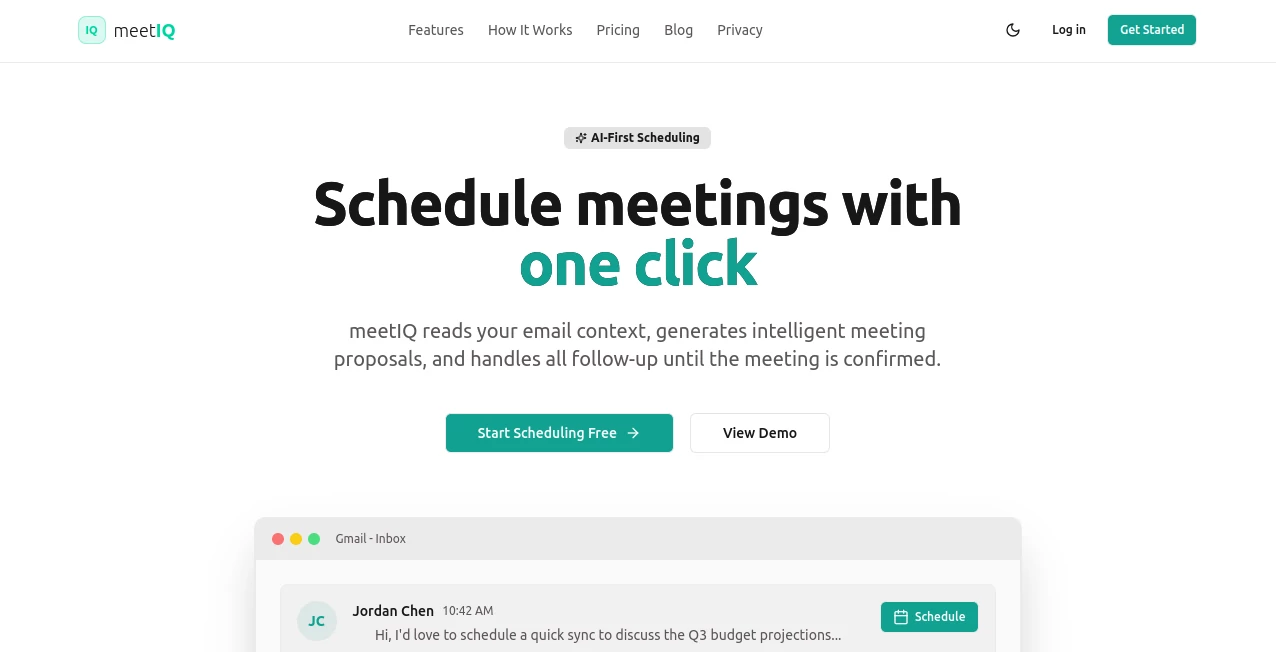
The interface is designed around existing email workflows rather than forcing users into a separate scheduling dashboard. Meeting suggestions appear naturally inside the inbox, allowing invitations to be reviewed, edited if necessary, and sent with only a few clicks. This familiar workflow minimizes the learning curve while keeping scheduling quick and intuitive.
Accuracy & Performance
The scheduling engine analyzes email conversations, available calendar slots, and meeting context to recommend practical times and appropriate meeting lengths. Calendar synchronization helps prevent overlapping appointments while intelligent follow-up automation reduces manual reminders. These capabilities make scheduling feel considerably more efficient than traditional calendar coordination. :contentReference[oaicite:1]{index=1}
Capabilities
Beyond selecting a meeting time, the platform automatically drafts invitation emails, generates professional messaging that matches the conversation, creates video conference links, synchronizes calendars, manages scheduling updates, and supports collaboration across multiple calendar providers. Teams can also coordinate availability across different members while reducing scheduling conflicts.
Security & Privacy
User accounts connect through secure Google or Microsoft authentication. Calendar permissions are required to create and manage events, while users maintain control over connected integrations and can revoke access whenever needed. AI-generated emails remain editable before sending in the standard workflow, giving users full control over outgoing communication. :contentReference[oaicite:2]{index=2}
Use Cases
- Scheduling client meetings without lengthy email exchanges
- Coordinating interviews for hiring teams
- Booking sales discovery calls faster
- Managing investor and partnership meetings
- Organizing internal team syncs
- Scheduling meetings across multiple time zones
- Reducing administrative work for executive assistants
- Handling recurring customer check-ins
Pros and Cons
- Pros
- Very fast scheduling workflow
- Context-aware AI-generated emails
- Automatic calendar synchronization
- Supports major calendar platforms
- Reduces repetitive scheduling work
- Built-in conflict detection
- Integrated video meeting creation
- Cons
- Advanced automation requires a paid subscription
- Best experience depends on calendar integration
- Some premium collaboration features are reserved for team plans
Pricing Plans
A free plan is available for individuals and includes limited monthly meetings, AI-generated emails, Google Calendar synchronization, and core scheduling capabilities. Paid plans unlock unlimited meetings, additional scheduling suggestions, Outlook support, intelligent follow-ups, advanced conflict detection, team collaboration features, and broader video conferencing integrations. :contentReference[oaicite:3]{index=3}
How to Use meetIQ
Install the extension, connect your preferred calendar, and open an email that requires a meeting. Activate the scheduling assistant, review the automatically generated invitation, verify the suggested time slots, make edits if needed, and send the invitation. Once recipients choose a time, the calendar event is created automatically and video meeting details are included without additional manual work.
Comparison with Similar Tools
Many scheduling platforms rely on sharing booking links and asking recipients to select a convenient time. This solution takes a more proactive approach by understanding email conversations, generating personalized invitations, recommending suitable meeting durations, handling follow-up messages, and managing scheduling from within the inbox. Users spend less time switching between multiple applications, making the experience feel considerably more streamlined for professionals who schedule meetings every day.
Conclusion
For professionals who spend a significant portion of their week arranging meetings, this platform offers a refreshing improvement over traditional scheduling methods. Intelligent email generation, automated calendar coordination, conflict prevention, and integrated meeting management combine into a workflow that reduces administrative effort without sacrificing personalization. The result is a scheduling experience that feels fast, organized, and surprisingly effortless.
Frequently Asked Questions (FAQ)
Can it schedule meetings directly from email?
Yes. It can generate invitations, suggest available time slots, and continue the scheduling process directly from email conversations.
Does it support Google and Outlook calendars?
Yes. Integration is available with Google Calendar, and paid plans also support Outlook and Microsoft calendar services.
Can it automatically create video meeting links?
Yes. It can generate meeting links for supported conferencing platforms such as Google Meet, Zoom, and Microsoft Teams.
Is there a free version?
Yes. A free plan allows users to schedule a limited number of meetings each month before upgrading becomes necessary.
Who benefits most from this platform?
Founders, recruiters, sales professionals, consultants, executive assistants, and distributed teams that schedule meetings frequently can benefit the most from its automation capabilities.
AI Productivity Tools , AI Team Collaboration , AI Meeting Assistant , AI Scheduling .
These classifications represent its core capabilities and areas of application. For related tools, explore the linked categories above.

meetIQ Alternatives Product

Magpie

Motion

Trimless for…

Monkey Eatin…

YouTube Thum…

Techvorizon …

AllInOneTools

HISAB 360

Fina Money