LinkToText
What is LinkToText?
There's a frustrating moment every content creator knows well: you've just watched a brilliant Instagram Reel or a fast-paced YouTube Short, and now you need the words from it — a quote, a hook, a key argument — but rewatching it five times to transcribe manually is the last thing you want to do. That's exactly the gap this tool fills.
LinkToText is a web-based AI transcription platform built around one deceptively simple idea: paste a public video link, get clean, readable text back in seconds. No downloading. No browser extensions. No account required to get started. Just a URL and a result.
While it began as an Instagram Reel transcript generator, the platform has grown into a multi-platform tool that handles short-form video content from across the social web. Its positioning is sharp — it's not trying to be a full video editor or an enterprise transcription suite. It's focused on the exact workflow that creators, marketers, researchers, and repurposers actually live in: grab the text, move it somewhere useful, ship content faster.
Key Features
User Interface
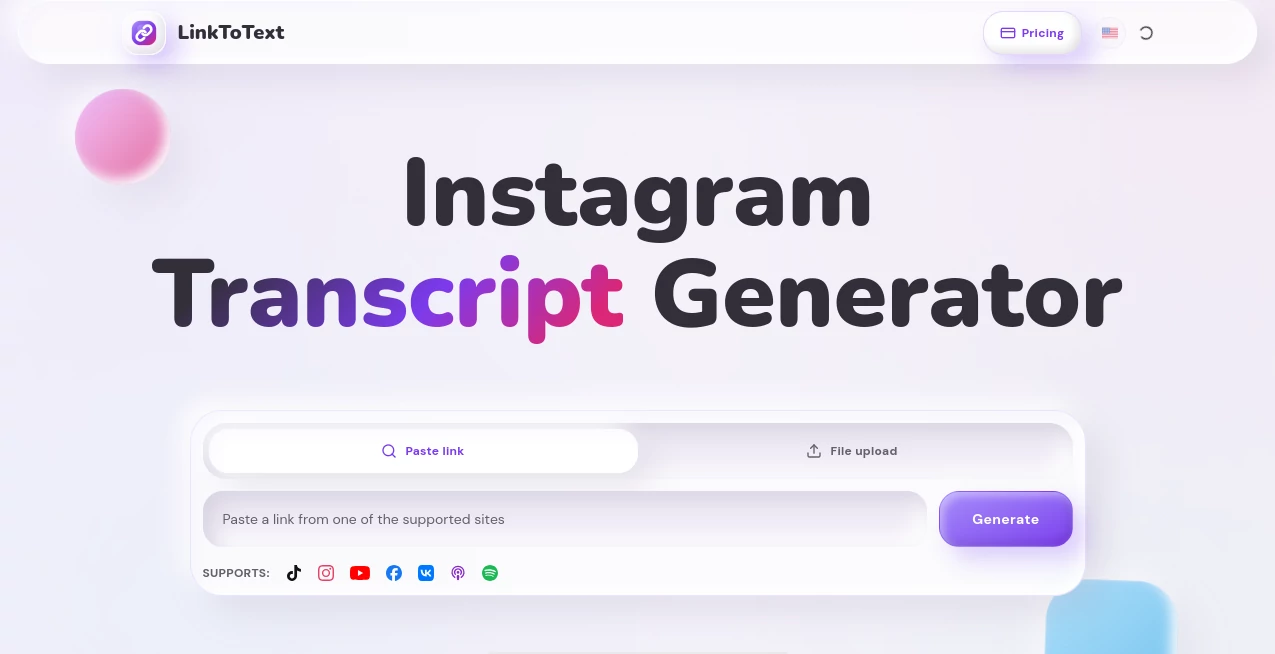
The interface couldn't be more stripped back. A single input field sits front and center — paste your link, hit convert, and within seconds you're looking at a formatted transcript. There's no dashboard to learn, no settings to configure before you get started, and no sign-up wall blocking your first use.
The layout is deliberately minimal. The transcript output is clean and easy to read, with a copy button that makes moving text into other tools — Notion, Google Docs, caption editors, AI prompts — a one-click action. For people who spend their days juggling content across platforms, that kind of frictionless workflow is worth more than a dozen fancy features they'll never use.
Accuracy & Performance
Transcription accuracy is where tools like this live or die, and LinkToText holds up well for spoken social content. Short-form video tends to feature clear, direct speech — exactly the kind of audio that AI transcription handles best. Hook lines, product pitches, tutorial steps, storytelling — these come through accurately and with the natural rhythm of the speaker preserved.
Processing is fast. Most short clips return a transcript in well under a minute. The tool also supports timestamps, which makes it easy to navigate longer content or pinpoint a specific moment you want to quote or reference. For creators working at volume — pulling transcripts from five or ten Reels in a session — that speed adds up fast.
Capabilities
Beyond basic transcription, LinkToText is built to be a starting point for further work, not an endpoint. Once you have the transcript, the platform makes it straightforward to push that text into a number of different workflows:
- Caption and subtitle creation: The transcript layout is designed to be easy to adapt into caption timing notes, SRT-ready copy, or VTT-format subtitles.
- AI summary workflows: The clean text output is structured to paste directly into AI tools like ChatGPT or Claude for summarization, content briefs, or repurposing prompts.
- Translation: Transcript text can be fed into translation pipelines for localized captions, international audience content, or multilingual social posts.
- Research and content analysis: Marketers and researchers can extract hooks, product claims, objections, and recurring phrases across multiple videos without rewatching anything.
- Content repurposing: A single Reel transcript can become the raw material for a Twitter thread, a LinkedIn post, a newsletter section, or a blog paragraph — all from one paste.
The platform supports Instagram Reels as its headline use case, but the broader capability around short-form video content makes it genuinely useful across platforms that publish similar formats.
Security & Privacy
LinkToText processes only public URLs. It does not require users to upload video files, provide login credentials for other platforms, or grant any account access. That keeps the privacy surface area minimal — you're sharing a public link, not sensitive data.
The tool does not appear to retain or sell user-submitted data for third-party purposes. For creators handling client content, brand voice material, or proprietary scripts, the URL-only approach means the actual video files never touch the platform's servers.
Use Cases
The clearest users of this tool are content creators and social media managers who need to move fast. A creator who posts daily can use it to pull transcripts from their own videos for repurposing, or from competitor content for research into what's resonating in their niche.
Marketers working on influencer campaigns will find it useful for quickly extracting exact language from creator content — capturing how a product is actually described in organic posts, versus the polished copy in a brief. That distinction matters for authentic messaging.
For agencies managing multiple clients, the ability to batch-process Reel transcripts and drop the output into a content planner or AI writing tool shortens the repurposing cycle significantly. A transcript that used to take ten minutes of manual work now takes ten seconds.
Researchers, journalists, and academics monitoring social trends can use it to archive spoken content from public videos — building searchable text records of what's being said in viral posts, without having to maintain a video library.
Accessibility teams will appreciate it as a quick route to generating captions for short-form video content that often gets published without them. Transcripts generated here can be lightly edited and applied as captions, improving reach and compliance without a full production workflow.
Pros and Cons
- Pro: Zero friction to get started — no account, no download, just paste and go
- Pro: Clean transcript output that's immediately usable in other tools
- Pro: Built specifically for short-form social video, which means the workflow is tight and focused
- Pro: Timestamps included, making navigation and citation easy
- Pro: Privacy-friendly URL-only processing with no file upload required
- Pro: Supports translation and AI summary workflows out of the box
- Con: Focused on short-form and social video — not designed for long-form podcasts or full-length films
- Con: Accuracy can dip with heavy background music, overlapping speakers, or strong accents
- Con: Dependent on the video being publicly accessible — private or restricted content won't process
- Con: Advanced export formats (SRT, VTT files) may require the paid tier
Pricing Plans
LinkToText offers a free tier that lets users start transcribing without entering payment details. This is genuinely useful for occasional users, students, or anyone who wants to test the tool before committing.
For higher-volume use — whether that's daily content repurposing, agency workflows, or API access — a paid plan removes rate limits and unlocks additional features. The paid version is positioned as accessible rather than enterprise-priced, which fits its core audience of independent creators and small teams.
An API is available for users who want to integrate transcript generation into their own tools or automated workflows, making it a viable option for developers building content pipelines on top of social video data.
It's worth checking the current pricing page directly for the latest plan structure, as feature tiers for tools like this tend to evolve quickly.
How to Use LinkToText
Getting your first transcript takes about thirty seconds. Here's the exact flow:
- Step 1: Open Instagram (or your platform of choice) and find the Reel or video you want to transcribe.
- Step 2: Tap the Share icon and select "Copy Link" — or copy the URL directly from your browser if you're on desktop.
- Step 3: Paste the URL into the input field on the tool's homepage and hit the convert button.
- Step 4: Wait a few seconds while the AI processes the audio and generates the transcript.
- Step 5: Review the output, copy the text, and move it into whatever tool or workflow comes next — a caption editor, an AI prompt, a Google Doc, a content planner.
For users building a repeatable repurposing workflow, it's worth keeping a simple template on hand for what you do with the transcript once you have it. The tool handles the extraction; the value multiplies when you pair it with a consistent process for what comes next.
Comparison with Similar Tools
The transcription space is crowded, but most tools are either too broad or too narrow for what creators working with short-form social content actually need.
Tools like Descript and Otter.ai are powerful, but they're designed around meetings, podcasts, and long-form video editing workflows. They bring a lot of overhead — learning curves, project management features, per-minute pricing — that doesn't fit the simple "paste a link, get text" use case.
Browser extensions like Tactiq work well within their supported platforms but require installation and often only cover YouTube or meeting tools. They don't follow you across social platforms in the same way.
General YouTube transcript generators handle one platform well but stop there. For creators working across Instagram, TikTok, and YouTube Shorts simultaneously, a tool that handles short-form social video as a category — rather than one platform — is genuinely more useful.
What distinguishes this tool from the pack is the deliberate focus on the post-transcript workflow. Most transcription tools treat the text as the end product. This platform treats it as the starting point, with the output structured to flow naturally into captions, AI tools, translation pipelines, and content archives. That's a meaningfully different product philosophy.
Conclusion
If you regularly work with short-form video content — whether you're creating it, analyzing it, repurposing it, or archiving it — a fast and clean URL-based transcript tool is one of those workflow additions that quietly saves enormous amounts of time every week.
LinkToText earns its place in a content creator's toolkit because it's honest about what it is. It doesn't try to be an all-in-one video editor or a heavyweight enterprise platform. It does one thing — turn a video link into clean, actionable text — and it does it without friction, without a steep learning curve, and without forcing you through a signup flow before you've seen the value.
For anyone who has ever wished they could just read a video instead of watching it, this is a tool worth trying. The free tier makes the barrier to entry essentially zero, and the workflow it enables — transcript, repurpose, publish — is one that compounds in value the more consistently you use it.
Frequently Asked Questions (FAQ)
Does it work on videos other than Instagram Reels?
The tool's primary focus is Instagram Reels, but it's built to handle short-form social video content more broadly. Check the homepage for the current list of supported platforms, as coverage expands over time.
Do I need to create an account to use it?
No sign-up is required to get started. You can paste a URL and generate a transcript without creating an account. An account becomes useful if you need higher volume access, saved history, or API features.
How accurate is the transcription?
For clear speech in short-form videos — which is the majority of Reels and Shorts content — accuracy is high. Results can vary with heavy background music, strong accents, or multiple overlapping speakers.
Can I use the transcripts for captions or subtitles?
Yes. The transcript output is structured to be easy to adapt for captions, subtitle timing, or SRT/VTT file creation. The timestamps included with each transcript make that workflow straightforward.
Is there an API available?
Yes, an API is available for developers and teams who want to integrate transcript generation into automated content workflows or custom applications.
What happens to the videos I submit?
The tool processes public URLs only — no video files are uploaded. The platform does not require access to your social media accounts, keeping the process simple and low-risk from a privacy standpoint.
Can I translate the transcripts into other languages?
Translation is supported as part of the post-transcript workflow. You can use the generated text directly in translation tools or AI-powered workflows to create multilingual captions and content.
AI Transcriber , AI YouTube Assistant , AI Transcription , AI Captions or Subtitle .
These classifications represent its core capabilities and areas of application. For related tools, explore the linked categories above.

LinkToText Alternatives Product

Quso AI
YouTube Thum…
Voza Transcr…

VideoText

YTVidHub-you…

AI Subtitle …

SuperAI

Video Transl…

ModelsLab