Local OS
What is Local OS?
Local search is where real money is made for most service businesses, yet tracking where you actually show up on the map feels like chasing shadows. This platform changes that. It shows you exactly where you rank for important “near me” searches, how you compare to nearby competitors, and what to fix next — all without the usual spreadsheet chaos. I’ve watched agency owners and multi-location operators light up when they see their visibility gaps mapped out clearly for the first time. It turns vague guesses into concrete, evidence-based decisions that actually move the needle on calls, visits, and bookings.
Introduction
Most local SEO work still relies on scattered screenshots, manual searches, and gut feeling. Local OS brings it all together into one intelligent workflow. It scans Google Maps across specific areas, tracks your positions and competitors’, pulls review insights, and turns that data into prioritized recommendations. Whether you run a single-location shop or manage dozens of branches, it gives you a clear operating view of your local presence. The best part? It feels built by people who actually do this work — practical, transparent, and focused on outcomes rather than vanity metrics.
Key Features
User Interface
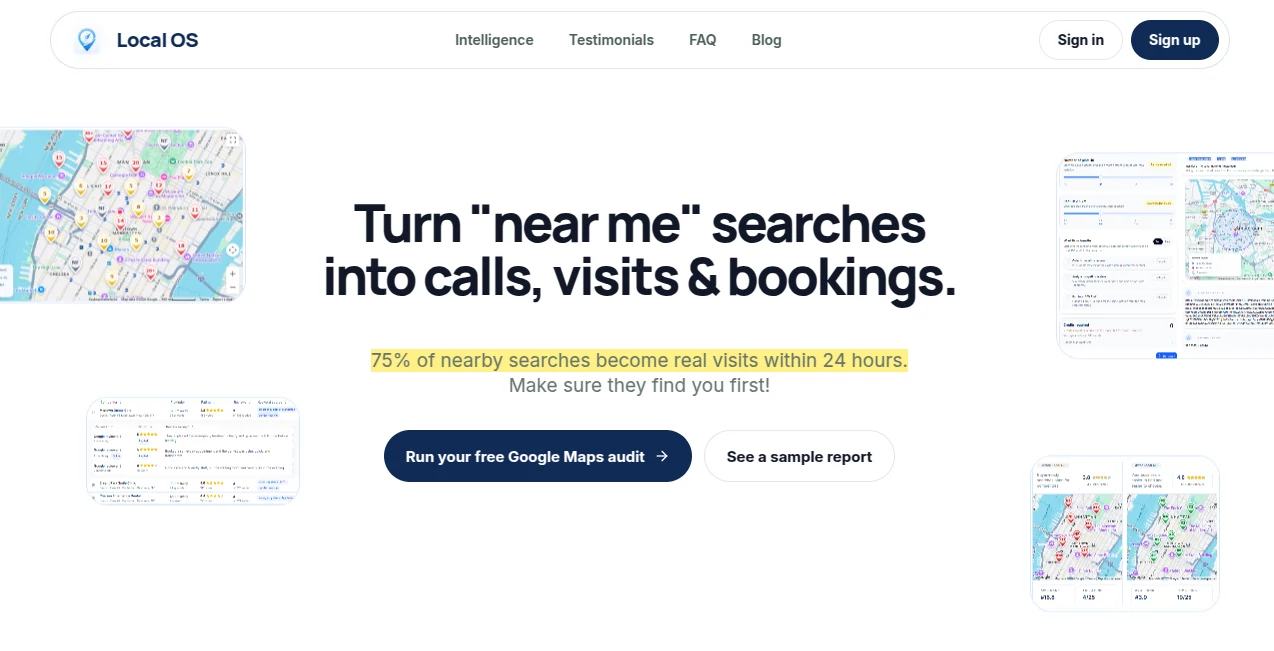
The dashboard is refreshingly clean. You pick your service area, run a scan, and immediately see an interactive map with your pins and competitors’. Everything from average rank to top keywords is laid out logically. Switching between visibility reports, competitor analysis, and actionable recommendations feels natural. No overwhelming data dumps — just the insights you need, presented in a way that makes sense even on a busy Monday morning.
Accuracy & Performance
It pulls real Google Maps data across multiple keywords and locations, showing organic positions with impressive consistency. Competitor tracking is sharp — you see exactly who’s winning certain searches and why. Scans run reliably, and historical data helps you spot real movement instead of random daily fluctuations. Users consistently say the numbers match what they see when they search manually, which builds real trust in the platform.
Capabilities
Beyond basic rank tracking, it analyzes competitor reviews for common praise and complaints, turns those into messaging ideas, and delivers prioritized recommendations tied directly to your visibility gaps. You get audit-style insights on profile and website signals, multi-location workspace management, and a full workflow that keeps diagnosis, context, and next steps together. It’s designed as a complete local SEO operating system rather than just another rank checker.
Security & Privacy
Your business data and scan results stay within your workspace. No unnecessary sharing or public exposure unless you choose to. The tool focuses on helping you improve without forcing you to hand over sensitive client information or login credentials to your Google profiles. That respectful approach matters a lot when you’re working with multiple locations or client accounts.
Use Cases
A dental clinic in Manhattan runs regular scans and discovers they dominate “emergency dentist” searches but disappear for “same-day dentist.” They adjust their profile and content accordingly and watch bookings increase. An agency managing 15 locations uses the multi-workspace feature to keep everything organized and prove ROI to clients with clear before-and-after maps. A plumbing company spots a competitor pulling ahead on mobile searches and strengthens their Google Business Profile — leading to more emergency call-outs. It’s especially powerful for anyone tired of guessing what’s actually working in local search.
Pros and Cons
Pros:
- Combines ranking data, competitor intelligence, and actionable recommendations in one place.
- Interactive maps make visibility gaps immediately obvious.
- Review intelligence turns competitor data into smart messaging opportunities.
- Multi-location and agency-friendly workspace structure.
- Focuses on real business outcomes (calls, visits, bookings) rather than just rankings.
Cons:
- Currently strongest in supported regions — coverage continues to expand.
- Full power and higher scan volumes require a paid plan.
Pricing Plans
It starts with a useful free scan so you can see your own visibility gaps before committing anything. Paid plans unlock regular monitoring, more keywords and locations, competitor tracking depth, and team workspaces. Pricing is straightforward and scales with your needs — many users say the insights pay for themselves through even a small increase in local leads.
How to Use Local OS
Sign up and create your first workspace. Enter your business details and target service areas. Run an initial scan to see your current map presence and nearby competitors. Explore the visibility report, review competitor insights, and check the recommendations section for prioritized next steps. Set up recurring scans to track progress over time. Use the data to update profiles, content, or offers — then watch how your positions shift on future scans. The loop is clear, repeatable, and surprisingly motivating.
Comparison with Similar Tools
Basic rank trackers show numbers but little context. Generic local SEO platforms often give vague advice. This one stands apart by combining accurate map tracking with competitor intelligence and practical, evidence-based recommendations. It feels less like a reporting tool and more like a strategic partner for local growth — exactly what busy owners and agencies have been missing.
Conclusion
Local search success shouldn’t depend on guesswork or endless manual checks. Local OS turns the chaotic reality of “near me” visibility into something you can see, understand, and improve systematically. For service businesses that live or die by local customers, having this kind of clear intelligence is a serious advantage. It won’t do the work for you — but it will show you exactly where the opportunities are and help you act on them with confidence.
Frequently Asked Questions (FAQ)
How accurate is the ranking data?
It uses real Google Maps searches across multiple points in your area for reliable averages.
Can agencies manage multiple clients?
Yes — dedicated workspaces keep each client’s data cleanly separated.
Do I need technical skills to use it?
Not at all. The interface and recommendations are built for business owners and marketers.
How often should I run scans?
Weekly or bi-weekly scans work well for most businesses to track meaningful movement.
Is there a free way to test it?
Yes — you can run initial scans and see your visibility report before upgrading.
AI SEO Assistant , AI Research Tool , AI Analytics Assistant , Other .
These classifications represent its core capabilities and areas of application. For related tools, explore the linked categories above.

Local OS Alternatives Product

UPDF AI

Free AI Dire…

StatMate
royaldle

AI Complianc…

Manus

AyeWatch AI

TrueSource AI

Greek Numero…