
🧠 AI Quiz
Think you really understand Artificial Intelligence?
Test yourself and see how well you know the world of AI.
Answer AI-related questions, compete with other users, and prove that
you’re among the best when it comes to AI knowledge.
Reach the top of our leaderboard.


















AI Logo Generator
Free AI Tool for Instant Brand Logos

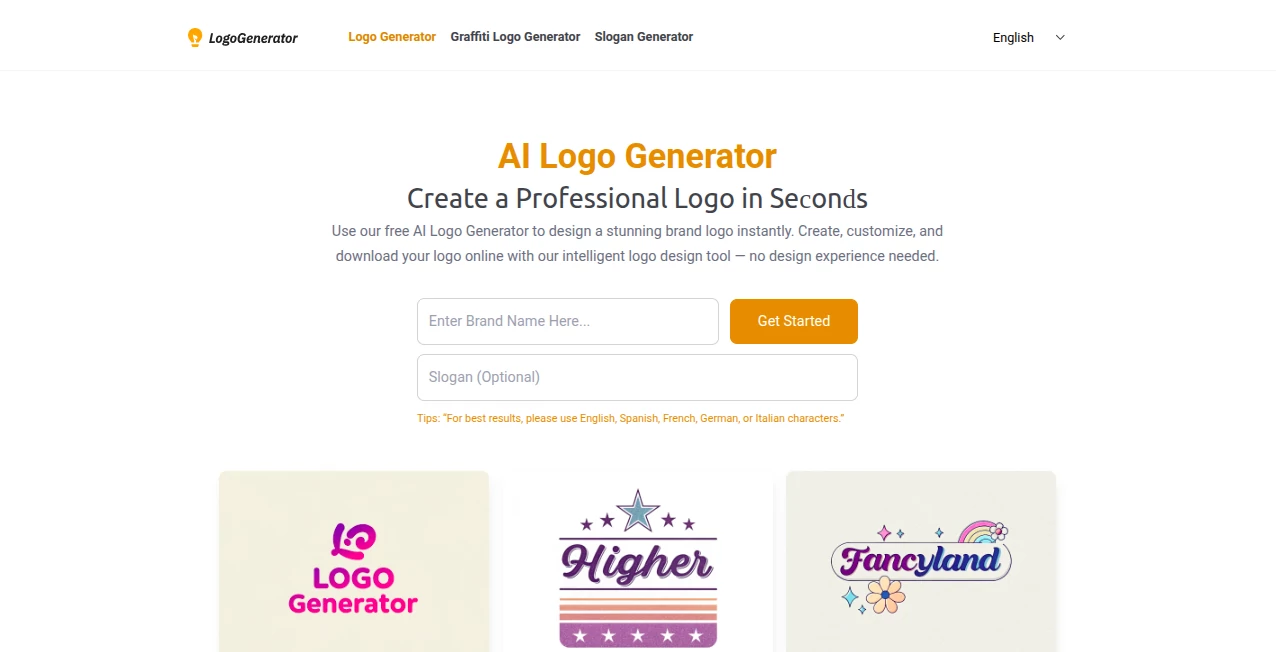
What is AI Logo Generator?
LogoGenerator makes it dead simple to dream up a logo that captures your brand's spirit, all without shelling out for a designer or fiddling with clunky software. You just type in your business name, maybe toss in a tagline, and boom—the AI serves up a batch of fresh ideas that you can tweak until they feel just right. It's caught on quick with folks starting side gigs or refreshing their look, turning what used to be a headache into a fun, five-minute win.
Introduction
I first stumbled on LogoGenerator while hunting for a quick fix to brand a new project, and it was like finding a hidden gem in a sea of overpriced apps. Launched not too long ago, it's built for the everyday hustler who needs something sharp but doesn't have hours to spare. What hooks you right away is how it nails that balance between effortless and effective—feed it a few words, and it spits out options that actually look thoughtful, not cookie-cutter. Over coffee chats with other creators, I've heard the same refrain: it's the spark that gets you from blank canvas to confident launch, especially when you're bootstrapping and every dollar counts.
Key Features
User Interface
The setup couldn't be more welcoming—you land on a clean page with a couple of input boxes staring back, no overwhelming menus or sign-up walls to slow you down. Punch in your details, hit the button, and watch a grid of previews fill the screen, each one easy to click and expand. From there, dropdowns for fonts and color pickers slide in smooth, letting you play around without feeling lost. It's that kind of thoughtful design that makes you think, 'Why hasn't everyone done this?'—intuitive enough for a total newbie, yet flexible for when you want to get picky.
Accuracy & Performance
Right off the bat, the suggestions land pretty true to what you describe, pulling in styles that echo your vibe without going off the rails. It chews through your inputs in seconds, even if you're testing a dozen variations, and the results hold up crisp on any device. Sure, the first round might need a nudge, but that's part of the charm—it's responsive, learning from your tweaks to dial in closer each time, leaving you with something that feels custom without the custom price tag.
Capabilities
At its core, it shines with text-driven designs, whipping up everything from elegant scripts to bold blocks that scream modern. You can layer in gradients or stick to solids, experiment with serifs that nod to tradition or sans that keep it sleek, and even blend in subtle effects for that extra pop. It's geared toward logos that stand alone, perfect for headers or favicons, and handles multiple languages if your brand crosses borders—just keep it to the basics for the smoothest ride.
Security & Privacy
Since everything happens in your browser, your ideas stay right there with you—no accounts to hack or data trails to worry about. It doesn't store your sketches or snoop on your sessions, which is a relief in a world full of apps that do just that. You download and dash, keeping full control over what you create and share, so it's as private as a napkin doodle in your back pocket.
Use Cases
Freelancers mocking up client pitches find it a lifesaver, churning out options to wow without the wireframe wait. Small shop owners slap together seasonal refreshes, like a holiday twist on their mainstay mark, to keep things fresh on shelves and sites. Bloggers or podcasters use it to unify their online presence, crafting a simple emblem that ties episodes or posts together. Even students pulling all-nighters for class projects grab a quick emblem that looks leagues beyond a rushed sketch.
Pros and Cons
Pros:
- Zero cost barrier—dive in and download without a dime or delay.
- Lightning-fast generations that fit into even the tightest schedules.
- Endless tweaks mean you land on something that truly clicks for you.
- High-quality outputs ready for real-world use, from prints to pixels.
Cons:
- Sticks mostly to text styles, so icon-heavy needs might feel light.
- Occasional misses on the first try call for a bit of back-and-forth.
- Best with straightforward inputs; wild prompts can wander a tad.
Pricing Plans
Here's the kicker—it's all free, no tiers or upsells lurking in the corners. You get unlimited access to the full suite, from generations to downloads, without ever hitting a paywall. That flat-out generosity makes it a no-brainer for testing waters or scaling up, though if you're churning out hundreds, you might wish for batch tools down the line. For now, it's pure value, letting you invest the savings back into your venture.
How to Use LogoGenerator
Kick things off by heading to the site and typing your brand name into the top box—add a slogan below if you've got one that packs a punch. Click generate, and sift through the lineup that appears, picking one that sparks joy. From there, swap fonts via the easy menu, play with palettes until the colors sing, and preview on mockups to see it in action. Once it's humming, snag the high-res file and drop it into your toolkit—done in under ten minutes, tops.
Comparison with Similar Tools
Stack it against flashier suites that bundle icons and templates galore, and LogoGenerator keeps it lean and mean, focusing on what you need without the bloat. Where others might nickel-and-dime for exports or lock basics behind logins, this one throws open the doors from jump. It's not the deepest dive for graphic gurus craving layers, but for quick, quality text logos, it outpaces the pack in speed and simplicity, especially if you're watching the wallet.
Conclusion
LogoGenerator wraps up the logo hunt in a neat, no-fuss package that punches way above its weight—free, fast, and surprisingly spot-on. It's the kind of tool that reminds you good things don't always come wrapped in hype; sometimes they're just there, ready to roll when inspiration strikes. If you're dipping toes into branding or just need a refresh without the fuss, give it a spin—you might walk away with more than a mark, but a real boost to get moving.
Frequently Asked Questions (FAQ)
Do I need design experience to get good results?
Not a bit—it's built for beginners, with tweaks that guide you gently.
Can I use these for commercial stuff?
Absolutely, they're yours to slap on products, sites, or ads without worry.
What languages does it handle best?
It loves English and a few European tongues, but give it a go with others.
How many options does it spit out at once?
A solid handful to start, with easy regens for more if you're picky.
Is there a limit on downloads?
Nope, grab as many as you like, in formats fit for any spot.
AI Icon Generator , AI Logo Generator , AI Design Generator , AI Illustration Generator .
These classifications represent its core capabilities and areas of application. For related tools, explore the linked categories above.
AI Logo Generator details
This tool is no longer available on submitaitools.org; find alternatives on Alternative to AI Logo Generator.
Pricing
- Free
Apps
- Web Tools
Categories

AI Logo Generator Alternatives Product

Wplace Live

Paper Animat…

z-image.me

ai banana

Z Image

NanoAI
Nano Banana …

Use Nano Ban…

Image to STL
