
AI Marker
What is AI Marker?
AI-generated and AI-manipulated content is becoming part of everyday publishing, marketing, product design, and communication. As transparency requirements become more important, simply creating an AI image or piece of content is no longer the whole job. Publishers and teams also need a practical way to disclose how that content was created.
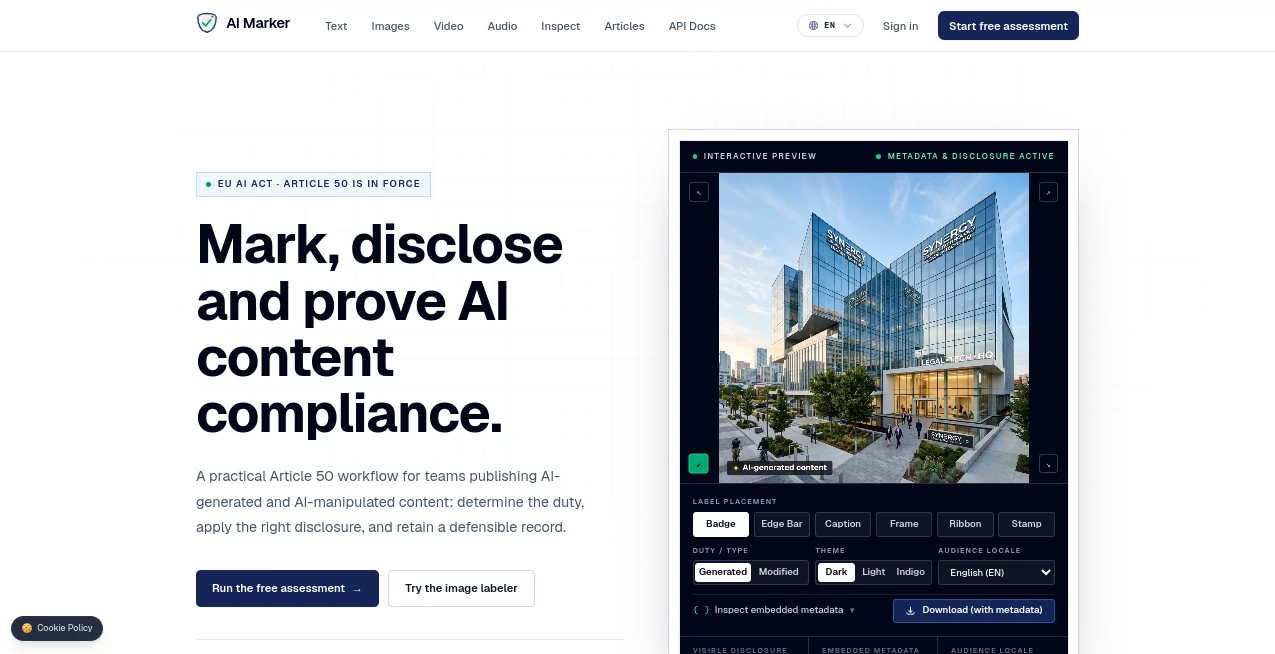
AI Marker is a free browser-based solution designed to help people understand and manage AI content disclosure requirements, particularly those connected with Article 50 of the EU AI Act. It combines a compliance assessment workflow with practical labeling tools, allowing users to determine what kind of disclosure may be appropriate before publishing AI-generated or AI-manipulated material.
One of its most appealing qualities is the straightforward approach. There is no complicated installation process, and the image labeling functionality can be used without creating an account. Files are processed locally in the browser, which makes the workflow especially attractive for users who do not want their images uploaded to a remote service.
Key Features
- Free AI content labeling tools available without an account.
- Structured assessment for understanding Article 50 transparency duties.
- Image labeling with several placement options, including badges, edge bars, captions, frames, ribbons, and stamps.
- Support for generated and modified content classifications.
- Localized disclosure wording for 24 EU languages.
- Embedded IPTC and XMP metadata for image disclosures.
- Interactive previews before downloading labeled assets.
- Browser-based processing that keeps image files on the user's device.
- Additional resources covering AI compliance, provenance, C2PA, and disclosure practices.
- Tools and documentation covering image, video, audio, metadata, and API-related workflows.
User Interface
The interface is built around a simple workflow rather than a collection of complicated settings. Users can select the type of content, choose whether it was generated or modified, pick a disclosure style, and preview the result before downloading it.
The labeling options are particularly useful for marketing and publishing teams because the visible disclosure can be positioned in different ways. A badge may work well for a social graphic, while a caption, frame, or ribbon may make more sense for editorial material.
The multilingual support is another thoughtful touch. Instead of forcing teams to create disclosure wording manually for every market, the platform provides localized options covering 24 EU languages.
Accuracy & Performance
This is not primarily an AI detection service that attempts to guess whether an image was created by artificial intelligence. Its purpose is different: it helps users disclose AI-generated or AI-manipulated content when they already know the relevant status of their asset.
The compliance assessment adds another useful layer by asking about factors such as the user's role, the type of media involved, and the intended audience or distribution market. That makes the workflow more practical than simply placing a generic “AI-generated” badge on every file.
Because the image labeling process happens locally in the browser, the experience can also be quick and convenient for ordinary image-processing tasks. The service states that files do not leave the user's device during this workflow.
Capabilities
The platform goes beyond a basic image-labeling widget. Its broader workflow is built around three stages: assessing the applicable obligation, applying an appropriate disclosure, and retaining evidence of the decision.
For images, users can create visible disclosures and download files containing embedded metadata. The available tools also extend into video labeling, audio labeling, metadata inspection, and API documentation, giving teams a path toward more structured content operations.
The knowledge hub is useful for users who want to understand the reasoning behind AI transparency requirements. Topics include Article 50, provider versus deployer responsibilities, practical labeling methods, C2PA, and machine-readable watermarking.
Security & Privacy
Privacy is one of the strongest practical advantages of the image workflow. The service states that files are processed locally using the browser's canvas functionality and that uploaded images are not sent to its servers.
This matters for designers, publishers, agencies, and businesses working with unreleased campaign material or proprietary visuals. Keeping the processing on-device reduces the need to transfer sensitive images to another platform.
Users should still distinguish between the free browser tools and any future or team-oriented services involving bulk processing, signing, watermarking, or evidence management. Organizations with formal compliance requirements should also treat the platform as a practical compliance aid rather than a substitute for qualified legal advice.
Use Cases
Marketing teams can use the labeling workflow when publishing AI-generated campaign graphics, advertisements, social media visuals, or promotional artwork. Adding a clear disclosure before publication can make the origin of synthetic content easier for audiences to understand.
Publishers and editorial teams can also benefit when AI-generated illustrations or modified images are incorporated into articles. A consistent disclosure process is easier to manage than creating different labels manually across multiple projects.
Product and engineering teams may find the assessment and technical documentation more useful than the visual labeler itself. The available resources provide a starting point for thinking about machine-readable disclosures, metadata, provenance, and future API-based workflows.
Freelancers and individual creators can use the service when they simply need a quick way to label an AI image without subscribing to a large enterprise platform. The no-account workflow makes it particularly approachable for occasional use.
Pros and Cons
Pros
- Free image labeling and disclosure tools.
- No account required for the core free workflow.
- Files remain on the user's device during image processing.
- Supports visible disclosures and embedded metadata.
- Useful assessment workflow instead of relying only on generic labels.
- Supports 24 EU languages.
- Provides educational material for users learning about AI transparency.
- Offers a broader direction toward C2PA, watermarking, audit records, and API workflows.
Cons
- The free tools are focused primarily on disclosure and compliance workflows rather than AI content creation.
- A visible label alone may not satisfy every technical or regulatory requirement.
- Organizations needing bulk processing, advanced provenance, or audit infrastructure may need the planned paid platform.
- Users with complex legal situations still need professional legal guidance.
Pricing Plans
The core image labeling tool and text disclosure guidance are available for free, with no account required. This makes the service easy to test before introducing it into a regular publishing workflow.
The platform also states that it is developing a paid solution for teams that require features such as bulk marking, C2PA signing, invisible watermarking, and audit-ready evidence records. For individuals and small teams, the current free tools provide a useful starting point without requiring an immediate subscription.
How to Use It
Start by opening the free assessment or image labeling tool. For the compliance assessment, answer the questions about your role, media type, publishing environment, and target audience. The resulting guidance helps identify the relevant transparency considerations.
For an image, open the labeling workflow and select whether the content was generated or modified. Choose a disclosure style such as a badge, edge bar, caption, frame, ribbon, or stamp. Select the appropriate audience language and review the interactive preview.
Once the result looks right, download the labeled image. The available workflow can also include machine-readable disclosure information in the downloaded file's metadata. Before using the output for a regulated business process, review the applicable requirements for your particular situation.
Comparison with Similar Tools
Many AI-related services focus on generating images, writing text, editing video, or detecting whether something may have been produced by AI. This platform takes a different position in that ecosystem. Its main purpose is disclosure and compliance rather than generation or automated detection.
That distinction can make it a better fit for someone who already has an AI-generated asset and wants to prepare it for publication. Instead of asking, “Was this made by AI?”, the workflow is more concerned with questions such as “What disclosure applies here?” and “How should that disclosure be presented?”
For teams dealing with increasingly formal content governance, the emphasis on assessment, disclosure, metadata, and evidence can also provide more value than a simple image badge generator.
Conclusion
AI content transparency is becoming a practical part of modern publishing, and the challenge is often less about creating synthetic content than handling it responsibly once it is ready to go public. This platform provides a useful starting point by combining a free labeling tool with structured compliance guidance and educational resources.
The local browser-based processing is a particularly welcome feature for anyone working with private images, while the multilingual disclosures make the workflow more practical for audiences across Europe. Its broader focus on metadata, provenance, C2PA, and evidence records also suggests a direction that goes beyond simply adding a visible label.
For creators, publishers, marketers, and smaller teams looking for a straightforward first step toward AI content disclosure, it is a practical tool worth exploring. Users with more complex regulatory obligations should use it as part of a broader compliance process rather than treating a generated label as a complete legal solution.
Frequently Asked Questions (FAQ)
Is the image labeling tool free?
Yes. The image labeling tool and text disclosure guidance are currently available for free, and the site states that no account is required for these tools.
Do images get uploaded to a server?
The service states that image processing happens locally in the browser and that images do not leave the user's device.
Can I label both AI-generated and AI-modified images?
Yes. The labeling workflow provides separate options for generated and modified content.
How many languages are supported?
The disclosure workflow supports 24 EU languages, making it useful for teams publishing content across different European markets.
Does a visible AI label guarantee legal compliance?
No. A visible disclosure can be an important part of the process, but some situations may also require machine-readable marking, provenance information, watermarking, or additional evidence. The service itself recommends treating its free tools as a practical starting point rather than a complete compliance programme.
Does it detect whether an image was created by AI?
The primary image tool is designed for labeling content rather than automatically deciding whether an image is AI-generated. Users indicate the relevant content status and then create the appropriate disclosure.
Is it useful for businesses?
Yes. Marketing, publishing, product, engineering, and compliance teams can use the assessment and labeling workflows to create a more consistent process for handling AI-generated and AI-manipulated content.
Does it support video and audio?
The platform provides dedicated video and audio labeling tools in addition to its image workflow, along with metadata and API-related resources.
Is the platform legal advice?
No. The service describes its material as an engineering interpretation of the EU AI Act rather than legal advice. Organizations with specific regulatory concerns should consult qualified counsel.
These classifications represent its core capabilities and areas of application. For related tools, explore the linked categories above.

AI Marker Alternatives Product

Sound Level …

steam worksh…

cznull

CRIMSON DESE…

BSA calculat…

PDFgear

GoDices

Astrologer B…

Teahose