


















Martini Art
What is Martini Art?
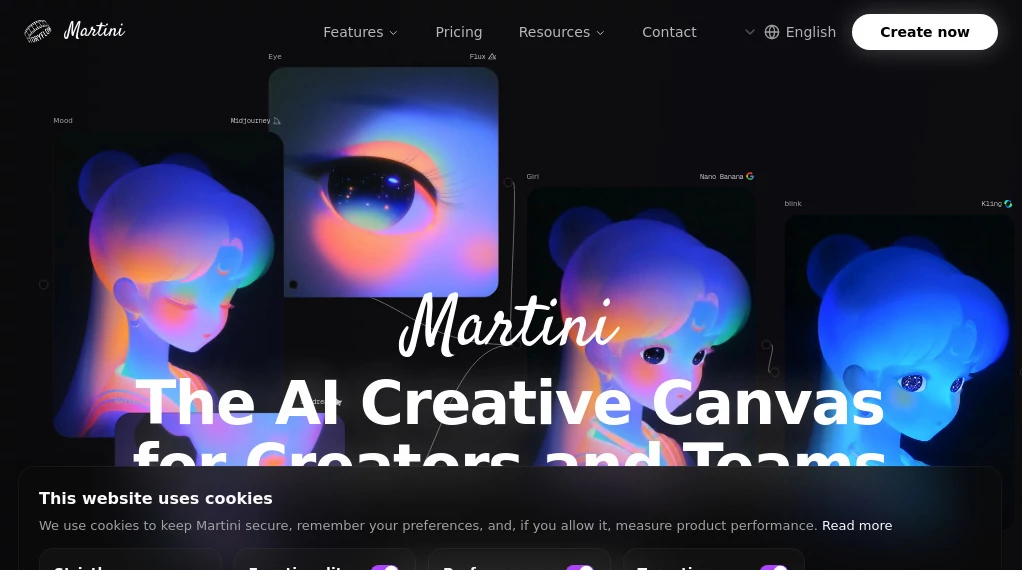
There’s something incredibly freeing about opening a blank canvas and knowing you can pull in any AI model you want—Sora, Runway, Kling, or dozens more—and start building scenes that flow together naturally. No more jumping between tabs, copying links, or losing your train of thought. This platform turns that scattered workflow into one smooth, creative space where ideas evolve in real time. I’ve watched filmmakers go from rough concepts to polished multi-shot sequences faster than they ever could before, and the best part is how it actually feels like directing rather than just prompting.
Introduction
Most AI video tools force you into isolated generations—one prompt, one clip, then manual stitching later. Martini Art flips that model entirely. It gives you an infinite canvas where you can chain models, build reusable workflows (they call them Recipes), collaborate with teammates, and follow trending creator techniques all in one place. Whether you’re making short social content, testing film ideas, or producing full animated sequences, it keeps everything connected so your vision stays intact from first frame to final export. It’s become a favorite among both solo creators who want speed and small teams who need consistency.
Key Features
User Interface
The canvas feels spacious and calm. You drag in nodes for different models, connect them with simple lines, and watch your workflow come alive visually. Previews pop up inline so you don’t have to guess what each step produces. Collaboration is seamless—teammates can jump in, comment, or edit the same project in real time. It’s one of those rare interfaces that gets better the more complex your project becomes, without ever feeling cluttered.
Accuracy & Performance
Because everything runs on one canvas, consistency across shots improves dramatically. Characters keep their look, lighting stays coherent, and motion flows naturally between generations. The platform handles heavy workloads smoothly, with fast previews that let you iterate quickly. Users consistently mention how much less cleanup they need compared to piecing together outputs from separate tools.
Capabilities
Access to 50+ top AI models for image, video, audio, and more. Build reusable Recipes that save your favorite workflows. Create multi-shot stories with intelligent transitions. Collaborate in real time. Follow community-curated trends and templates. Export in high quality for social, web, or professional use. The node-based system lets you experiment wildly while keeping full control over the final sequence.
Security & Privacy
Your projects stay private by default. Team sharing is granular and controlled. The platform uses strong authentication and doesn’t train on your private work. For creators handling client projects or sensitive ideas, that peace of mind makes a big difference.
Use Cases
A social media creator builds a consistent character series by saving a Recipe and generating new episodes in minutes. A small animation studio prototypes full scenes before committing to traditional production. A musician creates official music visuals that sync perfectly with their track. An indie filmmaker mocks up key story moments to pitch investors with moving storyboards instead of static images. The common thread is speed paired with creative control—getting professional-looking results without a big team or budget.
Pros and Cons
Pros:
- Infinite canvas keeps your entire project visible and connected.
- Support for so many strong models in one place is genuinely powerful.
- Reusable Recipes save hours on repetitive workflows.
- Real-time collaboration finally makes AI video feel like a team sport.
- High creative control without losing the fun of experimentation.
Cons:
- Learning the node system takes a short adjustment period for complete beginners.
- Some advanced features and higher usage limits require paid plans.
Pricing Plans
Free tier gives generous daily credits so you can explore and create meaningful work without paying upfront. Paid plans unlock unlimited generations, priority access to new models, team collaboration features, and higher export quality. Many creators find the value hits quickly—especially when comparing the time saved against hiring editors or juggling multiple tools.
How to Use Martini Art
Sign up and open a new canvas. Start by adding a generation node (text-to-image, image-to-video, etc.), type your prompt, and run it. Connect the output to the next node—maybe an upscaler, lip-sync tool, or transition effect. Build your sequence step by step, preview sections as you go, and adjust until it feels right. Save the whole workflow as a Recipe for next time. Invite teammates to collaborate or export the final video when you’re happy. The whole process feels more like directing a small film set than fighting with disconnected apps.
Comparison with Similar Tools
Most AI video platforms give you one model and one isolated clip at a time. This one brings everything together on a single canvas with workflow memory and team features. It’s less about quick one-offs and more about building coherent, repeatable video projects—which is exactly what creators and small teams actually need day after day.
Conclusion
Martini Art turns the chaos of modern AI video creation into something focused, collaborative, and genuinely fun. It respects your time, preserves your vision, and gives you tools that scale with your ambition. Whether you make content for fun, clients, or your own projects, it removes the usual friction and lets the creativity flow. In a crowded space, that combination of power and simplicity stands out.
Frequently Asked Questions (FAQ)
Do I need to know node-based editing?
Not really—the basics are intuitive, and there are templates to get you started fast.
How many AI models are available?
Over 50, covering image, video, audio, and more, with new ones added regularly.
Can teams work together?
Yes—real-time collaboration is built in and works smoothly.
Is there a free way to try it?
Absolutely—generous free credits let you create real projects from day one.
AI Animated Video , AI Image to Video , AI Video Generator , AI Design Generator .
These classifications represent its core capabilities and areas of application. For related tools, explore the linked categories above.

Martini Art Alternatives Product
HappyHorse AI

AI Animate I…

Seedance 2.5
imagen 5

kling 5.0
Seedance 2.0
Aura AI

Kyncept

KOOX AI
