


















Memdeklaro
What is Memdeklaro?
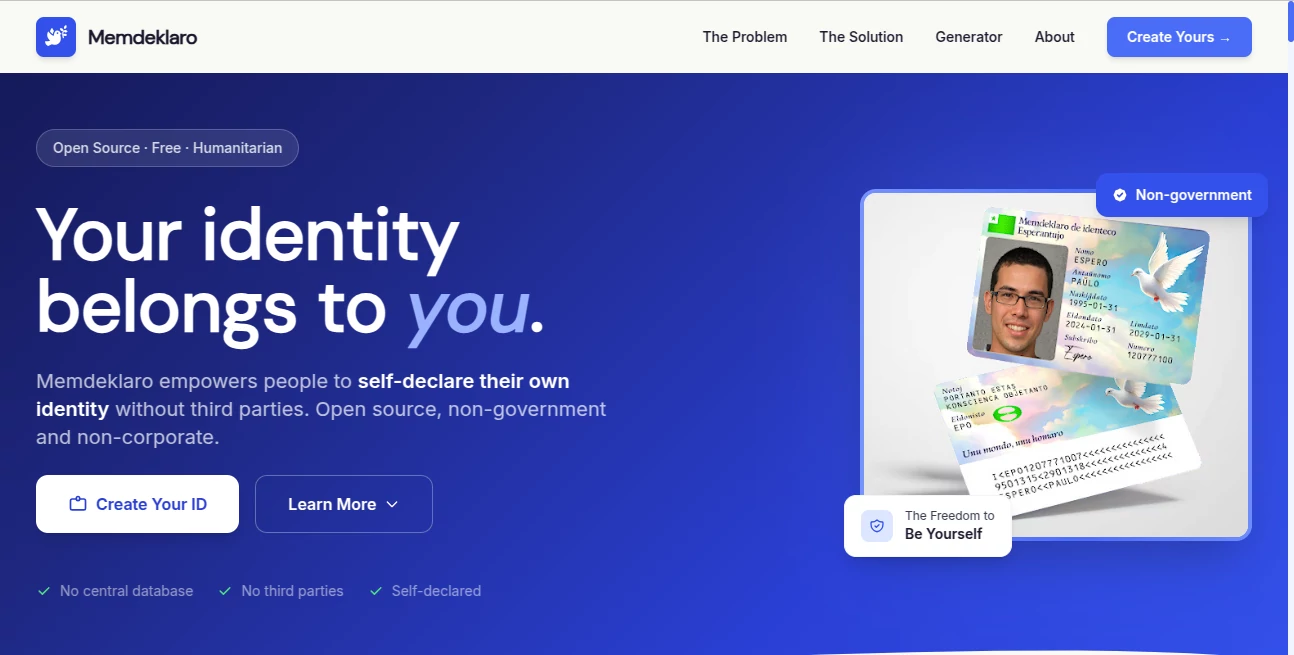
Memdeklaro is a free, open-source project built around a simple but unconventional idea: people should be able to declare their own identity without depending on a government, company, or other third party. Instead of acting as another centralized identity service, it provides a browser-based generator for creating a personal self-declaration of identity.
The project is designed with accessibility and privacy in mind. There is no central database, no account registration, and no third-party identity provider involved in the generation process. For someone exploring alternatives to conventional identification systems, it offers an interesting hands-on way to create a personal identity document that can be printed or kept digitally.
One particularly useful detail is that the generator works locally in the browser. This means users can enter their information and create the document without sending that information to a remote service.
Key Features
- Free and open-source identity declaration generator
- Local generation directly in the browser
- No central database for generated identity information
- No requirement for third-party identity providers
- Support for a self-chosen first and last name
- Fields for birth date, photo, signature, ID number, and notes
- Automatically generated MRZ information
- Digital use or physical printing
- Business-card and CR-80 card formats
- Public-domain software with the source available for inspection and reuse
User Interface
The interface is deliberately straightforward. The generator presents a form where users can enter the information they want to include in their self-declaration. Fields cover a first name, surname, birth date, issuance and expiry dates, an ID number, notes, issuer information, photograph, and signature.
There is little unnecessary complexity. Someone who has never worked with identity-generation software can understand the basic workflow quickly: enter the information, add the required visual elements, generate the document, and then download the front and back.
Accuracy & Performance
Performance is one of the more notable aspects of the project because the generation process runs locally in the browser. The website states that information entered into the generator is not sent elsewhere. This also avoids the need to wait for a remote server to process personal information before producing the result.
The generator creates the MRZ automatically and produces both sides of the self-declaration for digital use or printing. The result is intended as a self-declared identity document rather than an officially issued government credential, so users should not confuse the generated document with legally recognized identification.
Capabilities
The generator gives users control over the information that appears on the document. A self-chosen name, birth date, photograph, signature, identification number, notes, and other fields can be included. The site also provides specific dimensions for the photograph and supports common physical card formats.
For people experimenting with personal identity, privacy-oriented projects, or alternative forms of identification, this makes the tool more than a static template. It provides an interactive way to produce a finished document while keeping the creation process on the user's own device.
Security & Privacy
Privacy is central to the project's design. The website explicitly states that the generator runs locally in the browser and that information is not sent anywhere during the generation process. It also promotes a no-database and no-third-party approach.
That design can be particularly appealing when dealing with personal information. Rather than creating an account and uploading sensitive details to a centralized identity platform, users can work with the generator directly on their own device.
There is an important distinction, however: privacy in the generation process does not make the resulting document a government-issued identity credential. The project itself presents the document as a self-declaration, and users should understand the legal and practical limitations before relying on it for official identification.
Use Cases
The project is aimed at people interested in self-declared identity and alternatives to conventional identification systems. It may be useful for individuals researching privacy-preserving identity concepts, open-source identity projects, or alternative forms of personal documentation.
It can also be useful as an educational or experimental project. Developers and researchers can examine the public source code, while users can explore how a locally generated identity document can work without a centralized database.
For example, someone studying digital identity might use the generator to create a sample identity card and examine how personal information, photographs, signatures, and machine-readable information can be arranged on a physical or digital document.
Pros and Cons
- Pros: Free to use, open source, locally generated, no central database, no third-party identity provider, supports digital and physical formats, and gives users control over the information they declare.
- Pros: The interface is uncomplicated, making the generator accessible even to users without technical experience.
- Pros: The project is released into the public domain, allowing others to inspect, reuse, and build upon the software.
- Cons: The resulting document is self-declared and should not be assumed to have the legal status of a government-issued ID.
- Cons: Acceptance by employers, banks, government agencies, travel providers, or other organizations is not guaranteed.
- Cons: Users looking for conventional identity verification will need a different type of service.
Pricing Plans
There are no paid pricing tiers. The generator is presented as free and open source, so users can create their self-declaration without purchasing a subscription or paying a usage fee.
The project is also available as public-domain software, which makes it particularly interesting for developers and privacy enthusiasts who want to inspect or reuse the underlying work rather than simply consume it as a hosted service.
How to Use the Tool
Getting started is relatively simple. Open the generator and enter the information you want to appear on the self-declaration. This includes a chosen first name and surname, birth date, issuance and expiry dates, an ID number, and optional notes or issuer information.
Next, add a photograph and signature where required. The generator handles the MRZ field automatically. Once the information is complete, generate the document and download the front and back.
The finished result can be used digitally or prepared for printing as a business card or CR-80 plastic card. The project also provides an open-source template for users who prefer to work with the files manually.
Comparison with Similar Tools
Traditional government identification systems and modern digital identity platforms generally depend on an issuing authority or centralized organization. This project takes a very different approach by allowing the individual to create a self-declared identity without requesting permission from a central identity provider.
Other alternative identity projects, such as the World Passport and Digitalcourage ID, approach the subject from their own perspectives. The main distinction here is the combination of a free browser-based generator, local processing, open-source availability, and an emphasis on self-declaration.
This makes the project particularly interesting for people who want to explore the philosophical and technical differences between state-issued identification, commercial digital identity, and personally declared identity.
Conclusion
This is an unusual project, and that is part of its appeal. Rather than trying to compete with conventional digital ID platforms on authentication features, it questions the assumption that identity must always be created and controlled by a third party.
The practical side is refreshingly simple: enter personal details, add a photograph and signature, generate the document locally, and use the result digitally or print it. The open-source and public-domain approach adds another layer of transparency for people who want to understand or reuse the technology.
At the same time, users should keep the project's purpose in perspective. A self-declared identity document is not automatically equivalent to a passport, national ID card, or legally recognized credential. Its value depends on the context in which it is used.
For anyone interested in privacy, open-source software, self-sovereign identity concepts, or alternatives to centralized identification, this project provides a distinctive and hands-on way to explore the subject.
Frequently Asked Questions (FAQ)
Is the identity generator free?
Yes. The project provides its identity generator free of charge and describes the software as free and open source.
Does the generator store my personal information?
The website states that the generator runs locally in the browser and that the information entered into it is not sent anywhere. It also states that there is no central database.
What information can be included?
The generated document can contain a self-chosen first name and surname, birth date, photograph, signature, ID number, notes, and other fields such as issuance and expiry dates.
Can the generated identity be printed?
Yes. The project supports printing the generated document as a business card or CR-80 plastic card. It can also be used digitally.
Does this replace a government-issued ID?
No. The document is a self-declaration and should not be assumed to have the same legal status or acceptance as a passport, national identity card, driver's license, or other government-issued credential.
Is the project open source?
Yes. The project makes its source available publicly and describes the software as free, open source, and released into the public domain.
Can developers use the source code?
Yes. The project is released to the public domain and explicitly welcomes forks, making it possible for developers to inspect, reuse, and build upon the software.
Web3 .
These classifications represent its core capabilities and areas of application. For related tools, explore the linked categories above.

