mFax
What is mFax?
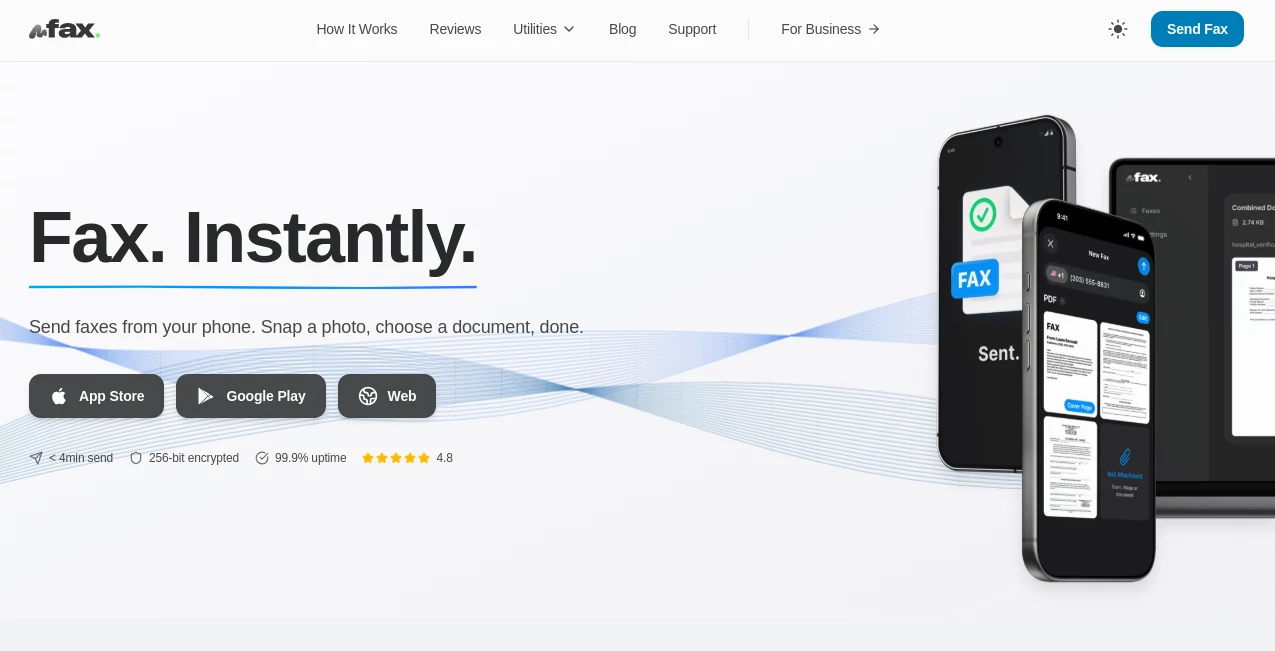
Some things still require a fax—tax forms, legal contracts, medical documents—and waiting in line at a copy shop or digging out an old machine feels ridiculous in 2026. This service makes faxing feel modern again. You open the app on your phone, snap a photo or upload a PDF, enter a number, and it’s sent in under two minutes with delivery confirmation. No machine, no paper jams, no extra fees for every page. I’ve used it to send important documents while traveling and the recipient got it before I even landed. It just works, quietly and reliably, exactly when you need it.
Introduction
mFax was built for real life—situations where you suddenly need to send or receive a fax but don’t have access to old-school hardware. Whether you’re a small business owner handling contracts, a freelancer submitting tax forms, or a patient sending medical records, it removes the friction completely. Available on both iOS and Android, it turns your smartphone into a full fax station that’s faster and more secure than traditional methods. Millions of users have already discovered how simple it feels to send professional documents without leaving the couch or office. It’s one of those tools that solves a very specific pain point so well you wonder how you ever managed without it.
Key Features
User Interface
The app is refreshingly straightforward. Big buttons for “Send Fax” and “Receive Fax,” clear camera integration for quick document scans, and a simple number entry field. Status updates appear instantly so you know when the fax reaches its destination. No complicated menus or hidden settings—just tap, scan or upload, send. Even my least tech-savvy friend figured it out in one try and immediately sent his first document with confidence.
Accuracy & Performance
Documents come through crisp and readable on the other end, with strong compression that keeps file sizes manageable without losing quality. Delivery confirmation is reliable, and you get notified the moment it’s received. It handles multi-page documents smoothly and works consistently even on slower mobile connections. In real-world use, success rates are very high, and the rare failed transmission is usually due to an invalid recipient number rather than the service itself.
Capabilities
You can send faxes to any traditional fax number worldwide, receive faxes to your personal virtual number, scan documents directly with your phone camera, upload PDFs or images, and get instant delivery reports. It supports high-volume sending for businesses and includes features like contact lists and fax history. The combination of mobile convenience and full fax functionality makes it suitable for both occasional personal use and regular business needs.
Security & Privacy
Security is taken seriously—documents are encrypted during transmission, and sensitive information (especially medical or legal) is handled with care. HIPAA-compliant options are available for healthcare users. Your faxes aren’t stored longer than necessary, and you control your virtual number and history. For anyone sending confidential paperwork, that peace of mind makes a big difference.
Use Cases
A real estate agent sends signed contracts to clients while sitting in their car between showings. A small business owner submits tax forms without driving to a print shop. A patient emails medical records to a new doctor from the waiting room. A freelancer sends invoices and agreements to international clients without worrying about time zones or postal delays. Wherever official documents still need the old fax stamp of approval, this service makes the process painless and professional.
Pros and Cons
Pros:
- Truly instant sending from anywhere with your phone.
- No need for a physical fax machine or dedicated phone line.
- Clear delivery confirmations and reliable transmission.
- Simple enough for anyone, powerful enough for regular business use.
- Strong focus on security for sensitive documents.
Cons:
- Per-page fees can add up for very high-volume users.
- Receiving faxes requires a paid virtual number plan.
- Some very large multi-page documents may take slightly longer to process.
Pricing Plans
It keeps things flexible with pay-as-you-go options so you only pay for what you actually send. Free trial credits let you test the service risk-free. Subscription plans with included pages and a dedicated virtual number make sense for regular users. Pricing stays competitive compared to traditional fax services, especially when you factor in the time and hassle you save. No long contracts—scale up or down as your needs change.
How to Use mFax
Download the app, sign up in seconds, and tap “Send Fax.” Scan your document with the phone camera or upload a file from your gallery. Enter the recipient’s fax number, add a cover page if you want, review the preview, and hit send. You’ll get a notification when it’s delivered. For receiving, get a virtual fax number and incoming documents arrive as PDFs in the app or your email. It’s that straightforward—most first-time users send their initial fax successfully within the first couple of minutes.
Comparison with Similar Tools
Many online fax services feel dated or require desktop logins. This one stands out because it’s genuinely built for mobile-first use with a clean, modern interface. Where some competitors nickel-and-dime you with hidden fees or poor scan quality, mFax focuses on reliability and simplicity. It’s not trying to be everything—it just does mobile faxing exceptionally well, which is exactly what most people need in 2026.
Conclusion
Faxing hasn’t disappeared—it’s just moved to your pocket. This service makes that transition smooth, secure, and actually pleasant. It respects your time, protects your documents, and delivers results you can count on. Whether you send one fax a month or dozens, it removes the friction and lets you focus on what actually matters. In a world that still occasionally demands a fax, having a tool this good in your phone feels like a small but meaningful win.
Frequently Asked Questions (FAQ)
How fast can I send a fax?
Most faxes are sent and confirmed in under two minutes from start to finish.
Do I need a dedicated fax number to receive?
Yes for receiving—you get a personal virtual number on paid plans.
Is it secure for medical or legal documents?
Yes—strong encryption and HIPAA-compliant options are available.
Can I send internationally?
Absolutely—works with fax numbers worldwide.
What file types can I send?
PDFs, scanned images, photos—basically anything you can open on your phone.
Other .
These classifications represent its core capabilities and areas of application. For related tools, explore the linked categories above.

mFax Alternatives Product

Mp3tag

Free AI Dire…

Sound Level …

Aback Tools

Al Maze Gene…

PetShard

Pixel Flow L…

CRIMSON DESE…
morse code t…