
MiniMax H3
What is MiniMax H3?
Creating a convincing AI video is no longer only about turning a sentence into moving images. Good results also depend on motion, sound, timing, character consistency, camera direction, and the ability to refine an idea without starting from scratch. This platform brings those pieces together in a single creative workflow, allowing users to generate video from text, images, video references, and audio.
One of its strongest advantages is the combination of native 2K video generation and synchronized audio. Instead of creating the visuals first and adding sound later, dialogue, sound effects, and environmental ambience can be generated alongside the scene. That makes it particularly interesting for creators who want short cinematic clips, social media content, product demonstrations, advertisements, and story concepts without having to assemble several separate AI tools.
The workflow is also flexible enough for users who already have a visual idea in mind. A first frame, last frame, reference images, video clips, or audio can help guide the generation. For someone working on a product advertisement, for example, this can make it easier to keep the product recognizable while changing the camera movement, environment, or action around it.
Key Features
- Text-to-video generation from detailed natural-language prompts.
- Image-to-video generation for animating still images.
- Multimodal reference support using images, videos, and audio.
- Native 2K video generation at up to 24 FPS.
- Video clips ranging from 5 to 15 seconds.
- Synchronized dialogue, sound effects, and environmental ambience.
- First-frame and last-frame control for more predictable transitions.
- Multi-shot storytelling through a single detailed prompt.
- Instruction-based editing for modifying existing generated content.
- Multiple aspect ratios including landscape, portrait, square, and cinematic formats.
User Interface
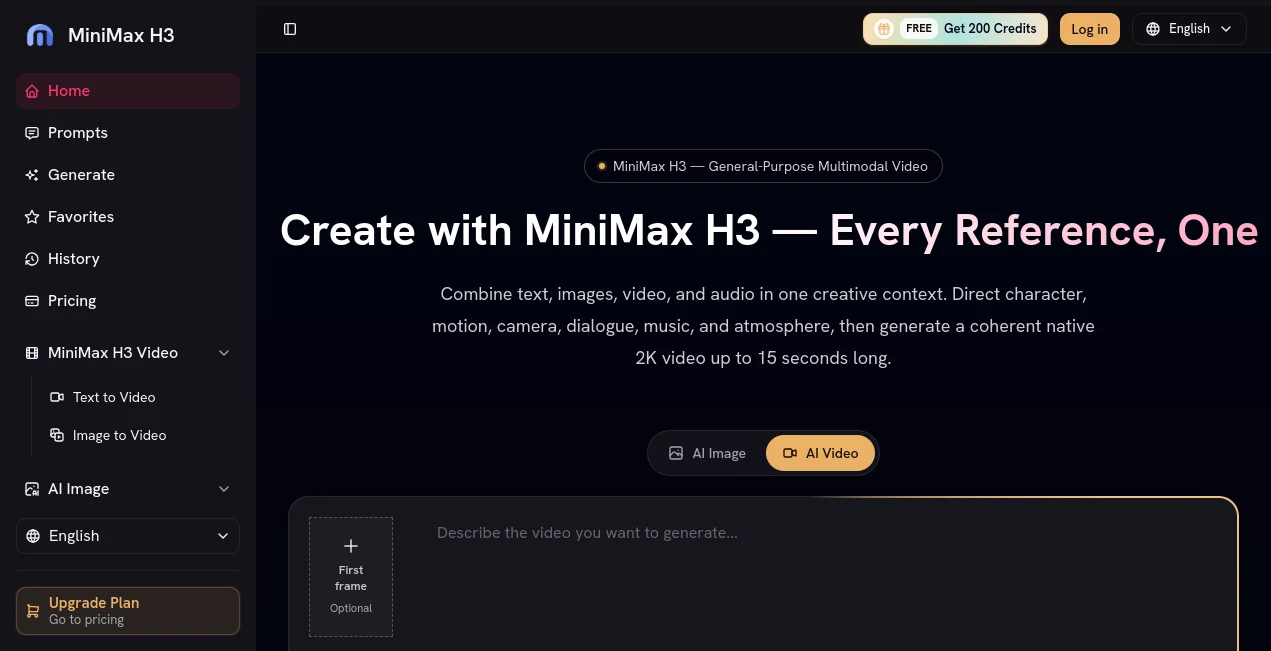
The interface is designed around a straightforward generation workflow rather than a complicated video-editing timeline. Users can begin with a prompt and then add reference material when additional control is needed. The platform also provides a gallery of community-created visual ideas, where prompts can be explored and reused as starting points.
This approach is useful for experimentation. Instead of staring at an empty generation screen, a creator can examine an existing visual concept, borrow the underlying idea, and then adapt it to a different character, product, environment, or story.
The generation workspace also keeps creative assets and previous generations accessible, which makes it easier to compare different directions before settling on a final clip.
Accuracy & Performance
The system is built for short-form video generation with an emphasis on maintaining visual continuity while handling several types of input. It can generate native 2K footage and supports clips between 5 and 15 seconds, giving creators enough room for short advertisements, social posts, cinematic shots, and individual scenes.
Its multimodal approach is especially useful when a text description alone is not enough. Reference images can help establish appearance, while video and audio references can provide additional information about movement, identity, voice, or rhythm. First- and last-frame controls can also give creators more influence over how a shot begins and ends.
As with any generative video system, results can vary depending on the prompt, references, subject matter, and desired motion. Detailed instructions tend to be more useful than vague descriptions when precise camera movement or scene behavior matters.
Capabilities
The platform covers several important stages of AI video creation. Text-to-video allows an idea to begin entirely from a written description, while image-to-video is better suited to users who already have a strong visual starting point.
Reference-based generation adds another layer of control. Multiple reference images can be used to help maintain the identity and appearance of subjects, while video references can contribute movement information. Audio references can also be incorporated when voice or sound is important to the concept.
Another useful capability is instruction-based editing. Rather than rebuilding an entire scene, users can describe changes to a character, object, environment, sound, or pacing. This makes the workflow feel closer to directing and revising a scene than simply generating a series of unrelated clips.
Multi-shot prompts are also valuable for storytelling. A creator can describe several shots within one instruction, which can be useful for product campaigns, action sequences, short narratives, and social advertisements.
Security & Privacy
When working with generative media, privacy is closely connected to the files used as references. Users should make sure that they have the necessary rights to any photographs, videos, recordings, voices, or other media they upload. This is particularly important when working with client material, recognizable individuals, or commercially owned assets.
The service states that commercial usage rights are included with its paid plans. However, users should still review the applicable terms before using generated material in a commercial campaign, especially when third-party reference content is involved.
Use Cases
- Social Media Content: Produce short visual clips for platforms that favor engaging video content.
- Advertising: Create product-focused scenes, promotional concepts, and short commercial sequences.
- E-commerce: Turn product images into dynamic demonstrations and promotional videos.
- Storytelling: Develop short narrative scenes with multiple shots, dialogue, and environmental sound.
- Concept Development: Quickly visualize ideas before investing in traditional production.
- Music and Creative Projects: Experiment with visual scenes that combine movement, atmosphere, and generated audio.
- Product Design: Present visual concepts and possible product interactions through short generated sequences.
- Client Work: Build early creative drafts and presentation material for marketing or production projects.
Pros and Cons
Pros
- Native 2K video generation.
- Integrated audio generation with synchronized dialogue and sound effects.
- Supports text, image, video, and audio references.
- Useful first-frame and last-frame controls.
- Can generate multi-shot sequences from detailed prompts.
- Instruction-based editing provides another way to refine existing results.
- Supports several aspect ratios for different publishing formats.
- Free credits are available to new users without requiring a credit card.
- Commercial usage rights are included with the listed paid plans.
Cons
- Generated clips are still relatively short, with a maximum duration of 15 seconds per generation.
- More advanced workflows can consume credits quickly.
- Precise results may require experimentation with prompts and reference material.
- Users working with sensitive or copyrighted reference media need to pay close attention to usage rights.
Pricing Plans
The service follows a credit-based pricing system, allowing users to begin with free credits and then move to a monthly subscription or other available credit options as their production needs grow.
- Basic: $7.50 per month with 1,000 credits, no watermark, and commercial usage rights.
- Pro: $24.17 per month with 5,000 credits, commercial usage rights, and priority support.
- Studio: $49.17 per month with 11,000 credits, commercial usage rights, dedicated support, and priority processing.
The annual billing options provide additional savings compared with monthly billing. Credit consumption depends on the selected model, generation settings, duration, and other factors, so creators producing a large number of videos should consider their expected monthly volume before selecting a plan.
How to Use It
- Start by creating an account and accessing the video generation workspace.
- Choose whether to begin with text, an image, or additional reference material.
- Write a clear description of the subject, action, environment, camera movement, lighting, dialogue, and sound.
- Add reference images, video clips, or audio when maintaining a particular identity or style is important.
- Choose the desired aspect ratio, duration, and available generation settings.
- Generate the video and review the result.
- Use more specific instructions or reference material when a scene needs refinement.
- Save the strongest version for use in your social, advertising, storytelling, or commercial workflow.
Comparison with Similar Tools
AI video generators increasingly compete across several areas, including visual quality, motion consistency, audio generation, reference control, editing, and production speed. This platform stands out by bringing several of these capabilities into one workflow instead of focusing exclusively on basic text-to-video generation.
For creators who mainly want a short visual generated from a sentence, a simpler video generator may be sufficient. However, users who want to combine prompts with reference images, video, and audio have more room to direct the result here.
The integrated audio workflow is another meaningful difference. Generating dialogue, sound effects, and ambience together with the visuals can reduce the need to move a short concept through several separate tools before it feels complete.
Its strongest fit is therefore not necessarily every type of video production. It is particularly compelling for creators who value control, multimodal references, synchronized sound, and rapid iteration within short-form video projects.
Conclusion
For creators looking for more than a basic text-to-video experience, this platform offers an appealing combination of visual generation, reference control, synchronized audio, and editing capabilities. Native 2K output gives the results a useful level of detail, while first- and last-frame controls and multimodal references make the creative process considerably more directed.
The ability to generate dialogue, sound effects, and ambience alongside the visuals is perhaps its most practical advantage. It can turn a rough concept into a much more complete scene without requiring a separate audio workflow.
With free credits available for experimentation and several paid options for heavier production, it is a strong choice for marketers, social media creators, designers, storytellers, and businesses exploring AI-assisted video production. The best results will come from users who treat the system less like a random video generator and more like a creative partner: provide useful references, describe the scene clearly, and refine the result when necessary.
Frequently Asked Questions (FAQ)
Is it free to use?
Yes. New users can start with free credits without entering a credit card. Paid plans are available for users who need additional generation capacity.
What types of input can I use?
You can work with text prompts, images, video references, and audio references. These inputs can be combined to provide more control over the generated scene.
What video resolution is supported?
The platform supports native 2K video generation and can produce footage at up to 24 FPS.
How long can generated videos be?
Generated clips can range from 5 to 15 seconds, depending on the selected generation workflow and settings.
Can it generate audio together with video?
Yes. Dialogue, sound effects, and environmental ambience can be generated in synchronization with the visual content.
Can I use a first or last frame?
Yes. You can provide a first-frame image, a last-frame image, or both to give the generation a stronger visual starting point and ending point.
Can I edit an existing generated video?
Yes. Instruction-based editing allows you to describe changes to elements such as characters, objects, scenes, sounds, or pacing rather than recreating the entire concept.
Can the generated videos be used commercially?
The listed paid plans include commercial usage rights. Users should also make sure they have appropriate rights to any third-party images, videos, audio, or other reference materials used during generation.
Which creators can benefit most from it?
It is particularly useful for social media creators, advertisers, e-commerce businesses, designers, filmmakers, storytellers, and teams that need to prototype or produce short AI-generated video content quickly.
AI Image to Video , AI Video Generator , Video , AI Text to Video .
These classifications represent its core capabilities and areas of application. For related tools, explore the linked categories above.

MiniMax H3 Alternatives Product
Veo 3.2 AI V…

LTX-3 AI

Vidmix
Kling 3.0

Seedance 2 V…
soro2

Nano Banana …

Seedance 2.0

Artifox