
Motion
What is Motion?
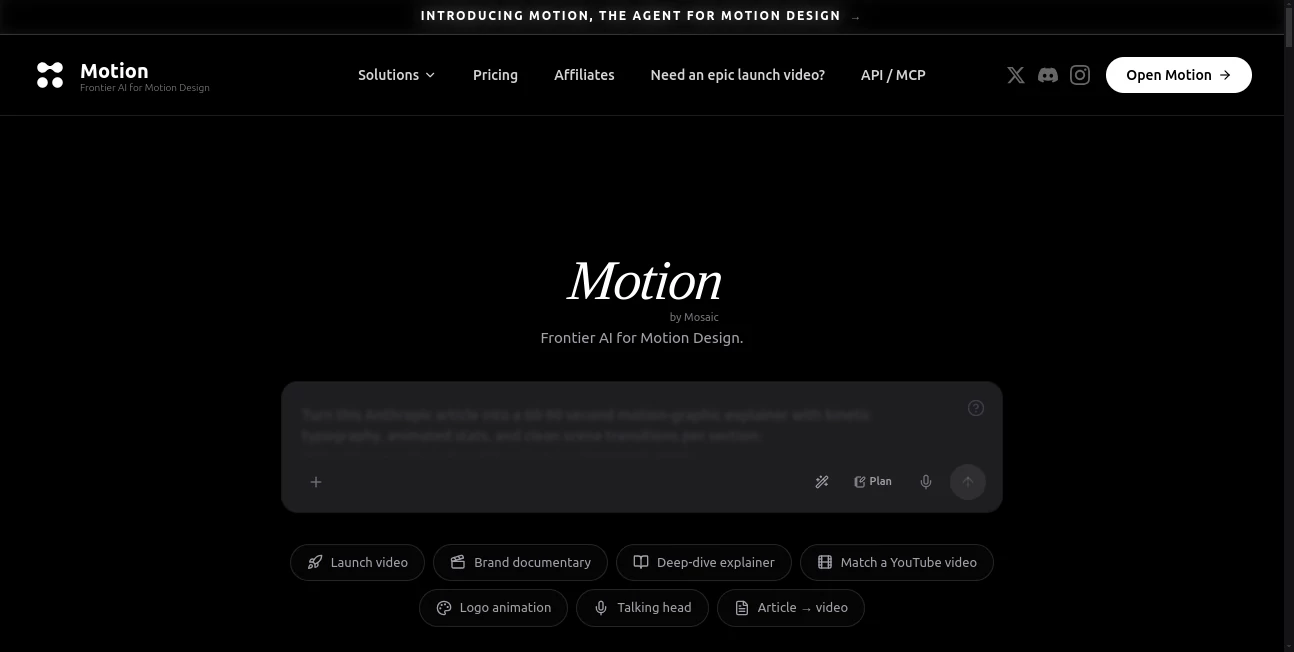
Motion is a frontier AI agent for motion design that turns a simple idea into a polished video. Instead of starting with a traditional timeline, storyboard, or complicated editing workflow, you can describe the video you want in a single sentence and let the system handle the production process. It can research a brand, develop the story, plan scenes, create motion graphics, and produce a finished cut that remains editable.
The approach is particularly appealing for product teams, startups, marketers, and creators who need launch videos, product demonstrations, explainers, logo animations, or social advertisements without building every scene manually. The platform is designed to bring the speed of generative AI closer to the creative control expected from professional motion design software.
Key Features
- One-line prompting for creating complete video concepts.
- Brand research based on a connected website.
- Automatic scene-by-scene storyboarding and planning.
- Motion graphics and visual scene generation.
- Editable individual elements after generation.
- Support for launch videos, explainers, product demos, logo animations, and social ads.
- Connectors for bringing information from existing tools and assets into a project.
- MCP and API access for integrating video generation into external AI workflows.
- Ability to work with agents such as ChatGPT, Claude, and Cursor.
User Interface
The interface takes a notably different approach from conventional video editors. Rather than asking users to assemble a timeline from scratch, the workflow begins with a brief. You can describe the desired video, specify its format and duration, and provide additional context such as a website, assets, brand information, or reference videos.
Once the initial version has been created, the editing experience remains flexible. Individual elements can be moved, resized, or rewritten manually, while conversational instructions can also be used to request changes. This makes the workflow feel closer to working with a creative collaborator than operating a conventional editing application.
Accuracy & Performance
One of the more interesting aspects of the platform is its effort to understand the context behind a video before producing it. When a website is provided, the system can examine the site's branding, including its visual language, typography, colors, and references, before developing the video.
The planning stage also helps organize the result before production begins. Scenes can be mapped out with pacing, visual direction, and a storyboard, reducing the need to repeatedly regenerate an entire video because the original concept was poorly structured. For businesses producing marketing material, that planning-first approach can save considerable creative back-and-forth.
Capabilities
The system covers much more than simple text-to-video generation. It is designed to take a project from an initial idea through research, planning, production, and editing. A single workflow can involve the brief, brand research, story development, visual design, animation, voiceover, music, and captions.
Its editable approach is especially useful when a generated video is close to the desired result but still needs human direction. For example, a marketing manager could ask for a different headline while a designer manually adjusts the position of a logo or visual element. The ability to make targeted changes without rebuilding an entire scene gives the workflow a practical advantage over one-shot generation tools.
For technical teams, the API and MCP support add another layer of flexibility. Video generation can be connected to existing agents and workflows, allowing a team to trigger production from tools such as ChatGPT, Claude, or Cursor instead of treating video creation as an isolated task.
Security & Privacy
Because the platform can work with websites, brand information, uploaded assets, documents, and connected tools, organizations should consider what information they provide to the service and which external integrations they authorize. Teams working with confidential material should review the provider's current terms, privacy documentation, and data-handling policies before connecting sensitive resources.
The ability to connect external systems through API and MCP also makes permission management important. Businesses should limit integrations to the data and services genuinely required for their production workflow.
Use Cases
Product launches: Startups and technology companies can turn a product concept into a launch video without beginning from an empty editing timeline.
Product demonstrations: SaaS companies can create polished demonstrations that explain how a product works and highlight its most important features.
Explainer videos: Complex products or ideas can be presented through structured scenes, motion graphics, narration, and visual storytelling.
Social advertising: Marketing teams can produce short promotional content designed for social channels without rebuilding each video from the ground up.
Brand storytelling: Because the system can research a website and learn its visual language, it can be useful when consistency with an existing brand is important.
AI-powered production workflows: Developers can connect video generation with external agents and internal systems through MCP or API access, opening the door to automated content-production pipelines.
Pros and Cons
Pros
- Turns a short creative brief into a complete video workflow.
- Can research a brand before creating the video.
- Includes planning and storyboarding rather than relying only on generation.
- Generated scenes remain editable.
- Supports several common business video formats.
- MCP and API capabilities make it attractive for technical workflows.
- Useful for teams that want faster production without giving up manual creative control.
Cons
- The credit-based model can become expensive for users producing videos frequently.
- Professional results may still require human editing and creative direction.
- The workflow is focused on motion design rather than traditional full-scale video editing.
- Users unfamiliar with AI-assisted creative workflows may need some experimentation to get consistently strong results.
Pricing Plans
The platform uses a credit-based pricing system. Current published pricing includes a Flex option at $5 for a one-time 200-credit purchase, a Pro plan at $29 per month with 1,250 credits, and a Max plan at $99 per month with 5,000 credits. The provider's credit estimator indicates that approximately four one-minute videos can use around 1,200 credits, although actual consumption depends on the production requirements.
The credit structure makes the Pro plan a reasonable starting point for individuals and smaller teams producing occasional marketing videos, while higher-volume creators and businesses may find the larger allowance of the Max plan more suitable. Since credit consumption can change depending on the project, users should check the current pricing page before committing to a plan.
How to Use Motion
- Create an account and open the video creation workflow.
- Describe the video you want in a concise natural-language brief.
- Add a website, brand information, assets, or reference material when additional context is useful.
- Choose the desired format and duration.
- Let the system research the brand and develop the video plan.
- Review the generated storyboard and production.
- Edit individual elements manually or describe changes conversationally.
- Refine the scenes until the result matches the intended message and visual direction.
- Export the finished video or integrate the workflow into another system through the available API or MCP capabilities.
Comparison with Similar Tools
Many AI video generators focus primarily on turning text prompts into short clips. This platform takes a broader production-oriented approach. It combines research, storytelling, planning, motion design, generation, and post-generation editing in one workflow.
That distinction matters for business users. Someone looking for a quick experimental clip may prefer a simpler text-to-video generator. A startup preparing a product launch, however, may benefit more from a system that can understand its existing brand, plan the scenes, and allow individual elements to be adjusted afterward.
The API and MCP capabilities are another important differentiator. They make the platform relevant not only to designers and marketers but also to developers building automated creative workflows around AI agents.
Conclusion
Motion offers an ambitious take on AI-assisted motion design by treating video creation as an end-to-end production process rather than a single generation step. The ability to begin with one sentence, provide real brand context, receive a structured storyboard, and then refine individual elements makes the workflow particularly compelling for modern marketing and product teams.
Its strongest appeal is the balance between automation and creative control. The AI handles much of the repetitive production work, while users can still shape the final result through direct editing and conversational instructions. Add API and MCP support, and it becomes more than a standalone video generator—it can also serve as a component inside a broader AI-powered content pipeline.
For startups, marketers, creators, and teams that regularly need polished launch videos, product demos, and explainers, it is a powerful option worth exploring.
Frequently Asked Questions (FAQ)
What can Motion create?
It can create launch videos, product demonstrations, explainers, logo animations, social advertisements, and other motion-design content from a written brief.
Can it understand an existing brand?
Yes. When given a website, the system can research the brand and identify elements such as colors, typography, visual references, and positioning to help guide the video.
Can generated videos be edited?
Yes. Individual elements can be moved, resized, or rewritten manually, and conversational instructions can also be used to iterate on the result.
Does it support API access?
Yes. An API is available, and the platform also supports MCP-based workflows that can connect video generation with external AI agents.
Can it work with ChatGPT or Claude?
Yes. The platform's MCP workflow allows it to be called from AI environments including ChatGPT, Claude, and Cursor.
Does it have a free plan?
The current published pricing uses paid credit options, including a $5 Flex purchase, rather than presenting a conventional unlimited free generation tier.
How much does the Pro plan cost?
The Pro plan is currently listed at $29 per month and includes 1,250 credits.
Who should use it?
It is particularly well suited to startups, product teams, marketers, agencies, creators, and developers who need branded motion-design videos and want to reduce the amount of manual production work involved.
AI Animated Video , AI Video Generator , AI Advertising Assistant .
These classifications represent its core capabilities and areas of application. For related tools, explore the linked categories above.

Motion Alternatives Product

Veo 3

Banana 2 Edi…

HypeClip
Veo 4

Seedance 2.5

Happy Horse …

Motion Contr…

Seedance 2.0

Seedance 2.5