


















Moxie Docs
What is Moxie Docs?
Let’s be honest: most repository documentation is a lie. It’s written with good intentions during the initial launch, but as features get added, bugs get squashed, and architectures evolve, the README lags behind. Before you know it, nobody trusts the docs, and new engineers spend weeks playing detective instead of shipping code. This platform exists to kill that problem for good. It hooks directly into your GitHub workflow, automatically generating and maintaining documentation that actually reflects what’s in your repository right now. I’ve seen teams waste hundreds of hours on internal knowledge transfer alone—this tool turns that chaos into a searchable, living knowledge base that even your AI coding assistants can use.
Key Features
What makes this platform special isn't just automation; it's how deeply it integrates into your existing development process. It doesn't just generate a static wiki page. It lives inside your pull requests and your AI agents' workflows.
User Interface
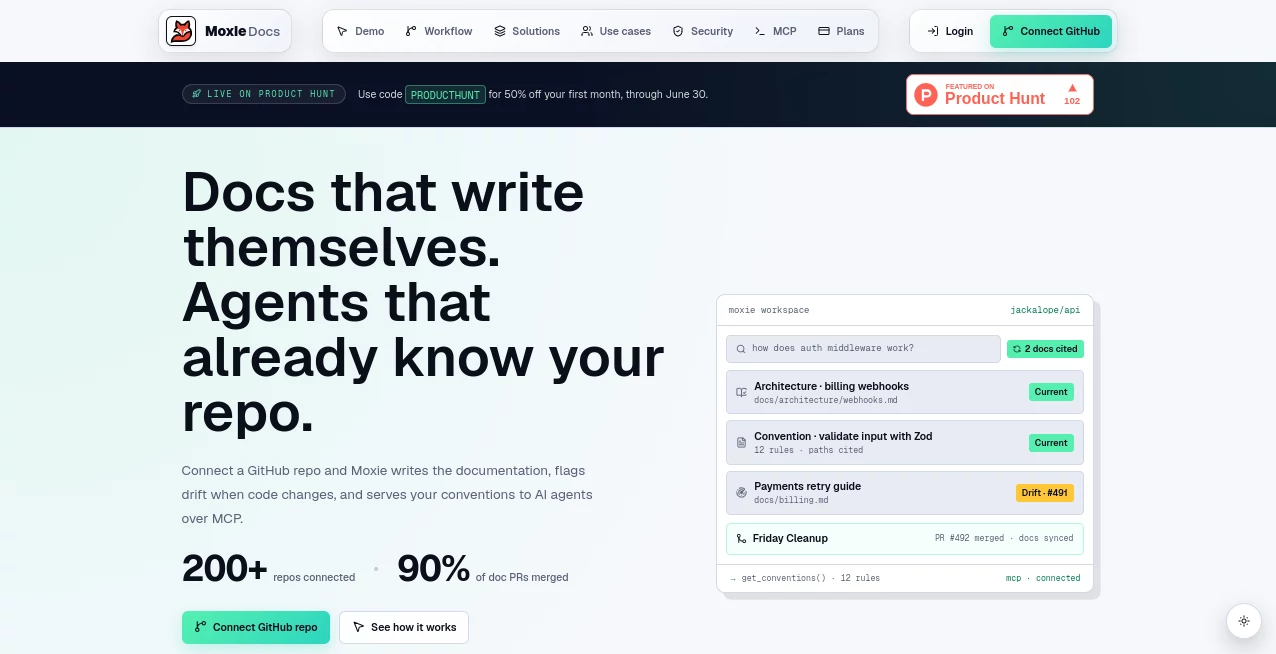
You interact with this tool through your usual coding environment. The main interface is a searchable workspace where you can find architecture overviews, conventions, and walkthroughs generated from your source code . Every piece of generated information is cited directly back to the specific lines of code it came from . There's no guesswork; if you read a piece of documentation, you can see the source file it was based on. It feels like having a senior developer who has read every single line of code in your project, ready to answer any question.
Accuracy & Performance
Accuracy here is critical, and the system ensures it by being grounded in reality. It indexes your repository—source code, tests, documentation, and commit history—on a schedule and after every pull request merge . When it suggests updates, it doesn't hallucinate. It uses the actual code and existing docs as sources to generate pull requests that you review before merging . This means you get the speed of AI-driven documentation without the fear of it inventing facts. Performance-wise, the initial index of a repository is fast, often completed within minutes, and after that, it incrementally updates on each merge.
Capabilities
One of its standout features is the Model Context Protocol (MCP) server . This allows AI coding agents like Cursor, Claude Code, Codex, or Copilot to query your codebase’s conventions, architecture, and documentation gaps directly. Instead of dumping your entire repository into a prompt (which is expensive and slow), the agent pulls only what it needs . It also automates PR hygiene by checking that your pull request descriptions match team templates and scanning for documentation drift . Plus, it offers a "Friday Cleanup" PR that bundles up all the documentation improvements identified during the week for an easy, single review.
Security & Privacy
Security is a top priority, especially when dealing with private repositories. The platform operates with a read-only default access model scoped per repository . The AI agents interacting with the MCP layer are restricted from accessing sensitive settings, billing info, or performing any code-merging actions. Most importantly, it follows a "human-in-the-loop" policy for changes. Any suggested documentation update comes as a pull request that needs a team member to review and approve . It doesn't auto-commit changes to your repository.
Use Cases
The most immediate impact I've observed is with new developer onboarding. Instead of a new hire pestering teammates with "where is the API key stored?" or "what naming convention do we use for services?", they can just ask the searchable workspace . Another critical use case is in AI-assisted refactoring. When you ask an AI agent to overhaul a module, it can pull the existing conventions and know where the documentation lives, ensuring the new code aligns with the established patterns and updates the docs in the same PR . It also makes generating release notes a breeze by automatically summarizing merged PRs into internal and external facing changelogs .
Pros and Cons
Pros:
- Stops documentation from rotting and becoming untrustworthy.
- Drastically cuts down the time spent on developer onboarding .
- Provides MCP context for AI agents, saving token costs and improving code quality.
- Automated PR checks ensure documentation stays in sync with code changes.
- All generated docs are sourced back to the original code, ensuring accuracy.
Cons:
- The free trial is limited to a specific number of repositories.
- You still need to review the AI-generated documentation PRs, so it adds a minor review step.
- It's most effective for teams using GitHub, so it won't work for other version control platforms.
Pricing Plans
The platform offers a 14-day free trial, which is plenty of time to test it on a critical repository and see the magic happen . Paid options start at around $29 per month for the Starter plan, which covers up to 5 repositories and is perfect for solo developers or small teams . For growing teams with more repositories and the need for Friday Cleanup PRs, the Pro tier is priced at roughly $79 per month and includes up to 15 repositories . Larger organizations with a fleet of services can opt for the Team plan at $199 per month, which supports up to 50 repositories and offers unlimited seats . Most plans offer a discount for annual billing.
How to Use Moxie Docs
Getting started is incredibly smooth. The first step is to install the GitHub App on the selected repositories you want to document. Once installed, the platform will perform its initial indexing of your source code, tests, and documentation—this usually takes only a few minutes . After the index is built, you immediately get a searchable documentation workspace and PR checks will start running on new pull requests . To take advantage of the MCP context for AI agents, you'll need to configure your IDE (like Cursor or VS Code) to connect to the Moxie MCP server . From then on, your AI agents will have the proper context. You can also schedule weekly "Friday Cleanup" PRs to review the documentation updates the platform has identified throughout the week.
Comparison with Similar Tools
Compared to traditional static documentation generators that rely on code comments (like Doxygen or JSDoc), this platform offers dynamic intelligence. It doesn't just pull comments; it analyzes architecture, conventions, and historical context. While tools like Sphinx or MkDocs are great for generating a site from markdown, they don't automatically check for drift or integrate with AI agents. Compared to other AI documentation tools that might try to autonomously rewrite code, this one has a strict "human-in-the-loop" policy and provides read-only access to AI agents over MCP . Its main advantage is the integration with the modern MCP ecosystem, allowing it to work as a contextual layer for your AI coding assistants, making them significantly smarter about your specific codebase.
Conclusion
If you've ever felt the frustration of outdated docs or the pain of onboarding new engineers to a complex repository, this tool is a breath of fresh air. It doesn't replace the need for a human to understand the code, but it eliminates the tedious, manual task of keeping documentation up to date. It bridges the gap between your code and your developers, and even your AI agents. By automating the boring stuff and ensuring everything is grounded in reality, it lets your team focus on building, not on maintaining legacy knowledge. It's a powerful investment in your team's velocity.
Frequently Asked Questions (FAQ)
Will it automatically change my source code?
Absolutely not. All documentation changes are submitted as pull requests that require human review and approval before they can be merged .
How does it save money on AI agent costs?
Instead of forcing your AI agent to read your entire repository for context every time (which uses a lot of tokens), the MCP layer provides just the relevant conventions and gaps . This targeted approach drastically reduces token consumption.
Can it generate changelogs?
Yes, it can automatically summarize merged PRs into internal and external facing changelog entries, which are editable before being finalized for release notes.
What is the "Friday Cleanup" PR?
It's a weekly, reviewable pull request that bundles all the documentation gaps and suggested updates identified throughout the week. This makes it easy to keep documentation in great shape without having to review tiny updates every day .
Does it support private repositories?
Yes, it's designed for GitHub repositories, including private ones, with a read-only security model to protect your code.
.
These classifications represent its core capabilities and areas of application. For related tools, explore the linked categories above.
