

















Pixal3D
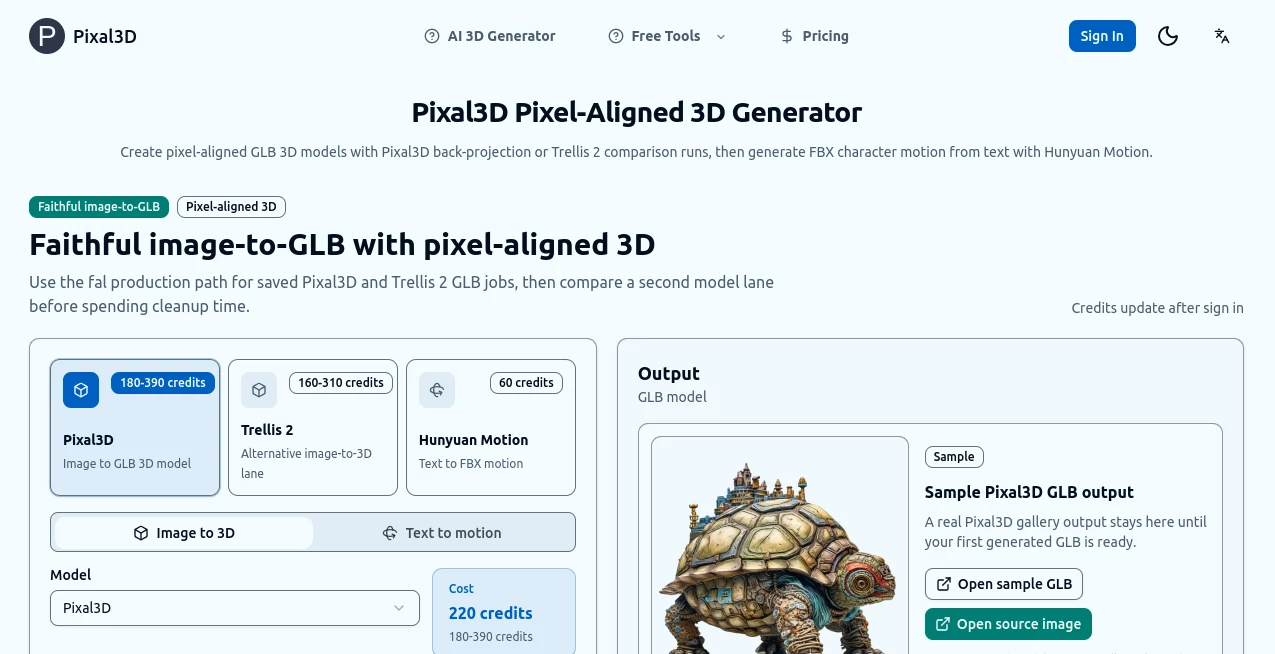
What is Pixal3D?
Turning a flat photo into a real 3D model used to mean hours of modeling work or expensive scanning equipment. This tool changes that completely. You upload a single image—whether it’s a product shot, a character concept, or even a casual phone photo—and it generates a clean, usable 3D model you can rotate, export, and use right away. The results often look so solid that people mistake them for hand-sculpted assets. I’ve seen indie game devs and product designers light up when they realize they can go from idea to 3D asset in minutes instead of days.
Introduction
3D content is everywhere now—from games and AR experiences to e-commerce and product visualization—but creating it has always been the bottleneck. Pixal 3D removes that barrier with a refreshingly simple approach. No complex software, no steep learning curve, just upload an image and get a ready-to-use 3D model. It’s particularly loved by creators who need fast results without sacrificing quality. The models come out with good topology, decent detail, and enough polish that you can drop them straight into Unity, Blender, or your favorite 3D tool. For anyone who’s ever wished they could bring their 2D ideas into three dimensions without the usual headache, this feels like a genuine breakthrough.
Key Features
User Interface
The whole process is built around simplicity. A large, friendly upload area takes center stage, with clear options for model quality and export format. After uploading, you get a clean 3D viewer where you can instantly rotate and inspect the model from every angle. No cluttered menus or hidden settings—just straightforward controls that get you from image to 3D model without frustration. Even first-time users usually succeed on their first or second try.
Accuracy & Performance
It handles a surprising range of input images well—from clean product photos to illustrated concepts. The generated geometry respects the original shapes and proportions, while adding believable depth and detail. Processing is quick enough that you can iterate fast, and the output quality is consistent enough for real projects. Many users report needing only minor tweaks in Blender before their models are production-ready.
Capabilities
You can generate full 3D models with textures, export in popular formats like OBJ, GLB, and FBX, and even get multiple variations from the same image. It works great on products, characters, environments, and abstract objects. The models come with decent topology for animation and game engines, and the texturing step preserves colors and details from your original photo. It’s versatile enough for both quick prototypes and more serious asset creation.
Security & Privacy
Your uploaded images are processed securely and not stored long-term unless you choose to save the resulting model. The platform focuses on delivering the output without unnecessary data retention, giving creators confidence when working with original designs or client material.
Use Cases
Product designers upload photos of physical prototypes and quickly get 3D versions for online stores or investor pitches. Game developers turn concept art into playable assets without waiting for a modeler. E-commerce sellers create 360° product views from single photos, improving customer experience. Architects and interior designers visualize real-world objects in 3D environments. Even hobbyists bring childhood drawings or favorite toys into digital life. Wherever you need fast, high-quality 3D from 2D sources, it delivers.
Pros and Cons
Pros:
- Extremely fast turnaround from image to usable 3D model.
- Surprisingly good geometry and texturing quality for a one-click tool.
- Simple workflow that doesn’t require 3D expertise.
- Multiple export formats that work across major software and engines.
- Generous free tier for testing and small projects.
Cons:
- Very complex or highly detailed subjects may need some post-processing.
- Free usage has reasonable daily limits.
- Advanced features like animation rigging require external tools.
Pricing Plans
The free tier lets you generate several high-quality models per day, perfect for testing ideas or small personal projects. Paid plans unlock unlimited generations, higher resolution outputs, priority processing, and commercial licensing options. Pricing feels fair for the time it saves—many creators say it pays for itself after converting just one big batch of assets.
How to Use Pixal 3D
Start by uploading a clear, well-lit image of the object or character you want to convert. Choose your preferred quality level and wait a short moment while it processes. Once the 3D viewer appears, rotate and inspect the model from all angles. If you’re happy, download in your chosen format (OBJ, GLB, etc.). For better results, use clean backgrounds and front/side views when possible. The whole process usually takes less than a minute from upload to export.
Comparison with Similar Tools
Many image-to-3D tools either produce low-quality meshes full of artifacts or require complex setups and multiple input photos. This one stands out for its balance of speed, simplicity, and output quality. It doesn’t pretend to replace professional modeling for ultra-complex work, but for the vast majority of everyday needs, it delivers faster and cleaner results than most alternatives in its category.
Conclusion
3D creation shouldn’t be reserved for specialists with expensive tools and years of experience. Pixal 3D brings professional-looking models within reach of anyone with a good idea and a photo. It saves enormous time while opening creative doors that used to stay closed for many. Whether you’re building games, selling products, prototyping designs, or just having fun, it turns the dream of “I wish I could make this 3D” into a simple reality. In a world that increasingly lives in three dimensions, having a tool this capable and approachable is genuinely exciting.
Frequently Asked Questions (FAQ)
What kind of images work best?
Clean, well-lit photos with clear subjects on simple backgrounds give the strongest results.
Can I use the models commercially?
Yes—paid plans include full commercial rights for your generated assets.
How detailed are the generated models?
Good enough for games, visualization, and prototypes; very complex organic shapes may benefit from light cleanup.
Do I need multiple angles of the object?
Usually one clear front or angled photo is enough, though multiple views can improve accuracy.
Is there a free way to try it?
Absolutely—the free tier gives you several generations per day to test quality on your own images.