
Planpoint
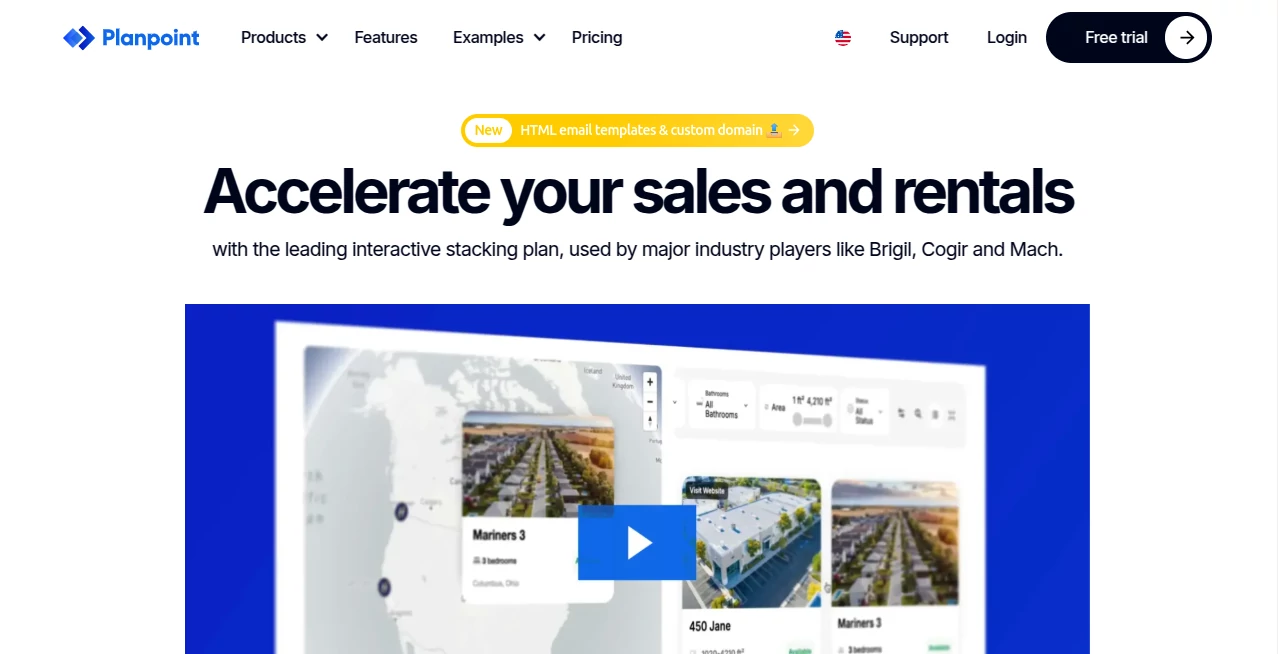
What is Planpoint?
Modern property buyers expect more than static floor plans and image galleries. They want to explore developments, compare units, and make informed decisions before contacting a sales team. This platform transforms traditional property presentations into an engaging digital experience that helps developers, brokers, and property managers showcase residential and commercial projects in a far more interactive way.
Designed for real estate professionals of every size, the solution combines interactive floor plans, immersive 3D experiences, detailed unit information, lead generation tools, and powerful project management features in a single platform. Whether the goal is marketing condominiums, rental communities, commercial properties, or large master-planned developments, it provides an elegant experience that keeps potential buyers engaged from the first click to the final inquiry. The platform is trusted by developers across multiple countries and continues to expand with new visualization and marketing capabilities that improve both customer experience and sales efficiency. :contentReference[oaicite:0]{index=0}
Key Features
User Interface
The interface is thoughtfully designed for both visitors and administrators. Prospective buyers can navigate buildings, compare available units, browse galleries, explore amenities, save favorites, and access unique pages for each property. Meanwhile, marketing teams can customize branding, themes, colors, terminology, and layouts without requiring advanced technical skills. Even first-time users can quickly understand how to navigate projects thanks to the intuitive visual design. :contentReference[oaicite:1]{index=1}
Accuracy & Performance
Real-time availability updates, pricing management, unit comparisons, searchable inventories, and synchronized project information help ensure visitors always see current data. The platform also supports integrations that allow property information and lead data to remain synchronized with external systems, reducing manual work while improving sales accuracy. :contentReference[oaicite:2]{index=2}
Capabilities
- Interactive floor plans and stacking plans
- Immersive 3D property visualization
- 360-degree project exploration
- Interactive maps and 3D site plans
- Unit comparison tools
- Favorites and priority lists
- Lead generation forms
- Advanced analytics and heatmaps
- CRM and API integrations
- Support for multiple project phases
- Custom branding and themes
- SEO-friendly unit pages with unique URLs
Security & Privacy
Administrative controls allow organizations to assign permissions based on team roles, ensuring that sales representatives, marketing teams, and administrators each receive the appropriate level of access. Business information, pricing, and project updates can be managed securely while maintaining consistent customer-facing content across every project. :contentReference[oaicite:3]{index=3}
Use Cases
- Marketing newly constructed residential developments.
- Managing apartment and rental property availability.
- Presenting commercial office or retail spaces.
- Showcasing master-planned communities and land projects.
- Displaying interactive property catalogs on touchscreen kiosks.
- Helping buyers compare floor plans before scheduling visits.
- Generating qualified leads directly from property pages.
- Providing multilingual property experiences for international buyers.
Pros and Cons
Pros
- Highly interactive property presentation.
- Professional and customizable design.
- Easy content management for non-technical teams.
- Excellent visualization with 3D and 360° support.
- Advanced analytics for sales optimization.
- CRM, API, and marketing integrations.
- SEO-friendly architecture for property listings.
- Works across desktop, mobile, kiosks, and touchscreen displays.
Cons
- Primarily designed for the real estate industry.
- Advanced enterprise capabilities may exceed the needs of very small projects.
- Some premium features are available only in higher service tiers.
Pricing Plans
The platform offers a free trial for new users, while paid subscription plans provide access to advanced business features, enterprise capabilities, enhanced visualization tools, analytics, integrations, and customization options. Pricing depends on project requirements and organization size. :contentReference[oaicite:4]{index=4}
How to Use Planpoint
Start by creating a new property project and uploading floor plans, images, pricing, and unit details. Customize the interface with your company branding, colors, terminology, and preferred layout. Configure availability, amenities, parking information, and lead forms before publishing the project. Finally, embed the interactive viewer into your website or share dedicated project links with potential buyers. Sales teams can continue updating prices, inventory, and project information whenever changes occur, ensuring visitors always receive accurate information. :contentReference[oaicite:5]{index=5}
Comparison with Similar Tools
Unlike traditional property listing platforms that rely mainly on static images and downloadable PDFs, this solution focuses on creating an immersive buying experience. Interactive floor plans, live availability, detailed unit comparisons, advanced analytics, customizable branding, API integrations, 3D visualization, and enterprise portfolio management make it particularly valuable for developers handling modern residential and commercial projects. Its combination of marketing, visualization, and sales management features offers a more complete workflow than many standalone floor plan viewers. :contentReference[oaicite:6]{index=6}
Conclusion
For real estate organizations looking to modernize property marketing, this platform delivers an impressive balance of visual presentation, operational efficiency, and customer engagement. Interactive browsing, immersive property exploration, flexible customization, and intelligent lead generation work together to create an experience that benefits both buyers and sales teams. Its continuous product development and focus on real estate innovation make it a strong choice for developers, agencies, and property managers seeking to stand out in a competitive market.
Frequently Asked Questions (FAQ)
Who is this platform designed for?
It is built primarily for real estate developers, property managers, brokers, and marketing teams.
Can it display interactive floor plans?
Yes. Visitors can explore buildings, compare units, review layouts, and interact with available properties through dynamic floor plans.
Does it support 3D experiences?
Yes. The platform supports immersive 3D visualization, 360-degree environments, and integrations with virtual tour providers.
Can teams update listings without technical knowledge?
Yes. Property availability, pricing, layouts, images, and project information can be updated through an intuitive management interface.
Does it integrate with external business systems?
Yes. API connectivity, CRM integrations, and automation options help synchronize property information and sales workflows.
AI Team Collaboration , AI Sales Assistant , AI Analytics Assistant .
These classifications represent its core capabilities and areas of application. For related tools, explore the linked categories above.

Planpoint Alternatives Product

LSGRO

Kol find

Reloq

Gemini Omni

Picmim

Sourcetable

Toflow AI

Customer Fee…

Arobis AI Vi…