


















Pondas
What is Pondas?
Pondas is a browser-based AI software development platform built around the idea of using a team of specialized AI agents instead of relying on a single assistant. Its main promise is simple: describe what you want to build, let different agents handle planning, development, research, and testing, then watch the application take shape without opening a terminal or configuring a traditional development environment.
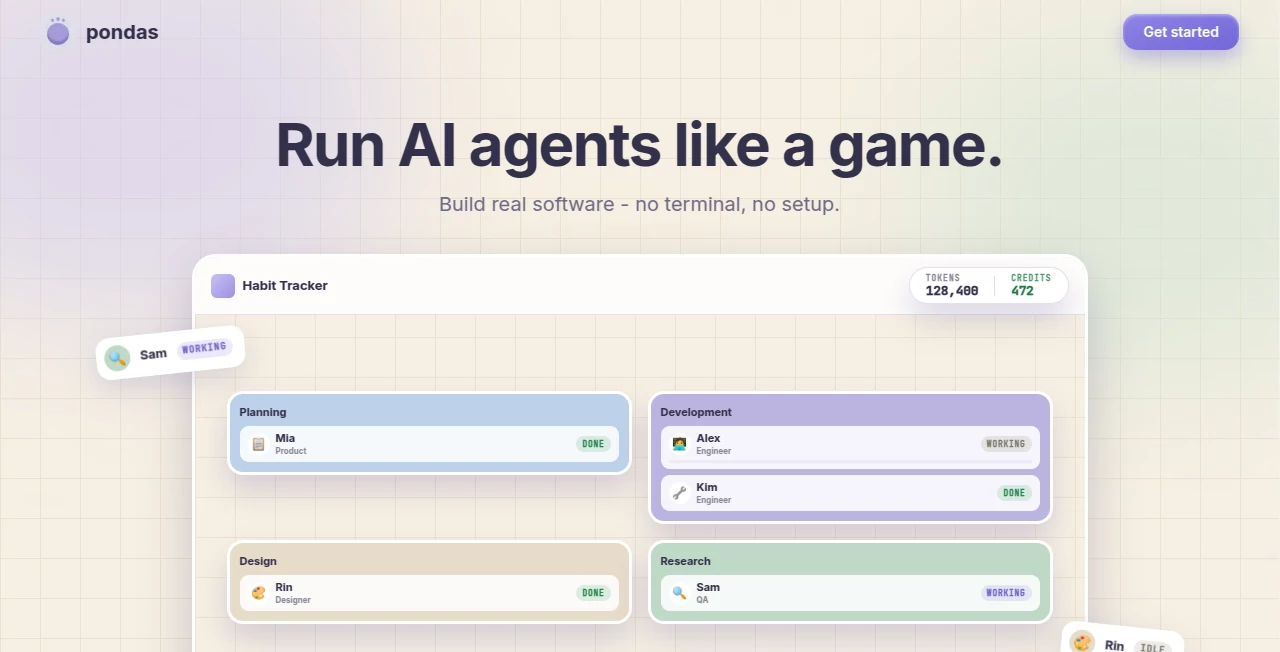
The platform takes a particularly visual approach to AI-assisted development. Rather than hiding the work behind a chat window, it presents agents, tasks, progress, token usage, and previews in one workspace. For someone who has an application idea but does not want to deal with local setup, this makes the process considerably easier to understand.
One of the more appealing aspects is the path from an initial idea to a working web application. Users can view the application while it is being built and publish it to a live URL when it is ready. That makes the experience useful for prototypes, internal tools, experiments, and early-stage products.
Key Features
- Multiple AI agents working on different parts of a software project.
- Visual monitoring of agent activity and completed tasks.
- Parallel development, planning, research, and testing workflows.
- Live application previews during development.
- One-click publishing to a live web address.
- No terminal or complicated local setup required.
- Visible token and credit usage inside the workspace.
- Free credits available when creating an account without requiring a payment card.
User Interface
The interface is designed to feel more like a small digital development office than a conventional coding environment. Different agents can appear as individual workers with specific responsibilities, while their current status and tasks remain visible on the same screen.
This approach is especially useful when several things are happening simultaneously. Instead of repeatedly asking an AI what it is doing, the workspace gives you a direct view of the development process. You can see an engineer working on code, another agent handling planning or specifications, and a testing-oriented agent checking the result.
For first-time builders, this visual structure can make AI-assisted development feel much less mysterious. For experienced developers, it offers a convenient way to supervise several automated tasks without constantly switching between tools.
Accuracy & Performance
The platform's multi-agent structure is designed to reduce the weakness of asking one AI model to handle every part of a project. Planning, implementation, and testing can be separated into different responsibilities, allowing one agent's work to be reviewed or extended by another.
This distinction matters because producing code is only one part of building software. A project can compile successfully and still contain broken interactions or unexpected behavior. A dedicated testing step can therefore provide an additional layer of practical validation before an application is published.
Performance also benefits from parallel work. When several independent tasks can be handled at the same time, a project does not necessarily have to move through every development step sequentially.
Capabilities
The platform focuses primarily on turning natural-language software ideas into functioning applications. Users can describe a project, assign work to different agents, observe development, preview the result, and eventually publish it.
Its capabilities are particularly interesting for projects where several roles are required. A planning agent can help define the work, an engineering agent can implement it, and a testing agent can examine what has been produced. Multiple agents can also work on different areas of a project at the same time.
The live preview is another practical feature. Instead of waiting until the end of a project to discover whether an interface behaves as expected, users can open the application during development and see its current state.
Security & Privacy
The service states that user prompts, instructions, uploaded context, and generated content are processed by its AI model providers to perform requested tasks. It also states that user inputs and outputs are not used to train its own AI models and that user content is not sold.
The privacy policy identifies Anthropic as the primary AI model provider and also lists services including Stripe for payments, Clerk for authentication, Vercel and Railway for hosting, and E2B for sandboxed code execution. Analytics services such as Google Analytics and Amplitude are described as loading only after the applicable analytics consent is provided.
Users should still avoid placing highly sensitive information into any AI development environment unless they have reviewed the current privacy policy and understand how their information is processed.
Use Cases
- Rapid prototypes: Turn an application concept into a working prototype without first setting up a complete local development environment.
- Internal business tools: Create simple dashboards, trackers, forms, or workflow applications for internal use.
- Startup experimentation: Test product ideas quickly before committing significant development resources.
- Learning and experimentation: Explore software development concepts while watching specialized agents handle different responsibilities.
- Small web applications: Build focused applications where planning, implementation, and testing can be divided among several agents.
- Design validation: Preview an application while it is being developed instead of waiting for a final build.
- Parallel development: Give multiple agents different parts of a project so independent tasks can progress simultaneously.
Pros and Cons
Pros
- Very low barrier to starting a software project.
- No terminal or traditional development setup is required.
- Multiple agents can collaborate on the same project.
- Development activity is visible instead of being hidden behind a single chat interface.
- Live previews make it easier to inspect work during development.
- Applications can be published directly to a live URL.
- Free starter credits are available without requiring a card at signup.
Cons
- The platform is primarily focused on AI-assisted software development rather than general-purpose AI tasks.
- Complex production applications may still require experienced developers for architecture, maintenance, and deeper debugging.
- AI-generated code should be reviewed rather than assumed to be production-ready.
- Users who prefer complete control over a local development environment may find a browser-first workflow restrictive.
Pricing Plans
The website currently promotes free credits for new users and states that no payment card is required to start building. The workspace also displays token and credit usage, giving users a way to monitor their consumption while working on projects.
The publicly visible website does not provide a detailed breakdown of paid plan names, monthly prices, or exact credit allocations on its main landing page. Because pricing and usage limits can change as the product develops, users should check the account or pricing interface available at the time they sign up before choosing a paid option.
How to Use the Platform
- Create an account and start with the available free credits.
- Describe the application you want to build in plain language.
- Allow the planning and development agents to break the idea into practical tasks.
- Watch the agents work on development, research, specifications, and testing.
- Use the live preview to inspect the current version of the application.
- Request changes when something needs to be adjusted or improved.
- Let the relevant agents continue working on the updated requirements.
- Publish the finished application when the result is ready.
Comparison with Similar Tools
Traditional AI coding assistants often revolve around a single conversation where the user asks for code and then manually integrates the result. AI application builders can simplify that process, but many still leave users wondering what is happening behind the scenes.
This platform takes a different direction by making the agents themselves part of the experience. Planning, development, research, and testing can be represented as separate roles, while their activity remains visible. The result is closer to supervising a small virtual development team than simply chatting with a coding assistant.
That difference is particularly valuable for people who care about the development process as much as the final output. It can also make experimentation more approachable because users can move from an idea to a live application without first learning a collection of command-line tools.
Conclusion
For anyone interested in building software with AI but tired of juggling prompts, terminals, environments, and separate development tools, this approach is genuinely refreshing. Its biggest strength is not simply generating code; it is the way it organizes several AI roles into a visible workflow.
The ability to watch agents plan, develop, research, and test a project side by side gives the experience a sense of direction that many AI coding tools lack. Add live previews and one-click publishing, and the distance between an idea and a usable web application becomes much shorter.
It is best viewed as an accelerated development environment rather than a replacement for every part of professional software engineering. For prototypes, experiments, small applications, and early product ideas, however, the combination of multi-agent collaboration and a visual workflow makes it an interesting option worth exploring.
Frequently Asked Questions (FAQ)
What is this platform used for?
It is designed for building real software applications with teams of AI agents. Users can describe an idea, have agents work on different development responsibilities, preview the application, and publish it.
Do I need to install a development environment?
No. The service is designed to work without a terminal or traditional local setup, allowing users to start building directly through the browser.
Can multiple AI agents work at the same time?
Yes. Multiple agents can be assigned different parts of a project and can work in parallel. This can include responsibilities such as planning, development, research, and testing.
Can I see the application before publishing it?
Yes. A live preview is available during development, allowing users to inspect the application while the agents are still working on it.
Can I publish the application?
Yes. The platform supports publishing an application to a live URL once the project is ready.
Is there a free option?
New users receive free credits when they sign up, and the website states that a payment card is not required to start building.
Does it use my content to train its own AI models?
According to its privacy policy, user inputs and outputs are not used to train its own AI models, and the service states that it does not sell user content.
Is it suitable for professional software development?
It can be useful for prototypes, experiments, and accelerating development workflows. For complex production systems, experienced developers should still review architecture, generated code, security, testing, and deployment decisions.
What makes its approach different from a normal AI coding assistant?
The main difference is the multi-agent workflow. Instead of treating the AI as a single assistant, the platform lets different agents take on separate roles and work on different parts of a project while their progress remains visible.
AI App Builder , AI Testing & QA , AI Code Generator , AI Developer Tools .
These classifications represent its core capabilities and areas of application. For related tools, explore the linked categories above.

Pondas Alternatives Product

ShipAhead

cznull

Somnio
Kimi K2.5

FurWall

Mythx AI

Toonifyit

Vibe Coding

Sourcetable
