
Proloca
What is Proloca?
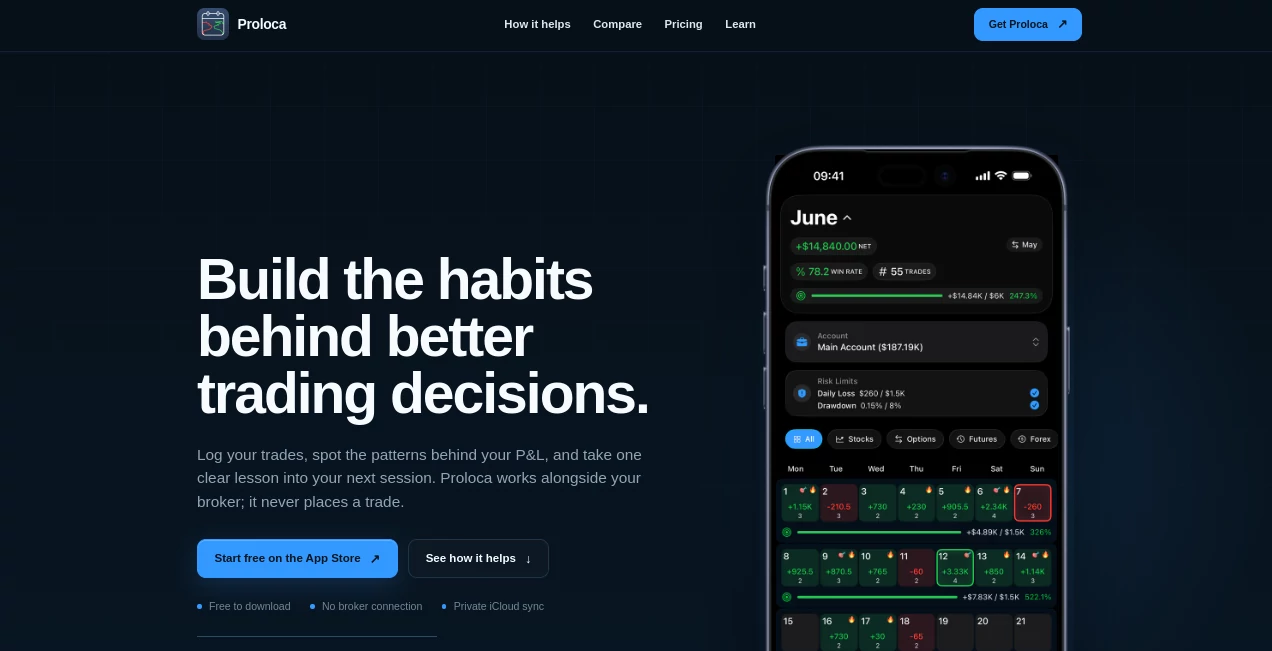
Proloca is a trading journal designed for iPhone users who want to understand more than just whether a trade made or lost money. Instead of treating a trading journal as a simple list of entries, it brings together trades, psychology, account context, goals, risk limits, and performance review in one place.
The idea is refreshingly practical. A profitable day does not always mean a good trading process, and a losing day does not necessarily mean the process was poor. By keeping information such as market, session, direction, fees, trade size, and psychological state alongside performance data, the app gives traders more context when reviewing what actually happened.
It works alongside a broker rather than replacing one. There is no trade execution, market access, or signal service involved. That makes it particularly useful for traders who already have their brokerage platform but want a dedicated space for reviewing decisions and building better habits.
Key Features
- Visual P&L calendar for reviewing trading performance by day and period.
- Trade-level analytics with filters for markets, sessions, direction, fees, size, and psychology.
- Separate Trading Accounts for personal capital, funded challenges, and archived accounts.
- Calculated Equity that separates trading results from cash movements.
- Weekly and monthly Profit Goals attached to individual accounts.
- Daily Loss and Maximum Drawdown Risk Limits.
- Psychology tracking for states such as discipline, FOMO, and revenge trading.
- CSV import and export for moving historical journal data.
- Widgets, highlights, streaks, and events for keeping progress visible.
- Optional Face ID or Touch ID protection.
- Private iCloud synchronization when enabled.
- Support for stocks, options, futures, forex, crypto, and other markets.
User Interface
The interface is built around the iPhone rather than trying to squeeze a desktop trading dashboard onto a small screen. Daily logging is intended to be quick, while calendar and statistics views make longer-term review easier to follow.
The visual calendar is especially useful for traders who prefer seeing their month as a pattern instead of scrolling through a spreadsheet. Green and red days, streaks, goals, risk information, and other context can be reviewed together, giving the trader a quick sense of how a period unfolded.
The account-focused design is another strong point. Traders managing several pools of capital can keep personal accounts, funded challenges, and archived accounts separate instead of mixing everything into one balance.
Accuracy & Performance
The quality of the analysis depends on the information entered into the journal, and the app is clear about that distinction. It does not predict markets or generate trading signals. Instead, its statistics are calculated from the trades and information recorded by the user.
This approach is useful because it keeps the review grounded in actual trading history. A trader can move from a statistic back to the trades that contributed to it and examine factors such as market, session, direction, fees, or psychological state.
Another thoughtful detail is the separation between Trading P&L and cash adjustments. Deposits, withdrawals, payouts, resets, and corrections should not automatically be interpreted as evidence of trading performance. Keeping these elements separate can make an equity review much easier to understand.
Capabilities
The feature set goes well beyond basic trade logging. Users can record trades manually or import historical information through CSV workflows. Each trade can include contextual information such as account, market, direction, session, fees, notes, screenshots, and how the trade was handled.
The account system adds another useful layer. A starting balance can establish the baseline for calculated equity, while cash adjustments account for money entering or leaving an account. Profit goals can be configured as fixed monetary amounts or percentages, and risk limits can be used to keep daily loss and maximum drawdown visible during the review process.
Psychology tracking is also an important part of the experience. Instead of looking only at P&L, traders can compare emotional and behavioral states with actual results. For example, someone might discover that their worst results consistently appear during revenge trading or that a particular market session produces better execution.
Security & Privacy
Privacy is one of the more notable aspects of the product. Trading journal records are stored on the user's device, with private iCloud or CloudKit synchronization available when enabled. If iCloud is unavailable, the application can continue storing information locally on the iPhone.
Users can also protect access with Face ID or Touch ID, export their journal through CSV, and use granular deletion controls. The privacy policy states that the company does not store personal trading information on its own servers. Anonymous usage analytics, such as feature usage, crashes, device type, and iOS version, may still be collected to improve the application.
For someone keeping detailed records of trading activity, this local-first approach can be reassuring. The product also avoids requiring a broker connection, which means traders are not handing over their brokerage credentials simply to maintain a journal.
Use Cases
- Daily trade review: Quickly record trades and review the decisions made during a session.
- Trading psychology: Compare emotional states and discipline with actual trading results.
- Prop-firm challenges: Keep funded challenges separate from personal accounts and monitor relevant risk limits.
- Multi-account traders: Maintain separate capital pools while still viewing aggregate performance across active accounts.
- Monthly performance analysis: Use the calendar and statistics to identify recurring patterns.
- Risk management: Keep daily loss and maximum drawdown limits visible alongside current results.
- Historical migration: Import existing records through CSV instead of rebuilding an entire journal manually.
- Process improvement: Identify which markets, sessions, directions, or behaviors deserve another look.
Pros and Cons
Pros:
- Designed specifically for iPhone.
- Combines trade records with psychology and execution context.
- Useful account and capital management features.
- Separates cash movements from Trading P&L.
- Includes profit goals and risk limits.
- Supports CSV import and export.
- Offers Face ID or Touch ID protection.
- Does not require a live broker connection.
- Supports several major trading markets.
- Includes a free tier for core journaling.
Cons:
- The functional application is currently designed for iPhone.
- There is no live broker synchronization.
- Analysis is based on the data entered or imported by the trader.
- Advanced features require the Pro subscription.
- It is a review and record-keeping tool rather than a trading platform or signal service.
Pricing Plans
The app can be downloaded for free and includes core trade-journaling functionality. A Pro subscription adds deeper analysis together with features related to capital, goals, risk, and automation.
Subscriptions are offered on monthly and yearly billing cycles. The exact price shown can vary according to the user's Apple App Store region and any eligible introductory offer, so checking the current in-app price is the most reliable way to see the applicable cost.
This structure makes sense for traders who want to try the basic journal first. Someone who only needs a place to record trades may find the free tier sufficient, while traders who regularly analyze performance, accounts, goals, and risk may get more value from the paid features.
How to Use the Trading Journal
- Create or open a trading account inside the app.
- Set the appropriate starting balance and account details.
- Record trades manually or import existing records through CSV.
- Add useful context such as market, direction, session, fees, notes, screenshots, and psychology.
- Review the visual calendar to identify winning, losing, and streak patterns.
- Use statistics and filters to investigate specific markets, sessions, directions, or behaviors.
- Review the trades behind important statistics instead of relying on a single number.
- Set profit goals and risk limits where appropriate.
- Use the resulting patterns to decide what should be repeated or changed in the next trading session.
Comparison with Similar Tools
Traditional broker history is primarily an execution record. It tells you what happened in the account but is not necessarily designed to help you study your decision-making process.
A spreadsheet offers much more flexibility, but that flexibility can become a weakness when every field, calculation, filter, and dashboard has to be maintained manually. A dedicated journal provides a more structured workflow with less setup.
This product sits between those two approaches. It is purpose-built for reviewing trading behavior while remaining separate from the broker itself. The difference becomes especially noticeable for traders who want to connect psychology, risk, account context, and performance instead of treating each as a separate spreadsheet.
It is also important to understand what it does not do. It does not place trades, provide market access, automatically synchronize with a live brokerage account, or promise profitable results. Its value comes from helping traders examine their own recorded history more carefully.
Conclusion
A trading journal becomes much more useful when it helps answer the question behind the numbers: why did the result happen?
That is where this iPhone-focused approach stands out. Instead of stopping at daily profit and loss, it brings account context, psychology, execution details, goals, and risk into the same review process. The ability to separate trading performance from deposits, withdrawals, payouts, and other capital movements is particularly useful for traders managing more than one account.
It will not tell you where the market is going, and it does not claim to. For traders who already have a broker and want a cleaner way to study their own decisions, however, it offers a focused alternative to spreadsheets and basic broker history.
The best use of a journal is not simply collecting more data. It is finding one meaningful pattern, deciding what to do differently, and carrying that lesson into the next session. This product is built around exactly that habit.
Frequently Asked Questions (FAQ)
Is this a trading platform?
No. It is a trading journal and review application. It does not provide market access, execute trades, or function as a broker.
Does it automatically connect to my broker?
No live broker synchronization is currently available. Trades can be entered manually, or historical information can be imported using CSV workflows.
Which markets can be tracked?
The journal supports stocks, options, futures, forex, crypto, and an Other category. Market-based filters can also be used when reviewing calendar and statistics views.
Can I track trading psychology?
Yes. Psychology and execution context can be recorded alongside trades, allowing users to compare states such as discipline, FOMO, and revenge trading with their actual results.
Does it provide trading signals or financial advice?
No. The application is designed for record-keeping and review. It does not predict markets, provide trade signals, or offer financial advice.
Is there a free version?
Yes. The free tier includes core trade journaling. The Pro subscription unlocks additional analysis, capital management, goals, risk features, and other advanced functionality.
Where is my trading data stored?
Journal records are stored on the device and can synchronize through private iCloud or CloudKit when available. Users can also export their records through CSV.
Can I protect my journal?
Yes. Optional Face ID or Touch ID protection is available, providing an additional layer of security for private trading records.
These classifications represent its core capabilities and areas of application. For related tools, explore the linked categories above.

Proloca Alternatives Product

StockTalker …

MacroMicro

Creget

Magia Trade

Sourcetable

IntoTheBlock

CoinIQ

MiniValuator

PowerballTax