
Rallied
What is Rallied?
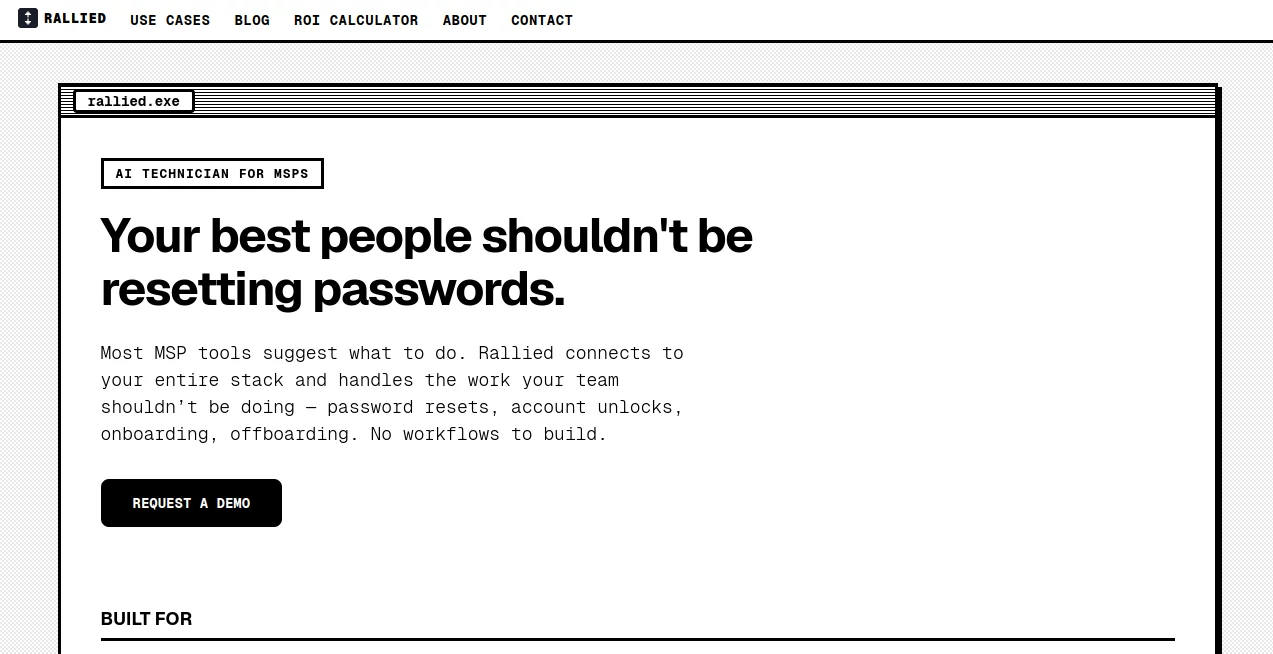
Rallied is an AI technician built specifically for managed service providers (MSPs) that want to reduce the amount of repetitive L1 and L2 work handled by human technicians. Instead of simply summarizing tickets or suggesting what a technician should do next, it can actually execute common IT tasks across the systems an MSP already uses.
For example, a routine account-lockout ticket can be investigated, resolved, communicated back to the user, and updated in the PSA without requiring a technician to open the ticket and perform every step manually. The same approach extends to password resets, mailbox permissions, group membership changes, onboarding, offboarding, and other recurring service-desk requests.
The platform is designed around a practical problem: skilled MSP technicians should spend their time on projects, complex troubleshooting, and customer work rather than repeatedly performing the same administrative tasks. It connects with PSA, RMM, identity, documentation, productivity, and collaboration systems, allowing routine work to happen across the existing technology stack.
Key Features
- Autonomous ticket resolution: Handles common L1 and L2 requests such as password resets, account unlocks, mailbox permissions, and group membership changes.
- Ticket triage and dispatch: Collects relevant information from users, categorizes requests, fills triage fields, retrieves documentation, and routes tickets to the appropriate technician.
- Onboarding and offboarding: Coordinates tasks such as Microsoft 365 licensing, account creation, security groups, RMM deployment, access removal, and license reclamation.
- Cross-platform execution: Connects with PSA, RMM, identity, documentation, and productivity platforms rather than operating as an isolated chatbot.
- Slack and Microsoft Teams support: Teams can interact with the AI technician through familiar communication channels, while PSA-only operation is also available.
- Controlled autonomy: Administrators decide which actions can be completed automatically and which situations require human approval.
- Fast deployment: The company states that deployments can go live within the same week rather than requiring a lengthy implementation project.
- No workflow builder requirement: The service is positioned as an alternative to manually creating and maintaining large numbers of automation workflows.
User Interface
The experience is designed around the tools MSP teams already use instead of forcing technicians to spend their day inside another complicated dashboard. Requests can arrive through a PSA, Slack, or Microsoft Teams, while the system works with connected platforms in the background.
The ticket-oriented approach is particularly easy to understand. A service request enters the system, the relevant information is investigated, an action is performed when permitted, and the result is communicated back to the requester. Internal notes and ticket updates provide visibility into what happened.
For an MSP manager, this is a useful distinction. The goal is not to give technicians another AI chat window to monitor. It is to make routine tickets disappear from their queue when those requests can safely be handled automatically.
Accuracy & Performance
Performance is centered on completing the entire task rather than merely identifying the likely solution. In a typical account-access scenario, the system can identify the requester, check the relevant identity system, determine the account state, perform an authorized change, notify the user, and update the ticket.
The company highlights common requests that can take around 10 to 15 minutes of technician time when completed manually. Its positioning is that automating this type of work can save substantial technician hours when an MSP receives hundreds of repetitive tickets each month.
Performance also depends on the integrations, permissions, policies, and scope configured for each environment. That is important for MSPs because every client environment can have different systems and approval requirements. Rather than assuming every action should be autonomous, the platform allows organizations to control where human intervention remains necessary.
Capabilities
The strongest capability is its ability to move from understanding a ticket to taking action. Supported scenarios include password resets, account unlocks, MFA-related assistance, mailbox access, group membership changes, VPN troubleshooting, onboarding, offboarding, approval routing, and knowledge lookups.
The integration layer covers widely used MSP platforms including ConnectWise, Autotask, HaloPSA, SuperOps, Datto RMM, NinjaRMM, Microsoft 365, Entra ID, Okta, JumpCloud, Google Workspace, IT Glue, Hudu, and Atlassian.
Another useful capability is handling work that crosses several systems. An employee onboarding request, for instance, may require account creation, licensing, group membership, RMM configuration, and PSA documentation. Bringing those steps together can remove a considerable amount of repetitive coordination from an MSP's service desk.
Security & Privacy
Security is especially important for an AI system that can perform administrative actions. The platform gives administrators control over what it can do autonomously and where approval from a human is required. This makes it possible to begin with lower-risk tasks and gradually expand its permissions as confidence grows.
The service also emphasizes permission controls and auditability. Its website states that it uses least-privilege service accounts and is SOC 2 compliant. Approval-based actions can be routed through communication channels such as Slack, Microsoft Teams, or email before execution.
MSPs should still review the permissions, integrations, client requirements, and internal security policies before enabling autonomous actions. The ability to restrict autonomy is valuable because not every service-desk request should receive the same level of automation.
Use Cases
Password and account recovery: Repetitive password resets and account unlocks are among the clearest candidates for automation. The system can investigate the account state, perform an authorized change, notify the requester, and update the ticket.
MFA problems: Employees who replace phones or lose access to an authentication method can create frequent support requests. These cases can be investigated and routed according to the organization's configured policies.
Access management: Mailbox permissions, group membership, licensing, and similar access-related requests can be processed without requiring a technician to manually perform every routine step.
Employee onboarding: New employees often require several changes across Microsoft 365, identity systems, security groups, RMM platforms, and PSA records. Coordinating these tasks from a single request can reduce manual effort.
Employee offboarding: When an employee leaves, access can need to be revoked, licenses reclaimed, accounts updated, and documentation completed. Automating the repetitive portions can make the process faster and more consistent.
Ticket triage: When a request is unclear, the system can ask follow-up questions, identify priority, retrieve relevant documentation, and send the request toward the appropriate technician.
Routine VPN and application issues: Some recurring technical problems can be investigated using information available across connected systems before escalation becomes necessary.
Pros and Cons
- Pros: Performs actions rather than only suggesting solutions.
- Pros: Designed specifically around MSP service-desk operations.
- Pros: Supports PSA, RMM, identity, documentation, and productivity integrations.
- Pros: Can handle onboarding and offboarding workflows.
- Pros: Provides controls for autonomous versus approval-based actions.
- Pros: The company offers a 30-day free trial.
- Cons: It is primarily designed for MSPs rather than general consumers or ordinary internal users.
- Cons: The value depends heavily on having compatible systems and properly configured integrations.
- Cons: Organizations may need time to establish appropriate permissions and autonomy boundaries before allowing more sensitive actions.
- Cons: Public pricing information is not provided, so prospective customers need to contact the company for commercial details.
Pricing Plans
Public pricing is not listed on the website. Instead, the company offers a 30-day free trial and positions the onboarding process around a kickoff call, integration setup, permissions, and deployment.
During the initial phase, the team helps identify which workflows should be handled first, tunes integrations, addresses edge cases, and expands the scope of autonomous work. This approach makes sense for MSP environments because pricing and implementation requirements can vary according to the number of systems, clients, and workflows involved.
How to Use It
- Start with a kickoff call: Map the MSP's existing technology stack and identify the first categories of work to automate.
- Connect the required systems: Integrate the PSA, RMM, identity providers, documentation platforms, and communication tools used by the service desk.
- Set permissions: Decide which actions can be performed autonomously and which require approval.
- Start with repetitive tickets: Password resets, account unlocks, access requests, and similar high-volume tasks are natural starting points.
- Monitor the initial results: Review completed work, edge cases, and escalations during the trial period.
- Expand gradually: Once the team is comfortable with the results, additional workflows and permissions can be enabled.
Comparison with Similar Tools
Traditional MSP automation platforms often require teams to design triggers, conditions, actions, approval rules, and individual workflows. That model can be powerful, but it can also create another operational responsibility for smaller MSPs.
AI assistants and ticket copilots take a different approach by helping technicians understand requests, summarize conversations, or recommend next steps. Those capabilities can be useful, but they still leave someone responsible for carrying out the actual change.
This platform takes a more execution-focused position. Rather than stopping after identifying what should happen, it aims to perform the authorized work across the connected stack and close the loop. That makes it particularly interesting for MSPs whose main problem is the amount of technician time consumed by repetitive L1 and L2 tickets.
It is not necessarily a replacement for every automation platform or human technician. Complex incidents, unusual environments, sensitive changes, and situations requiring judgment can still benefit from experienced engineers. The stronger use case is removing predictable work from their queues so they can focus on higher-value responsibilities.
Conclusion
For MSPs, the most attractive part of AI automation is not another polished ticket summary. It is getting repetitive work completed without asking a skilled technician to repeat the same process hundreds of times.
This platform takes that idea seriously by combining ticket understanding with real execution across PSA, RMM, identity, documentation, and collaboration systems. Password resets, account unlocks, access changes, onboarding, offboarding, and ticket triage are practical examples where the approach can make a measurable difference.
The 30-day trial also gives MSPs an opportunity to test the concept against real service-desk workloads before expanding its permissions. For teams dealing with high ticket volumes and limited technician capacity, an AI technician that actually performs routine work can be considerably more valuable than one that simply tells employees what to do next.
Frequently Asked Questions (FAQ)
What type of businesses is it designed for?
It is designed primarily for managed service providers that manage IT environments for multiple clients and want to automate repetitive L1 and L2 service-desk work.
Can it resolve tickets automatically?
Yes. It is designed to execute authorized fixes, communicate with the requester, and update the associated ticket rather than only recommend a solution.
What kinds of tickets can it handle?
Examples include password resets, account unlocks, MFA-related requests, mailbox permissions, group membership changes, onboarding, offboarding, VPN issues, and other repetitive service-desk scenarios.
Does it support PSA and RMM platforms?
Yes. The platform connects with several popular PSA and RMM products, as well as identity, documentation, productivity, and collaboration platforms.
Does every action happen automatically?
No. Administrators can determine which tasks are safe to execute autonomously and which require human approval. This allows an MSP to increase the level of autonomy gradually.
How quickly can it be deployed?
The company states that it can connect to an MSP's stack and go live within the same week, following a kickoff and integration setup.
Is there a free trial?
Yes. The website currently advertises a 30-day free trial during which integrations can be tuned and the scope of autonomous work can be expanded.
Is pricing publicly available?
No public pricing table is displayed. MSPs can contact the company to discuss deployment requirements and commercial details.
Can it work with Slack or Microsoft Teams?
Yes. It can be deployed through Slack or Microsoft Teams, and PSA-only operation is also supported.
AI Workflow Management , AI Productivity Tools , AI Task Management , AI Customer Service Assistant .
These classifications represent its core capabilities and areas of application. For related tools, explore the linked categories above.

Rallied Alternatives Product

Weekly Brief

Rierino
AnyToURL

MindSnapz

AiZolo

SlideStorm AI

Motion

Supawazap

FINIITE AI