
RewriteAI
What is RewriteAI?
Clear writing makes a lasting impression, whether you're preparing a business email, polishing a blog post, improving an academic paper, or refining marketing copy. This platform is designed to make that process fast and effortless by transforming rough drafts into polished, natural-sounding text while preserving the original message. It focuses on improving grammar, readability, sentence flow, and writing style in just a few seconds.
Instead of simply replacing words with synonyms, the platform analyzes context before suggesting improvements. This produces text that feels smoother, more engaging, and easier to understand. With dozens of writing styles available, users can quickly adapt content for professional, casual, creative, or formal communication without rewriting everything manually.
Its clean interface removes unnecessary distractions, making it easy for anyone—from students and freelancers to marketers and business professionals—to improve their writing with minimal effort. Whether you need to fix grammar mistakes or completely transform the tone of your content, the experience remains simple and efficient.
Key Features
User Interface
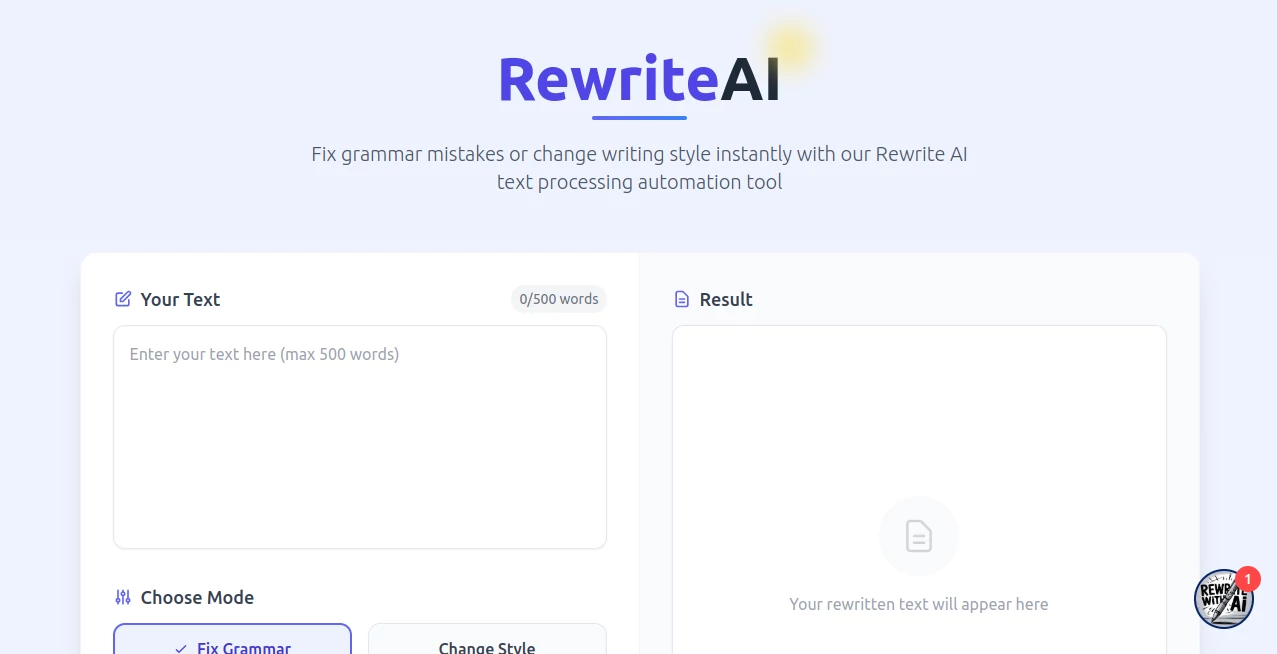
The interface is intentionally minimalistic. Users simply paste their text, choose a rewriting mode, select a preferred writing style, and receive improved content within seconds. The streamlined workflow eliminates complicated settings and makes the tool approachable even for first-time users.
- Simple text editor
- One-click rewriting
- Grammar correction mode
- Writing style transformation
- Fast processing
- Easy copy-and-use workflow
Accuracy & Performance
The rewriting engine focuses on maintaining the original meaning while improving readability and sentence structure. Rather than making unnecessary changes, it refines awkward wording, corrects grammar, and produces text that feels more natural. The result is cleaner communication without losing the author's intent.
Processing is almost instant, allowing users to edit multiple drafts without slowing down their workflow.
Capabilities
- Correct grammar mistakes automatically
- Improve sentence clarity
- Rewrite paragraphs naturally
- Transform writing tone
- Choose from more than 30 writing styles
- Create custom writing styles
- Enhance readability
- Preserve original meaning
- Improve professional communication
- Refine creative writing
Security & Privacy
The service emphasizes secure text processing while handling user content responsibly. Text is processed through encrypted connections, giving users confidence when working with business documents, reports, educational content, or personal writing.
Use Cases
- Improving blog articles before publishing
- Editing marketing copy for higher engagement
- Rewriting emails in a professional tone
- Enhancing academic assignments and reports
- Refining social media posts
- Improving website content
- Making customer communication clearer
- Adjusting writing style for different audiences
Pros and Cons
Pros
- Very easy to use
- Fast rewriting results
- Grammar correction included
- More than 30 writing styles
- Maintains the original message
- Clean and distraction-free interface
- Suitable for personal and professional writing
Cons
- English delivers the strongest results
- Advanced projects may still benefit from manual review
- Customization options are focused mainly on rewriting rather than full document editing
Pricing Plans
The platform offers a free plan for users who want to explore its rewriting capabilities. Premium subscription plans provide higher usage limits, larger text inputs, additional writing capacity, and access to advanced features for individuals and professionals with frequent editing needs.
How to Use Rewrite AI
- Paste your text into the editor.
- Select either Grammar Fix or Style Change mode.
- Choose one of the available writing styles or create a custom tone.
- Generate the rewritten version.
- Review the output and copy the improved content.
Comparison with Similar Tools
Unlike traditional paraphrasing applications that mainly replace words with synonyms, this solution emphasizes readability, grammar improvement, and contextual rewriting. Its extensive collection of writing styles makes it flexible for both professional communication and creative projects.
Compared with many editing platforms, the workflow is considerably simpler, allowing users to move from draft to polished text within seconds without navigating complex editing panels or advanced configuration options.
Conclusion
For anyone looking to improve writing quality without spending hours editing, this platform offers an impressive balance of simplicity, speed, and flexibility. Grammar correction, contextual rewriting, and writing style transformation work together to produce polished content that remains faithful to the original message.
Whether you're preparing business communication, educational content, marketing material, or everyday writing, it provides an efficient way to communicate more clearly while maintaining your own voice. Its intuitive experience and versatile rewriting capabilities make it a valuable addition to any writer's toolkit.
Frequently Asked Questions (FAQ)
Can it fix grammar mistakes automatically?
Yes. It automatically identifies grammar errors and improves sentence clarity during the rewriting process.
Can I change the tone of my writing?
Yes. Users can choose from more than 30 writing styles or define a custom tone.
Does it preserve the original meaning?
The rewriting engine is designed to improve readability while maintaining the intent of the original content.
Who can benefit from this platform?
Students, marketers, content creators, freelancers, business professionals, and anyone who writes regularly can benefit from its editing capabilities.
Is there a free version available?
Yes. A free plan is available, with paid plans offering higher limits and additional features.
These classifications represent its core capabilities and areas of application. For related tools, explore the linked categories above.

RewriteAI Alternatives Product

Simplified

Jasper

Rephrazy

AI Bypass Hub

Klyra AI

ModelsLab

Ryne AI

UndetectedGPT

RewriteBar