


















SecondGlance
What is SecondGlance?
Professional communication often comes down to small details. A missing answer, an unclear sentence, or the wrong tone can change the outcome of an important conversation. This AI-powered assistant was built to provide a final review before messages are sent, helping users communicate with greater confidence and fewer mistakes.
Instead of rewriting every sentence, the platform focuses on identifying overlooked questions, incomplete responses, and potential misunderstandings within email threads and written conversations. This practical approach makes it especially valuable for professionals who regularly handle clients, partners, or internal business discussions where clarity matters.
Whether preparing a sales reply, responding to customer feedback, or sending an executive email, the assistant offers meaningful suggestions that improve completeness while preserving the writer's own voice.
Key Features
User Interface
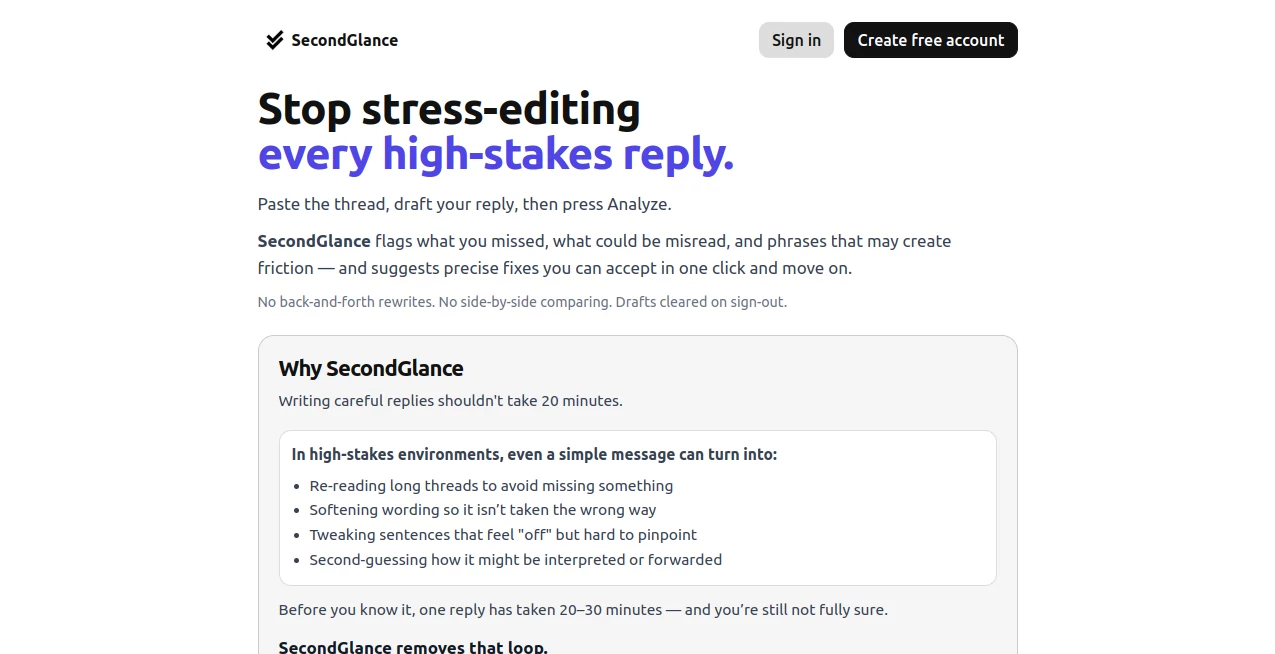
The interface is intentionally simple. Users can paste an existing conversation together with their draft reply, then receive immediate feedback highlighting possible omissions, unanswered questions, and communication gaps. The workflow is clean, distraction-free, and designed to fit naturally into everyday business communication.
Accuracy & Performance
Rather than generating entirely new messages, the AI evaluates context between the original conversation and the proposed response. This review process helps detect missing information that could easily be overlooked during busy workdays. The result is a more complete, thoughtful response that feels natural instead of over-edited.
Capabilities
- Reviews conversation threads before sending replies.
- Detects unanswered questions.
- Highlights missing context.
- Identifies communication gaps.
- Suggests improvements without replacing the writer's style.
- Helps maintain professional tone.
- Supports business communication workflows.
- Provides fast AI-powered analysis.
- Reduces editing fatigue.
- Improves confidence before sending important messages.
Security & Privacy
The platform is designed around reviewing user-provided content only when requested. Since many conversations contain sensitive business information, users should always follow their organization's privacy policies before sharing confidential data with any online AI service.
Use Cases
- Reviewing client emails before sending.
- Checking sales proposals for missing answers.
- Improving customer support responses.
- Preparing executive communications.
- Validating project updates.
- Responding to complex discussion threads.
- Ensuring complete freelance client communication.
- Helping remote teams maintain consistent messaging.
Pros and Cons
- Pros
- Focuses on message quality instead of generic rewriting.
- Finds overlooked questions quickly.
- Simple workflow with minimal learning curve.
- Helps improve professional communication.
- Suitable for business, sales, and customer support teams.
- Cons
- Specialized primarily for communication review.
- Requires conversation context for the best results.
- May not replace a full writing assistant for long-form content.
Pricing Plans
A freemium model is available, allowing users to try core functionality before upgrading. Premium options provide additional usage and capabilities for individuals and professional users.
How to Use Second Glance
Start by opening the application and pasting the original conversation thread along with your draft response. Run the AI analysis to review the conversation for missing information, unanswered questions, or unclear wording. Read the recommendations, make any necessary adjustments, and send your message with greater confidence knowing it has received an additional layer of intelligent review.
Comparison with Similar Tools
Many AI writing assistants concentrate on generating new text, correcting grammar, or rewriting entire paragraphs. This solution takes a different approach by acting as a communication reviewer. Instead of replacing the user's writing style, it checks whether the response actually addresses everything discussed in the conversation. That makes it particularly useful for business professionals who care more about accuracy and completeness than creative rewriting.
Conclusion
Sending an important message should never feel like a gamble. By analyzing conversations from a reviewer’s perspective, this AI assistant helps users avoid overlooked details, strengthen professional communication, and reduce costly misunderstandings. Its focused design makes it a valuable companion for anyone who regularly exchanges high-stakes emails or business messages and wants one final layer of confidence before pressing the send button.
Frequently Asked Questions (FAQ)
What does this AI tool do?
It reviews conversation threads and draft replies to identify missing information, unanswered questions, and communication gaps before messages are sent.
Is it designed for business communication?
Yes. It is especially useful for professionals handling client communication, customer support, sales conversations, and executive emails.
Does it rewrite my entire message?
No. Its primary purpose is to review your draft and suggest improvements while preserving your original writing style.
Can beginners use it easily?
Yes. The workflow is straightforward and requires only pasting the conversation and draft response before running the AI analysis.
Is there a free version?
Yes. A freemium plan allows users to explore the service before choosing a paid option.
AI Email Assistant , AI Customer Service Assistant , AI Writing Assistants .
These classifications represent its core capabilities and areas of application. For related tools, explore the linked categories above.

SecondGlance Alternatives Product

Prompt Sloth

Humanize AI …

Grammarly

Customer Fee…

LyricStudio

Gemini Omni
ResumeTailor…

Supawazap

ieltswriting…
