


















Seply
What is Seply?
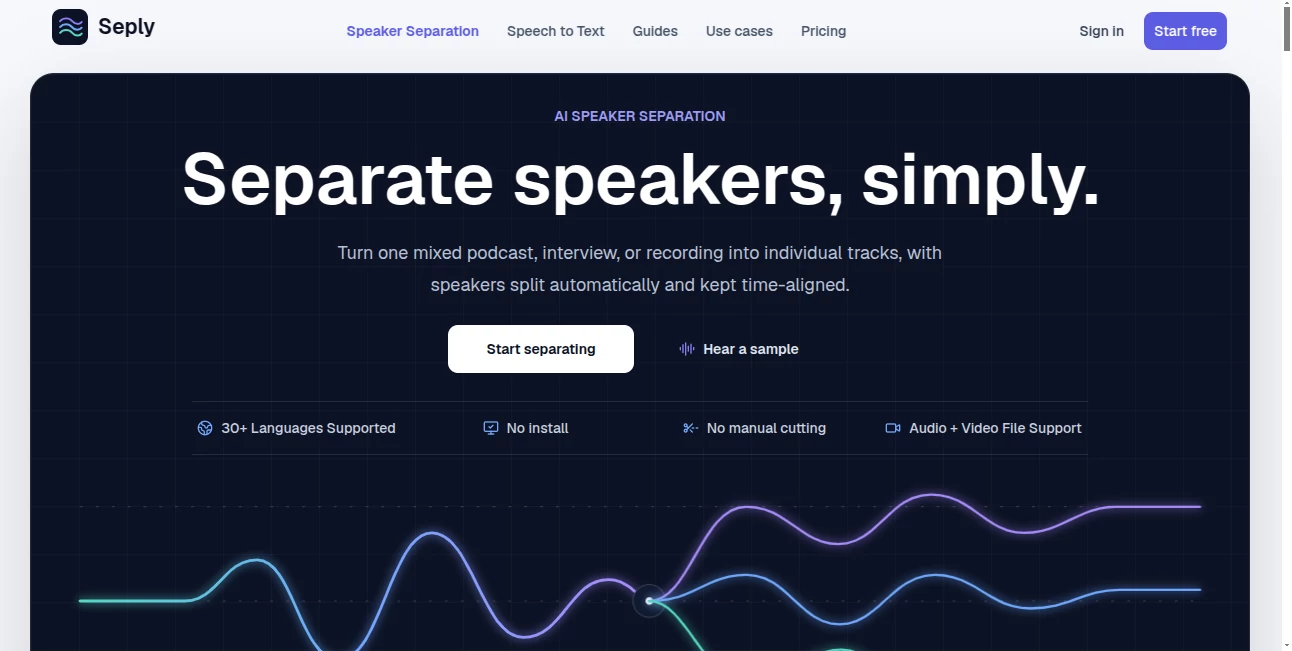
Seply is an AI speaker separation tool designed to turn a mixed podcast, interview, meeting, or other multi-speaker recording into individual, time-aligned audio tracks. Instead of manually cutting voices apart or relying only on speaker labels, the service creates a separate track for each detected speaker, making the result much easier to edit and reuse.
The workflow is straightforward: upload an audio or video recording, let the system identify the speakers, then preview and download the resulting tracks. It supports more than 30 languages, requires no software installation, and accepts files up to 1 GB. For creators who regularly work with conversations, this can remove a surprisingly tedious part of post-production.
Key Features
- AI-powered speaker separation for multi-person recordings
- Automatic or manual speaker-count detection
- Individual WAV tracks for each detected speaker
- Time-aligned output that stays synchronized with the original recording
- Support for both audio and video uploads
- More than 30 languages supported
- Files up to 1 GB can be uploaded
- Browser-based workflow with no installation required
- Preview original and separated tracks before downloading
- Credit-based pricing with monthly and one-time options
User Interface
The interface is built around the actual job users need to complete rather than a collection of unnecessary controls. After signing in, users can upload a recording and choose whether the speaker count should be detected automatically or entered manually. Once processing is complete, the individual tracks can be previewed and downloaded.
The playback area is particularly useful for checking results because users can switch between the original mix and isolated speaker tracks without losing their position in the recording. That makes it easier to compare the separation before bringing the files into another editor.
Accuracy & Performance
Speaker separation is more demanding than simply identifying who spoke at a particular moment. The system produces actual audio tracks for individual voices while keeping those tracks aligned with the source recording. This distinction makes the output considerably more practical for editing.
Performance can naturally depend on the source material. Background noise, echo, similar voices, recording quality, and overlapping speech can affect the final result. The service is designed to handle real conversations, including recordings where speakers occasionally talk over one another, but difficult audio conditions may still produce less clean separation.
Capabilities
The platform supports WAV, MP3, M4A, AAC, FLAC, OGG, OPUS, WMA, and Speex audio files, along with MP4, AVI, MOV, MKV, and WebM video files. For compatible video uploads, the original audio track is processed without requiring video re-encoding.
One of its strongest capabilities is the production of editor-ready WAV files. Each detected speaker receives an independent track, allowing an editor to adjust volume, mute sections, clean up mistakes, enhance a particular voice, or reuse dialogue without having to reconstruct the conversation manually.
There is also an important difference between speaker diarization and speaker separation. Diarization generally tells you which person spoke and when. Here, the goal is to actually create separate audio tracks, which gives creators considerably more control during post-production.
Security & Privacy
Privacy is an important consideration when uploading interviews, meetings, podcasts, and other recordings. Uploaded recordings and completed speaker tracks are kept private, with new jobs and their resulting media retained for 30 days from completion. This gives users time to review and download their work without keeping the files indefinitely.
The service also states that users must have the necessary rights to upload and process their recordings. That is especially relevant for interviews, private meetings, research material, and other recordings involving people who may not have authorized redistribution.
Use Cases
- Podcast editing: Separate hosts and guests so individual voices can be adjusted, corrected, muted, or enhanced independently.
- Interviews and research: Create separate tracks for interviewers and participants to make review and analysis easier.
- Meetings and panels: Turn a mixed discussion into individual speaker tracks for archiving, review, or post-production.
- Video production: Extract independent dialogue tracks before bringing them into a video editing timeline.
- Content repurposing: Give editors cleaner access to individual voices when creating clips, highlights, or new versions of recorded conversations.
A practical example would be a two-person podcast recorded through a single microphone setup. Rather than spending time manually identifying and cutting every section, a creator can process the recording and receive separate tracks for the host and guest. Those files can then be adjusted independently in the editor of choice.
Pros and Cons
Pros
- Creates actual individual speaker tracks instead of only speaker labels
- Maintains time alignment between separated tracks
- Works with both audio and video files
- Supports a wide range of common media formats
- No desktop installation is required
- Offers a free trial with 30 credits and no card required
- Provides both subscriptions and one-time credit packs
- Useful for podcasts, interviews, meetings, and video production
Cons
- Results may vary with heavy background noise, echo, similar voices, or extensive overlapping speech
- Credits are consumed based on processing duration
- Monthly credits expire after their 30-day period
- Completed media is retained for 30 days, so important files should be downloaded in time
- Users need appropriate rights to process uploaded recordings
Pricing Plans
The pricing model is based on credits, with both recurring subscriptions and one-time purchases available. A free trial provides 30 credits once, remains valid for 30 days, and does not require a payment card. This is enough for up to three minutes of speaker separation or substantially more speech-to-text processing.
- Free Trial: $0 with 30 credits, valid for 30 days.
- Starter: $12 per month for 200 credits, suitable for occasional interviews and shorter recordings.
- Creator: $29 per month for 600 credits, aimed at regular podcast and interview production.
- Studio: $65 per month for 1,500 credits, designed for teams processing audio regularly.
- Basic: $16 for 200 one-time credits, valid for 12 months.
- Standard: $39 for 600 one-time credits, valid for 12 months.
- Pro: $89 for 1,500 one-time credits, valid for 12 months.
Speaker separation uses 10 credits per full minute, calculated in six-second increments, while speech-to-text uses one credit per started three minutes. The service shows an estimated processing cost before a job begins, which makes it easier to understand the expected credit usage.
How to Use It
- Upload a recording: Select an audio or video file containing multiple speakers.
- Choose speaker detection: Allow automatic detection or provide the expected number of speakers manually.
- Start processing: The AI analyzes the recording and creates a time-aligned track for each detected speaker.
- Preview the result: Listen to the original mix and individual speaker tracks to check the separation.
- Download the tracks: Save the individual WAV files and continue editing them in your preferred audio or video software.
Comparison with Similar Tools
Many audio AI services focus on transcription, noise removal, enhancement, or speaker identification. This solution takes a more specific approach by concentrating on the physical separation of voices into independent tracks.
That distinction matters for creators who already have an editing workflow. A transcription service can tell you what was said and who said it, but it does not necessarily provide separate audio for every person. Likewise, a conventional noise-reduction tool can improve a mixed recording without giving each participant an editable track.
For podcast producers, interview editors, and video teams whose main problem is separating voices from a shared recording, a dedicated speaker-separation workflow can therefore be more useful than a general-purpose audio AI tool.
Conclusion
For anyone regularly working with multi-speaker recordings, separating voices manually can become one of the least enjoyable parts of the editing process. This service approaches that problem directly by turning a mixed recording into independent, synchronized speaker tracks that can be reviewed and edited individually.
The combination of broad file support, automatic speaker detection, time-aligned WAV output, private processing, and flexible credit options makes it a practical choice for podcasts, interviews, meetings, research recordings, and video production. The free trial also provides an easy way to test the quality on real recordings before committing to a paid plan.
Frequently Asked Questions (FAQ)
What does this tool do?
It separates a mixed audio or video recording into individual, time-aligned audio tracks for each detected speaker.
Is speaker separation the same as speaker diarization?
No. Speaker diarization identifies who spoke and when, while speaker separation creates an actual audio track for each speaker.
Can it separate overlapping speech?
It is designed for multi-speaker conversations, including recordings with overlapping dialogue. However, results can vary depending on background noise, echo, voice similarity, recording quality, and the degree of overlap.
What file formats are supported?
Supported audio formats include WAV, MP3, M4A, AAC, FLAC, OGG, OPUS, WMA, and Speex. Supported video formats include MP4, AVI, MOV, MKV, and WebM.
What format are the separated tracks?
Each detected speaker is provided as an individual, time-aligned WAV file that can be used in an audio or video editing workflow.
Do I need to install software?
No. The workflow is browser-based, so recordings can be uploaded and processed online without installing a desktop application.
How long are processed files available?
The original recording and completed speaker tracks are stored privately for 30 days from completion. Users should download important tracks before that period ends.
Do credits expire?
Credits included with monthly plans expire after 30 days. One-time credit purchases remain valid for 12 calendar months.
Is there a free option?
Yes. A one-time free trial provides 30 credits for 30 days, with no payment card required.
Can I use it for podcast production?
Yes. Podcast editing is one of the primary use cases, particularly when hosts and guests were recorded together and need to be adjusted independently.
AI Podcast Assistant , AI Recording , AI Speech to Text , AI Voice & Audio Editing .
These classifications represent its core capabilities and areas of application. For related tools, explore the linked categories above.

Seply Alternatives Product

AudioScribe

Lyria.run

FluentDictat…

Klyra AI

SAM Audio

mp3tourl
Qwen3 TTS

Riverside.fm
Transcribe A…
