
Slashy
What is Slashy?
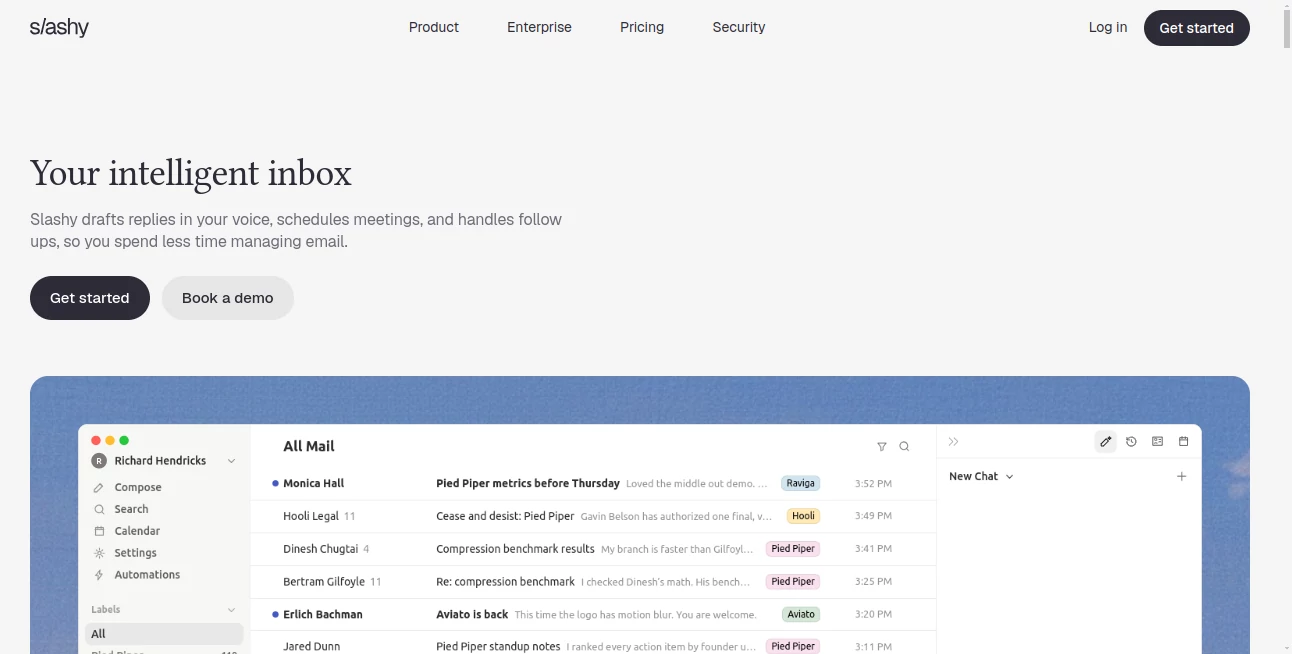
Slashy is an AI-native email assistant designed for people who spend a significant part of their day inside their inbox. Instead of treating email as a simple place to read and send messages, it turns the inbox into a workspace where replies, follow-ups, scheduling, search, and routine tasks can happen with far less manual effort.
The idea is straightforward: email should not constantly interrupt your work. The assistant can learn how you communicate, help draft replies in your style, organize incoming messages, prepare you for meetings, and keep track of conversations that still need attention. It is particularly appealing to founders, sales professionals, executives, recruiters, and other people whose work depends heavily on email.
What makes the experience interesting is the combination of an AI assistant with the everyday tools surrounding email. Multiple inboxes, calendars, meeting information, and workflow automations can be brought into a single environment, reducing the need to jump between applications for small tasks.
Key Features
- AI-assisted email drafting based on your communication style
- Unified management of multiple inboxes
- AI-powered email classification and importance labels
- Automated follow-up tracking
- Meeting preparation and calendar assistance
- AI-powered search across email
- Custom email labels and classification rules
- Keyboard shortcuts for faster inbox navigation
- Reusable snippets for frequently sent messages
- Inbox automations that can run without constant manual input
- Integration with communication and productivity workflows
- Mobile and desktop access
User Interface
The interface is designed around the inbox rather than forcing users to move into a separate AI chatbot whenever they need assistance. This makes a noticeable difference for everyday tasks. Instead of copying an email into another application, explaining the context, generating a response, and pasting it back, users can work with AI directly alongside their messages.
Power users also get keyboard shortcuts, search tools, snippets, and a unified inbox experience. For someone handling several accounts, having conversations organized in one place can make the daily workflow considerably less fragmented.
Accuracy & Performance
Email assistance is only useful when it understands context. The platform's classification system considers factors such as the sender, message content, conversation history, and custom label instructions when deciding how incoming messages should be categorized. Users can also provide training examples and corrections, allowing the classification behavior to become better aligned with their preferences.
This approach is more practical than relying solely on fixed folders. For example, a user can distinguish messages that genuinely require a response from newsletters, billing notifications, calendar messages, or other routine communication.
Performance also benefits from keeping common actions close to the inbox. Searching for information, preparing replies, checking follow-ups, and handling scheduling tasks can be completed without repeatedly switching between unrelated applications.
Capabilities
The strongest part of the platform is the range of work it can connect around email. A user can ask for help drafting a response, find information from previous conversations, prepare for an upcoming meeting, or identify conversations that have gone unanswered.
Automations add another layer. Repetitive workflows such as meeting preparation, follow-up reminders, VIP notifications, and receipt handling can be configured so they happen automatically. This makes the product more than a writing assistant; it can become a lightweight operational layer around an inbox.
Its integrations with calendars, meeting information, communication platforms, and other business tools also make it useful for people whose email is closely tied to their broader workflow.
Security & Privacy
Email assistants require a high level of trust because they work with sensitive conversations and account information. The service provides controls that let users pause the AI agent in Read Mode, disconnect an inbox, revoke access through Google, or permanently request account deletion.
Read Mode is particularly useful when users want the assistant to continue searching, reading, and preparing drafts while preventing it from sending emails or performing other actions. Disconnecting an account stops synchronization and automations, while Google access can also be revoked directly from the user's account settings.
The provider's documentation also states that its security program includes SOC 2, encryption, and privacy controls, and that AI providers do not train on customer data. Users working with confidential business information should still review the current security documentation and account permissions before connecting important inboxes.
Use Cases
Founders and executives: Keep important conversations moving while spending less time manually sorting and answering routine email.
Sales teams: Draft prospect follow-ups, keep track of unanswered conversations, prepare for calls, and connect email activity with customer context.
Recruiters: Manage candidate conversations, scheduling messages, reminders, and recurring communication without losing track of individual threads.
Customer-facing professionals: Respond faster to repetitive questions while maintaining a consistent writing style.
Busy professionals: Combine several inboxes, calendars, reminders, and AI assistance into a more focused daily workflow.
Virtual and executive assistants: Reduce repetitive inbox management and spend more time on tasks that require human judgment.
Pros and Cons
Pros
- AI assistance is built directly around the email workflow
- Useful for managing multiple inboxes
- Personalized email drafting can reduce repetitive writing
- Strong automation possibilities for follow-ups and recurring tasks
- Calendar and meeting workflows complement email management
- Custom labels and training examples provide more control over inbox organization
- Read Mode provides an additional safety layer for AI actions
Cons
- The service is primarily focused on Gmail-based workflows
- Some integrations and features are still being developed
- Users who prefer completely manual email management may not need the automation features
- AI access to an inbox requires careful consideration of account permissions and privacy
- The growing feature set may take some time to configure fully for advanced workflows
Pricing Plans
The service offers a free starting option, allowing users to explore the email workflow before committing to a paid plan. Paid options are designed for users who need more extensive AI assistance, automation, and productivity capabilities.
Pricing and included limits can change as the product develops, so users should check the current pricing information before subscribing. Larger organizations may also require additional controls, onboarding, or customized arrangements.
How to Use Slashy
Getting started begins by connecting a supported Gmail account and allowing the application to synchronize the information required for its email features. Once the inbox is connected, users can explore AI-generated drafts, search, classification, labels, calendar functionality, and automation settings.
A practical way to begin is to start with simple tasks. Let the assistant organize incoming messages, generate drafts for routine replies, and identify conversations that need follow-up. After becoming comfortable with the results, users can introduce more advanced automations.
For example, a sales professional might create a workflow that highlights important prospect emails, prepares meeting information before a call, and reminds them when a promising conversation has gone quiet. A founder might use similar automations to keep track of investors, customers, hiring conversations, and internal communication.
Users who want additional control can switch to Read Mode. This allows the assistant to continue reading and drafting while preventing outbound actions and other changes to the inbox.
Comparison with Similar Tools
Traditional email clients generally provide the tools needed to read, organize, and send messages, but they often leave the repetitive reasoning to the user. AI-first email products take a different approach by attempting to understand the context around each conversation and assist with the next action.
Compared with productivity-focused email clients, this platform puts greater emphasis on autonomous workflows, follow-up management, personalized drafting, and connections between email and other parts of a professional workflow.
It is also a different proposition from a standalone AI writing assistant. A writing tool may help produce a better paragraph, but an inbox-focused assistant can work with the surrounding conversation, previous messages, scheduling requirements, and follow-up history.
For someone who simply wants a clean email interface, a conventional client may be sufficient. For professionals who treat their inbox as a central part of their workday, the additional automation and context-aware features are considerably more compelling.
Conclusion
Email remains one of the biggest sources of repetitive work for modern professionals. The real problem is rarely writing a single message; it is everything surrounding that message: finding the right context, deciding what deserves attention, remembering to follow up, scheduling a meeting, and keeping several conversations moving at once.
This platform takes an ambitious approach to that problem by placing AI directly inside the inbox and connecting email with calendars, meetings, search, reminders, and automations. Its personalized drafting and classification features are useful on their own, while the broader automation capabilities make it more interesting for people managing high volumes of communication.
For founders, sales professionals, executives, recruiters, and other heavy email users, it can turn an inbox from a constant source of interruptions into a more organized and proactive workspace. The best results are likely to come from users who take the time to configure labels, permissions, and automations around the way they actually work.
Frequently Asked Questions (FAQ)
What is Slashy used for?
It is an AI-powered email assistant designed to help users draft replies, organize incoming messages, manage follow-ups, search conversations, prepare for meetings, and automate repetitive inbox tasks.
Can it write emails in my style?
Yes. The AI drafting system is designed to learn from a user's communication patterns and produce replies that are more consistent with their personal writing style.
Can I manage multiple email accounts?
Yes. One of its notable features is unified inbox management, allowing users to work with multiple inboxes from a single environment.
Does it automatically send emails?
AI-generated actions can be configured according to the user's setup. Read Mode can be enabled when users want the assistant to read, search, and prepare drafts while preventing it from sending messages or performing other action-based automations.
Can I stop the AI from accessing my inbox?
Yes. Users can disconnect an inbox, revoke access through their Google account, or request permanent account deletion. Disconnecting stops synchronization and automations while leaving the original Gmail messages unaffected.
Is it suitable for business email?
It can be particularly useful for business users whose daily work depends on email, including founders, sales professionals, recruiters, executives, and customer-facing teams. Organizations should review the current security, privacy, and account-permission documentation before connecting sensitive business accounts.
AI Productivity Tools , AI Email Assistant , AI Email Generator , AI Scheduling .
These classifications represent its core capabilities and areas of application. For related tools, explore the linked categories above.

Slashy Alternatives Product

AnyToURL

TruthSpine

Hands Off

Eleven AI

Khuram Youraj

Jasper

fasturl

Automaited

Betula AI