

















SmartHumanizer
Verified Blue CheckMark
Verified Blue CheckMark products are featured above free or unverified listings.
This badge indicates authenticity and builds trust, giving your product higher visibility across the platform.
Upgrade to get verified
Verified Blue CheckMark products are featured above free or unverified listings. This badge indicates authenticity and builds trust, giving your product higher visibility across the platform.
Upgrade to get verified
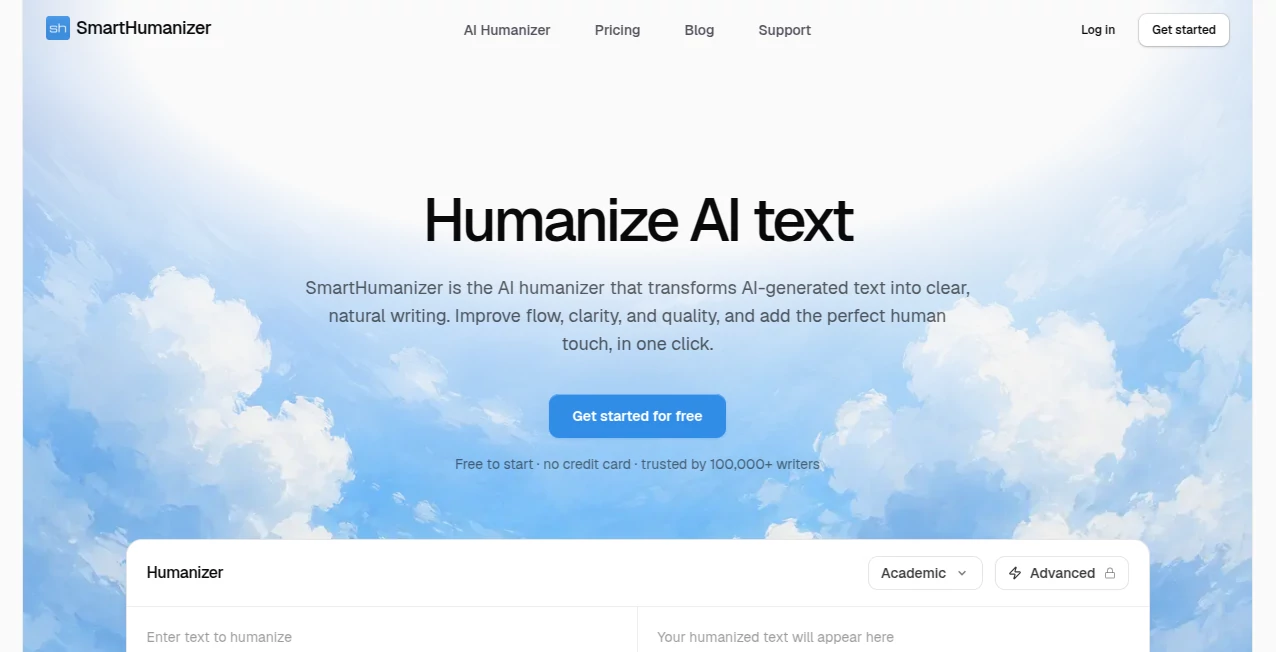
What is SmartHumanizer?
SmartHumanizer is an AI writing tool designed to turn AI-generated text into clearer, smoother, and more natural prose. Instead of simply replacing words with synonyms, it focuses on sentence structure, rhythm, phrasing, and overall readability while keeping the original meaning and tone intact.
The platform is particularly useful for people who regularly work with text generated by ChatGPT, Claude, Gemini, or other AI writing systems. It offers a simple workflow: paste your content or upload a document, apply the humanization process, and receive a more polished version that feels easier and more natural to read.
Key Features
- One-click AI text humanization with no complicated setup.
- Rewriting that focuses on sentence flow, phrasing, and natural rhythm rather than simple synonym replacement.
- Support for text generated by popular AI models such as ChatGPT, Claude, and Gemini.
- Preservation of the original meaning, intent, and tone.
- Quotes, citations, and references can remain untouched while the surrounding writing is refined.
- Adjustable humanization strength and tone controls for more flexible rewriting.
- Support for more than 50 languages with automatic language detection.
- Document upload support for working with longer pieces of content.
User Interface
The interface is built around simplicity. Users can paste their text directly into the editor or upload a document, making the first step straightforward even for someone who has never used an AI humanizer before. The main workflow is centered around entering content and receiving the revised version without unnecessary menus or complicated configuration.
This simplicity is one of the platform's strongest points. For example, a writer who has generated a first draft with an AI assistant can move it into the editor, humanize it, review the result, and continue editing without having to learn a complicated writing application.
Accuracy & Performance
The rewriting approach is focused on improving the way text reads rather than changing its underlying message. The platform varies sentence rhythm, tightens phrasing, and improves transitions so that the final result feels less rigid and repetitive.
It also emphasizes preserving important information. Quotes, citations, and references are designed to remain unchanged, which can be particularly useful when working on research material, academic drafts, reports, or articles that contain supporting sources.
Capabilities
The tool offers adjustable humanization controls, including different strength levels and tone options. An advanced mode provides deeper control for users who want a more substantial rewrite.
Its multilingual capability is another useful feature. With support for more than 50 languages and automatic language detection, it can serve writers working across different markets rather than being limited to English content.
The platform is also designed to work with text originating from different AI systems. This makes it useful as a final editing layer after generating an initial draft with another AI writing assistant.
Security & Privacy
When working with documents, privacy is an important consideration. The platform provides dedicated privacy and terms pages, while its workflow is designed around processing user-provided text and documents. Users should still review the current privacy policy before submitting confidential, proprietary, or sensitive material.
Use Cases
- Students: Refine AI-assisted drafts of essays and assignments into clearer, more naturally structured writing.
- Researchers and academics: Improve the readability of AI-assisted papers and abstracts while keeping citations and references intact.
- Marketers: Polish blog posts, emails, landing-page copy, and other marketing material before publication.
- Bloggers and creators: Turn rough AI drafts into smoother articles that are easier for readers to follow.
- Professionals: Improve reports, proposals, business documents, and everyday emails without rewriting everything manually.
- Non-native English writers: Make AI-assisted English writing flow more naturally and comfortably.
Pros and Cons
- Pros: Simple one-click workflow, natural rewriting approach, meaning and tone preservation, citation preservation, support for more than 50 languages, adjustable humanization controls, and compatibility with content generated by multiple AI platforms.
- Cons: Users who need highly specialized editing may still want to manually review the final result. The quality of any rewrite can also depend on the quality and context of the original text.
Pricing Plans
The platform is free to start and does not require a credit card for the initial experience. The homepage currently highlights a free starting option, allowing users to test the humanization workflow before committing to regular use. For users with larger or more specialized requirements, it is best to check the current account and pricing options directly because available plans and limits can change over time.
How to Use the Tool
Using the platform takes only a few steps. First, paste the AI-generated text into the editor or upload a supported document. Next, choose the appropriate humanization settings if additional control is needed. Then start the rewriting process and review the resulting text.
For the best outcome, it is worth reading through the final version before publishing. A quick human review can add personal examples, preferred terminology, or small changes that make the content better suited to its intended audience.
Comparison with Similar Tools
Many AI humanizers concentrate primarily on changing individual words. This approach can sometimes leave the underlying sentence structure feeling artificial. The platform takes a broader approach by working on sentence rhythm, phrasing, flow, and readability.
Another practical advantage is the combination of humanization controls and multilingual support. Writers can adjust the intensity of the rewriting instead of relying on a single fixed transformation. The ability to keep citations and references untouched also gives it a useful place in academic, professional, and research-oriented workflows.
Conclusion
For anyone who uses AI to create first drafts but wants the final writing to feel clearer and more natural, this tool offers a practical editing step between generation and publication. Its straightforward interface makes it easy to get started, while tone controls, adjustable humanization, multilingual support, and citation preservation give experienced users more flexibility.
The strongest use case is not replacing human editing altogether, but making the first AI-generated draft a much better starting point. With a final review and a few personal edits, writers can turn rough machine-generated material into writing that is more comfortable to read and better aligned with their own voice.
Frequently Asked Questions (FAQ)
What is an AI humanizer?
An AI humanizer rewrites AI-generated content to improve sentence structure, rhythm, clarity, and overall readability while attempting to preserve the original message.
Can I use text generated by ChatGPT, Claude, or Gemini?
Yes. The platform is designed to work with AI-generated text from ChatGPT, Claude, Gemini, and other AI writing tools.
Does the rewriting change the original meaning?
The service is designed to preserve the original meaning, intent, and key points while improving the way the text is written. Reviewing the output is still recommended, especially for important documents.
Are citations and references preserved?
Yes. The platform states that quotes, citations, and references can remain unchanged while the surrounding prose is rewritten.
How many languages are supported?
The platform currently advertises support for more than 50 languages and automatic language detection.
Can I upload a document?
Yes. Users can either paste text directly into the editor or upload a document for humanization.
Is there a free option?
Yes. The service is free to start and the homepage states that no credit card is required for getting started.
Can I control how much the text is rewritten?
Yes. Humanization strength and tone controls are available, with an advanced mode for users who want deeper rewriting.
Who can benefit from an AI humanizer?
Students, researchers, marketers, bloggers, content creators, professionals, and non-native writers can all use this type of tool to improve AI-assisted drafts and make them clearer and more natural.
Should I review the output before publishing?
Yes. Even when the meaning is preserved, a final human review is recommended to check facts, context, terminology, personal voice, and any details that are important to the intended audience.