


















Smart Stack
What is Smart Stack?
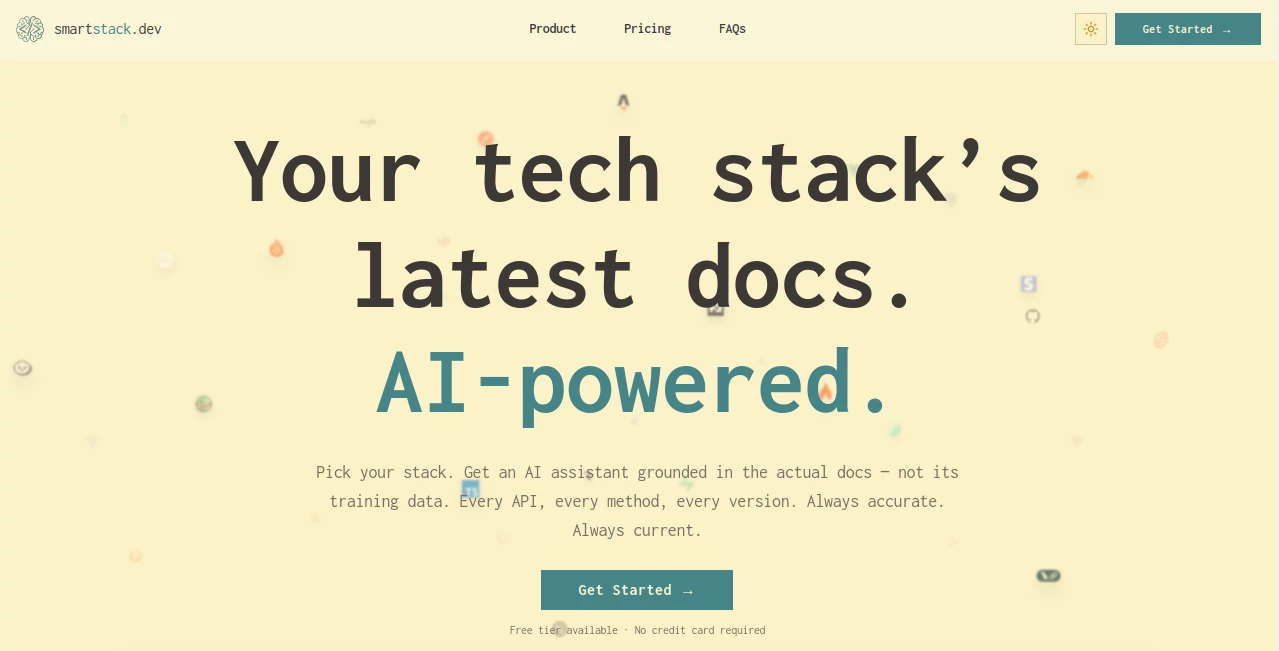
Smart Stack is an AI-powered developer documentation assistant designed to help programmers find accurate answers from real, up-to-date technical documentation. Instead of relying only on general AI knowledge that may become outdated, it connects responses to indexed documentation, making technical research faster and more reliable.
For developers working with modern frameworks, APIs, and rapidly changing libraries, keeping track of documentation updates can be frustrating. This tool simplifies that process by allowing users to select their technology stack and ask questions with confidence, knowing the answers are based on current documentation sources.
Whether you are debugging an issue, learning a new framework, or checking how multiple technologies work together, this AI assistant reduces the time spent searching through countless documentation pages and browser tabs.
Key Features
User Interface
The platform provides a clean and developer-focused interface where users can choose their preferred technologies and start asking questions immediately. The experience is designed around simplicity, removing unnecessary steps between identifying a problem and finding a solution.
The built-in documentation reader allows developers to explore original sources without leaving the workspace. This creates a smoother workflow for users who want both AI assistance and direct access to technical references.
Accuracy & Performance
One of the strongest advantages of this tool is its focus on documentation-grounded answers. Instead of generating responses based only on previously learned information, it retrieves information from selected documentation sources to provide more dependable results.
This approach is especially valuable for software development because frameworks and APIs change frequently. Developers can avoid outdated suggestions and spend less time verifying whether an answer still applies.
Capabilities
The platform supports a wide range of modern technologies and helps developers understand how different parts of their stack interact. Users can ask questions about frameworks, libraries, APIs, configurations, and implementation challenges.
- AI-powered answers based on technical documentation
- Support for multiple technology stacks
- Documentation search with contextual understanding
- Cross-stack questions and troubleshooting assistance
- Source references for verifying answers
- Web search support for additional technical information
- File and image input capabilities for debugging scenarios
Security & Privacy
Privacy is an important consideration for developer tools. The platform focuses on providing AI assistance without using user conversations for model training. User interactions are stored only to provide continuity within the product experience.
For developers working with private projects or internal workflows, having a tool that respects conversation privacy creates additional confidence when seeking technical guidance.
Use Cases
This AI documentation assistant can support many types of developers and technical teams. A beginner learning a new framework can use it as a guided learning companion, while experienced engineers can use it to quickly verify implementation details.
- Software Development: Quickly find answers about frameworks, libraries, and APIs.
- Debugging: Understand errors and discover possible solutions using current documentation.
- Learning New Technologies: Explore unfamiliar tools without manually reading hundreds of pages.
- Full-Stack Development: Ask questions involving multiple connected technologies.
- Technical Research: Compare approaches and understand best practices.
- Team Productivity: Reduce time spent searching documentation during development cycles.
Pros and Cons
Pros
- Answers are connected to real documentation sources.
- Helps reduce time spent searching technical websites.
- Useful for both beginners and experienced developers.
- Supports modern development stacks and frameworks.
- Provides source references for better verification.
- Simple workflow with minimal setup.
Cons
- The quality of answers depends on available documentation sources.
- Advanced users may still need direct source code investigation for complex problems.
- Some features require a paid subscription.
Pricing Plans
The platform offers a free plan that allows developers to explore its core features without requiring payment information. This makes it suitable for students, hobby projects, and users who want to evaluate the workflow before upgrading.
The paid plan is designed for developers who use AI assistance regularly. It includes higher usage limits, expanded capabilities, and additional features for more demanding development workflows.
- Free Plan: Access to documentation collections, AI chat, documentation-based answers, and basic features.
- Pro Plan: Higher usage limits, enhanced capabilities, web search support, and additional developer-focused features.
How to Use Smart Stack
Getting started is straightforward. Users first select the technologies they work with from the available library. After choosing a stack, they can ask questions naturally, similar to speaking with another developer.
For example, a developer working with React, database tools, and backend frameworks can ask how different components interact or request help understanding a specific error. The system searches relevant documentation and provides an answer with supporting sources.
- Select your preferred technologies.
- Ask a technical question in natural language.
- Review the AI-generated answer and referenced documentation.
- Use the information to build, debug, or improve your project.
Comparison with Similar Tools
Traditional AI coding assistants are useful for generating code and explaining concepts, but they may sometimes provide outdated information because their knowledge is based on previous training data. This platform takes a different approach by focusing on current documentation as the foundation of its answers.
Compared with manually searching documentation websites, it provides a faster experience by combining search, context understanding, and AI assistance in one place. Developers can move from problem to solution without constantly switching between multiple resources.
Conclusion
Smart Stack offers a practical solution for developers who want faster access to reliable technical information. By connecting AI assistance with real documentation, it creates a more dependable way to explore frameworks, APIs, and modern development tools.
For anyone who spends hours reading documentation, troubleshooting errors, or learning new technologies, this platform can become a valuable part of the daily development workflow. It combines the speed of AI with the accuracy of trusted technical sources, helping developers focus more on building and less on searching.
Frequently Asked Questions (FAQ)
What type of developers can use this tool?
It is suitable for beginners, professional developers, software engineers, and technical teams who need quick access to accurate documentation-based answers.
How does it provide more reliable answers?
The system uses indexed documentation sources and references instead of depending only on general AI training knowledge.
Can it help with multiple technologies together?
Yes. Users can select their technology stack and ask questions about how different frameworks and tools work together.
Is there a free version available?
Yes. A free plan is available for users who want to explore the platform and its core features before choosing a paid option.
Does it replace official documentation?
No. It works as an intelligent assistant that helps users find and understand documentation faster while still allowing access to original sources.
AI Code Assistant , AI Research Tool , AI Developer Docs , AI Developer Tools .
These classifications represent its core capabilities and areas of application. For related tools, explore the linked categories above.

Smart Stack Alternatives Product

AutoChangelog

Ecom Tool AI
Timestamp Ro…

Tate-A-Tate

AllInOneTools

Domain Rank …
langextract.…

EntreDash
Devplan
