
Sumoclip
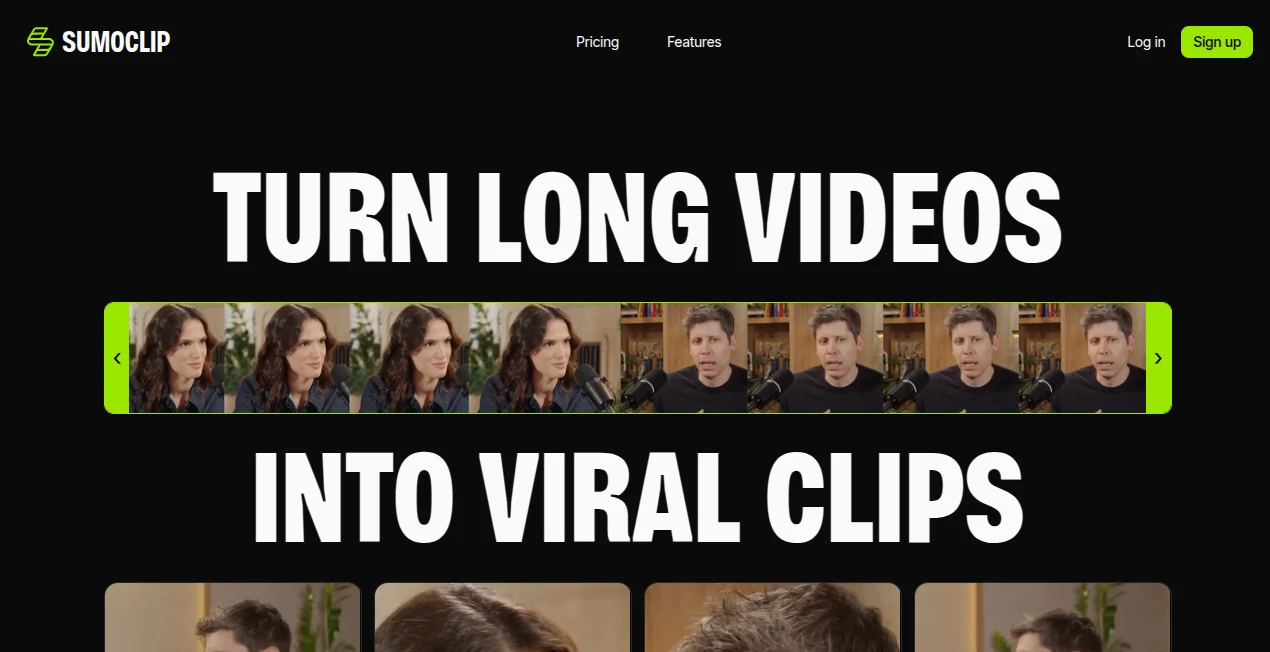
What is Sumoclip?
Creating engaging short-form videos used to require hours of manual editing, careful timeline navigation, and endless adjustments. Today, AI has transformed that workflow by making it possible to identify the most compelling moments automatically. This platform is designed for creators, marketers, educators, podcasters, and businesses that want to publish more content without spending countless hours behind a video editor.
By analyzing long-form videos, the platform detects highlights, generates social-ready clips, adds captions, intelligently reframes subjects, and provides editing tools to polish every result. Whether the source is a podcast, webinar, interview, tutorial, or YouTube video, the entire process becomes significantly faster while maintaining professional quality.
Instead of starting every clip from scratch, users can focus on content strategy while AI handles repetitive editing tasks. The result is a smoother workflow, greater publishing consistency, and more opportunities to grow across modern social media platforms.
Key Features
User Interface
The interface is refreshingly simple. Users can upload a video or paste a supported video link, and the AI immediately begins processing the content. Generated clips are displayed in an organized workspace where every edit is easy to access. Even creators with limited editing experience can navigate the platform comfortably without a steep learning curve.
Accuracy & Performance
One of the strongest aspects of the platform is its intelligent highlight detection. Rather than selecting random moments, the AI analyzes conversations, pacing, engagement potential, and scene composition to identify clips that are naturally suited for short-form content. Automatic caption generation is highly accurate, while smart reframing keeps speakers centered across vertical video formats.
Capabilities
- Automatically extracts engaging moments from long videos.
- Creates vertical clips optimized for Shorts, Reels, and TikTok.
- Generates accurate AI captions automatically.
- Uses smart face tracking and reframing.
- Includes a built-in video editor for trimming and adjustments.
- Processes podcasts, interviews, webinars, tutorials, and presentations.
- Produces multiple clip suggestions from a single upload.
- Helps reduce manual editing time dramatically.
- Supports content repurposing for multiple social platforms.
Security & Privacy
Videos are processed through a secure cloud-based workflow designed for content creators. Subscription management is straightforward, and users maintain control over their uploaded projects. As with any cloud editing solution, reviewing the latest privacy policy before uploading confidential material is always recommended.
Use Cases
- Turning podcast episodes into multiple viral short videos.
- Repurposing webinars for social media marketing.
- Creating YouTube Shorts from long educational videos.
- Producing Instagram Reels for brands and agencies.
- Generating TikTok content from interviews.
- Helping marketing teams scale video production.
- Creating promotional snippets from product demonstrations.
- Publishing consistent short-form content with minimal editing.
Pros and Cons
Pros
- Very easy to use for beginners and professionals.
- Excellent automatic highlight detection.
- Accurate AI-generated captions.
- Smart vertical reframing saves editing time.
- Built-in editing tools eliminate the need for additional software.
- Ideal for creators publishing across multiple platforms.
Cons
- Some clips may still benefit from manual fine-tuning.
- Cloud processing depends on internet connectivity.
- Advanced usage may require a paid subscription.
Pricing Plans
The platform offers subscription-based pricing with different usage levels suitable for individual creators and growing teams. A free or trial experience may be available for new users, while premium plans unlock additional processing capacity, credits, and advanced editing capabilities. Pricing may change over time, so checking the official website for the latest plans is recommended.
How to Use SumoClip
Start by uploading a long video or providing a supported video link. The AI analyzes the content and automatically detects the most engaging sections. After processing, review the generated clips, choose your favorites, edit captions or timing if needed, and export them in formats optimized for modern social media platforms. The complete workflow usually takes only a fraction of the time required for traditional editing.
Comparison with Similar Tools
Compared with many AI clipping solutions, this platform focuses on combining automatic highlight detection, intelligent reframing, caption generation, and lightweight editing within a single workflow. Instead of requiring creators to switch between multiple applications, everything is handled in one place. This integrated approach is particularly valuable for creators who publish content frequently and need reliable production speed.
Conclusion
Repurposing long-form videos into engaging short clips has become an essential strategy for modern content creation. This platform simplifies what was once a time-consuming editing process through intelligent automation that identifies highlights, generates captions, optimizes framing, and provides practical editing tools. For creators, agencies, educators, marketers, and businesses looking to maximize every video they produce, it offers an efficient workflow that saves time while increasing publishing consistency and audience reach.
Frequently Asked Questions (FAQ)
Can it convert podcasts into short videos?
Yes. Podcast episodes are one of the primary content types supported for automatic clip generation.
Does it generate captions automatically?
Yes. AI-generated captions are created automatically and can be edited before exporting.
Can I edit clips after AI processing?
Yes. Built-in editing tools allow users to trim, adjust, and refine generated clips.
Which social media platforms are supported?
The generated videos are optimized for platforms such as TikTok, Instagram Reels, and YouTube Shorts.
Who benefits the most from this platform?
Content creators, marketers, agencies, educators, podcasters, coaches, and businesses that regularly produce long-form video content.
AI Video Generator , AI Video Editor , AI Short Clips Generator , AI YouTube Assistant .
These classifications represent its core capabilities and areas of application. For related tools, explore the linked categories above.

Sumoclip Alternatives Product

hailuo03

Seedance 2.0

Khuram Youraj

AI Best

Seedance 2.5

MuseCraft.AI
seedance2-pro

Riverside.fm

Veo4