TalkPix
What is TalkPix?
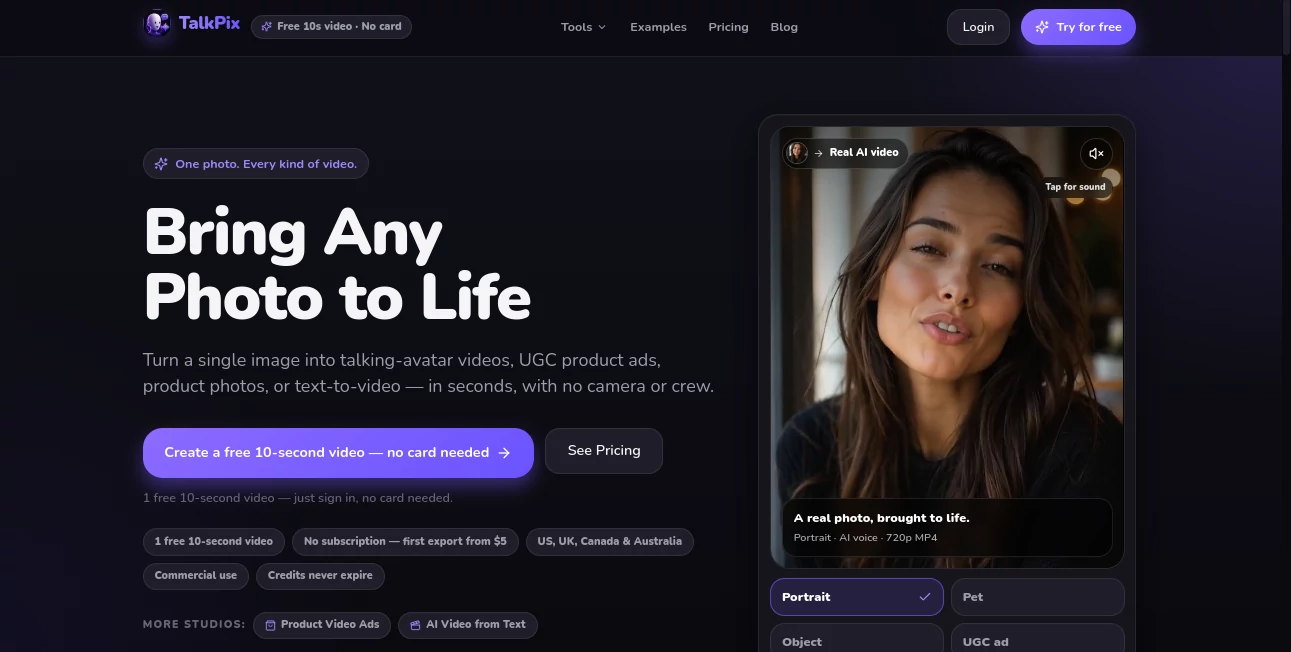
TalkPix is an AI-powered talking photo and avatar video creation platform that transforms a single image into a realistic speaking video. Designed for creators, marketers, businesses, and everyday users, it allows anyone to animate a portrait, add a script or voice recording, and create engaging video content without cameras, complex editing software, or production equipment.
The platform focuses on making visual storytelling simple. Whether you want to create a personalized greeting, a social media clip, a product promotion, or an educational video, this tool helps turn static images into dynamic content within minutes. Its straightforward workflow makes advanced AI video creation accessible even for users with no previous editing experience.
Key Features
User Interface
The interface is designed around simplicity. Users can upload an image, enter a script, select a voice option, and generate a talking video through a clear step-by-step process. The minimal setup removes unnecessary complexity and helps beginners create their first animated photo quickly.
The platform experience feels closer to a creative studio than a technical AI application. Users can preview their ideas, experiment with different messages, and produce downloadable video files without navigating complicated controls.
Accuracy & Performance
The technology focuses on realistic facial animation and natural lip synchronization. Uploaded portraits are processed to match mouth movements with the selected script or uploaded audio, creating a more believable talking effect.
Performance depends on the quality of the source image. Clear, front-facing portraits with good lighting generally produce the most natural results. Generated videos are delivered as HD MP4 files and are designed for quick sharing across different platforms.
Capabilities
The platform offers a wide range of creative possibilities beyond simple talking portraits. Users can create AI avatar videos, animated product presentations, social media content, and personalized messages from a single image.
- AI talking photo generation
- Photo lip-sync animation using AI technology
- AI avatar video creation
- Support for AI-generated voices
- Option to use personal audio recordings
- Multiple voice and language choices
- Product video and marketing content creation
- Downloadable HD MP4 video exports
Security & Privacy
Privacy is an important part of the platform design. User photos and audio files are not used for training AI models, and generated content is handled with privacy-focused practices. Users are encouraged to upload only images they own or have permission to use.
This approach makes the service suitable for personal projects, business content, and professional marketing workflows where responsible AI usage matters.
Use Cases
The flexibility of this AI video solution makes it useful across many industries and creative scenarios.
- Social Media Content: Create eye-catching videos for platforms where animated visuals can improve engagement.
- Marketing Campaigns: Produce personalized promotional videos without hiring actors or organizing video shoots.
- E-commerce: Turn product images into interactive promotional videos and advertisements.
- Personal Messages: Create birthday greetings, celebration videos, and memorable digital messages.
- Education: Build visual lessons and explainers using animated presenters.
- Brand Avatars: Develop digital representatives for online communication and customer engagement.
Pros and Cons
Pros
- Very simple workflow suitable for beginners
- Creates talking videos from a single image
- Supports both AI voices and personal audio uploads
- No need for cameras or professional equipment
- Useful for marketing, social content, and personal projects
- Pay-as-you-go pricing without mandatory subscriptions
- Credits do not expire
Cons
- Final quality depends heavily on the uploaded image
- Advanced video editing features are limited compared with full video editing platforms
- Users need permission before animating someone else's photo
Pricing Plans
The platform uses a credit-based pricing model instead of traditional monthly subscriptions. Users can start with a free short video preview before purchasing credits, making it easy to test the quality before paying.
- Free Trial: Includes a free short video generation for new users.
- Starter Plan: A one-time credit package suitable for experimenting with multiple short videos.
- Creator Plan: Designed for users producing regular social media and marketing content.
- Pro Plan: Suitable for larger content projects requiring more video generation capacity.
The credit system allows users to pay only for the amount of video they create, while unused credits remain available for future projects.
How to Use TalkPix
Creating an animated talking image requires only a few simple steps:
- Upload a clear portrait, pet image, product image, or suitable visual.
- Add a script or upload your own voice recording.
- Select a preferred AI voice and language option.
- Generate the video and review the result.
- Download the finished MP4 file and use it for your project.
The process is designed for speed, allowing creators to move from an idea to a finished video without complicated production steps.
Comparison with Similar Tools
Many AI video platforms focus on generating completely new scenes from text prompts, while this solution takes a different approach by bringing existing images to life. This makes it especially useful for users who already have portraits, product images, or brand visuals they want to animate.
Compared with traditional video production methods, it removes the need for cameras, actors, studios, and editing teams. Compared with basic image animation tools, it adds voice synchronization and more personalized storytelling options.
Conclusion
TalkPix provides a practical way to transform ordinary images into engaging video experiences. Its combination of simple controls, realistic lip synchronization, flexible voice options, and affordable credit-based pricing makes it a strong choice for creators, businesses, and anyone interested in AI-powered storytelling.
For users looking to create personalized videos, marketing clips, digital avatars, or memorable messages from a single image, this platform offers an approachable and creative solution without requiring advanced technical skills.
Frequently Asked Questions (FAQ)
What type of images work best?
Clear, front-facing portraits with good lighting usually provide the most realistic animation results. Images with visible facial details generally create smoother talking effects.
Can I use my own voice?
Yes. Users can upload their own audio recording and synchronize the image animation with their personal voice.
Do I need video editing experience?
No. The workflow is designed for beginners and requires only an image, script or audio, and a few simple selections.
Can generated videos be used commercially?
Yes, generated videos can be used for commercial projects when users have the necessary rights to the images and content they upload.
Does it require a subscription?
No. The pricing model is based on one-time credit purchases rather than recurring monthly subscriptions.
AI Image to Video , AI Avatar Generator , AI Video Generator , AI Voice & Audio Editing .
These classifications represent its core capabilities and areas of application. For related tools, explore the linked categories above.

TalkPix Alternatives Product

Picsart

Sora AI Vide…

Seedance 2.0…

Kling 5.0

Seedance AI

AI Best

KOOX AI

Seedance 2.5

Aura AI