


















TeachQuill
What is TeachQuill?
Most teachers I know are drowning in planning, grading, and creating materials on top of actually teaching. Sundays disappear into lesson prep, and evenings get eaten by rubrics and report card comments. I’ve been there — staring at a blank screen at 9pm wondering how to make tomorrow’s science lesson both standards-aligned and engaging. This platform changed that for a lot of us. You describe what you need in plain English, pick a grade and subject, and it delivers ready-to-use drafts — lesson plans, worksheets, quizzes, rubrics, even IEP goals — in under a minute. It feels like having a very smart, very fast teaching assistant who actually understands real classrooms.
Introduction
TeachQuill was built by people who get it. It brings together over 100 specialized AI tools organized around how teachers actually work — planning, creating materials, engaging students, assessing, and supporting learners. Everything stays aligned with major standards (CCSS, NGSS, TEKS, etc.) and major curricula like Eureka Math or Amplify. The best part? It doesn’t try to replace you. It gives you strong first drafts you can review, edit, and make your own in minutes instead of hours. Teachers who use it regularly talk about leaving school earlier, having more energy for their students, and actually enjoying planning again.
Key Features
User Interface
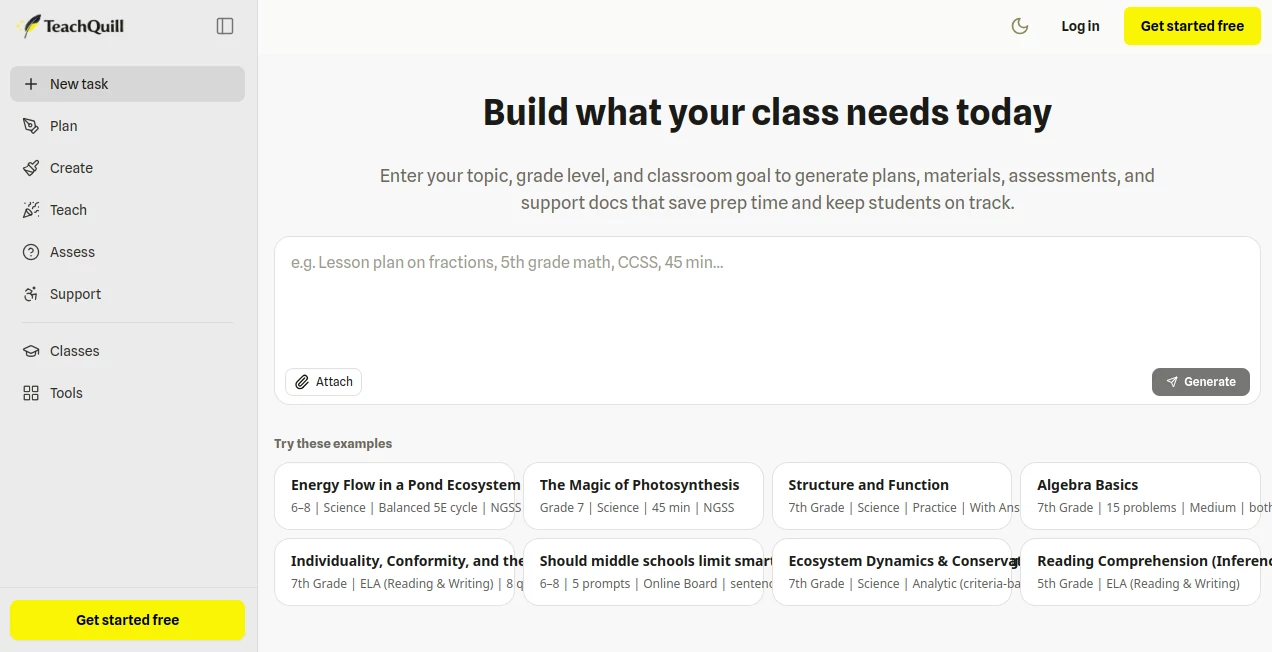
The design is clean and teacher-friendly. You describe what you need in everyday language (“45-minute lesson on photosynthesis for 7th grade, NGSS aligned”), select grade and subject if needed, and hit generate. Results appear with clear sections, editable text, and export options for PDF, Google Docs, or Slides. No complicated templates or steep learning curve — it feels like chatting with a helpful colleague who’s really good at their job.
Accuracy & Performance
The outputs are impressively aligned with real standards and classroom realities. Lesson plans include proper objectives, activities, and assessments. Worksheets have varied question types and answer keys. Rubrics are detailed and fair. Generation is fast — usually under 60 seconds — and the quality is high enough that most teachers only need light editing. It handles differentiation well and produces materials that actually feel usable on Monday morning.
Capabilities
It covers the full teaching cycle: lesson and unit planning, worksheets, quizzes, Jeopardy games, rubrics, essay feedback, report card comments, IEP goals, BIPs, social stories, differentiated materials, and more. You can generate for any grade from K-12, adapt to different curricula, and create both general and SPED-specific resources. The tools work together, so you can take a lesson plan and instantly generate matching worksheets or exit tickets.
Security & Privacy
Built with schools in mind — FERPA and COPPA compliant, no unnecessary student data collection, and strong privacy practices. Teachers can generate many resources without entering identifying student information. It’s one of the more thoughtful platforms when it comes to handling education data responsibly.
Use Cases
A middle school science teacher generates a complete 5E lesson on ecosystems with worksheets and an exit ticket in one planning period. A special education teacher creates aligned IEP goals and differentiated materials for multiple students quickly. An elementary teacher turns a boring homework assignment into an engaging story-based activity that kids actually complete. A department head builds curriculum maps and common assessments for the whole team. The time saved lets teachers focus more on relationships and instruction instead of paperwork.
Pros and Cons
Pros:
- Saves hours every week on repetitive planning and material creation.
- Materials feel classroom-ready and respect real standards and curricula.
- Easy to edit and customize — it supports your expertise, doesn’t replace it.
- Covers planning through assessment and SPED support in one place.
- Generous free tier lets you test with real lessons before upgrading.
Cons:
- Outputs are strong starting points that still benefit from teacher review and personalization.
- Some very specialized or brand-new topics may need more guidance.
Pricing Plans
It starts free so teachers can try it with their actual curriculum and see the difference immediately. Paid plans unlock unlimited generations, advanced features, priority processing, and school-friendly tools. Many teachers find it pays for itself in the first month through time saved alone. Flexible options make it accessible for individual teachers as well as larger departments or schools.
How to Use TeachQuill
Sign up (quick and free to start), then go to the tool you need or just describe your request in plain language. For example: “Create a 45-minute lesson on fractions for 4th grade with differentiated worksheets.” Review the output, make any edits inline, and export to PDF or Google Docs. Save your favorites for reuse. The more specific you are about grade, standards, and goals, the better the first draft becomes. It’s simple enough to use between classes yet powerful enough for full unit planning.
Comparison with Similar Tools
Many AI education tools produce generic content that still needs heavy editing. This one stands out because it’s built specifically for real classroom workflows and major U.S. curricula. The outputs feel more teacher-like and less robotic, and having everything — from lesson plans to IEP goals — in one place reduces the usual tool-switching chaos. It’s less about flashy features and more about practical, time-saving help that respects how teachers actually work.
Conclusion
Teaching is already hard enough without spending nights and weekends buried in prep work. This platform gives teachers back precious time while still producing materials they can be proud to use. It doesn’t replace great teaching — it supports it by handling the repetitive parts so you can focus on what matters most: your students. If you’re tired of Sunday planning sessions that steal your weekend, this might be the relief you’ve been hoping for.
Frequently Asked Questions (FAQ)
How long does it take to generate something?
Most resources are ready in under 60 seconds.
Is it aligned with my curriculum?
Yes — it supports major standards and popular programs used across the U.S.
Can I edit the outputs?
Absolutely — everything is fully editable before you use it in class.
Is there a free way to try it?
Yes, the free tier lets you generate real lessons and materials right away.
Is it suitable for special education?
Very — it has strong tools for IEP goals, BIPs, differentiation, and social stories.
AI Tutorial , AI Course , AI Education Assistant .
These classifications represent its core capabilities and areas of application. For related tools, explore the linked categories above.

TeachQuill Alternatives Product

Gizmo

Dialogues wi…

Rate My Prof…
Sovi.AI

GameGen

Classroom Sc…

Traecta
EduSolver: A…

Google Skills
