
Teleplay
What is Teleplay?
Creating a short drama series is very different from generating a single AI video. A successful series needs a clear story arc, recurring characters, recognizable locations, strong episode hooks, and enough continuity to make the viewer want to watch the next episode. Teleplay is built specifically around this challenge, turning a story idea, summary, or existing script into a structured vertical drama production workflow.
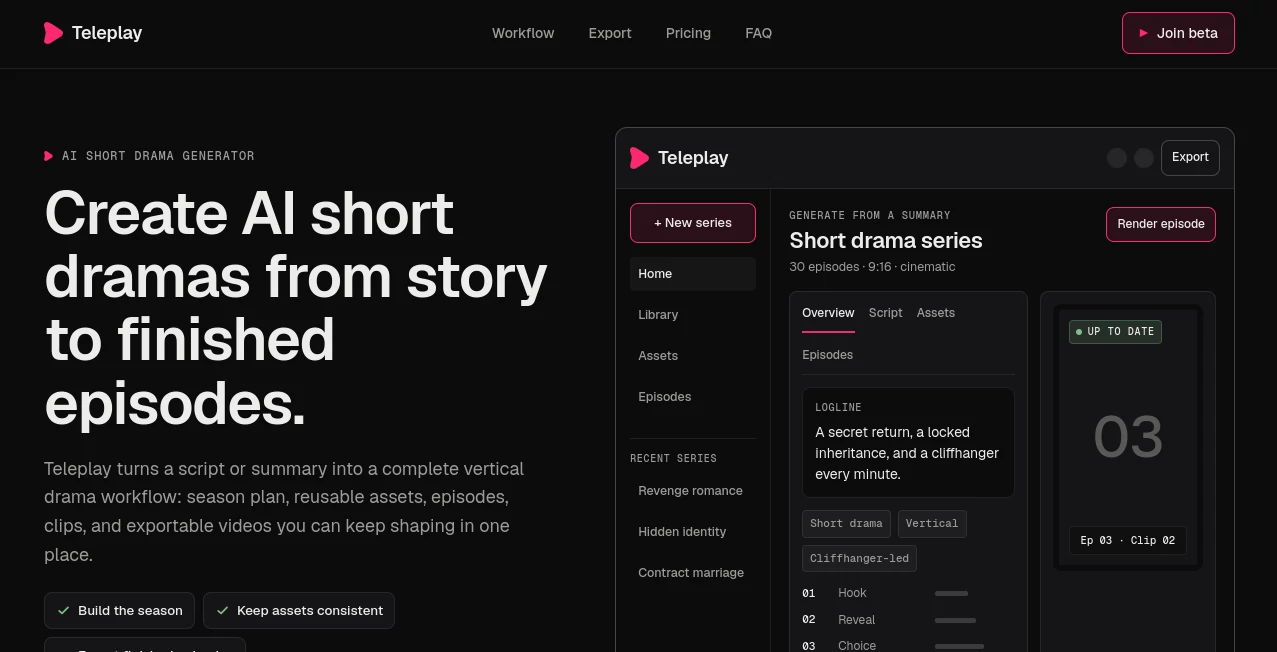
The platform is designed for serialized short dramas made for mobile viewing. Instead of treating every video as an isolated generation, it brings season planning, scripts, characters, locations, props, scenes, clips, and finished episodes into one connected workspace. For a creator developing a 30-episode or even longer series, that difference can save a considerable amount of repetitive work.
Key Features
- AI-assisted short drama production from a premise, summary, or script
- Season planning with hooks, reveals, choices, paywall beats, and finales
- Reusable character, location, voice, outfit, and prop references
- Episode, scene, and shot planning in one production workspace
- AI-generated video clips for serialized vertical dramas
- Editable episodes and production assets
- Vertical 9:16 video exports up to 1080p
- No-watermark exports on paid plans
- Finished videos that can be distributed through the creator's preferred channels
User Interface
The interface is organized more like a production workspace than a traditional AI prompt generator. Creators can move between the home area, series, library, assets, and episodes, while individual projects include sections for the overview, script, assets, and episodes.
This structure makes sense for serialized storytelling. Instead of searching through dozens of unrelated generations, a creator can keep the important pieces of a show together. The season plan provides the larger picture, while the episode editor brings the creator closer to individual scenes and clips.
For someone who has ever tried to build a story across several disconnected AI tools, the centralized approach is one of the most appealing parts of the workflow.
Accuracy & Performance
The platform focuses less on producing one impressive clip and more on maintaining continuity throughout a series. Characters, locations, voices, and props can be reused as reference assets across scenes and episodes, helping the generated material feel like it belongs to the same fictional world.
This is particularly important for vertical drama. A character who looks noticeably different every few episodes can quickly break immersion, even when the individual shots look good. The production model therefore puts continuity alongside generation rather than treating it as an afterthought.
Generated output is still AI-generated content, so creators should review finished clips for visual artifacts, inconsistencies, and story issues before publishing. The service itself also notes that AI output can contain errors or artifacts.
Capabilities
The workflow begins with a premise or script. A creator can paste a summary, upload a script, or start developing a new story from scratch. The system then turns the idea into an editable short-drama plan.
From there, the season can be structured around important narrative beats such as hooks, cliffhangers, reveals, choices, paywall moments, and the finale. Scenes and shots can then be developed within the same production environment.
Another useful capability is asset continuity. Characters, sets, voices, and props can be referenced repeatedly so that the fictional world remains recognizable from one episode to another. Finished clips can then be reviewed and exported as vertical videos.
The workflow is especially well suited to creators who think in episodes rather than individual social media clips. For example, a creator could start with a hidden-identity romance, build the season around escalating reveals, establish a recurring cast and locations, and then develop the individual episodes without rebuilding the entire concept each time.
Security & Privacy
The service states that creators retain ownership of the scripts, summaries, images, audio, and other material they upload, as well as generated output to the extent permitted by its terms. It receives a limited license to host, process, and display content for providing and improving the service.
Creators should still review the applicable terms before uploading commercially sensitive material. The platform relies on third-party services, including AI model providers, hosting, and payment processing, and users remain responsible for ensuring they have the necessary rights to any material they provide.
Use Cases
The strongest use case is serialized vertical entertainment. Independent filmmakers can use the workflow to experiment with micro-dramas without organizing every production element across separate applications.
It can also be useful for social video creators who want to build recurring fictional series for mobile audiences. Romance, revenge, family secrets, contract relationships, hidden identities, and other high-hook storytelling formats can be developed into multi-episode concepts.
Small production teams may benefit as well. A shared production workspace gives writers, creators, and producers a central place to manage the story, assets, episodes, and generated material.
Another practical use is rapid concept development. A creator with a strong one-line premise can move from an initial idea to a structured season plan before investing significant time in production. That makes it easier to test whether a story has enough twists and escalation to sustain a complete series.
Pros and Cons
- Pros: Designed specifically for serialized vertical drama rather than generic video generation.
- Pros: Season planning, scripts, assets, episodes, and clips are connected in one workspace.
- Pros: Reusable references help maintain character and location continuity.
- Pros: Supports 9:16 vertical exports up to 1080p without a watermark on paid plans.
- Pros: Creators can export their finished work instead of being tied to a publishing marketplace.
- Cons: The service is currently in private beta, so access is being opened gradually.
- Cons: Generation credits are metered on the paid plans.
- Cons: AI-generated footage still requires human review for artifacts and continuity issues.
Pricing Plans
The platform currently offers three paid plans, with pricing in USD. Every plan includes the complete production workspace, while the main differences are generation credits, the number of active series, and team seats.
- Creator – $29/month: Includes one active series, 300 generation credits per month, season planning, scripts and assets, 1080p vertical exports without a watermark, and email support.
- Studio – $99/month: Includes everything in Creator, unlimited series, 1,500 generation credits per month, a priority rendering queue, and credit top-ups.
- Production – $299/month: Includes everything in Studio, 5,000 generation credits per month, three team seats, priority support, and early access to new models and formats.
Planning, scripts, and asset management are not metered. Generation credits are used for AI video rendering. The service is currently in private beta, with paid plans starting when a creator's workspace goes live.
How to Use Teleplay
- Start with a story premise, summary, or existing script.
- Turn the idea into a structured season plan.
- Define the major hooks, reveals, cliffhangers, paywall beats, and finale.
- Develop recurring characters, locations, voices, and props as reusable assets.
- Build individual episodes from scenes and shots.
- Generate and review video clips for each episode.
- Make adjustments to the story, assets, and clips as needed.
- Export finished vertical episodes when they are ready for distribution.
Comparison with Similar Tools
Traditional AI video generators are generally optimized around creating individual clips from prompts. That approach can work well when the goal is a standalone social video, but it becomes harder to manage when the same characters and locations need to appear across dozens of episodes.
This platform takes a different approach by placing generation inside a serialized production workflow. The season plan, scripts, reference assets, episodes, and generated clips are connected, making it more comparable to a lightweight digital production environment than a simple text-to-video tool.
That distinction is important for creators who are building a story rather than simply collecting visually interesting AI clips. If the project is a single short video, a conventional generator may be enough. If the goal is an ongoing vertical drama with recurring characters and episode-to-episode continuity, the production-focused workflow becomes considerably more relevant.
Conclusion
AI video generation is becoming increasingly capable, but producing a convincing series requires more than generating attractive footage. The difficult part is keeping the story moving, maintaining recognizable characters and locations, and giving every episode a reason to continue.
Teleplay approaches that problem from the perspective of serialized production. Its combination of season planning, reusable assets, episode development, AI video generation, and export tools makes it an interesting option for creators focused specifically on vertical drama.
The private-beta status means access is still limited, but the product's direction is clear: instead of being another blank prompt box for making isolated clips, it aims to give creators a structured environment for turning a story idea into an entire short-drama season.
Frequently Asked Questions (FAQ)
What is Teleplay?
It is an AI production workspace designed for serialized vertical drama. It helps creators plan seasons, develop scripts, manage reusable assets, generate clips, edit episodes, and export finished videos.
What type of videos can I create?
The platform is focused on short serialized dramas in a vertical 9:16 format, typically designed for mobile viewing. A season can contain many short episodes connected by an ongoing story.
Can I use my own script?
Yes. You can upload an existing script or paste a summary and use it as the starting point for a production plan.
How does character consistency work?
Characters, locations, voices, and props can be stored as reusable reference assets and reused across scenes and episodes to help maintain continuity.
Can I export my finished videos?
Yes. Finished episodes can be exported as vertical 9:16 videos at up to 1080p. Paid plans provide exports without a watermark.
Does the platform publish my videos for me?
No. It is production software rather than a publishing marketplace. Once an episode is ready, you can export it and choose where to distribute it.
Do I need filmmaking experience?
No. The workflow is designed around premises, season plans, episodes, scenes, shots, and assets rather than requiring users to begin with a conventional professional editing timeline.
How much does it cost?
The current plans are Creator at $29 per month, Studio at $99 per month, and Production at $299 per month. Each plan provides the full production workspace, while generation credits, series capacity, and team seats vary by plan.
Is it available to everyone?
The service is currently in private beta. Creators can join the waitlist, with access being opened as additional production capacity becomes available.
Who owns the content I create?
The terms state that creators retain ownership of their uploaded material and, to the extent permitted by law and the terms, the generated output. Users should review the current terms for the full details surrounding content rights and usage.
AI Animated Video , AI Personalized Video Generator , AI Video Generator , AI Short Clips Generator .
These classifications represent its core capabilities and areas of application. For related tools, explore the linked categories above.

Teleplay Alternatives Product

VideoSnap

Nano Banana …
DomoAI

seedance 2.0
Seedance 2.0

Kling 5.0

Image2

Veo 3.1

Banana 2 Edi…