

















ToonBee AI

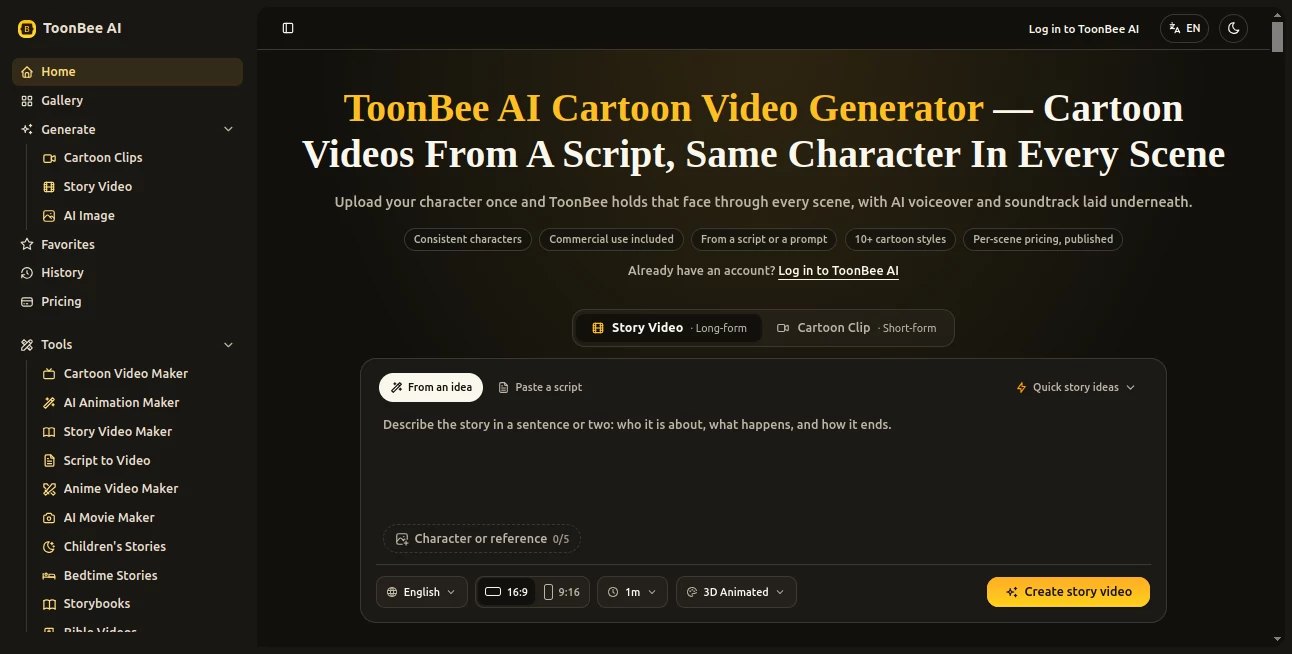
What is ToonBee AI?
ToonBee AI is a cartoon video creation platform built for people who want to turn an idea, prompt, or finished script into an animated video without learning traditional animation software. Its main focus is not simply producing an attractive individual clip, but keeping the characters recognizable as the story moves from one scene to another.
The workflow is straightforward. A creator can provide a script or describe an idea in plain English, add a character reference, choose a visual style, and let the system build the scenes. Voiceover and background sound can be included as part of the finished video, making the process useful for creators who want something closer to a complete production rather than a collection of disconnected AI clips.
One particularly useful detail is the ability to review and edit the scene breakdown before rendering. This gives creators a chance to fix the story structure before spending credits on generation.
Key Features
- Script and prompt-based cartoon video generation
- Character references for more consistent faces, outfits, and proportions
- Multiple cartoon styles including 2D, modern flat, 3D, comic book, and storybook looks
- AI voiceover and soundtrack generation
- Vertical video support for platforms such as TikTok, Reels, and Shorts
- Scene-by-scene generation and credit pricing
- Commercial use included with plans and credit packages
- Multiple AI video and image models available from the same workspace
- Browser-based workflow with no local animation software required
User Interface
The interface is designed around the actual production process rather than a complicated animation timeline. Users can start with an idea or paste an existing script, select a character or reference image, choose the aspect ratio and style, and then review the resulting scenes before rendering.
This approach is especially convenient for someone who understands the story they want to tell but has no interest in learning keyframes, character rigging, or professional animation software. The ability to edit the scene breakdown before rendering is also a practical touch because it puts creative decisions in the user's hands before credits are spent.
Accuracy & Performance
Character consistency is one of the platform's strongest areas. A reference image can be uploaded and used to anchor the character throughout the video. This is important for stories with several scenes, where an otherwise good-looking AI animation can become distracting if the main character suddenly changes appearance.
Generation is handled on a scene basis, and the available models support different combinations of duration and resolution. The platform also shows the credit cost before rendering, which makes it easier to understand what a particular generation will consume.
For creators working on longer stories, this scene-based approach has another advantage: a weak scene can be regenerated without necessarily throwing away the entire project. That makes experimentation less frustrating than rebuilding a complete video from scratch.
Capabilities
The platform supports more than one type of cartoon production. A creator can work on educational explainers, children's stories, product demonstrations, short social videos, narrated stories, and other animated formats.
Available visual directions include classic 2D, modern flat, 3D, comic book, and storybook styles. There are also dedicated workflows for animation, anime-style videos, story videos, children's stories, bedtime stories, and script-to-video projects.
The model selection is another notable part of the system. Users can access several generation models, including ToonBee 1.0, Seedance variants, H3 Max, H3 Max Turbo, Wan 3.0, and image-generation models. This gives experienced users more room to choose a suitable generation method instead of relying on one fixed model.
Security & Privacy
The service operates directly in the browser, so users do not need to install animation software or configure a local GPU. The platform also clearly states that sexually explicit NSFW content is prohibited.
For professional projects, the commercial-use policy is particularly relevant. Commercial rights are included with the available plans and credit packages, covering uses such as client projects, monetized channels, advertising, courses, and products. Users working with private or sensitive source material should still review the current service terms and privacy information before uploading confidential assets.
Use Cases
Educational creators can use the platform to turn lessons and abstract concepts into animated explanations. A teacher, for example, could transform a written lesson into a sequence of illustrated scenes rather than relying on slides and static images.
Storytellers and YouTube creators can build narrated cartoon stories while keeping the main cast visually consistent. This is particularly useful for children's stories, where viewers quickly notice if a character's appearance changes between scenes.
Small businesses can also use animated videos for product explanations and marketing content. A short cartoon demonstration can explain how a product works without requiring a camera crew, actors, or a traditional animation team.
Social media creators have another practical option: the native vertical format can be used for short-form content designed for platforms such as TikTok, Instagram Reels, and YouTube Shorts.
Pros and Cons
Pros:
- Strong focus on character consistency across scenes
- Simple script-to-video workflow
- Several cartoon and animation styles
- Voiceover and soundtrack can be generated with the video
- Commercial use is included
- Scene costs are displayed before rendering
- One-time credit packages do not expire
- Suitable for both short clips and longer story projects
Cons:
- Generation uses credits, so larger projects require careful planning
- Different models, resolutions, and durations have different credit costs
- Results can still require scene regeneration when an individual generation does not match the intended direction
- Creators looking for highly detailed manual animation controls may prefer a traditional animation application
Pricing Plans
The service uses both monthly subscriptions and one-time credit packages. Monthly plans currently start at 19.50 per month for 5,000 credits. The Pro plan provides 10,000 credits for 34.50 per month, while the Max plan provides 20,000 credits for 59.50 per month.
There are also one-time packages for creators who do not want another monthly subscription. These currently range from 2,000 credits for 29 to 30,000 credits for 249. One-time credits do not expire, which can be useful for a single project or occasional top-ups.
The actual credit consumption depends on the selected model, video duration, and resolution. The platform states that a five-second scene can cost roughly 65 to 200 credits, and the cost is displayed before rendering.
New users can also try the service with free credits before committing to a paid plan. This makes it easier to test the character consistency and overall output on a real project first.
How to Use the Tool
- Start with an idea, prompt, or finished script.
- Review the automatically created scene breakdown.
- Edit the scenes if the story needs changes.
- Upload a character reference or create a character and use it as the visual anchor.
- Select the desired cartoon style and video format.
- Choose an appropriate generation model, duration, and resolution.
- Check the credit cost before rendering.
- Generate the scenes and review the result.
- Regenerate individual scenes when necessary.
- Download the finished video and use it according to the included commercial rights.
A useful approach is to keep the character reference clear and well lit and describe the character consistently throughout the story. This gives the generation system a stronger visual reference and can reduce unwanted changes between scenes.
Comparison with Similar Tools
Many AI video generators are excellent at producing individual shots, but creating a coherent multi-scene cartoon is a different challenge. A five-second clip can look impressive while the same character becomes noticeably different when the story continues.
The platform takes a more story-oriented approach by combining script breakdown, character references, scene generation, narration, and soundtrack creation. That makes it particularly interesting for users who need a complete animated story rather than an isolated visual effect.
Traditional animation software still offers substantially more manual control, but it also requires more time and technical knowledge. On the other hand, general-purpose AI video tools may provide broader cinematic capabilities. For users specifically interested in cartoons, stories, explainers, and recurring characters, the focused workflow can be a meaningful advantage.
Conclusion
Creating a convincing animated story is harder than generating one attractive AI video clip. The characters need to remain recognizable, the visual style needs to stay coherent, and the story has to make sense from beginning to end. This platform addresses those practical problems with a workflow centered around scripts, scene planning, character references, and consistent visual styles.
It is a strong option for creators who want to produce cartoon stories, educational videos, product explainers, or short-form animated content without becoming professional animators first. The combination of character consistency, multiple styles, built-in audio, commercial rights, and transparent scene-level credit costs makes the platform particularly appealing for creators who care about both creative control and predictable production.
Frequently Asked Questions (FAQ)
Can I use my own character?
Yes. You can upload a reference image and use it to anchor the character across multiple scenes, helping maintain the same face, outfit, and proportions throughout the video.
Can I create a video from an existing script?
Yes. You can paste a finished script and have it turned into a scene-based animated video. The scene breakdown can be reviewed and edited before rendering.
What cartoon styles are available?
The available styles include classic 2D, modern flat, 3D, comic book, storybook, and additional styles available through the generation workflow.
Does it generate voiceovers?
Yes. AI voiceover and soundtrack can be included in the generated cartoon video.
Can the videos be used commercially?
Yes. Commercial use is included with the subscription plans and one-time credit packages, including client work, monetized channels, advertising, courses, and products.
How are credits calculated?
Credit usage varies according to the selected model, duration, and resolution. The cost of each scene is shown before the generation starts.
Do one-time credits expire?
No. One-time credit packages remain available without an expiration date, making them suitable for occasional projects.
Is there a free option?
New accounts receive free credits that can be used to test the workflow and generate a short scene before purchasing a paid plan.
Can I create vertical videos?
Yes. The generator supports vertical 9:16 videos designed for short-form platforms, in addition to other aspect ratios.
Can I regenerate only one scene?
Yes. If one scene does not turn out as expected, it can be regenerated against the same character reference instead of rebuilding the entire video.