


















Vehla
What is Vehla?
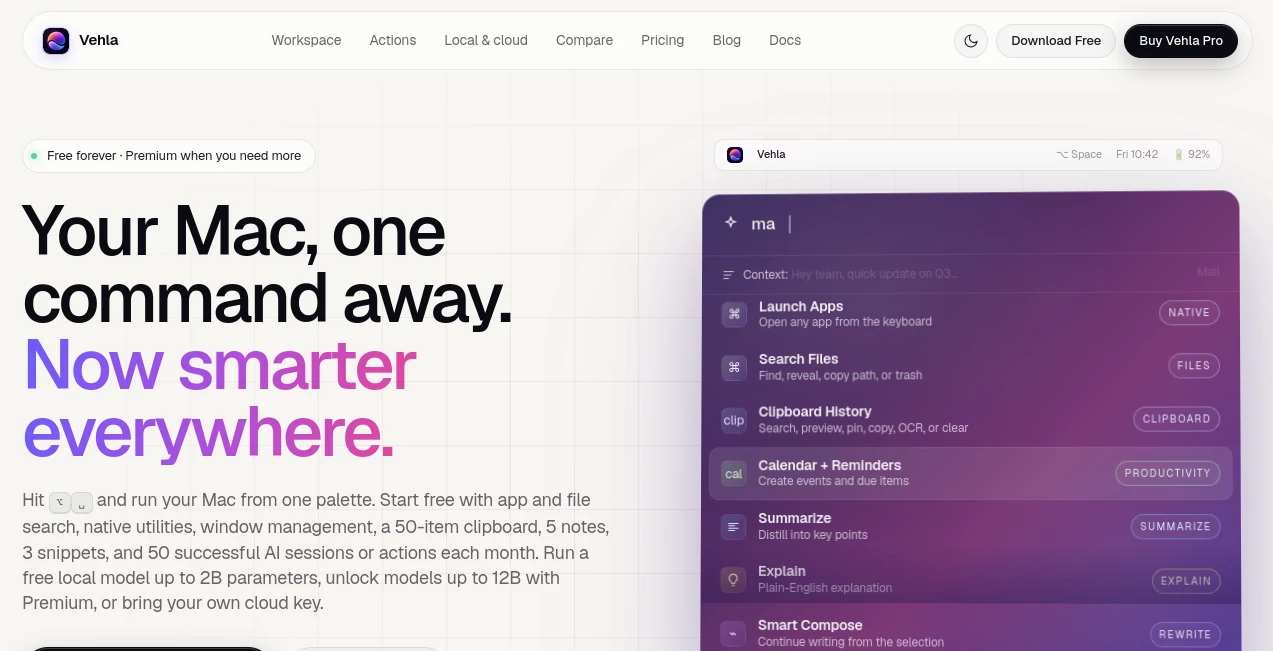
For people who spend most of their day on a Mac, productivity often gets interrupted by small things: opening another app, finding a file, switching to an AI chat, copying text, checking a calendar, or hunting through clipboard history. Vehla brings these everyday actions together in a keyboard-driven command center that sits quietly in the menu bar.
The main idea is refreshingly simple: press Option + Space, type what you need, and act without leaving the application you are already using. Alongside native Mac utilities, the platform combines AI writing, coding, research, translation, clipboard tools, notes, window management, local models, cloud providers, workflows, and more.
It supports macOS 15.0 or later on Apple Silicon Macs and offers a free-forever plan, making it easy to test the workflow before paying for additional capabilities.
Key Features
- Keyboard-driven command palette for launching apps, searching files, and running actions.
- Local AI powered by Gemma models and MLX on Apple Silicon.
- Bring-your-own-key support for OpenAI, Anthropic Claude, Google Gemini, DeepSeek, and OpenRouter.
- Local server support through Ollama and LM Studio.
- AI rewriting with multiple tones, including professional, friendly, concise, confident, casual, executive, technical, and customer-support styles.
- AI tools for summarization, translation, grammar correction, coding, email, social media, research, and productivity.
- Smart clipboard history with search, preview, pinning, OCR, formatting cleanup, and link extraction.
- Recall for searching selected local sources such as notes, clipboard history, snippets, canvases, Kanban boards, research reports, and selected folders.
- Notes, Canvas, Kanban, Shelf, window management, QR generation, color picking, shortcuts, and system commands.
- Custom AI actions, aliases, workflows, personas, memory, and installable command extensions.
User Interface
The interface is designed around speed rather than visual complexity. The command palette can be opened from the menu bar, a global shortcut, or other floating surfaces, giving users one place to search for applications, files, actions, snippets, workflows, and AI commands.
The Option + Space shortcut is particularly useful because it keeps the interaction consistent across different applications. Whether you are working in Mail, Slack, Notion, VS Code, or another Mac application, the same command center is available without forcing you into a separate browser tab.
There are also more focused surfaces for specific jobs. Shelf temporarily holds files while you work between applications, Quick Capture provides a fast place for notes, and Snap Wheel helps arrange windows across the screen. The result feels less like another standalone AI chatbot and more like an extra layer of the operating system.
Accuracy & Performance
Performance benefits from the fact that many operations are native Mac actions rather than requests sent to a remote service. App launching, file searching, window controls, clipboard operations, calculations, and many other utilities can be handled directly on the computer.
AI performance depends on the model and provider selected. Local AI can run Gemma models directly on Apple Silicon, while users who need a different model can connect supported cloud providers using their own API keys. The platform also supports local servers such as Ollama and LM Studio, giving technically experienced users considerable control over how AI requests are processed.
For writing tasks, the available actions are practical rather than limited to generic text generation. Users can summarize, shorten, expand, correct grammar, translate, explain, rewrite for different audiences, generate replies, create meeting notes, and turn selected content into actionable tasks.
Capabilities
The breadth of the command catalog is one of the strongest aspects of the experience. AI actions cover writing, translation, coding, email, social content, clipboard processing, research, productivity, and image-related tasks. Developers can explain or refactor code, convert programming languages, debug snippets, generate tests, and create or explain shell commands.
There are useful tools outside conventional AI as well. Users can generate QR codes, search contacts, manage reminders and calendar events, run Shortcuts, control Bluetooth and Wi-Fi, manage processes, work with Homebrew packages, inspect colors, search symbols, and arrange windows.
Custom actions make the system more interesting for advanced users. A frequently repeated prompt can become a dedicated command, while aliases and workflows can turn regular sequences of actions into something that is much faster to trigger.
Security & Privacy
Privacy is a notable part of the architecture. The service does not operate its own inference server for model prompts and outputs. When cloud AI is used, requests travel directly from the Mac to the selected provider, while API keys are stored in the macOS Keychain.
Local AI provides another option for sensitive material. With a compatible local model selected, prompts and inference remain on the device. Local Recall retrieval also stays on the Mac for the sources the user chooses to index.
There is an important distinction when cloud models are used: although the platform does not proxy the request, the assembled prompt and retrieved information may still be sent directly to the chosen cloud provider. Users should therefore select local processing when working with information that should not leave their computer.
Use Cases
For writers and marketers, the rewriting and composition tools can turn rough text into polished emails, concise messages, social posts, summaries, or customer-support replies. Different writing tones make it easier to adapt the same idea to different situations without repeatedly opening an AI website.
Developers can use the command palette to inspect code, refactor snippets, debug errors, generate tests, create shell commands, manage processes, and work with terminal operations. Having these functions available from the keyboard is especially convenient during active development.
Researchers and knowledge workers can use webpage summarization, fact-checking, Recall, notes, clipboard context, and research actions to keep information closer to the work they are already doing.
It is also useful for ordinary Mac housekeeping. Finding files, launching applications, moving windows, retrieving an old clipboard item, creating reminders, generating QR codes, checking calculations, or running a Shortcut can all happen from the same command center.
Pros and Cons
Pros
- Combines AI and traditional Mac utilities in one keyboard-driven workspace.
- Offers local AI as well as several cloud and local-provider options.
- Strong collection of writing, coding, research, email, and productivity actions.
- Useful clipboard, notes, file, window, and workflow features beyond AI.
- Custom AI actions, aliases, personas, and workflows provide room for personalization.
- Free plan is available without requiring a payment card.
- Pro uses a one-time license rather than a recurring subscription.
Cons
- Requires macOS 15.0 or later and an Apple Silicon Mac.
- The number of features may feel overwhelming to users looking for a simple AI utility.
- Cloud AI usage requires the user's own provider key.
- Some advanced vision and web-connected capabilities require network access.
- Local models require storage space and suitable Mac hardware.
Pricing Plans
The free plan costs $0 and is available indefinitely. It includes the command palette, app and file search, native utilities, basic window management, a 50-item rolling clipboard, up to five notes, three snippets, selected workspaces, and 50 successful AI sessions or actions per month on each Mac. It also supports local catalog models up to 2B parameters and compatible BYOK cloud providers.
The Pro plan costs $29.99 as a one-time payment and can be activated on two Macs. It adds the advanced workspaces and surfaces, larger catalog models, custom MLX imports, expanded clipboard and notes, advanced AI actions, Recall, Flow, MCP, automations, workflows, personas, memory, and lifetime updates. A seven-day Premium trial is available without requiring a card.
How to Use Vehla
Start by installing the Mac application and launching it. The current release requires macOS 15.0 or later on Apple Silicon hardware.
Once it is running, open the command palette with Option + Space. Type an application name, file, command, action, or AI task and select the appropriate result.
For AI work, choose a local model or configure a supported provider with your own API key. You can then select text, use clipboard content, or enter a request directly and choose an action such as summarizing, rewriting, translating, explaining, researching, or generating a response.
Users who want a more personalized workflow can create snippets, aliases, custom AI actions, personas, and workflows. Over time, this can turn the palette into a highly customized command center for repetitive daily tasks.
Comparison with Similar Tools
The platform sits in an interesting space between a Mac launcher, AI assistant, clipboard manager, window utility, note-taking application, and workflow tool. Traditional launchers such as Alfred focus heavily on application launching and workflows, while other utilities concentrate on a single task such as window management or clipboard history.
What makes this approach compelling is the attempt to bring those functions together. AI is not treated as a separate destination; it can work with selected text, clipboard information, notes, files, and other context already available on the Mac.
For someone who only wants a lightweight launcher, a dedicated alternative may be simpler. But users who prefer having one keyboard-driven environment for AI, system controls, files, writing, coding, notes, and automation may find the broader approach considerably more convenient.
Conclusion
Vehla is a strong choice for Mac users who want AI to feel like part of their everyday computer workflow rather than another website that has to be opened. Its combination of local models, BYOK cloud providers, native commands, clipboard intelligence, notes, window management, research tools, and customizable actions gives it considerably more range than a typical AI assistant.
The free plan makes the decision easy: users can explore the core workflow without committing money, while the $29.99 lifetime Pro license offers a straightforward upgrade for people who need the larger feature set. For developers, writers, researchers, and power users who live at the keyboard, the biggest attraction may simply be how many small interruptions it removes from the workday.
Frequently Asked Questions (FAQ)
What is Vehla?
It is a native Mac command center that combines AI, app and file search, clipboard tools, system utilities, notes, workflows, window management, and other productivity features in a keyboard-driven interface.
Does it work offline?
Many native features work offline, and local AI can run directly on the Mac. Cloud AI, web search, connected MCP servers, licensing, updates, and some integrations require an internet connection.
Which AI providers are supported?
Users can bring their own keys for OpenAI, Anthropic Claude, Google Gemini, DeepSeek, and OpenRouter. Local options include Gemma models, Ollama, LM Studio, and a compatible companion application.
Is local AI really processed on the Mac?
Yes. When Local AI is selected and a compatible model is available, model inference runs on the Apple Silicon device rather than through a remote inference server.
How much does Pro cost?
The Pro license is $29.99 as a one-time purchase for activation on up to two Macs, with free updates for life.
Is there a free version?
Yes. The Free plan is available indefinitely and includes the command palette, app and file search, native utilities, limited clipboard and notes features, selected AI access, and local models up to 2B parameters.
What Macs are supported?
The application requires macOS 15.0 or later and an Apple Silicon Mac.
Can I customize the AI behavior?
Yes. Users can create custom AI actions, snippets, aliases, personas, memory notes, and workflows to adapt the command center to their preferred working style.
Can it work with my existing notes and files?
Recall can index selected local sources, including notes, clipboard history, Shelf items, snippets, canvases, Kanban boards, research reports, and selected folders. Retrieval remains local.
Is there a trial for the paid features?
Yes. A seven-day Premium trial is available without requiring a credit card. After the trial, the application returns to the Free plan unless a lifetime license is activated.
AI Code Assistant , AI Productivity Tools , AI Developer Tools , AI Writing Assistants .
These classifications represent its core capabilities and areas of application. For related tools, explore the linked categories above.

Vehla Alternatives Product

Alai

GTM API

Trimless for…

TClaw AI Hum…

Devplan

Website Clon…

ChatGPT

bridger west…

Course Hero
